
ጠቃሚ የደህንነት መረጃ
Please read all safety and operating instructions carefully before using this VCR. Retain this manual for future reference.
- የኃይል ምንጭ፡- Connect the VCR only to the power supply indicated on the label.
- የአየር ማናፈሻ; በቂ የአየር ዝውውርን ያረጋግጡ. የአየር ማናፈሻ ክፍተቶችን አያግዱ.
- ውሃ እና እርጥበት; Do not expose the VCR to rain or moisture. Do not place objects filled with liquids on the VCR.
- ማጽዳት፡ Unplug the VCR from the wall outlet before cleaning. Use a dry cloth.
- አገልግሎት መስጠት፡ ይህንን ምርት እራስዎ ለማገልገል አይሞክሩ። ሁሉንም አገልግሎት ወደ ብቃት ላለው የአገልግሎት ሠራተኛ ያማክሩ።
ምርት አልቋልview
The Sharp VC-A422 is a 4-head VCR designed for reliable playback and recording of VHS tapes. It features a user-friendly interface for easy operation.
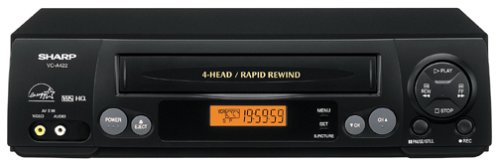
ምስል፡ ፊት ለፊት view of the Sharp VC-A422 4-Head VCR, showing the tape slot, display, and control buttons.
ማዋቀር
1. ማሸግ እና አቀማመጥ
- Carefully remove the VCR from its packaging.
- Place the VCR on a stable, level surface. Ensure there is adequate space around the unit for ventilation.
- Avoid placing the VCR near heat sources, direct sunlight, or areas with high humidity.
2. ከቴሌቪዥን ጋር በመገናኘት ላይ
To connect your VCR to a television, you will typically use RCA audio/video cables (red, white, yellow) or a coaxial cable.
- RCA Connection (Recommended for best quality):
- Connect the yellow video output jack on the VCR to the yellow video input jack on your TV.
- Connect the white audio output jack on the VCR to the white audio input jack on your TV.
- Connect the red audio output jack on the VCR to the red audio input jack on your TV.
- Select the corresponding AV input on your television (e.g., Video 1, AV1, Input 1).
- Coaxial ግንኙነት;
- Connect a coaxial cable from the "RF Out" or "Antenna Out" jack on the VCR to the "Antenna In" or "RF In" jack on your TV.
- Connect your antenna or cable TV signal to the "RF In" or "Antenna In" jack on the VCR.
- Tune your television to channel 3 or 4 (depending on the VCR's output setting) to receive the VCR signal.
3. የኃይል ግንኙነት
- Plug the VCR's power cord into a standard electrical outlet.
- The VCR should enter standby mode, indicated by a clock display or power light.
የአሠራር መመሪያዎች
1. መሰረታዊ መልሶ ማጫወት
- Ensure the VCR is powered on and your TV is set to the correct input.
- Insert a VHS tape into the tape slot. The VCR will automatically load the tape.
- የሚለውን ይጫኑ ተጫወት በቪሲአር ወይም በርቀት መቆጣጠሪያ ላይ ያለው አዝራር።
- መልሶ ማጫዎትን ለማቆም የ ተወ አዝራር።
- መልሶ ማጫወትን ለአፍታ ለማቆም ን ይጫኑ ለአፍታ አቁም አዝራር። ለመቀጠል እንደገና ይጫኑ።
- To fast forward or rewind, press the FF (ፈጣን ወደፊት) ወይም REW (Rewind) button. Press ተጫወት መደበኛ መልሶ ማጫወትን ለመቀጠል
- ቴፕውን ለማስወጣት ን ይጫኑ አስወጣ አዝራር።
2. ፕሮግራሞችን መቅዳት
The Sharp VC-A422 allows for recording television programs. Ensure a blank or recordable VHS tape is inserted and its safety tab is intact.
- Tune the VCR to the desired channel using the VCR's tuner.
- የሚለውን ይጫኑ መዝገብ button. The VCR will begin recording.
- ቀረጻውን ለማቆም የ ተወ አዝራር።
- For timed recordings, refer to the VCR's on-screen programming guide (if available) or consult the full manual for detailed timer recording instructions.
ጥገና
ትክክለኛ ጥገና የቪሲአርዎን ረጅም ዕድሜ እና ጥሩ አፈፃፀም ያረጋግጣል።
- የውጭ ጽዳት; የቪሲአር ውጫዊውን ክፍል ለስላሳና ደረቅ ጨርቅ ይጥረጉ። ፈሳሽ ማጽጃዎችን ወይም የማጽጃ ቁሳቁሶችን አይጠቀሙ።
- የጭንቅላት ማጽዳት; If picture quality degrades (e.g., snowy picture, lines), the video heads may be dirty. Use a dry-type VCR head cleaning cassette sparingly. Excessive use can wear down the heads.
- የቴፕ እንክብካቤ፡ Store VHS tapes in their cases, away from dust, direct sunlight, and strong magnetic fields. Avoid exposing tapes to extreme temperatures.
- የአየር ማናፈሻ; Keep the VCR's ventilation slots clear of obstructions to prevent overheating.
መላ መፈለግ
If you encounter issues with your Sharp VC-A422 VCR, refer to the following common problems and solutions:
| ችግር | ሊሆን የሚችል ምክንያት | መፍትሄ |
|---|---|---|
| ኃይል የለም | የኃይል ገመድ ተነቅሏል፤ የኃይል መውጫው ንቁ አይደለም። | የኃይል ገመድ ግንኙነትን ያረጋግጡ. ከሌላ መሣሪያ ጋር የሙከራ መውጫ። |
| ምንም ምስል ወይም ድምጽ የለም | የተሳሳተ የቴሌቪዥን ግብዓት ተመርጧል፤ የኤ/ቪ ኬብሎች ጠፍተዋል ወይም በትክክል አልተገናኙም። | Select correct TV input (e.g., AV1, Video 1). Ensure A/V cables are securely connected to matching color ports. |
| Snowy or distorted picture | Dirty video heads; poor tape quality; incorrect channel for coaxial connection. | Use a VCR head cleaning cassette. Try a different tape. If using coaxial, ensure TV is on channel 3 or 4. |
| Tape will not eject | Power failure; mechanical issue. | Ensure VCR is powered on. If problem persists, seek professional service. |
| መቅዳት አልተቻለም | Tape's safety tab removed; VCR not tuned to a channel. | Check if the safety tab on the VHS tape is intact (cover the notch with tape if removed). Ensure VCR tuner is set to the desired channel. |
ዝርዝሮች
- የምርት ስም፡ ስለታም
- ሞዴል፡ VC-A422
- ራሶች፡ 4-Head (Video)
- የእቃው ክብደት፡ 6 ፓውንድ
- የጥቅል መጠኖች: 15.55 x 11.02 x 5.24 ኢንች
- ASIN: B00005LABU
- መጀመሪያ የሚገኝ ቀን፡- ሴፕቴምበር 4፣ 1999
ማስታወሻ-ዝርዝር መግለጫዎች ያለ ማስታወቂያ ሊለወጡ ይችላሉ ፡፡
የዋስትና መረጃ
This Sharp product is covered by a limited warranty. For specific details regarding warranty coverage, duration, and terms, please refer to the warranty card included with your purchase or visit the official Sharp webጣቢያ. ለዋስትና ጥያቄዎች የግዢ ማረጋገጫዎን ያስቀምጡ።
የደንበኛ ድጋፍ
For further assistance, technical support, or service inquiries, please contact Sharp customer support. You can find contact information on the official Sharp webጣቢያ ወይም ከምርትዎ ጋር በቀረበው ሰነድ ውስጥ።
Visit the official Sharp store for more information: Sharp Official Store
የህግ ማስተባበያ
የሸማቾች ማንቂያ፡ This television receiver has only an analog broadcast tuner and will require a converter box after February 17, 2009 to receive over-the-air broadcasts with an antenna because of the U.S.'s transition to digital broadcasting. Analog-only TVs should continue to work as before with cable and satellite TV services, gaming consoles, VCRs, DVD players, and similar products. For more information, call the Federal Communications Commission at 1-888-225-5322 (TTY: 1-888-835-5322), or visit the commission s digital-television Web ጣቢያ በ: www.dtv.gov.