
1. መግቢያ
This manual provides essential information for the safe and efficient operation of your Crosley WR18 Mini Bubbler Jukebox. Please read these instructions thoroughly before using the unit and retain them for future reference.
The Crosley WR18 is a reproduction of a 1946-style jukebox, featuring percolating bubble tubes, neon lights, a front-loading compact disc player, FM radio, and stereo speakers. It is operated primarily via a 12-button remote control.
2. የደህንነት መመሪያዎች
- ክፍሉን ለዝናብ ወይም ለእርጥበት አያጋልጡት።
- የአየር ማናፈሻ ክፍተቶችን አያግዱ።
- ክፍሉ በተረጋጋና ደረጃ ላይ መቀመጡን ያረጋግጡ።
- በመብረቅ አውሎ ንፋስ ጊዜ ወይም ለረጅም ጊዜ ጥቅም ላይ በማይውልበት ጊዜ ክፍሉን ይንቀሉ.
- ሁሉንም አገልግሎቶች ብቁ ለሆኑ የአገልግሎት ሰራተኞች ያመልክቱ።
3. ማዋቀር
3.1 ማሸግ እና አቀማመጥ
Carefully remove the jukebox from its packaging. Place the unit on a flat, stable surface away from direct sunlight, heat sources, and excessive dust or moisture. Ensure there is adequate space around the unit for ventilation.
3.2 የኃይል ግንኙነት
Connect the AC power cord to the power input on the back of the unit, then plug it into a standard wall outlet. The unit is designed for 120V AC, 60Hz power supply.
3.3 የርቀት መቆጣጠሪያ ቅንብር
Insert two AAA batteries (not included) into the remote control, observing the correct polarity. The remote control is essential for operating most functions of the jukebox.
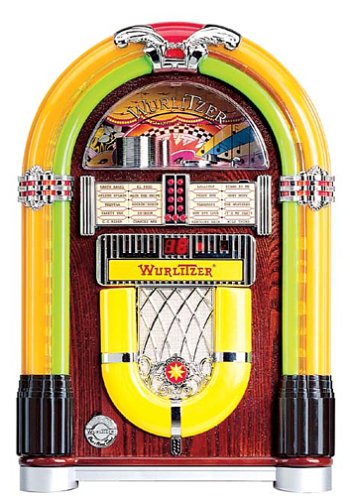
ምስል 1፡ ፊት ለፊት view of the Crosley WR18 Mini Bubbler Jukebox. This image shows the main unit with its distinctive bubble tubes, neon lights, and speaker grilles. The CD player slot is visible below the main display area.
4. የአሠራር መመሪያዎች
4.1 ማብራት / ማጥፋት
የሚለውን ይጫኑ ኃይል መሣሪያውን ለማብራት ወይም ለማጥፋት በርቀት መቆጣጠሪያው ላይ ያለውን ቁልፍ ይጫኑ።
4.2 ሲዲ ማጫወቻ ክወና
- የሚለውን ይጫኑ CD button on the remote to select CD mode.
- የሚለውን ይጫኑ ክፈት/ዝጋ button on the remote to open the CD tray.
- Place a compact disc, label side up, into the tray.
- ተጫን ክፈት/ዝጋ ትሪውን እንደገና ለመዝጋት። ክፍሉ ዲስኩን ማንበብ ይጀምራል።
- የሚለውን ተጠቀም አጫውት/አፍታ አቁም መልሶ ማጫወትን ለመጀመር ወይም ለአፍታ ለማቆም አዝራር።
- የሚለውን ተጠቀም ወደ ፊት ዝለል (|>>) ወይም ወደ ኋላ ዝለል (<<|) buttons to navigate between tracks.
- የ ፕሮግራም function allows you to create a custom playback order for tracks. Refer to the remote control diagram for specific programming steps.
- የ ድገም function allows you to repeat the current track or the entire disc.
4.3 ኤፍኤም ሬዲዮ ኦፕሬሽን
- የሚለውን ይጫኑ FM button on the remote to select FM radio mode.
- Extend the external FM antenna located at the back of the unit for optimal reception. Adjust its position for clearer sound.
- የሚለውን ተጠቀም አስተካክል። (+) ወይም ወደ ታች ያስተካክሉ (-) buttons on the remote to manually tune to desired radio stations.
4.4 የድምጽ መቆጣጠሪያ
በመጠቀም ድምጹን ያስተካክሉ ድምጽ ከፍ ያድርጉ (+) እና ድምጽ ወደ ታች (-) buttons on the remote control. Note that all volume adjustments are made via the remote.
4.5 Neon Lights and Bubble Tubes
The genuine multicolored neon lights and percolating bubble tubes activate automatically when the unit is powered on, enhancing the retro aesthetic. There are no separate controls for these features.
5. ጥገና
5.1 ካቢኔን ማጽዳት
Wipe the handcrafted hardwood cabinet with a soft, dry cloth. For stubborn marks, a slightly damp ጨርቅ መጠቀም ይቻላል, ከዚያም ወዲያውኑ ማድረቅ. ገላጭ ማጽጃዎችን ወይም ፈሳሾችን ያስወግዱ።
5.2 የሲዲ ማጫወቻ እንክብካቤ
To ensure optimal performance, keep the CD tray and lens clean. Use a specialized CD lens cleaner disc periodically. Avoid touching the CD lens directly.
5.3 Bubble Tubes and Neon Lights
The bubble tubes and neon lights are sealed units and require no user maintenance. If any issues arise with these components, contact customer support.
6. መላ መፈለግ
| ችግር | ሊሆን የሚችል ምክንያት | መፍትሄ |
|---|---|---|
| ኃይል የለም | የኃይል ገመድ አልተገናኘም; መውጫው ንቁ አይደለም | Ensure power cord is securely plugged in; test outlet with another device. |
| ድምጽ የለም። | Volume too low; incorrect mode selected | Increase volume using remote; ensure correct mode (CD/FM) is selected. |
| ሲዲ አይጫወትም። | Disc inserted incorrectly; disc dirty/scratched; CD mode not selected | Reinsert disc correctly; clean disc; select CD mode. |
| ደካማ ኤፍኤም አቀባበል | Antenna not extended/positioned correctly | Fully extend and adjust the external FM antenna. |
| የርቀት መቆጣጠሪያ አይሰራም | Batteries depleted; line of sight blocked; remote malfunction | Replace batteries; ensure no obstructions between remote and unit; if remote remains unresponsive, contact customer support as many functions are remote-only. |
7. ዝርዝሮች
- የሞዴል ቁጥር፡- WR18
- የምርት መጠኖች: 12 x 22 x 16 inches (Width x Height x Depth)
- የእቃው ክብደት፡ 16.8 ፓውንድ
- አምራች፡ ክሮስሊ ሬዲዮ
- የድምጽ ባህሪያት: Stereo sound with two 4-inch speakers and built-in ampማብሰያ
- የሚዲያ መልሶ ማጫወት CD player with program and repeat functions, FM radio with external antenna
- የውበት ባህሪያት፡ Handcrafted hardwood cabinet, genuine multicolored neon lights, bubble tube accents
- ቁጥጥር፡- 12-button mini jukebox remote control
8. ዋስትና እና ድጋፍ
The Crosley WR18 Mini Bubbler Jukebox typically comes with a manufacturer's warranty. Based on user reports, the Crosley warranty period is 90 days. Please note that for warranty service, you may be responsible for shipping the unit back to the manufacturer and an additional fee for return shipping and handling after repair.
For technical support, warranty claims, or service inquiries, please contact Crosley Radio customer service directly. Refer to the contact information provided with your product packaging or visit the official Crosley webበጣም ወቅታዊ የድጋፍ ዝርዝሮች ለማግኘት ጣቢያ.