
Cambridge Soundworks SoundWorks Ensemble III
የካምብሪጅ ሳውንድዎርክስ ስብስብ III ሰብዎፈር/ሳተላይት ድምጽ ማጉያ ስርዓት የተጠቃሚ መመሪያ
Model: SoundWorks Ensemble III
መግቢያ
This manual provides comprehensive instructions for the setup, operation, maintenance, and troubleshooting of your Cambridge SoundWorks Ensemble III Subwoofer/Satellite Speaker System. Please read this manual thoroughly before using the product to ensure proper functionality and longevity.
The Cambridge SoundWorks Ensemble III is a compact yet powerful speaker system designed to deliver natural, balanced, and wide-range sound. It features a two-way satellite speaker design and a dedicated subwoofer for impressive deep bass.
የጥቅል ይዘቶች
ጥቅሉን ሲከፍቱ፣ እባክዎን ሁሉም ክፍሎች መኖራቸውን እና ምንም ጉዳት እንዳልደረሰባቸው ያረጋግጡ።
- 1 x Ensemble III Subwoofer
- 2 x Ensemble III Satellite Speakers
- Speaker Cables (for connecting satellites to subwoofer)
- Audio Input Cable (for connecting subwoofer to audio source)
- የኃይል ገመድ
- የተጠቃሚ መመሪያ (ይህ ሰነድ)
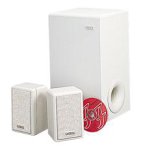
Figure 1: Cambridge SoundWorks Ensemble III Subwoofer/Satellite Speaker System. This image displays the main components: the white subwoofer unit and two compact white satellite speakers.
የማዋቀር መመሪያዎች
1. አቀማመጥ
- Subwoofer አቀማመጥ፡- The subwoofer can be placed almost anywhere in the room due to its non-directional bass output. For optimal bass response, experiment with placement near a wall or in a corner. Ensure it is on a stable, flat surface.
- የሳተላይት ድምጽ ማጉያ አቀማመጥ፡ Position the two satellite speakers equidistant from your primary listening position. For best stereo imaging, place them at ear level or slightly above, and ensure they are not obstructed.
2. ግንኙነቶች
- የሳተላይት ድምጽ ማጉያዎችን ከሱብዎፈር ጋር ያገናኙ፡ Use the provided speaker cables to connect the satellite speakers to the corresponding outputs on the subwoofer. Ensure correct polarity (positive to positive, negative to negative).
- Connect Audio Source to Subwoofer: Connect your audio source (e.g., TV, receiver, computer) to the audio input jacks on the subwoofer using the appropriate audio cable.
- የግንኙነት ኃይል; Plug the power cord into the subwoofer's power input, then plug the other end into a wall outlet.
ጠቃሚ፡- ስርዓቱን ከማብራትዎ በፊት ሁሉም ግንኙነቶች ደህንነታቸው የተጠበቀ መሆኑን ያረጋግጡ።
የአሠራር መመሪያዎች
በማብራት / በማጥፋት ላይ
Locate the power switch on the subwoofer. Flip the switch to the "ON" position to power on the system. Flip it to "OFF" to power off.
የድምጽ መቆጣጠሪያ
Volume is typically controlled via your connected audio source (e.g., TV remote, receiver volume knob, computer volume control). The Ensemble III system is designed to reproduce the audio signal from your source.
Adjusting Bass Output
The subwoofer may have a dedicated bass level control. Adjust this control to blend the subwoofer's output seamlessly with the satellite speakers, according to your preference and room acoustics.
ጥገና እና እንክብካቤ
- ማጽዳት፡ Use a soft, dry cloth to clean the surfaces of the speakers and subwoofer. Do not use liquid cleaners or abrasive materials, as they may damage the finish.
- የአየር ማናፈሻ; Ensure adequate ventilation around the subwoofer, especially if it has cooling vents. Do not block these vents.
- አካባቢ፡ Avoid exposing the system to extreme temperatures, high humidity, direct sunlight, or excessive dust.
- አያያዝ፡ Handle the speakers and subwoofer with care. Avoid dropping or subjecting them to strong impacts.
መላ መፈለግ
| ችግር | ሊሆን የሚችል ምክንያት | መፍትሄ |
|---|---|---|
| ከድምጽ ማጉያዎች ድምፅ የለም |
|
|
| የተዛባ ድምጽ |
|
|
| No bass output from subwoofer |
|
|
ዝርዝሮች
| ባህሪ | ዝርዝር |
|---|---|
| የሞዴል ስም | SoundWorks Ensemble III |
| የድምጽ ማጉያ አይነት | Subwoofer/Satellite System |
| የሱብዎፈር ልኬቶች (ሰ x ሰ x መ) | 15" x 8" x 8" (38.1 ሴሜ x 20.32 ሴሜ x 20.32 ሴሜ) |
| Satellite Speaker Dimensions (H x W x D) | 4 1/4" x 3 1/8" x 6 5/8" (10.8 ሴሜ x 7.94 ሴሜ x 16.83 ሴሜ) |
| Subwoofer Driver Diameter | 6 1/2 ኢንች (16.51 ሴሜ) |
| የዙሪያ ድምጽ ቻናል ውቅር | 2.1 |
| የግንኙነት ቴክኖሎጂ | ባለገመድ |
| የድምጽ ውፅዓት ሁኔታ | ሳተላይት |
| የመጫኛ አይነት | የጠረጴዛ ተራራ |
| ቀለም | ነጭ |
| የእቃው ክብደት | 10 kg 400 g (22.9 lbs) |
| አምራች | Cambridge SoundWorks |
የዋስትና መረጃ
The Cambridge SoundWorks Ensemble III Subwoofer/Satellite Speaker System comes with a Manufacturer's 10-year parts and labor warranty.
This warranty covers defects in materials and workmanship under normal use. For warranty service, please retain your proof of purchase and contact Cambridge SoundWorks customer support. The warranty does not cover damage caused by misuse, accident, unauthorized modification, or improper installation.
የደንበኛ ድጋፍ
For further assistance, technical support, or warranty inquiries, please visit the official Cambridge SoundWorks webጣቢያ ወይም የደንበኞች አገልግሎት ክፍልን ያነጋግሩ።
የመስመር ላይ መርጃዎች፡-
- Cambridge SoundWorks Official Webጣቢያ (Please note: This is a placeholder link as the actual website might have changed or be defunct for an older product. Users should search for current support channels.)
When contacting support, please have your product model number (SoundWorks Ensemble III) and purchase information readily available.
Ask a question about this manual
Ask about setup, troubleshooting, compatibility, parts, safety, or missing instructions. Manuals+ will review the question and use this page’s manual context to help answer it.