
1. መግቢያ
Thank you for choosing the MAC AUDIO Red Attack 4800 2-Channel Ampማፍያ ይህ ከፍተኛ ጥራት ያለው amplifier is designed to enhance your car audio experience by providing powerful and clear sound reproduction. This manual provides essential information for proper installation, operation, and maintenance of your ampሊፋየር። ጥሩ አፈጻጸም እና ደህንነት ለማረጋገጥ ከመጠቀምዎ በፊት በደንብ ያንብቡት።
2. የደህንነት መመሪያዎች
ጉዳት ወይም ጉዳት እንዳይደርስ ለመከላከል ሁል ጊዜ የሚከተሉትን የደህንነት ጥንቃቄዎች ይከተሉ ampሊፋየር እና ተሽከርካሪ;
- የኃይል ግንኙነት መቋረጥ; ከማንኛውም ጭነት ወይም ሽቦ በፊት የኤሌክትሪክ ማቋረጥን ለመከላከል የተሽከርካሪውን ኔጌቲቭ የባትሪ ተርሚናል ያላቅቁ።
- የባለሙያ ጭነት; ስለ መጫኑ ሂደት እርግጠኛ ካልሆኑ፣ ብቃት ካለው ባለሙያ የመኪና ድምጽ ጫኚ እርዳታ ይጠይቁ።
- ትክክለኛ ሽቦ; Use appropriate gauge wiring for power, ground, and speaker connections as specified in this manual to prevent overheating and damage.
- የአየር ማናፈሻ; ያረጋግጡ amplifier is mounted in a location with adequate ventilation to prevent overheating. Do not block cooling fins or vents.
- የእርጥበት መጋለጥ; አታጋልጥ ampእርጥበት፣ ውሃ ወይም ከፍተኛ የሙቀት መጠንን የሚቀንስ።
- ፊውዝ መከላከያ፡- Always use the correct fuse rating as specified. Never replace a blown fuse with one of a higher ampእርጅና።
- የድምጽ ደረጃዎች፡- ለከፍተኛ የድምፅ መጠን ለረጅም ጊዜ መጋለጥ የመስማት ችግርን ሊያስከትል ይችላል. መጠንን በኃላፊነት ያስተካክሉ።
3. ምርት አብቅቷልview
The MAC AUDIO Red Attack 4800 is a robust 2-channel amplifier engineered for reliable performance in car audio systems. It features a durable design and essential controls for sound customization.
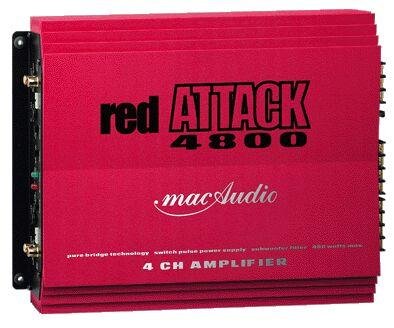
ምስል 1: የፊት view of the MAC AUDIO Red Attack 4800 2-Channel Amplifier, showing input and output terminals, and control knobs.
ይህ amplifier is designed to deliver clean power to your speakers, enhancing the clarity and impact of your music. Its compact design allows for flexible installation options within your vehicle.
4. ማዋቀር እና መጫን
Careful installation is crucial for the amplifier's performance and longevity. Follow these steps for a successful setup.
4.1. የመጫኛ ቦታ
- ከፀሐይ ብርሃን እና ከሙቀት ምንጮች ርቀው ደረቅ ፣ በደንብ አየር የተሞላ ቦታ ይምረጡ።
- በዙሪያው በቂ የአየር ዝውውርን ማረጋገጥ ampየሊፋየር ሙቀት መስመጥ።
- ን ይጫኑ amplifier securely to a solid surface using appropriate screws to prevent movement during vehicle operation.
4.2. የወልና ግንኙነቶች
Before making any connections, ensure the vehicle's battery negative terminal is disconnected.
4.2.1. Power and Ground Wiring
- ኃይል (ቢ+): Connect a heavy-gauge power cable (e.g., 8 AWG or 4 AWG depending on power requirements) directly from the positive terminal of the vehicle's battery to the amplifier's B+ terminal. Install an in-line fuse holder with the correct amperage fuse (refer to specifications) within 18 inches (45 cm) of the battery.
- መሬት (ጂኤንዲ)፦ Connect a heavy-gauge ground cable of the same length and gauge as the power cable from the amplifier's GND terminal to a clean, unpainted metal surface on the vehicle's chassis. Ensure a good electrical connection by scraping away any paint or rust.
- የርቀት (REM): አነስተኛ የጌጅ ሽቦ (ለምሳሌ፣ 18 AWG) ከኤሌክትሪክ ሽቦው ጋር ያገናኙ amplifier's REM terminal to the remote output of your car stereo or head unit. This wire turns the amplifier on and off with the stereo.
4.2.2. Audio Input Wiring
- Connect RCA cables from the pre-out outputs of your car stereo to the RCA input jacks on the amplifier. Ensure correct channel matching (Left to Left, Right to Right).
4.2.3. Speaker Output Wiring
- የእርስዎን ድምጽ ማጉያዎች ከ ጋር ያገናኙ amplifier's speaker output terminals. Observe correct polarity (+ to + and - to -) for each speaker. Incorrect polarity can lead to poor sound quality and reduced bass response.
- Ensure the total impedance of the connected speakers matches the amplifier's minimum impedance rating (refer to specifications).
4.3. የመጀመሪያ ቅንብሮች
After all wiring is complete and verified, reconnect the vehicle's negative battery terminal.
- ቁጥጥር ያግኙ የጌይን መቆጣጠሪያውን ወደ ዝቅተኛው በማቀናበር ይጀምሩ። በጭንቅላትዎ ክፍል ላይ መካከለኛ መጠን ያለው የታወቀ የሙዚቃ ክፍል ያጫውቱ። ቀስ በቀስ ይጨምሩት። amplifier's gain control until you hear distortion, then back it off slightly. This sets the ampየሊፋየር የግቤት ትብነት ከጭንቅላት አሃድዎ ውጤት ጋር እንዲዛመድ።
- ተሻጋሪ ቅንብሮች፡- የእርስዎ ከሆነ amplifier has built-in crossover filters (e.g., Low Pass Filter, High Pass Filter), adjust them according to your speaker type and system configuration. For full-range speakers, you might use a high-pass filter to protect them from low frequencies. For subwoofers, a low-pass filter is essential.
5. በመስራት ላይ Ampማብሰያ
Once installed and configured, operating your MAC AUDIO Red Attack 4800 amplifier is straightforward.
- ማብራት/ማጥፋት፡ የ amplifier will automatically turn on when your car stereo is powered on (via the remote wire) and turn off when the stereo is off.
- የድምጽ መቆጣጠሪያ፡- Adjust the overall system volume using your car stereo's volume control. The amplifier's gain control should only be used for initial level matching, not as a volume knob.
- የድምፅ ማስተካከያዎች; Fine-tune your sound using the crossover controls and any bass boost features available on the amplifier or your head unit. Make small adjustments and listen carefully to the changes.
6. ጥገና
መደበኛ ጥገና የእርሶን ረጅም ዕድሜ እና ጥሩ አፈፃፀም ያረጋግጣል ampማብሰያ
- ማጽዳት፡ በየጊዜው ማጽዳት ampየሊፋየርን ውጫዊ ክፍል ለስላሳና ደረቅ ጨርቅ ይጠቀሙ። ጠጣር ኬሚካሎችን ወይም ሻካራ ማጽጃዎችን አይጠቀሙ። የማቀዝቀዣ ክንፎቹ ከአቧራና ከቆሻሻ የፀዱ መሆናቸውን ያረጋግጡ።
- የግንኙነት ፍተሻ፡- Occasionally check all wiring connections (power, ground, remote, RCA, speaker) to ensure they are secure and free from corrosion. Loose connections can cause performance issues or damage.
- የአየር ማናፈሻ; መሆኑን ያረጋግጡ amplifier's mounting location remains clear of obstructions to maintain proper airflow.
7. መላ መፈለግ
ከእርስዎ ጋር ችግሮች ካጋጠሙዎት amplifier፣ ድጋፍን ከማነጋገርዎ በፊት የሚከተለውን የመላ ፍለጋ መመሪያ ይመልከቱ።
| ችግር | ሊሆን የሚችል ምክንያት | መፍትሄ |
|---|---|---|
| Ampሊፋይ አይበራም። | No power, poor ground, remote wire not connected or faulty, blown fuse. | Check power (B+) and ground (GND) connections. Verify remote (REM) wire connection to head unit. Check in-line fuse and amplifier's internal fuses. |
| ምንም የድምፅ ውፅዓት የለም። | RCA cables disconnected, speaker wires disconnected or shorted, amplifier in protection mode, head unit settings. | Check RCA input connections. Verify speaker wire connections and ensure no shorts. Check if protection LED is on. Confirm head unit output is active. |
| የተዛባ ድምጽ። | Gain set too high, poor ground, speaker impedance mismatch, damaged speakers. | Reduce gain setting. Check ground connection. Verify speaker impedance. Inspect speakers for damage. |
| Ampሊፋይር ከመጠን በላይ ይሞቃል. | በቂ ያልሆነ አየር ማናፈሻ, መከላከያ በጣም ዝቅተኛ, ረዘም ያለ ከፍተኛ መጠን. | በአካባቢው በቂ የአየር ዝውውርን ያረጋግጡ amplifier. Check speaker impedance. Reduce volume or operating time. |
8. ዝርዝሮች
The following are general specifications for the MAC AUDIO Red Attack 4800 amplifier. Specific performance figures may vary.
- የምርት ስም፡ ማክ ኦዲዮ
- የሞዴል ቁጥር፡- RED 4800 Attack
- የሰርጦች ብዛት፡- 2
- የመጫኛ አይነት፡ ራሱን ችሎ የቆመ
- የእቃው ክብደት፡ 10 g (Note: This weight seems unusually low for an amplifier and might be a data entry error. Please refer to product packaging for accurate weight.)
- ጂቲን፡ 04023037264807
- ASIN: B0000WR722
Note: For detailed power output ratings (RMS/Max power), frequency response, signal-to-noise ratio, and other electrical specifications, please refer to the official product packaging or manufacturer's webጣቢያ.
9. ዋስትና እና ድጋፍ
MAC AUDIO products are manufactured to high-quality standards. For information regarding warranty coverage, terms, and conditions, please refer to the warranty card included with your product or visit the official MAC AUDIO website. For technical support or service inquiries, please contact your authorized MAC AUDIO dealer or the manufacturer directly.
ለዋስትና ጥያቄዎች የግዢ ደረሰኝዎን እንደ ግዢ ማረጋገጫ ያቆዩት።