
መግቢያ
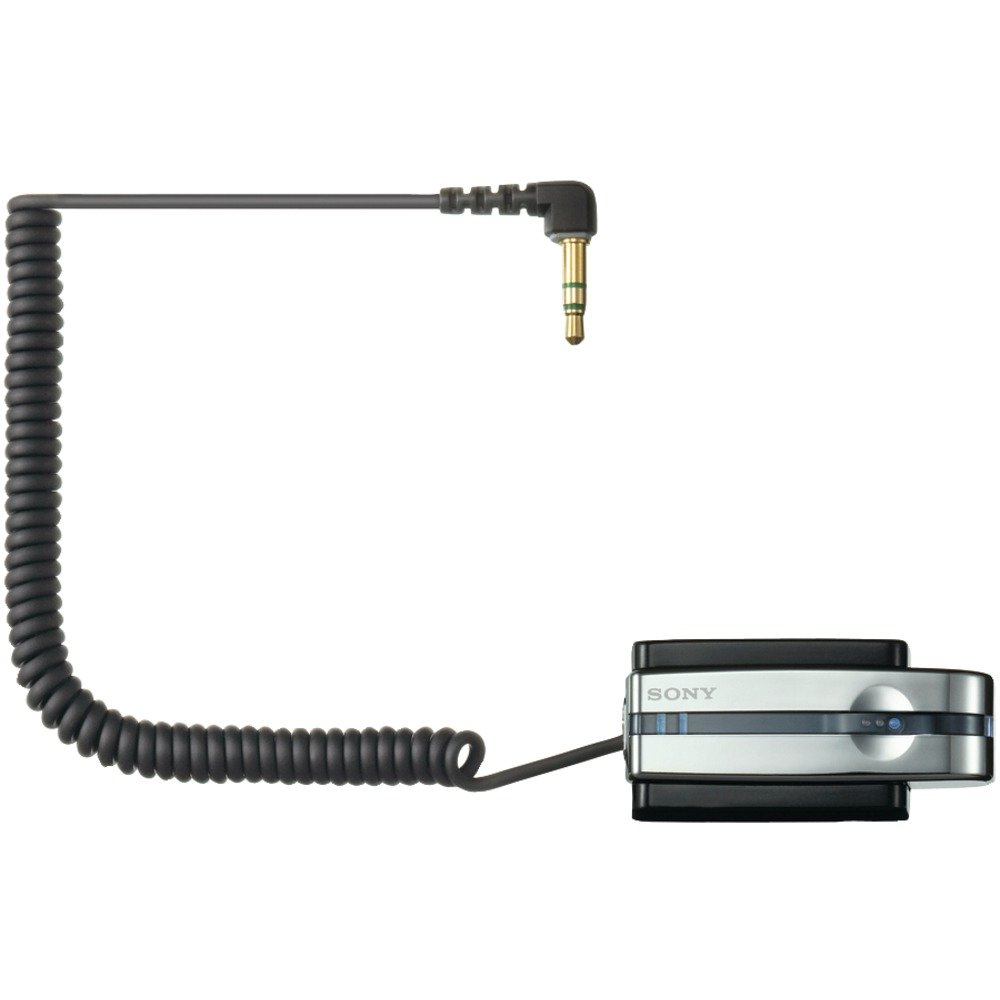
The Sony TMR-BT10A is a compact Bluetooth transmitter designed to wirelessly transmit stereo audio signals from your portable music player to compatible Bluetooth stereo audio receiving devices. This includes Bluetooth-enabled headsets, car audio systems, or home audio components. It connects to any audio device via a standard headphone jack, offering a convenient way to enjoy your music wirelessly.
የምርት ባህሪያት
- የገመድ አልባ ማስተላለፊያ; Transmits audio from your player to compatible Bluetooth devices.
- Compact and Rechargeable: Designed for portable use with a built-in rechargeable battery.
- ሁለንተናዊ ግንኙነት፡ Connects to any portable music player via a standard headphone jack.
- የብሉቱዝ ስሪት 2.0፡ Supports A2DP profile for high-quality stereo audio.
- Gold-plated Stereo Mini Plug: Ensures reliable audio connection.
- Battery Charging Stand: Includes a dedicated stand for convenient charging.
የጥቅል ይዘቶች
እባክዎ ማዋቀሩን ከመቀጠልዎ በፊት ሁሉም እቃዎች መኖራቸውን ያረጋግጡ፡-
- Sony TMR-BT10A Bluetooth Transmitter
- Battery Charging Stand
- የኤሲ ኃይል አስማሚ
- የትምህርት መመሪያ (ይህ ሰነድ)
የማዋቀር መመሪያ
1. Charging the Transmitter
Before initial use, fully charge the TMR-BT10A transmitter. Place the transmitter into its dedicated charging stand and connect the AC power adapter to the stand and a wall outlet. The charging indicator light will illuminate. A full charge typically takes approximately 3 hours and provides up to 11 hours of playback time.
ምስል፡ The Sony TMR-BT10A Bluetooth Transmitter placed in its charging stand, connected to power. This image illustrates the correct way to charge the device.
ማስታወሻ፡- The transmitter cannot be used while it is connected to the charging dock or actively charging.
2. ከድምጽ መሳሪያ ጋር መገናኘት
Plug the gold-plated stereo mini plug of the TMR-BT10A into the headphone jack of your portable music player (e.g., iPod, MP3 player) or any other audio source. Ensure the connection is secure.
3. Pairing with a Bluetooth Receiver
To establish a wireless connection, the TMR-BT10A must be paired with your Bluetooth stereo audio receiving device (e.g., headphones, car stereo).
- Turn on the TMR-BT10A transmitter.
- Put your Bluetooth receiving device into pairing mode. Refer to your receiver's manual for specific instructions.
- On the TMR-BT10A, press and hold the pairing button (if available, or power button for 7 seconds as indicated in some reviews) until the indicator light flashes rapidly, indicating it is in pairing mode.
- Once paired, the indicator lights on both devices will change to a steady illumination or a slower flash, confirming the connection. The TMR-BT10A can store pairing information for up to 8 devices.
የአሠራር መመሪያዎች
- ማብራት/ማጥፋት፡ Press and hold the power button on the TMR-BT10A to turn it on or off.
- ከድምጽ ምንጭ ጋር ይገናኙ፡ Ensure the transmitter's mini-plug is securely inserted into your audio player's headphone jack.
- Activate Bluetooth Receiver: Turn on your paired Bluetooth headphones or audio system. The devices should automatically connect if they have been paired previously and are within range.
- ኦዲዮን አጫውት፡ Start playback on your audio source. The sound will be transmitted wirelessly to your Bluetooth receiver.
- የድምጽ መቆጣጠሪያ፡- Adjust the volume directly on your Bluetooth receiving device or your audio source. The TMR-BT10A does not have its own volume controls.
ጠቃሚ፡- For optimal performance, ensure a clear line of sight between the transmitter and the receiving device. Obstacles and distance can affect signal quality and range.
ጥገና
- ማጽዳት፡ Use a soft, dry cloth to clean the transmitter and charging stand. Do not use liquid cleaners or solvents.
- ማከማቻ፡ ለረጅም ጊዜ አገልግሎት በማይሰጥበት ጊዜ መሳሪያውን በቀጥታ ከፀሀይ ብርሀን እና ከከፍተኛ ሙቀት ርቆ በቀዝቃዛና ደረቅ ቦታ ያከማቹ።
- የባትሪ እንክብካቤ To prolong battery life, avoid fully discharging the battery frequently. Charge the device regularly, even if not in constant use. The battery is designed to be replaceable by removing two screws and unplugging it from the unit, though this is typically a service task.
- የግንኙነት እንክብካቤ; Handle the gold-plated stereo mini plug with care to prevent bending or damage.
መላ መፈለግ
| ችግር | ሊሆን የሚችል ምክንያት | መፍትሄ |
|---|---|---|
| ምንም ድምፅ ወይም አልፎ አልፎ የሚሰማ ድምጽ የለም። |
|
|
| Poor sound quality (hissing, static). |
|
|
| Audio latency (lip-sync issues). |
|
|
| Transmitter does not charge. |
|
|
ዝርዝሮች
| ባህሪ | ዝርዝር |
|---|---|
| የሞዴል ቁጥር | TMR-BT10A |
| የምርት ስም | ሶኒ |
| የግንኙነት ቴክኖሎጂ | ብሉቱዝ |
| የብሉቱዝ ስሪት | 2.0 (A2DP profile) |
| የኃይል ምንጭ | በባትሪ የተጎላበተ (እንደገና ሊሞላ የሚችል) |
| የባትሪ ህይወት (በግምት) | 11 ሰዓታት |
| የኃይል መሙያ ጊዜ (በግምት) | 3 ሰዓታት |
| የድምፅ ማያያዣ | Gold-plated Stereo Mini Plug |
| የእቃው ክብደት | 8.64 አውንስ |
| ASIN | B000P9CEVO |
| ዩፒሲ | 027242697867 |
ዋስትና እና ድጋፍ
የዋስትና መረጃ እና የደንበኛ ድጋፍ ለማግኘት፣ እባክዎን ከምርትዎ ጋር የተካተተውን የዋስትና ካርድ ይመልከቱ ወይም ኦፊሴላዊውን የ Sony ድጋፍ ይጎብኙ webጣቢያ. ለማንኛውም የዋስትና ጥያቄዎች የግዢ ማረጋገጫዎን ያስቀምጡ።
የመስመር ላይ ድጋፍ www.sony.com/electronics/support


