
1. መግቢያ
This manual provides essential information for the safe and efficient operation of your Sharp Aquos LC42D64U 42-Inch 1080p LCD HDTV. Please read these instructions thoroughly before using your television and retain them for future reference. The Sharp Aquos D64 series offers a slim design, Full HD 1080p resolution, and advanced features for an enhanced viewልምድ.
2. ጠቃሚ የደህንነት መረጃ
ይህንን ቴሌቪዥን ሲጠቀሙ የእሳት፣ የኤሌትሪክ ንዝረት እና የመቁሰል አደጋን ለመቀነስ ሁል ጊዜ መሰረታዊ የደህንነት ጥንቃቄዎችን ይከተሉ።
- የኃይል ምንጭ፡- Connect the TV only to the power supply indicated on the label.
- የአየር ማናፈሻ; ትክክለኛውን አየር ማናፈሻ ማረጋገጥ. የአየር ማናፈሻ ክፍተቶችን አያግዱ.
- ውሃ እና እርጥበት; ቴሌቪዥኑን ለዝናብ እና ለእርጥበት አያጋልጡት። በፈሳሽ የተሞሉ ነገሮችን በቴሌቪዥኑ ላይ አታስቀምጡ።
- ማጽዳት፡ ከማጽዳትዎ በፊት ቴሌቪዥኑን ከግድግዳ ሶኬት ያላቅቁት። ለስላሳና ደረቅ ጨርቅ ይጠቀሙ።
- አገልግሎት መስጠት፡ ይህንን ምርት እራስዎ ለማገልገል አይሞክሩ። ሁሉንም አገልግሎት ወደ ብቃት ላለው የአገልግሎት ሠራተኛ ያማክሩ።
- መጫን፡ If wall-mounting, ensure the mount is compatible and installed by qualified personnel.
- ልጆች፡- ልጆች በቴሌቪዥኑ ላይ እንዳይወጡ ወይም እንዳይጫወቱ ለመከላከል ይቆጣጠሩ።
3. በሳጥኑ ውስጥ ያለው
ማዋቀሩን ከመቀጠልዎ በፊት ሁሉም አካላት መኖራቸውን ያረጋግጡ።
- Sharp Aquos LC42D64U 42-Inch LCD HDTV
- የርቀት መቆጣጠሪያ
- የጠረጴዛ ማቆሚያ
- የኃይል ገመድ
- የተጠቃሚ መመሪያ (ይህ ሰነድ)
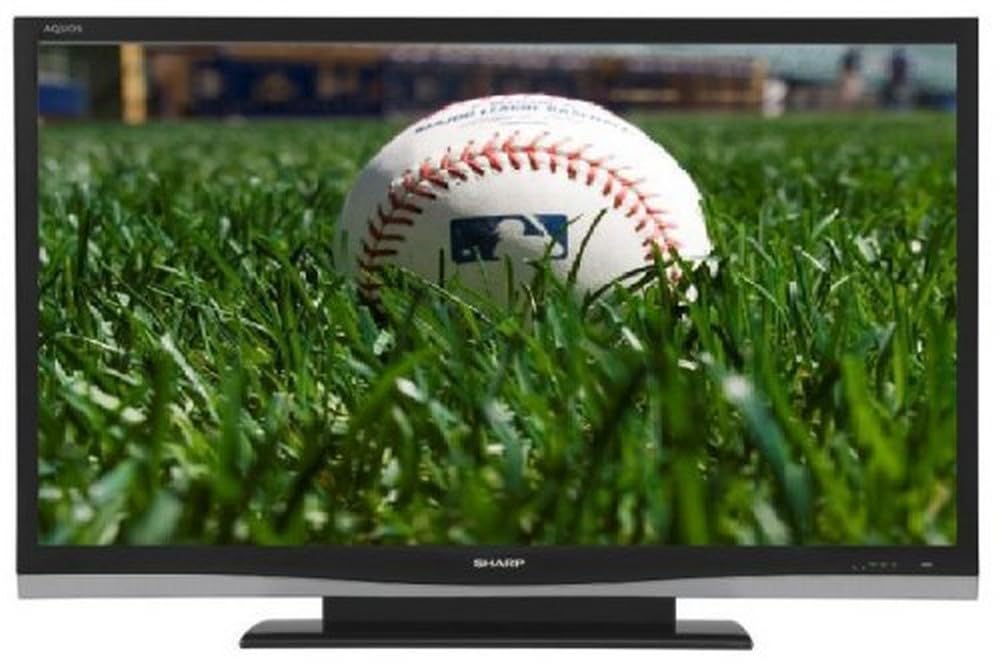
ምስል፡ ፊት ለፊት view of the Sharp Aquos LC42D64U 42-Inch LCD HDTV with its included table stand.
4. ማዋቀር
4.1 የጠረጴዛ ማቆሚያውን ማያያዝ
If you are not wall-mounting the television, attach the included table stand. Refer to the separate assembly guide for detailed instructions on securing the stand to the TV. Ensure all screws are tightened securely.
4.2 የውጭ መሳሪያዎችን ማገናኘት
Connect your external devices (e.g., cable box, Blu-ray player, game console) to the appropriate input terminals on the rear or side of the TV.
- ኤችዲኤምአይ: For high-definition digital video and audio. The TV features three HDMI 1.3 inputs (two rear, one side).
- Component Video (Y, Pb, Pr): For high-definition analog video. Two inputs are available.
- Composite Video (A/V): For standard-definition analog video and audio. One side and one rear input.
- ኤስ-ቪዲዮ: For standard-definition video. One side and one rear input.
- PC Input (D-Sub 15-pin): እንደ ሞኒተር ለመጠቀም ኮምፒውተርን ያገናኙ።
- RF Antenna Inputs: Two inputs for connecting an antenna or cable TV.
- የኢተርኔት ወደብ For network connectivity (DLNA).
4.3 የኃይል ግንኙነት
After connecting all desired devices, plug the power cord into the TV's power inlet and then into a wall outlet. The TV will enter standby mode.
5. የአሠራር መመሪያዎች
5.1 Initial Power On and Channel Setup
- የሚለውን ይጫኑ ኃይል በርቀት መቆጣጠሪያው ላይ ወይም ቴሌቪዥኑን ለማብራት አዝራር።
- The first time you power on, the TV will guide you through the initial setup process, including language selection and channel scanning.
- Select your preferred language (English, Spanish, or French).
- Perform an "Easy Setup" or "Channel Setup" scan to detect available digital (ATSC, QAM) and analog (NTSC) channels.
5.2 መሰረታዊ የርቀት መቆጣጠሪያ ተግባራት
- ኃይል፡- Turns the TV on or off (standby).
- ግብዓት Cycles through available input sources (HDMI, Component, PC, etc.).
- CH +/-: ሰርጦችን ይቀይራል።
- ጥራዝ +/-: የድምፅ መጠንን ያስተካክላል።
- መኑ Accesses the on-screen menu for settings adjustments.
- የቀስት ቁልፎች፡- በምናሌ አማራጮች ውስጥ ያስሱ።
- ግባ ምርጫዎችን ያረጋግጣል።
- መውጫ/መመለስ፡ ምናሌዎችን ይወጣል ወይም ወደ ቀዳሚው ማያ ገጽ ይመለሳል።
5.3 ሜኑ አሰሳ እና ቅንብሮች
የሚለውን ይጫኑ MENU button to access various settings categories:
- ምስል፡ Adjust brightness, contrast, color, tint, sharpness, and backlight. The OPC function automatically adjusts brightness based on room conditions.
- ኦዲዮ፡ Control volume, bass, treble, balance, and select audio modes.
- ቻናል፡ Rescan channels, add/delete channels, and set up favorite channels.
- ማዋቀር፡ General settings like language, time, sleep timer, and parental controls (V-Chip).
- የላቁ ባህሪያት፡ Access settings for DLNA, Picture-in-Picture, and AQUOS LINK.
6. የላቁ ባህሪያት
6.1 AQUOS LINK (HDMI-CEC)
AQUOS LINK allows convenient control of compatible Sharp devices connected via HDMI using just your AQUOS TV remote. Ensure connected devices also support HDMI-CEC (Consumer Electronics Control) and are enabled in their respective settings.
6.2 DLNA Compatibility
The TV is DLNA-compatible, enabling interoperability with other DLNA-certified electronics, computers, and mobile devices. Connect the TV to your home network via the Ethernet port to access and share digital content (photos, videos, music) from compatible devices on your network.
6.3 ፎቶ-በ-ፎቶ (ፒአይፒ)
The Picture-in-Picture function allows simultaneous viewing of a TV program and a video or PC source. Consult the on-screen menu for PIP activation and source selection.
6.4 V-Chip System
The V-Chip system allows you to block TV and movie programs based on their rating, providing parental control over objectionable content. Access V-Chip settings through the TV's setup menu.
7. ጥገና
7.1 ማያ ገጹን ማጽዳት
ስክሪኑን በቀስታ ለስላሳ እና ከተሸፈነ ጨርቅ ይጥረጉ። ለግትር ምልክቶች፣ በትንሹ መampጨርቁን በውሃ ወይም በልዩ ማያ ገጽ ማጽጃ። አትሥራ ጠጣር ኬሚካሎችን፣ ሻካራ ማጽጃዎችን ወይም ፈሳሾችን በቀጥታ በማያ ገጹ ላይ ይረጩ።
7.2 ካቢኔን ማጽዳት
Wipe the TV cabinet with a soft, dry cloth. Avoid using solvents or abrasive materials.
7.3 አጠቃላይ እንክብካቤ
- በመብረቅ አውሎ ንፋስ ጊዜ ወይም ለረጅም ጊዜ ጥቅም ላይ በማይውልበት ጊዜ ቴሌቪዥኑን ይንቀሉ.
- ቴሌቪዥኑን በቀጥታ ከፀሀይ ብርሀን ፣ ከሙቀት ምንጮች እና ከመጠን በላይ አቧራ ያርቁ።
- Ensure adequate space around the TV for proper ventilation.
8. መላ መፈለግ
የደንበኛ ድጋፍን ከማነጋገርዎ በፊት ለተለመዱ ጉዳዮች የሚከተሉትን መፍትሄዎች ይሞክሩ።
| ችግር | ሊሆን የሚችል መፍትሄ |
|---|---|
| ኃይል የለም | የኃይል ገመዱ ከቴሌቪዥኑ እና ከግድግዳው መውጫ ጋር ደህንነቱ በተጠበቀ ሁኔታ መሰካቱን ያረጋግጡ። መውጫው ኃይል እንዳለው ያረጋግጡ። |
| ምንም ምስል የለም, ግን ድምጽ አለ | ትክክለኛው የግቤት ምንጭ መመረጡን ያረጋግጡ። ከውጭ መሳሪያዎች ጋር የኬብል ግንኙነቶችን ያረጋግጡ. |
| ምንም ድምጽ የለም, ግን ምስል አለ | የድምጽ መጠኑን ያረጋግጡ እና የድምጸ-ከል ቅንብሩን ያረጋግጡ። የድምጽ ገመዶች በትክክል መገናኘታቸውን ያረጋግጡ። |
| የርቀት መቆጣጠሪያ አይሰራም | ባትሪዎችን ይተኩ. በርቀት መቆጣጠሪያው እና በቴሌቪዥኑ IR ዳሳሽ መካከል ምንም እንቅፋቶች አለመኖራቸውን ያረጋግጡ። |
| "Hotel Mode" issue (as per customer review) | If the TV is stuck in a limited functionality mode, contact Sharp customer support for assistance in disabling "Hotel Mode." This typically requires a specific service menu sequence. |
9. ዝርዝሮች
| ባህሪ | ዝርዝር |
|---|---|
| የሞዴል ቁጥር | LC42D64U |
| የስክሪን መጠን | 42 ኢንች |
| የማሳያ ቴክኖሎጂ | LCD |
| ጥራት | 1080 ፒ (ሙሉ ኤችዲ) |
| የንፅፅር ሬሾ | 10,000:1 ዳይናሚክ |
| የምላሽ ጊዜ | 4 ሚሊሰከንዶች |
| HDMI ወደቦች | 3 (2 የኋላ ፣ 1 ጎን) |
| የክፍለ አካል ቪዲዮ ግብዓቶች | 2 |
| የተዋሃዱ የቪዲዮ ግብዓቶች | 3 (1 ጎን ፣ 2 የኋላ) |
| S-Video Inputs | 2 (1 ጎን ፣ 1 የኋላ) |
| ፒሲ ግቤት | 1 (D-Sub 15-pin) |
| የኤተርኔት ወደብ | አዎ |
| መቃኛ አይነት | ATSC, QAM, NTSC |
| የወላጅ ቁጥጥር | ቪ-ቺፕ |
| ክብደት | 70.2 ፓውንድ (ግምት) |
| ሞዴል ዓመት | 2008 |
10. ዋስትና እና ድጋፍ
10.1 የተወሰነ ዋስትና
This Sharp Aquos LC42D64U television comes with a 1 Year Parts and 1 Year Labor Warranty from the date of original purchase. This warranty covers manufacturing defects in materials and workmanship under normal use. It does not cover damage caused by misuse, accident, modification, or unauthorized repair.
ለዋስትና ጥያቄዎች እባክዎ የግዢ ማረጋገጫዎን ያቆዩ።
10.2 የደንበኛ ድጋፍ
For technical assistance, troubleshooting beyond this manual, or warranty service, please contact Sharp Customer Support. Refer to the contact information provided with your product documentation or visit the official Sharp webበጣም ወቅታዊ የድጋፍ ዝርዝሮች ለማግኘት ጣቢያ.
When contacting support, please have your model number (LC42D64U) and serial number ready.