
መግቢያ
This manual provides detailed instructions for the proper use and maintenance of your Royal DM2070 Electronic Organizer. Please read this manual thoroughly before operating the device to ensure safe and efficient use. Keep this manual for future reference.
የደህንነት መረጃ
- መሳሪያውን ለከፍተኛ ሙቀት፣ ቀጥተኛ የፀሐይ ብርሃን ወይም ከፍተኛ እርጥበት አያጋልጡት።
- መሳሪያውን ከመጣል ወይም ለጠንካራ ተጽእኖዎች ከማድረግ ተቆጠብ።
- መሳሪያውን እራስዎ ለመበተን ወይም ለመጠገን አይሞክሩ. ሁሉንም አገልግሎቶች ብቁ ለሆኑ ባለሙያዎች ያመልክቱ።
- መሳሪያውን ከውሃ እና ከሌሎች ፈሳሾች ያርቁ.
- Use only the specified battery type for replacement.
የጥቅል ይዘቶች
ሁሉም እቃዎች በጥቅልዎ ውስጥ መኖራቸውን ያረጋግጡ፡-
- Royal DM2070 Electronic Organizer
- Stylus (if applicable)
- ፈጣን ጅምር መመሪያ
- የዋስትና ካርድ
ማዋቀር
1. የባትሪ ጭነት
The Royal DM2070 requires batteries for operation. Follow these steps to install them:
- በመሳሪያው ጀርባ ላይ የባትሪውን ክፍል ሽፋን ያግኙ.
- ክፍሉን ለመክፈት ሽፋኑን ያንሸራትቱ ወይም ያንሱ.
- Insert the required batteries, ensuring correct polarity (+ and -) as indicated inside the compartment.
- የባትሪውን ክፍል ደህንነቱ በተጠበቀ ሁኔታ ይተኩ.
2. የመነሻ ኃይል-ማብራት እና ቅንብሮች
After installing batteries, power on your device and configure basic settings:
- ተጭነው ይያዙት። ኃይል ማያ ገጹ እስኪበራ ድረስ አዝራሩን ጠቅ ያድርጉ።
- The device may prompt you to set the date and time. Use the navigation buttons or stylus to enter the correct information.
- Confirm your settings to complete the initial setup.
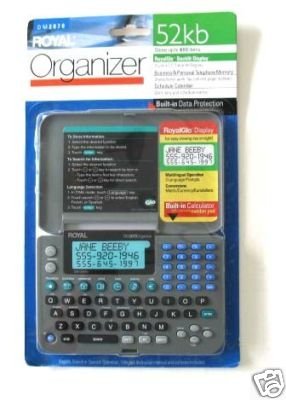
Image: Royal DM2070 Electronic Organizer. This image displays the device's front view, highlighting its screen and keypad, essential for navigation and data entry.
የአሠራር መመሪያዎች
1. አሰሳ
The DM2070 features a keypad and potentially a stylus for navigation. Use the arrow keys to move between menu options and press አስገባ or a designated selection button to confirm.
2. Entering Data
To enter information such as contacts, appointments, or notes:
- Navigate to the desired application (e.g., 'Contacts', 'Calendar', 'Notes').
- Select 'New Entry' or a similar option.
- Use the alphanumeric keypad to input text. Some models may offer an on-screen keyboard via stylus.
- Save your entry before exiting the application.
3. አፕሊኬሽኖችን መጠቀም
The DM2070 includes various applications:
- የቀን መቁጠሪያ፡ View daily, weekly, or monthly schedules. Add and edit appointments.
- እውቂያዎች፡- Store names, phone numbers, addresses, and email information.
- ማስታወሻዎች፡- Create and manage text notes or memos.
- ካልኩሌተር መሰረታዊ የሂሳብ ስሌቶችን ያከናውኑ።
- የምንዛሬ መለወጫ፡- Convert between different currencies (requires manual update of exchange rates on some models).
ጥገና
1. መሣሪያውን ማጽዳት
To keep your DM2070 in optimal condition:
- ማያ ገጹን ይጥረጉ እና ሐasinግ ለስላሳ፣ ደረቅ፣ ከላጣ አልባ ጨርቅ ጋር።
- ለግትር ምልክቶች፣ በትንሹ መampen ጨርቅ በውሃ; ኃይለኛ ኬሚካሎችን ወይም ቆሻሻ ማጽጃዎችን ያስወግዱ.
- Ensure no moisture enters openings.
2. የባትሪ እንክብካቤ
- የባትሪው ዝቅተኛ ደረጃ ጠቋሚ ሲታይ ባትሪዎቹን ወዲያውኑ ይተኩ።
- መሳሪያው እንዳይፈስ ለመከላከል መሳሪያው ረዘም ላለ ጊዜ ጥቅም ላይ የማይውል ከሆነ ባትሪዎችን ያስወግዱ.
መላ መፈለግ
If you encounter issues with your Royal DM2070, refer to the following common solutions:
| ችግር | ሊሆን የሚችል ምክንያት | መፍትሄ |
|---|---|---|
| መሣሪያው አይበራም። | የሞቱ ወይም በስህተት የተጫኑ ባትሪዎች። | ባትሪዎችን በአዲሶቹ ይተኩ። |
| ማያ ገጹ ባዶ ወይም የቀዘቀዘ ነው። | የሶፍትዌር ችግር ወይም ዝቅተኛ ባትሪ። | Try a soft reset (refer to Quick Start Guide for specific button combination) or replace batteries. |
| Data loss. | Battery depletion or improper shutdown. | Ensure batteries are fresh. Always save data before powering off. |
| የቁልፍ ሰሌዳው ምላሽ አይሰጥም። | Dust/debris under keys or internal issue. | Clean keypad gently. If problem persists, contact support. |
ዝርዝሮች
Key technical specifications for the Royal DM2070 Electronic Organizer:
| ባህሪ | ዝርዝር |
|---|---|
| የምርት ስም | ሮያል |
| የሞዴል ቁጥር | DM2070 |
| የሽፋን ቁሳቁስ | ቆዳ |
| ቅርጸት | አደራጅ |
| የእቃው ክብደት | 181 ግ |
| የንጥል መጠኖች (LxWxH) | 24.4 x 14.5 x 1 ሴንቲሜትር |
| የዒላማ ታዳሚዎች | አዋቂ |
ዋስትና እና ድጋፍ
The Royal DM2070 Electronic Organizer comes with a standard manufacturer's warranty. Please refer to the warranty card included in your package for specific terms and conditions. For technical support, service, or inquiries, please contact Royal customer service through the contact information provided on the warranty card or the official Royal webጣቢያ.