
መግቢያ
ስለገዙ እናመሰግናለንasing the Snakebyte Wireless Bluetooth Premium PS3 Controller. This manual provides detailed instructions for setting up, operating, maintaining, and troubleshooting your new controller. Please read this manual thoroughly before use to ensure optimal performance and longevity of your device.
የጥቅል ይዘቶች
እባክዎ ሁሉም እቃዎች በጥቅሉ ውስጥ እንዳሉ ያረጋግጡ፡-
- Snakebyte Wireless Bluetooth Premium PS3 Controller
- USB Charging Cable (approximately 3 meters)
- የትምህርት መመሪያ (ይህ ሰነድ)

Image: The Snakebyte Wireless Bluetooth Premium PS3 Controller shown in its retail blister packaging, indicating the product and included cable.
ማዋቀር
1. መቆጣጠሪያውን መሙላት
Before initial use, fully charge the controller. Connect the supplied USB charging cable to the controller's charging port and the other end to a USB port on your PlayStation 3 console or a compatible USB power adapter. The indicator lights on the controller will show charging status and turn off or change color when fully charged.
2. ከ PlayStation 3 ጋር መገናኘት
To connect the controller wirelessly to your PlayStation 3 console:
- የ PlayStation 3 ኮንሶልዎ መብራቱን ያረጋግጡ።
- Connect the controller to the PS3 console using the supplied USB charging cable. This will register the controller with the console.
- የሚለውን ይጫኑ የ PS ቁልፍ (located in the center of the controller) once. The controller will power on and attempt to establish a connection.
- Once the controller is registered and connected, the indicator lights will illuminate, typically assigning a player number.
- You can now disconnect the USB cable for wireless gameplay. If the connection is lost, reconnect the USB cable and press the PS button again.

ምስል፡ ፊት ለፊት view of the Snakebyte Wireless Bluetooth Premium PS3 Controller, showing the button layout including the central PS button.
የአሠራር መመሪያዎች
የመቆጣጠሪያ አቀማመጥ እና ተግባራት
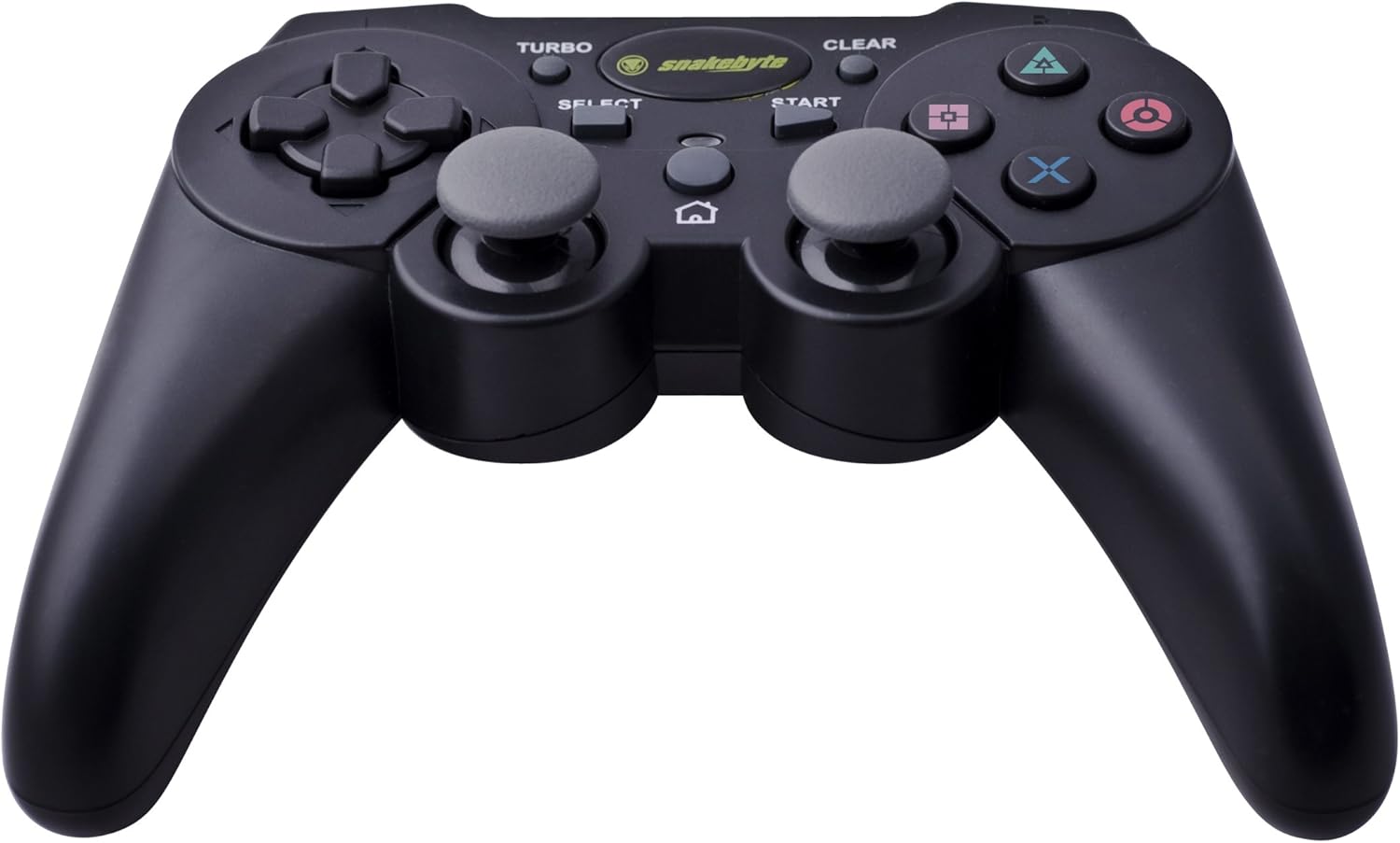
Image: The Snakebyte Wireless Bluetooth Premium PS3 Controller, highlighting the dual analog sticks and various buttons.
- የአቅጣጫ ፓድ (ዲ-ፓድ)፡- For precise directional input in games.
- የግራ አናሎግ ዱላ፡ ዋናው የእንቅስቃሴ ቁጥጥር።
- የቀኝ አናሎግ ዱላ፡ የካሜራ መቆጣጠሪያ ወይም ሁለተኛ ደረጃ እንቅስቃሴ።
- የድርጊት አዝራሮች (ትሪያንግል፣ ክብ፣ መስቀል፣ ካሬ)፦ Game-specific actions.
- L1/R1 አዝራሮች፡- ለተለያዩ የጨዋታ ውስጥ ተግባራት የትከሻ አዝራሮች።
- የL2/R2 ቀስቅሴዎች፡ Analog triggers for pressure-sensitive input, often used for acceleration/braking or aiming/firing.
- የጀምር አዝራር፡- Pauses games or opens menus.
- አዝራር ምረጥ ፦ Opens in-game maps, inventories, or other menus.
- PS አዝራር፡- Powers on the controller, accesses the PS3 XMB (Cross Media Bar) menu, or turns off the controller/console.
- ቱርቦ አዝራር፡- Activates the turbo function for other buttons.
- ግልጽ አዝራር; Deactivates the turbo function.
የቱርቦ ተግባር
The controller features a TURBO function, allowing a selected button to register multiple presses rapidly with a single hold. This can be useful for certain game mechanics.
- To activate TURBO: Press and hold the TURBO አዝራር, then press the desired action button (e.g., Cross, Square, Circle, Triangle, L1, R1, L2, R2). Release both buttons. The selected button will now have the TURBO function enabled.
- To deactivate TURBO for a specific button: Press and hold the አጽዳ አዝራር, then press the button for which TURBO is currently active. Release both buttons.
- To deactivate all TURBO functions: Press the አጽዳ አዝራር once without holding it down.
Motion Sensing and Vibration Feedback
This controller supports motion sensing capabilities, allowing for intuitive control in compatible games. It also provides vibration feedback to enhance immersion during gameplay, reacting to in-game events such as impacts or explosions.
ማብራት እና ማጥፋት
- ለማብራት፡ ን ይጫኑ የ PS ቁልፍ.
- To power off: The controller will automatically enter sleep mode after a period of inactivity to conserve battery. Alternatively, you can hold the የ PS ቁልፍ for several seconds to bring up the PS3 menu, where you can choose to turn off the controller.
ጥገና
- ማጽዳት፡ መቆጣጠሪያውን ለማጽዳት ለስላሳና ደረቅ ጨርቅ ይጠቀሙ። ሻካራ ማጽጃዎችን ወይም ሟሟቶችን አይጠቀሙ።
- ማከማቻ፡ መቆጣጠሪያውን በቀጥታ ከፀሀይ ብርሀን እና ከከፍተኛ ሙቀት ርቆ በቀዝቃዛና ደረቅ ቦታ ያከማቹ።
- የባትሪ እንክብካቤ የባትሪውን ዕድሜ ለማራዘም፣ መቆጣጠሪያውን በተደጋጋሚ ሙሉ በሙሉ ከመሙላት ይቆጠቡ። ያለማቋረጥ ጥቅም ላይ ባይውልም እንኳ በመደበኛነት ይሙሉት።
- ጉዳትን ያስወግዱ; Do not drop the controller or expose it to excessive force or moisture.
መላ መፈለግ
| ችግር | ሊሆን የሚችል መፍትሄ |
|---|---|
| መቆጣጠሪያው ያለገመድ አይገናኝም። |
|
| አዝራሮች ወይም የአናሎግ እንጨቶች ምላሽ የማይሰጡ ናቸው. |
|
| መቆጣጠሪያው ክፍያ አይጠይቅም። |
|
መቆጣጠሪያውን እንደገና በማስጀመር ላይ
If the controller behaves erratically or becomes unresponsive, you can perform a reset. Locate the small reset button on the back of the controller (often in a small hole). Use a thin, pointed object (like a straightened paperclip) to press and hold the reset button for a few seconds. This will restart the controller's internal electronics.
ዝርዝሮች
- የምርት ስም፡ Snakebyte
- የሞዴል ቁጥር፡- SB904714
- ተስማሚ መድረክ፡ ሶኒ PlayStation 3
- ግንኙነት፡ ገመድ አልባ (ብሉቱዝ)
- የአዝራሮች ብዛት፡- 16
- ልኬቶች (L x W x H)፦ በግምት 23.01 x 16.31 x 8.51 ሴሜ (9.06 x 6.42 x 3.35 ኢንች)
- ክብደት፡ በግምት 419.99 ግ (0.93 ፓውንድ)
- ቀለም፡ ጥቁር
ዋስትና እና ድጋፍ
For warranty information and technical support, please refer to the documentation provided with your purchase or contact your retailer. You may also visit the official Snakebyte webለተጨማሪ እገዛ እና የምርት መረጃ ጣቢያ።