
መግቢያ
The Mackie HD1221 is a 12-inch 2-way compact high-definition powered loudspeaker designed for professional audio applications. It features 1200W of Class-D Fast Recovery amplification, high-definition audio processing, and custom-designed transducers by EAW. This manual provides essential information for the safe and effective use of your HD1221 loudspeaker, including setup, operation, maintenance, and troubleshooting.
የደህንነት መረጃ
Before operating the Mackie HD1221 loudspeaker, please read and understand all safety instructions. Failure to do so may result in electric shock, fire, or other injuries. Keep these instructions for future reference.
- የኃይል ምንጭ፡- አሃዱን በአሠራር መመሪያው ላይ ከተገለጸው ዓይነት የኃይል አቅርቦት ጋር ወይም በመሳሪያው ላይ እንደተገለጸው ብቻ ያገናኙ።
- መሬት ላይ Ensure the loudspeaker is properly grounded to prevent electric shock.
- የአየር ማናፈሻ; የአየር ማናፈሻ ክፍተቶችን አያግዱ። በአምራቹ መመሪያ መሰረት ይጫኑ.
- ውሃ እና እርጥበት; ይህንን መሳሪያ ከውሃ አጠገብ አይጠቀሙ ወይም ለጠብታ ወይም ለመርጨት አያጋልጡት።
- ማጽዳት፡ በደረቅ ጨርቅ ብቻ አጽዳ.
- አገልግሎት መስጠት፡ ሁሉንም አገልግሎቶች ብቁ ለሆኑ የአገልግሎት ሰራተኞች ያመልክቱ። አፓርትመንቱ በማናቸውም መንገድ ጉዳት ከደረሰ በኋላ ማገልገል ያስፈልጋል፣ ለምሳሌ የኃይል ማስተላለፊያ ገመድ ወይም መሰኪያ ሲበላሽ፣ ፈሳሽ ሲፈስ ወይም ዕቃው ውስጥ ሲወድቅ፣ መሳሪያው ለዝናብ ወይም ለእርጥበት ሲጋለጥ፣ መደበኛውን የማይሰራ ከሆነ። , ወይም ተጥሏል.
- መጫን፡ በአምራቹ በተጠቀሰው ጋሪ፣ ቁም፣ ትሪፕድ፣ ቅንፍ ወይም ጠረጴዛ ብቻ ይጠቀሙ ወይም በመሳሪያው ይሸጣል። ጋሪ ጥቅም ላይ በሚውልበት ጊዜ ከጫፍ በላይ ጉዳት እንዳይደርስ የጋሪውን/የመሳሪያውን ጥምረት ሲያንቀሳቅሱ ይጠንቀቁ።
የጥቅል ይዘቶች
Verify that the following items are included in your Mackie HD1221 package:
- Mackie HD1221 Powered Loudspeaker
- የኃይል ገመድ
- ፈጣን ጅምር መመሪያ (የሚመለከተው ከሆነ)
- የዋስትና መረጃ
ማንኛቸውም እቃዎች ከጠፉ ወይም ከተበላሹ እባክዎን ወዲያውኑ አከፋፋይዎን ያነጋግሩ።
ምርት አልቋልview
The Mackie HD1221 is a versatile loudspeaker designed for various applications, including main PA, stage monitor, and flown installations. It features a robust construction and advanced audio processing.
ፊትና ጎን Views
ምስል 1: የፊት እና ጎን view of the HD1221 loudspeaker, highlighting the durable grille and integrated handles for portability.

ምስል 2: በግራ በኩል view of the HD1221 loudspeaker.
የኋላ ፓነል መቆጣጠሪያዎች እና ግንኙነቶች

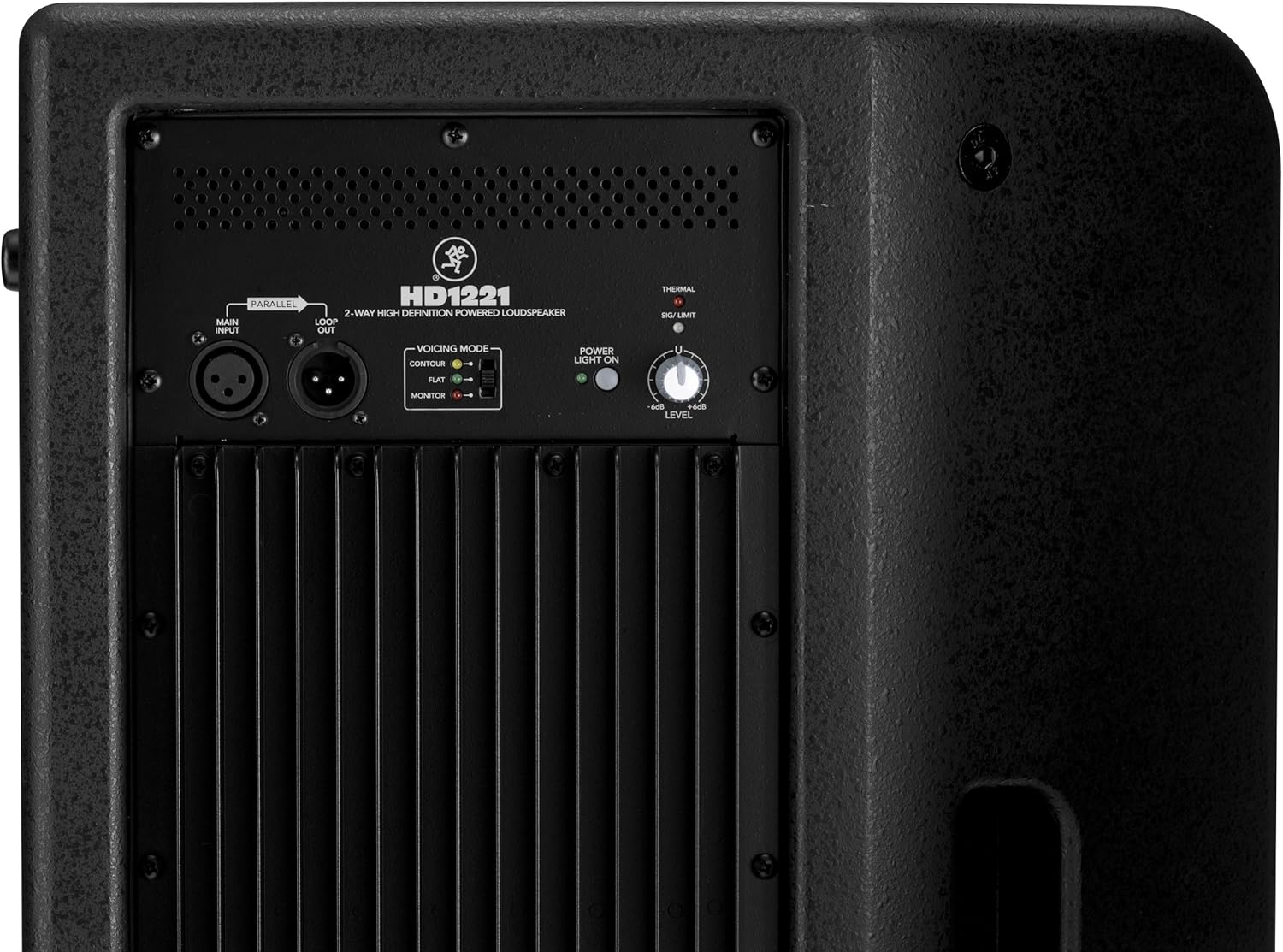
Figure 3: Rear panel of the HD1221, detailing the input/output section, voicing mode switch, power indicator, and level control knob.
- Main Input (XLR): Connect your audio source here.
- Loop Out (XLR): Provides a parallel output of the main input signal for connecting to additional loudspeakers or other audio equipment.
- Voicing Mode Switch: Selects between Contour, Flat, and Monitor modes to optimize the loudspeaker's frequency response for different applications.
- የኃይል መብራት; የክፍሉን የኃይል ሁኔታ ያሳያል።
- Thermal/Sig/Limit Indicators: Provide visual feedback on the loudspeaker's operational status, including thermal protection, signal presence, and limiting.
- የደረጃ ቁጥጥር፡- Adjusts the overall output volume of the loudspeaker.
- የኤሲ የኃይል ግቤት Connects the power cable to the mains supply.
የውስጥ አካላት
ምስል 4 - ውስጣዊ view of the HD1221, showcasing the 12-inch neodymium woofer and 1.75-inch titanium compression driver, designed by EAW.
ማዋቀር
Proper setup ensures optimal performance and safety. Follow these steps for initial setup:
የኃይል ግንኙነት
- Ensure the Level control on the rear panel is set to its minimum position.
- Connect the supplied AC power cable to the AC Power Input on the rear panel of the HD1221.
- የኃይል ገመዱን ሌላኛውን ጫፍ ወደ ኤሌክትሪክ መሰኪያ ይሰኩት።
የድምጽ ግንኙነቶች
- Connect your audio source (e.g., mixer, instrument) to the Main Input (XLR) on the rear panel.
- If connecting multiple loudspeakers, use the Loop Out (XLR) to send the signal to the next loudspeaker.
የመጫኛ አማራጮች
The HD1221 offers several mounting options for flexibility:
ምሰሶ መጫኛ

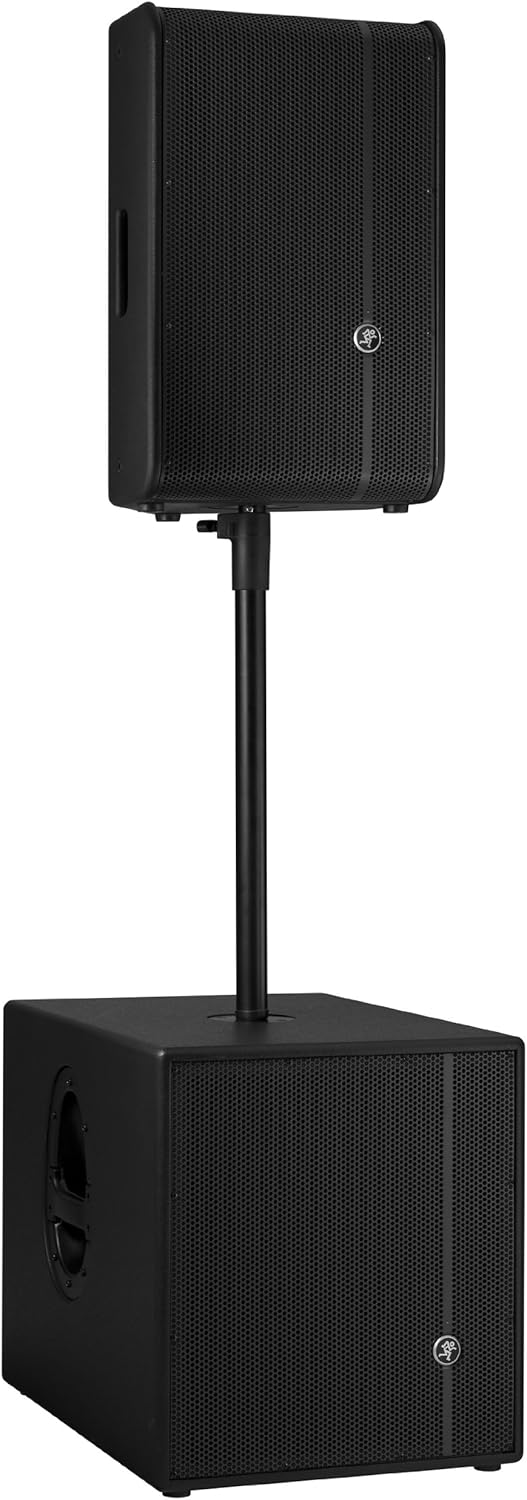
Figure 5: The HD1221 mounted on a pole, typically above a subwoofer like the HD1501 for a full-range PA system.
The HD1221 can be mounted on a standard speaker pole stand. Ensure the stand is stable and rated for the weight of the loudspeaker (approximately 58 lbs).
Stage Monitor Placement
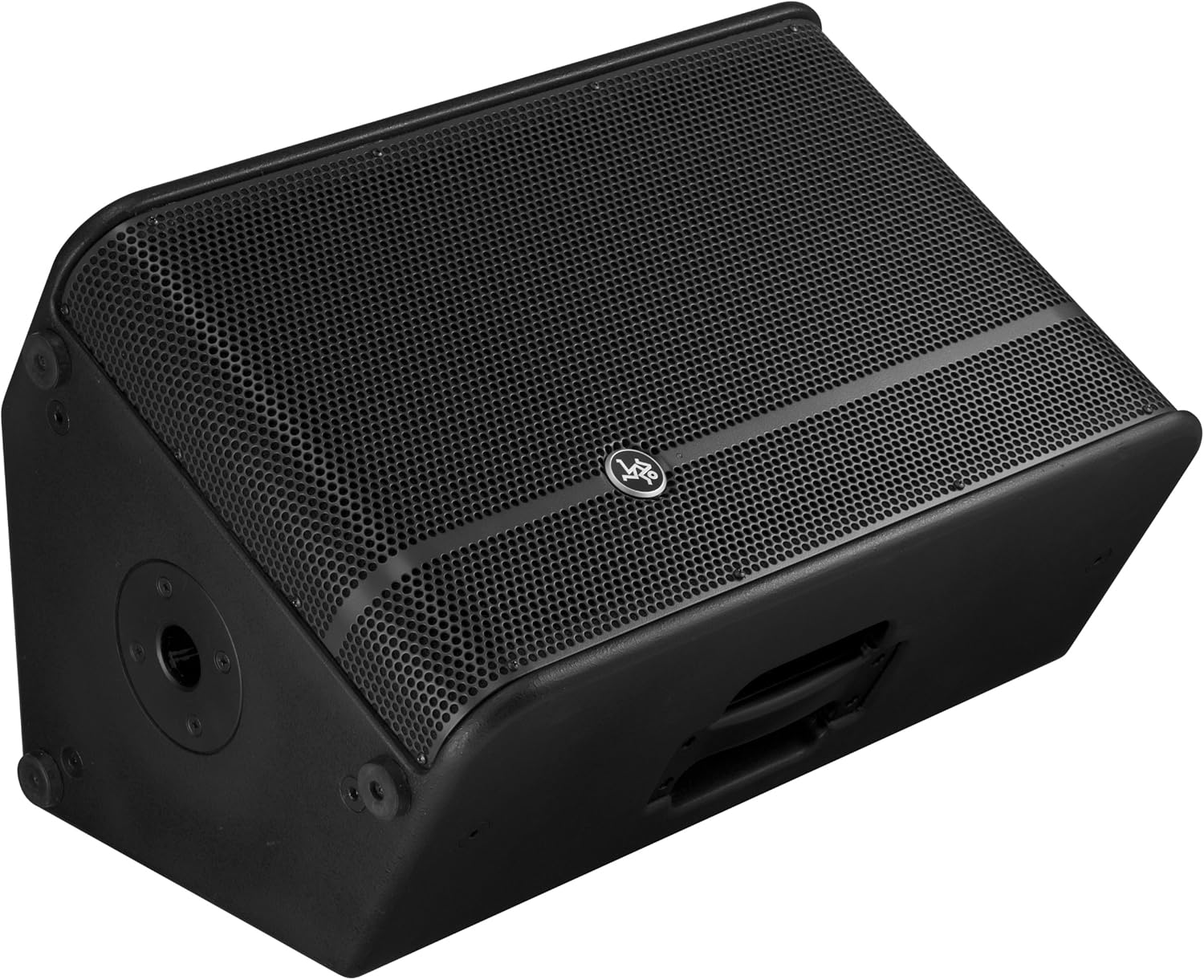
Figure 6: The HD1221 configured as a stage monitor, utilizing its 60-degree angle for optimal sound projection towards the performer.
The cabinet design allows for use as a stage monitor with a 60-degree angle. Place the loudspeaker directly on the stage floor, angled towards the performer.
Flying/Suspension

Figure 7: The HD1221 suspended vertically using appropriate rigging hardware.

Figure 8: The HD1221 suspended horizontally using appropriate rigging hardware.
The HD1221 can be flown both vertically and horizontally. Always use certified rigging hardware and consult with a qualified professional for safe installation. The user-rotatable horn allows for precise sound placement in either orientation.
የአሠራር መመሪያዎች
ድምጽ ማጉያው አንዴ ከተዋቀረ በኋላ የሚከተሉትን የአሠራር ደረጃዎች ይከተሉ፡
- አብራ፡ Turn on your audio source (mixer, etc.) first, then turn on the HD1221 loudspeaker. The 'Power Light On' indicator should illuminate.
- Set Voicing Mode: Use the Voicing Mode switch on the rear panel to select the appropriate setting for your application:
- ኮንቱር Provides a sculpted frequency response, often suitable for music playback.
- ጠፍጣፋ Offers a neutral frequency response, ideal for critical listening or when external EQ is used.
- ተቆጣጠር፥ Optimizes the frequency response for use as a stage monitor, reducing low-end rumble and enhancing clarity.
- የማስተካከያ ደረጃ፦ Slowly increase the Level control on the rear panel to achieve the desired volume. Monitor the 'Sig/Limit' indicator; if it flashes frequently or stays lit, reduce the input level from your source or the HD1221's level to prevent distortion and potential damage.
- ኃይል ዝጋ: When finished, turn off the HD1221 loudspeaker first, then turn off your audio source.
ይፋዊ የምርት ቪዲዮ
ቪዲዮ 1: አልቋልview of the Mackie HD1221 12-inch 2-Way High-Definition Powered Loudspeaker, demonstrating its features and applications.
ጥገና
Regular maintenance helps prolong the life and performance of your HD1221 loudspeaker.
- ማጽዳት፡ Use a dry, lint-free cloth to clean the exterior of the loudspeaker. Do not use liquid cleaners or solvents.
- ግሪል፡ Periodically check the steel grille for any damage or debris. Clean gently if necessary.
- ግንኙነቶች፡ ሁሉም ኬብሎች ደህንነቱ በተጠበቀ ሁኔታ የተገናኙ እና ከጉዳት የፀዱ መሆናቸውን ያረጋግጡ።
- ማከማቻ፡ When not in use, store the loudspeaker in a dry, temperate environment, protected from dust and extreme temperatures.
መላ መፈለግ
If you encounter issues with your HD1221, refer to the following common problems and solutions:
| ችግር | ሊሆን የሚችል ምክንያት | መፍትሄ |
|---|---|---|
| ምንም የድምፅ ውፅዓት የለም። | No power; incorrect connections; low level setting; faulty cable. | Check power cable and outlet. Verify audio cable connections. Increase Level control. Test with a different cable. |
| የተዛባ ድምጽ | Input level too high; faulty cable; damaged speaker component. | Reduce input level from source or HD1221. Check 'Sig/Limit' indicator. Test with a different cable. If distortion persists, contact support. |
| የኃይል መብራት የለም። | No power; power switch off; internal fuse blown. | Ensure power cable is connected and outlet is active. Check power switch. If still no light, contact support. |
| Overheating (Thermal indicator lit) | Insufficient ventilation; prolonged high-volume operation. | Ensure adequate airflow around the unit. Reduce volume. Allow unit to cool down. |
ዝርዝሮች
Detailed technical specifications for the Mackie HD1221 powered loudspeaker:
- የኃይል ውፅዓት፡- 1200 ዋ ከፍተኛ
- የድምጽ ማጉያ አይነት፡ 2-Way High-Definition Powered Loudspeaker
- Woofer 12-inch Neodymium Woofer
- የማመቅ ሾፌር፡- 1.75-ኢንች የቲታኒየም መጭመቂያ ነጂ
- ቀንድ፡ ተጠቃሚ-የሚሽከረከር 90° x 50° ቀንድ
- የካቢኔ ቁሳቁስ፡- 15mm Birch Plywood
- ግሪል፡ የቀዝቃዛ ብረት ብረት
- የመቆጣጠሪያ አንግል; 60 ዲግሪ
- Voicing Modes: Contour, Flat, Monitor
- Ampማጣቀሻ Class-D Fast Recovery
- ጫና፡ 8 ኦኤም
- የእቃው ክብደት፡ 58 ፓውንድ £
- የግንኙነት ፕሮቶኮል፡- Wi-Fi (Note: This specification might refer to internal processing or future features, as direct Wi-Fi audio input is not typical for this type of speaker.)
- የሞዴል ቁጥር፡- HD1221
- ዩፒሲ፡ 663961030495
ዋስትና
The Mackie HD1221 loudspeaker comes with a comprehensive warranty:
- ኤሌክትሮኒክስ፡ የ 3 ዓመት ዋስትና
- አሽከርካሪዎች፡- የ 2 ዓመት ዋስትና
Please retain your proof of purchase for warranty claims. For full terms and conditions, refer to the warranty card included with your product or visit the official Mackie webጣቢያ.
ድጋፍ
For additional assistance, technical support, or service inquiries, please contact Mackie Customer Support. You can find contact information and frequently asked questions on the official Mackie webጣቢያ.
የመስመር ላይ መርጃዎች፡- ን ይጎብኙ የማኪ መደብር በአማዞን ላይ ለምርት መረጃ እና ዝማኔዎች.