
1. መግቢያ
This manual provides essential instructions for the safe and efficient operation of your Sharp CD-DH950P 240W Mini-Component System. This system features a 5-disc CD changer, a cassette deck, an iPod/iPhone docking station, a USB host for digital audio playback, and an AM/FM tuner. Please read this manual thoroughly before using the system and retain it for future reference.
2. የደህንነት መረጃ
- የኃይል ምንጭ፡- መለኪያውን ከተጠቀሰው ቮልት ካለው የኤሲ ሶኬት ጋር ብቻ ያገናኙtage.
- የአየር ማናፈሻ; በቂ የአየር ዝውውርን ያረጋግጡ. የአየር ማናፈሻ ክፍተቶችን አያግዱ.
- ውሃ እና እርጥበት; መሳሪያውን ለዝናብ፣ ለእርጥበት ወይም ለሚንጠባጠብ/ለሚረጭ ፈሳሽ አያጋልጡት።
- ሙቀት፡ መሳሪያውን እንደ ራዲያተሮች፣ የሙቀት መመዝገቢያዎች፣ ምድጃዎች ወይም ሌሎች ሙቀትን ከሚያመነጩ መሳሪያዎች እንደ ሙቀት ምንጮች ያርቁ።
- ማጽዳት፡ ከማጽዳትዎ በፊት መሳሪያውን ከግድግዳው መውጫ ያላቅቁት። ለስላሳና ደረቅ ጨርቅ ይጠቀሙ።
- አገልግሎት መስጠት፡ ይህንን ምርት እራስዎ ለማገልገል አይሞክሩ። ሁሉንም አገልግሎት ወደ ብቃት ላለው የአገልግሎት ሠራተኛ ያማክሩ።
3. የጥቅል ይዘቶች
ጥቅልዎ የሚከተሉትን ንጥሎች መያዙን ያረጋግጡ፡-
- Main Unit (CD-DH950P)
- የግራ ተናጋሪ
- ትክክለኛ ተናጋሪ
- የርቀት መቆጣጠሪያ ከባትሪዎች ጋር
- AM Loop አንቴና
- ኤፍ ኤም ሽቦ አንቴና
- የኃይል ገመድ
4. ማዋቀር
4.1 ድምጽ ማጉያዎቹን ማገናኘት
Connect the speaker wires from the main unit to the corresponding terminals on the back of each speaker. Ensure correct polarity (red to red, black to black) for optimal sound quality. The left speaker connects to the left speaker output, and the right speaker to the right speaker output.
4.2 አንቴናዎችን ማገናኘት
- ኤፍኤም አንቴና Connect the supplied FM wire antenna to the FM antenna terminal on the rear of the main unit. Extend the wire for better reception.
- AM አንቴና፡ Connect the supplied AM loop antenna to the AM antenna terminals on the rear of the main unit. Position the antenna for best reception.
4.3 የኃይል ግንኙነት
Plug the power cord into the AC IN jack on the rear of the main unit, then plug the other end into a standard AC wall outlet.
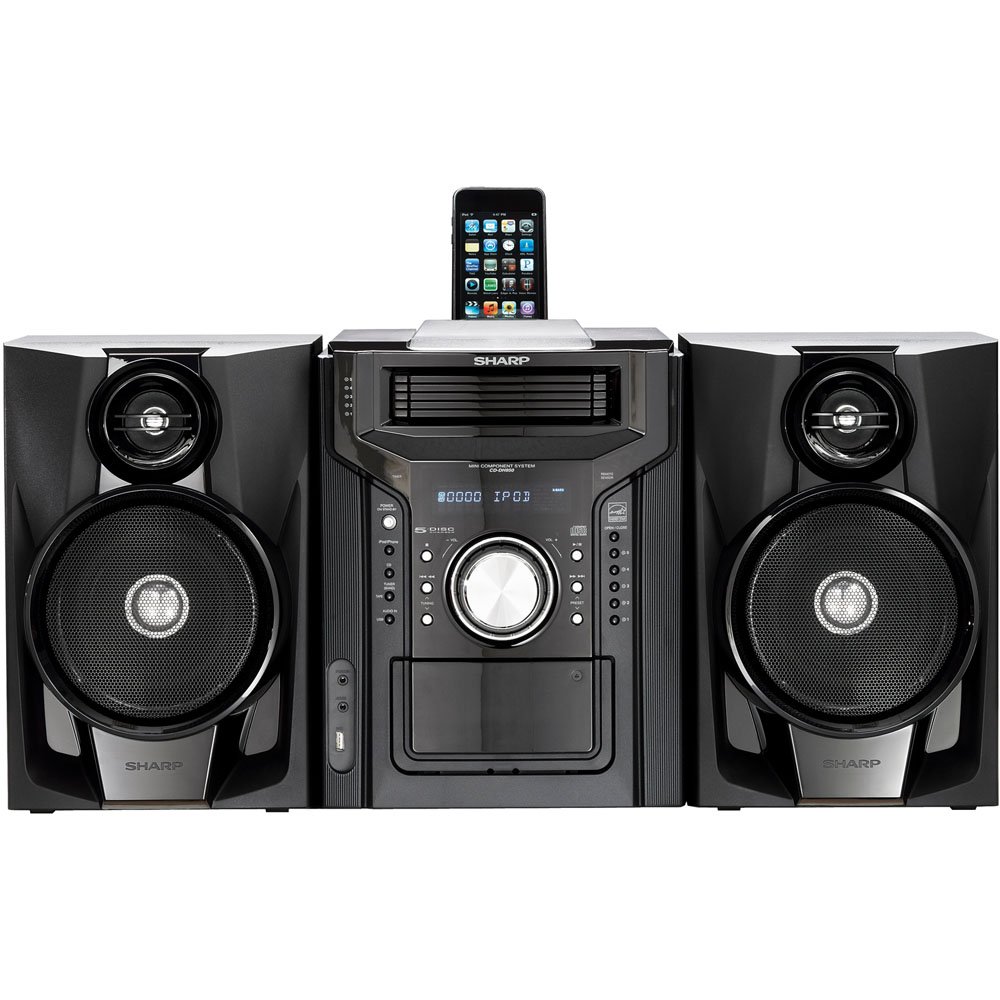
ምስል 4.3.1: አጠቃላይ view of the Sharp CD-DH950P Mini-Component System, showing the main unit flanked by two speakers, with an iPhone docked on top of the main unit.
5. የአሠራር መመሪያዎች
5.1 ማብራት / ማጥፋት እና የድምጽ መቆጣጠሪያ
- የሚለውን ይጫኑ ኃይል አሃዱን ለማብራት ወይም ለማጥፋት በፊተኛው ፓነል ላይ ያለው አዝራር ወይም የርቀት መቆጣጠሪያ።
- አሽከርክር ድምጽ የፊት ፓነል ላይ ይንኩ ወይም ይጠቀሙ ቮልት +/- የድምፅ ደረጃን ለማስተካከል በርቀት መቆጣጠሪያው ላይ ያሉ አዝራሮች።
5.2 ሲዲ መልሶ ማጫወት
This system features a 5-disc CD changer.
- የሚለውን ይጫኑ ክፈት/ዝጋ የሲዲ ትሪ ለመክፈት አዝራር.
- Place up to five CDs on the disc trays, label side up.
- ተጫን ክፈት/ዝጋ እንደገና ትሪውን ለመዝጋት.
- የሚለውን ይጫኑ CD የሲዲ ተግባርን ለመምረጥ አዝራር.
- የሚለውን ይጫኑ አጫውት/አፍታ አቁም መልሶ ማጫወት ለመጀመር አዝራር።
- የሚለውን ተጠቀም ዝለል buttons to navigate between tracks or discs.
5.3 የካሴት ዴክ አሠራር
- የሚለውን ይጫኑ TAPE OPEN/CLOSE button to open the cassette deck.
- የካሴት ቴፕ አስገባ።
- የሚለውን ይጫኑ ቴፕ የካሴት ተግባሩን ለመምረጥ አዝራር።
- ተጫን ተጫወት መልሶ ማጫወት ለመጀመር።
- To record, ensure the source is selected (e.g., CD, Tuner) and press the መዝገብ button on the cassette deck.
5.4 iPod/iPhone Docking
The system includes a top-mounted docking slot for compatible iPod and iPhone devices (30-pin connector).
- Carefully place your iPod or iPhone into the docking slot.
- The system will automatically switch to iPod/iPhone mode or you may need to press the አይፖድ / አይፎን አዝራር።
- Use the system's controls or your device's controls to play music. The device will also charge while docked.
5.5 USB Host Playback
Connect a USB storage device containing MP3 or WMA audio fileበፊት ፓነል ላይ ወዳለው የዩኤስቢ ወደብ።
- የዩኤስቢ መሣሪያውን ወደ ዩኤስቢ ወደብ ያስገቡ።
- የሚለውን ይጫኑ ዩኤስቢ button to select the USB function.
- Use the playback controls to navigate and play files.
5.6 AM/FM ማስተካከያ
- የሚለውን ይጫኑ TUNER የAM ወይም FM ሬዲዮን ለመምረጥ አዝራር።
- የሚለውን ተጠቀም ማስተካከል +/- አዝራሮች ወደ ጣቢያ እራስዎ ለመቃኘት።
- በራስ-ሰር ለመቃኘት፣ ተጭነው ይያዙት ማስተካከል +/- አዝራሮች.
- To store a preset, tune to the desired station, then press ትውስታ አስቀድሞ የተቀመጠ ቁጥር ተከትሎ።
5.7 የድምጽ ግቤት
Connect an external audio device (e.g., MP3 player, smartphone) to the AUDIO IN jack on the front panel using a 3.5mm stereo cable.
- Connect your device to the AUDIO IN jack.
- የሚለውን ይጫኑ ኦዲቶ በ button to select this source.
- ከተገናኘው መሣሪያዎ መልሶ ማጫወትን ይቆጣጠሩ።
6. ጥገና
6.1 ክፍሉን ማጽዳት
Wipe the exterior of the unit with a soft, dry cloth. Do not use abrasive cleaners, waxes, or solvents. Ensure the unit is unplugged before cleaning.
6.2 CD and Cassette Care
- Handle CDs by their edges to avoid fingerprints and scratches. Clean discs with a soft, lint-free cloth from the center outwards.
- Store cassette tapes away from strong magnetic fields and direct sunlight.
7. መላ መፈለግ
| ችግር | ሊሆን የሚችል ምክንያት | መፍትሄ |
|---|---|---|
| ኃይል የለም | የኃይል ገመድ አልተገናኘም፤ የኃይል መውጫው ችግር አለበት | የኤሌክትሪክ ገመድ ደህንነቱ በተጠበቀ ሁኔታ መያያዙን ያረጋግጡ; የተለየ መውጫ ይሞክሩ |
| ድምጽ የለም። | Volume too low; Speakers not connected; Incorrect source selected | የድምጽ መጠን ይጨምሩ፤ የድምጽ ማጉያ ግንኙነቶችን ያረጋግጡ፤ ትክክለኛውን የግቤት ምንጭ ይምረጡ |
| ሲዲ አይጫወትም። | Disc inserted incorrectly; Disc is dirty or scratched | Insert disc correctly (label side up); Clean or replace disc |
| ደካማ የሬዲዮ አቀባበል | Antenna not positioned correctly; Weak signal | Adjust position of AM/FM antennas; Try auto-tuning or manual fine-tuning |
| iPod/iPhone not charging/playing | Device not properly docked; Device not compatible (e.g., newer connector) | Re-dock the device; Note that this system uses a 30-pin connector, newer devices may require an adapter (not included) |
8. ዝርዝሮች
- የምርት ስም፡ ስለታም
- ሞዴል፡ CD-DH950P
- ጠቅላላ የውጤት ኃይል፡ 240 Watts RMS (85W/ch FTC)
- የድምጽ ማጉያ ማዋቀር፡- 2.1 ቻናል
- የሚደገፉ የድምጽ ቅርጸቶች፡- ሲዲ፣ MP3፣ WMA
- የምልክት-ወደ-ጫጫታ ሬሾ- 100 ዲቢቢ
- ተስማሚ መሣሪያዎች MP3 Player, Smartphone (via 30-pin dock or USB/Audio In)
- ልኬቶች (L x W x H)፦ 27.6 x 13.6 x 13.5 ኢንች
- የእቃው ክብደት፡ 24.4 ፓውንድ £
- ዩፒሲ፡ 074000369863፣ 074000369290
9. የዋስትና መረጃ
This product is covered by a 1-year limited warranty from the date of purchase. Please refer to the warranty card included with your product for full terms and conditions, or contact Sharp customer service for details.
10. ድጋፍ
For further assistance, technical support, or service inquiries, please contact Sharp customer service. Contact information can typically be found on the Sharp official webጣቢያ ወይም ከምርትዎ ጋር በቀረበው ሰነድ ውስጥ።