
1. መግቢያ
This manual provides essential information for the safe and efficient operation of your InFocus IN112 Portable DLP Projector. Please read these instructions thoroughly before using the projector and retain them for future reference.
The InFocus IN112 is designed for versatile use, offering high brightness and a strong contrast ratio. It incorporates BrilliantColor technology for clear image reproduction and is 3D-ready. Its compact and lightweight design facilitates easy portability and installation.
2. በሳጥኑ ውስጥ ያለው
ከዚህ በታች የተዘረዘሩት ሁሉም እቃዎች በምርት ማሸጊያዎ ውስጥ መካተታቸውን ያረጋግጡ፡-
- InFocus IN112 Projector
- የኃይል ገመድ
- RGB cable (VGA cable)
- A/V cable (Composite Video cable)
- የደህንነት መመሪያዎች
- የተጠቃሚ መመሪያ (ይህ ሰነድ)
- የርቀት መቆጣጠሪያ
3. ፕሮጀክተር ኦቨርview

ምስል 1: ከፍተኛ View - Displays the control panel with buttons for power, source selection, menu navigation, and keystone adjustment, along with the focus ring for the lens.

ምስል 2: ጎን View - Shows the ventilation grilles essential for heat dissipation during operation. Ensure these are not obstructed.
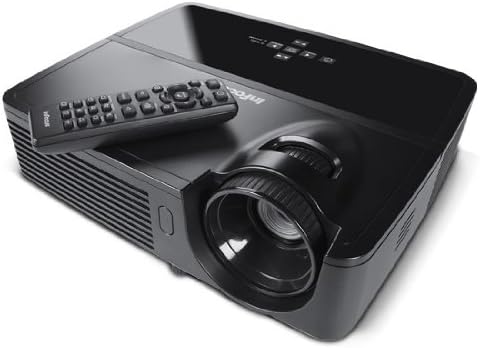
ምስል 3: ማዕዘን View ከርቀት ጋር - Illustrates the projector from an angle, highlighting the lens and the included remote control for convenient operation.

ምስል 4: የኋላ View - Details the various input and output ports, including power, audio in/out, video, computer (VGA), RS232, and Mini USB.
4. ማዋቀር
4.1 አቀማመጥ
Position the projector on a stable, flat surface or mount it securely. Ensure adequate ventilation around the projector to prevent overheating. The distance from the screen will determine the image size. Adjust the projector's position to achieve the desired image size and clarity.
4.2 የኃይል ግንኙነት
- Connect the supplied power cord to the projector's power inlet.
- የኤሌትሪክ ገመዱን ሌላኛውን ጫፍ ወደ ኤሌክትሪክ ሶኬት ይሰኩት።
4.3 የግቤት ምንጮችን ማገናኘት
The IN112 projector offers multiple input options:
- VGA (Computer In 1 & 2): Use the RGB cable to connect to a computer's VGA output.
- የተቀናጀ ቪዲዮ፡ Use the A/V cable to connect to devices with composite video output.
- ኤስ-ቪዲዮ: Connect to devices with S-Video output.
- ኦዲዮ በ Connect external audio sources using a 3.5mm stereo cable.
- RS232C For control and automation systems.
- USB B Mini: For control and firmware updates.
ፕሮጀክተሩን ከማብራትዎ በፊት ሁሉም ኬብሎች ደህንነቱ በተጠበቀ ሁኔታ መገናኘታቸውን ያረጋግጡ።
5. የአሠራር መመሪያዎች
5.1 ማብራት / ማጥፋት
- ለማብራት፣ የሚለውን ይጫኑ ኃይል button on the control panel or remote control. The power indicator light will illuminate.
- ኃይልን ለማጥፋት፣ ን ይጫኑ ኃይል button again. Confirm shutdown if prompted. Allow the projector to cool down before unplugging.
5.2 የምስል ማስተካከያ
- ትኩረት፡ ምስሉ ስለታም እና ግልጽ እስኪሆን ድረስ የትኩረት ቀለበቱን በፕሮጀክተር ሌንስ ላይ ያሽከርክሩት።
- ቁልፍ ድንጋይ የሚለውን ተጠቀም ቁልፍ ድንጋይ buttons on the control panel or remote to correct trapezoidal image distortion if the projector is not perfectly perpendicular to the screen.
5.3 የምንጭ ምርጫ
የሚለውን ይጫኑ ምንጭ button on the control panel or remote control to cycle through available input sources (VGA1, VGA2, Video, S-Video).
5.4 የምናሌ ዳሰሳ
የሚለውን ይጫኑ ምናሌ/ውጣ የስክሪን ማሳያ (OSD) ሜኑ ለመድረስ አዝራር። ለማሰስ የቀስት አዝራሮችን ይጠቀሙ እና የ ይምረጡ or አስገባ ምርጫዎችን ለማረጋገጥ አዝራር። ተጫን ምናሌ/ውጣ እንደገና ምናሌውን ለመዝጋት.
5.5 ኢኮ ሞድ
Activate Eco Mode to extend lamp life and reduce power consumption. This mode is suitable for environments with lower ambient light. The lamp life is approximately 6,000 hours in Eco Mode compared to 5,000 hours in normal mode.
5.6 3D Content Projection
The IN112 is 3D-ready. To project 3D content, you will need compatible 3D source material, a 3D-capable player, and active 3D glasses (sold separately). Refer to your 3D source device's manual for specific setup instructions.
6. ጥገና
6.1 ኤልamp መተካት
ፕሮጀክተር ኤልamp የተወሰነ የህይወት ዘመን አለው. መቼ lamp አመላካች (Temp/Lamp) illuminates or the image brightness significantly decreases, the lamp may need replacement. The lamp door is conveniently located on the top of the projector for easy access, even when installed.
ጥንቃቄ፡- Ensure the projector is powered off and completely cooled before attempting lamp replacement. Refer to the detailed lamp replacement instructions in the full service manual for safety and proper procedure.
6.2 ጽዳት
The IN112 projector is designed without filters, eliminating the need for filter cleaning or replacement. Periodically wipe the exterior casing with a soft, dry cloth. For the lens, use a specialized lens cleaning cloth and solution to avoid scratches.
7. መላ መፈለግ
| ችግር | ሊሆን የሚችል ምክንያት | መፍትሄ |
|---|---|---|
| ምንም ምስል አልታየም። | Power cable disconnected, incorrect input source selected, source device not powered on. | Check power connections. Press the ምንጭ button to select the correct input. Ensure the source device is on. |
| ምስሉ ደብዛዛ ነው | መነፅር ከትኩረት ውጭ። | የትኩረት ቀለበቱን በፕሮጀክተር ሌንስ ላይ ያስተካክሉት. |
| ምስሉ ትራፔዞይድ ነው | ፕሮጀክተር ከማያ ገጹ ጋር ቀጥተኛ ያልሆነ። | የሚለውን ተጠቀም ቁልፍ ድንጋይ buttons to correct the image shape. |
| Colors appear incorrect or dull | Color settings require adjustment. | Access the OSD menu and navigate to image settings to adjust color, brightness, and contrast. |
| ፕሮጀክተር ይሞቃል እና ይዘጋል | Ventilation obstructed, high ambient temperature. | Ensure clear airflow around the projector. Operate in a well-ventilated area. |
8. ዝርዝሮች
| ባህሪ | ዝርዝር |
|---|---|
| የሞዴል ቁጥር | IN112 |
| የማሳያ ቴክኖሎጂ | DLP with BrilliantColor |
| ቤተኛ ውሳኔ | ኤስቪጋ (800 x 600) |
| ብሩህነት (ANSI Lumens) | 2700 (2200 in Eco Mode) |
| የንፅፅር ሬሾ | 3000፡1 |
| Lamp Life (Average) | 5,000 hours (Normal), 6,000 hours (Eco Mode) |
| 3D ዝግጁ | አዎ |
| ግንኙነት | 2x VGA In, Composite Video, S-Video, 3.5mm Stereo In, RS232C, USB B Mini |
| የምርት ልኬቶች | 13 x 5.5 x 12.5 ኢንች |
| የእቃው ክብደት | 4.78 ፓውንድ (2.17 ኪ.ግ) |
| የአሠራር ቋንቋ | እንግሊዝኛ |
9. ዋስትና እና ድጋፍ
9.1 የምርት ዋስትና
The InFocus IN112 projector is backed by a comprehensive warranty:
- የ 5 ዓመት የተወሰነ ዋስትና በፕሮጀክተሩ ላይ.
- የ 2 ዓመት ሙሉ ዋስትና ክፍሎችን እና የጉልበት ሥራን የሚሸፍን ነው።
- የ 6-ወር ዋስትና በ lamp.
Please retain your proof of purchase for warranty claims. For detailed terms and conditions, refer to the official InFocus warranty documentation or visit the InFocus webጣቢያ.
9.2 የቴክኒክ ድጋፍ
For technical assistance, troubleshooting, or service inquiries, please contact InFocus customer support. Contact information can typically be found on the InFocus official webጣቢያ ወይም በተካተቱ ሰነዶች ውስጥ.
10. Related Product Information (IN130 Series)
የሚከተለው ቪዲዮ ማጠቃለያ ይሰጣልview of features found in the InFocus IN130 Series projectors. While specific models may vary, many core functionalities and design principles are shared across InFocus projector lines, offering general insight into InFocus projector capabilities.
Video: InFocus IN130 Series Overview - This video highlights features such as HDMI + Power for streaming sticks, high brightness, vivid colors, long lamp life, 3D readiness, and various connectivity options. Note: This video is for the IN130 series, but demonstrates general InFocus projector features.