
Infocus IN124
InFocus IN124 DLP ፕሮጀክተር
የተጠቃሚ መመሪያ
1. መግቢያ
This manual provides comprehensive instructions for the setup, operation, and maintenance of your InFocus IN124 DLP Projector. Please read this manual thoroughly before using the projector to ensure proper functionality and to maximize its lifespan.
The InFocus IN124 is designed to deliver clear and bright projections, suitable for various environments including home cinema and business presentations. Its compact design and robust features make it a versatile display solution.
2. የምርት ክፍሎች
Upon unboxing your InFocus IN124 DLP Projector, please verify that all the following components are included:
- InFocus IN124 DLP Projector Unit
- የርቀት መቆጣጠሪያ
- የኃይል ገመድ
- VGA Cable (may vary by region/package)
- User Manual (this document, typically on CD or downloadable)
If any items are missing or damaged, please contact InFocus customer support immediately.
3. ማዋቀር
3.1 አካላዊ አቀማመጥ
Position the projector on a stable, flat surface or mount it securely to a ceiling. Ensure adequate ventilation around the unit to prevent overheating. Maintain a clear path between the projector lens and the projection surface (screen or wall).
3.2 ማገናኛ መሳሪያዎች
The InFocus IN124 supports various input sources. Connect your source device (e.g., laptop, DVD player, gaming console) to the projector using the appropriate cable.
- ኤችዲኤምአይ: For high-definition digital video and audio. Connect an HDMI cable from your source device to the HDMI port on the projector.
- ቪጂኤ: For analog video input, commonly used with computers. Connect a VGA cable from your computer's VGA output to the VGA input on the projector.
- የተቀናጀ ቪዲዮ፡ For standard definition video. Connect a composite video cable (yellow RCA) to the corresponding port.
- ኦዲዮ ውጣ/ውጪ፡ አስፈላጊ ከሆነ ውጫዊ የድምጽ መሳሪያዎችን ያገናኙ።
3.3 በማብራት ላይ
ሁሉንም አስፈላጊ ገመዶች ካገናኙ በኋላ:
- Connect the power cable to the projector and then to a power outlet.
- Press the power button on the projector's control panel or the remote control. The power indicator light will change, and the projector lamp ያበራል።
- Allow a few moments for the projector to warm up and display the image.
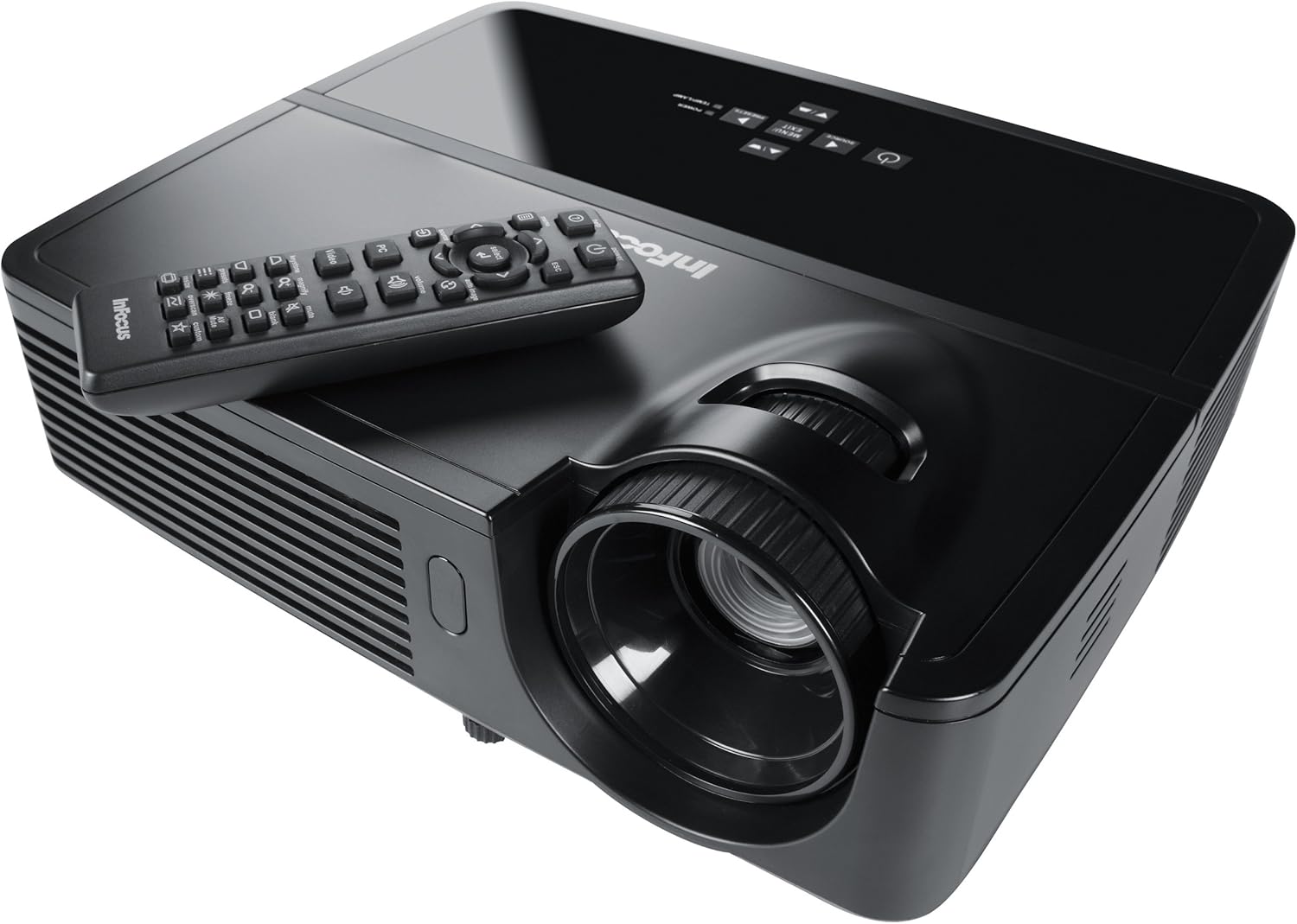
Figure 1: InFocus IN124 DLP Projector with its remote control. The image shows the top-down view of the black projector unit, highlighting the lens, ventilation grilles, and the control panel. The remote control is placed on top of the projector.
4. ፕሮጀክተሩን መስራት
4.1 መሰረታዊ ቁጥጥሮች
The projector can be operated using the control panel on the unit or the included remote control.
- የኃይል ቁልፍ፡- ፕሮጀክተሩን ያበራል ወይም ያጠፋል.
- ምንጭ ቁልፍ Cycles through available input sources (HDMI, VGA, Video).
- የምናሌ አዝራር፡- ለቅንብሮች ማስተካከያ የስክሪን ማሳያ (OSD) ምናሌን ይደርሳል።
- የቀስት አዝራሮች፡ በምናሌ አማራጮች ውስጥ ያስሱ እና እሴቶችን ያስተካክሉ።
- አስገባ/አዝራር ምረጥ በምናሌው ውስጥ ምርጫዎችን ያረጋግጣል።
- የድምጽ አዝራሮች፡- የድምጽ ውፅዓት ደረጃን ያስተካክላል።
- የቁልፍ ድንጋይ ማስተካከያ የ trapezoidal መዛባትን ለማስተካከል የምስሉን ቅርፅ ያስተካክላል።
- የትኩረት ቀለበት Manually adjust the lens to sharpen the image.
4.2 ሜኑ አሰሳ እና ቅንብሮች
Press the "Menu" button to open the On-Screen Display (OSD). Use the arrow keys to navigate through categories such as "Picture," "Display," "Setup," and "Advanced." Press "Enter" to select a category or option. Adjust settings like brightness, contrast, color temperature, aspect ratio, and resolution to optimize your viewልምድ.
4.3 3D ተግባራዊነት
The InFocus IN124 is 3D-ready. To experience 3D content, you will need compatible 3D source material, a 3D-capable player, and active DLP Link 3D glasses (sold separately). Refer to your 3D source device's manual for specific setup instructions.
5. ጥገና
መደበኛ ጥገና ጥሩ አፈፃፀምን ያረጋግጣል እና የፕሮጀክተርዎን ዕድሜ ያራዝመዋል።
5.1 ሌንስን ማጽዳት
Use a soft, lint-free cloth specifically designed for optical lenses. Gently wipe the lens surface to remove dust or smudges. Avoid using abrasive cleaners or excessive force, which can scratch the lens.
5.2 የአየር ማጣሪያዎችን ማጽዳት
The projector has air filters to prevent dust from entering the internal components. Locate the filter cover (refer to the diagram in the full manual if available) and remove it. Clean the filter using a small brush or a vacuum cleaner with a brush attachment. Replace the filter securely.
5.3 ኤልamp መተካት
ፕሮጀክተር ኤልamp የተወሰነ የህይወት ዘመን አለው. መቼ lamp indicator light illuminates or the image becomes dim, it's time to replace the lamp. Always allow the projector to cool down completely before attempting lamp replacement. Consult the full service manual or a qualified technician for detailed lamp replacement procedures specific to the IN124 model.
6. መላ መፈለግ
ይህ ክፍል ከፕሮጀክተርዎ ጋር ሊያጋጥሙዎት የሚችሉ የተለመዱ ችግሮችን ያብራራል።
| ችግር | ሊሆን የሚችል ምክንያት | መፍትሄ |
|---|---|---|
| ምንም ምስል አልታየም። | Incorrect input source selected; Loose cable connection; Projector not powered on. | Press the "Source" button to cycle inputs; Check all cable connections; Ensure projector is powered on and lamp በርቷል ። |
| ምስሉ ደብዛዛ ነው | Out of focus; Incorrect resolution setting. | Adjust the focus ring on the lens; Adjust the resolution setting in the OSD menu or on your source device. |
| ምስሉ ትራፔዞይድ ነው | ፕሮጀክተር ወደ ማያ ገጽ ቀጥ ያለ አይደለም። | Use the keystone correction feature (digital or manual) to square the image. Reposition the projector if possible. |
| ኦዲዮ የለም | Volume too low; Incorrect audio input selected; Muted. | Increase volume; Check audio cable connections; Ensure projector or source device is not muted. |
| ፕሮጀክተር ይሞቃል እና ይዘጋል | የአየር ዝውውር ታግዷል፤ የቆሸሸ የአየር ማጣሪያ። | Ensure clear space around vents; Clean air filter as per maintenance section. |
For issues not listed here, please refer to the comprehensive online support resources or contact InFocus customer service.
7. ዝርዝሮች
Below are the key technical specifications for the InFocus IN124 DLP Projector:
| ባህሪ | ዝርዝር |
|---|---|
| የሞዴል ቁጥር | IN124 |
| የማሳያ ቴክኖሎጂ | ዲኤልፒ |
| ቤተኛ ውሳኔ | 1280x720 (ኤችዲ) |
| ብሩህነት | እስከ የ 3200 ጨረር |
| የንፅፅር ሬሾ | 3000፡1 |
| ግንኙነት | ኤችዲኤምአይ፣ ቪጂኤ፣ የተቀናጀ ቪዲዮ |
| ልዩ ባህሪያት | 3D-ዝግጁ |
| የምርት ልኬቶች (L x W x H) | 12.99 x 12.99 x 5.9 ኢንች |
| የእቃው ክብደት | 4.78 ፓውንድ (2.17 ኪ.ግ) |
| የኃይል አቅርቦት | 100-240 Volts at 50-60 Hz |
| የሚመከር አጠቃቀም | የቤት ሲኒማ |
8. ዋስትና እና ድጋፍ
InFocus provides a limited warranty for the IN124 DLP Projector. For detailed warranty terms and conditions, please refer to the warranty card included with your product or visit the official InFocus webጣቢያ. ለዋስትና ጥያቄዎች የግዢ ደረሰኝዎን እንደ ግዢ ማረጋገጫ ያቆዩት።
For technical support, troubleshooting assistance beyond this manual, or service requests, please contact InFocus customer support through their official website or the contact information provided in your product documentation. Online resources, including FAQs and driver downloads, may also be available.
Ask a question about this manual
Ask about setup, troubleshooting, compatibility, parts, safety, or missing instructions. Manuals+ will review the question and use this page’s manual context to help answer it.