
መግቢያ
This manual provides essential instructions for setting up, operating, and maintaining your Canon PowerShot ELPH 310 HS digital camera. Please read this manual thoroughly to ensure proper use and to maximize your camera's performance.
በሣጥኑ ውስጥ ያለው
ከማሸጊያው በኋላ፣ ሁሉም የሚከተሉት እቃዎች መካተታቸውን ያረጋግጡ፡-
- Canon PowerShot ELPH 310 HS Camera
- የባትሪ ጥቅል NB-4L
- Battery Charger CB-2LV
- የእጅ አንጓ
- የዩኤስቢ ገመድ
- CD-ROM (Software/Drivers)
ማዋቀር
1. ባትሪውን በመሙላት ላይ
Insert the Battery Pack NB-4L into the Battery Charger CB-2LV. Plug the charger into a power outlet. The charging indicator light will show the charging status. Once fully charged, remove the battery.
2. ባትሪ እና ማህደረ ትውስታ ካርዱን ማስገባት
Open the battery/card compartment cover on the camera. Insert the charged battery pack, ensuring correct orientation. Insert a compatible SD/SDHC/SDXC memory card into the card slot until it clicks into place. Close the compartment cover securely.

ምስል፡ ፊት ለፊት view of the Canon PowerShot ELPH 310 HS digital camera, showcasing its silver finish and lens.
ካሜራውን በመስራት ላይ
1. ማብራት / ማጥፋት
የሚለውን ይጫኑ አብራ/አጥፋ button located on the top or side of the camera to power it on or off. The lens will extend when powered on.
2. መሰረታዊ ፎቶግራፍ
- ትኩረት መስጠት፡ Gently press the shutter button halfway down to focus. The camera will emit a beep and display a green frame when focus is achieved.
- ፎቶ ማንሳት፡- ምስሉን ለማንሳት የመዝጊያውን ቁልፍ ሙሉ በሙሉ ይጫኑ።
- አጉላ፡ Use the zoom lever around the shutter button to adjust the optical zoom (8x).
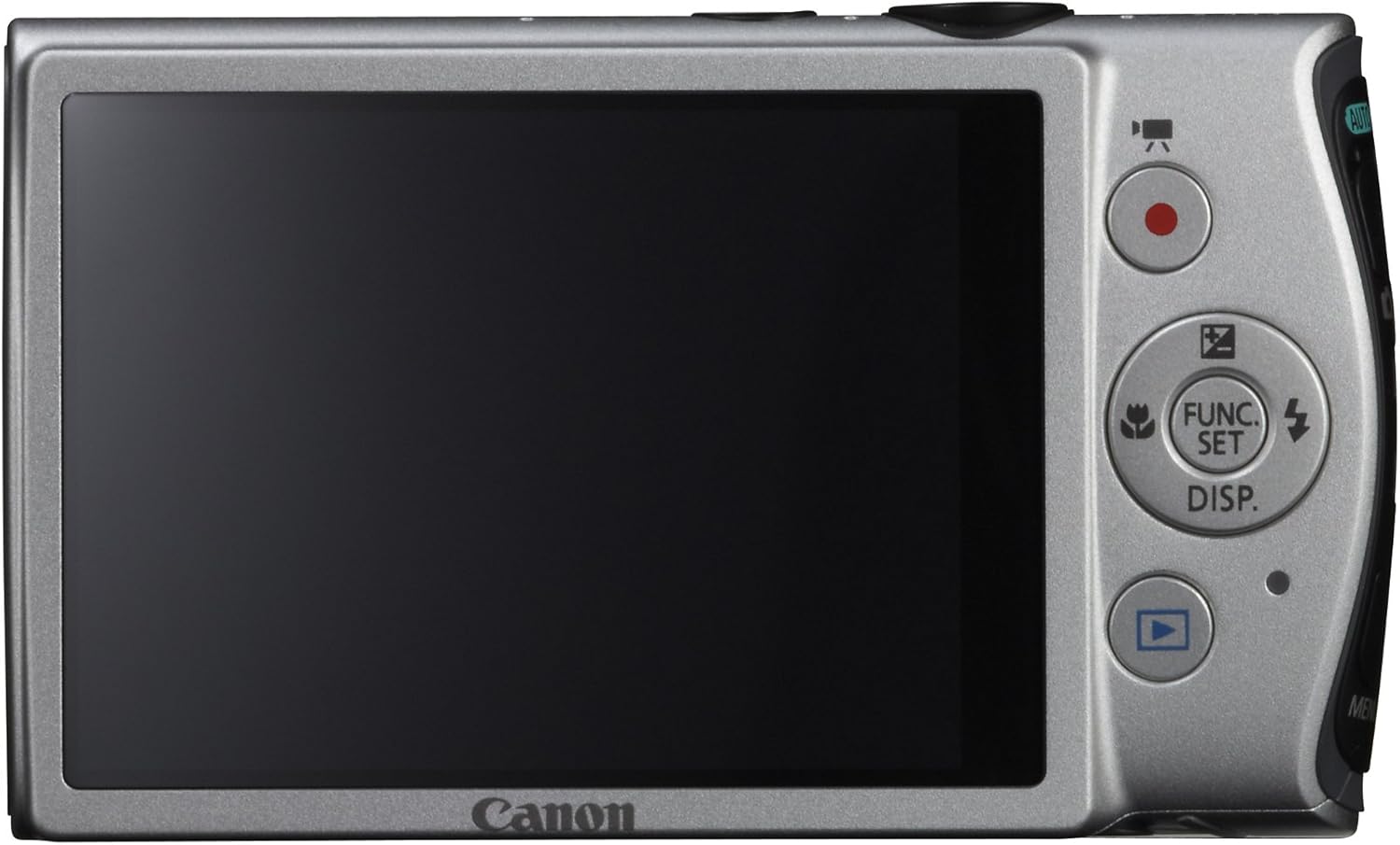
ምስል: የኋላ view of the Canon PowerShot ELPH 310 HS, displaying the 3.0-inch LCD screen and various control buttons for navigation and function selection.
3. የተኩስ ሁነታዎች
The PowerShot ELPH 310 HS offers various shooting modes to suit different situations. Use the mode dial or menu to select:
- ዘመናዊ አውቶሜትድ፡ Automatically detects scenes and applies optimal settings for point-and-shoot simplicity.
- ፕሮግራም (P): Allows for automatic aperture/shutter speed selection based on conditions, with some user control.
- Movie Digest: Records a short video clip before each still image, combining them into a daily video.
- የከፍተኛ ፍጥነት ፍንዳታ; Captures rapid action at approximately 8.7 frames per second.
- Super Slow Motion Movie: Records video at high frame rates (up to 240 fps) for slow-motion playback.
- ልዩ የትዕይንት ሁነታዎች፡ Includes options like Handheld Night Scene, Portrait, Beach, Snow, Fireworks, Fisheye Effect, Miniature Effect, Toy Camera Effect, and more for specific photographic effects.
4. የቪዲዮ ቀረጻ
To record videos, press the dedicated movie button. The camera supports Full HD 1080p video at 24 fps and 720p HD video at 30 fps. The iFrame movie format is also supported for easier editing.
5. የምስል ማረጋጊያ (ኢንተለጀንት አይኤስ)
The camera features Intelligent IS, which automatically selects the best shake correction method for your shooting situation. This includes modes for stills (Normal, Panning, Macro, Tripod) and videos (Dynamic, Powered, Macro, Tripod) to ensure steady images and footage.
ጥገና
1. ካሜራውን ማጽዳት
- መነፅር ለካሜራ ሌንሶች በተለይ የተነደፈ ለስላሳ፣ ከላጣ ነፃ የሆነ ጨርቅ ይጠቀሙ። ሌንሱን በቀጥታ በጣቶች ከመንካት ይቆጠቡ።
- LCD ስክሪን፡ Wipe gently with a soft, dry cloth. Do not use abrasive cleaners.
- የካሜራ አካል፡ Use a soft, dry cloth to wipe away dust and smudges.
2. የባትሪ እንክብካቤ
- ጥቅም ላይ በማይውልበት ጊዜ ባትሪዎችን በቀዝቃዛና ደረቅ ቦታ ያከማቹ.
- የባትሪውን ዕድሜ ለማራዘም በተደጋጋሚ ባትሪውን ሙሉ በሙሉ ከመሙላት ይቆጠቡ።
- ባትሪዎችን ለከፍተኛ ሙቀት አያጋልጡ።
3. ማከማቻ
ካሜራውን ለረጅም ጊዜ ሲያስቀምጡ ባትሪውን እና የማህደረ ትውስታ ካርዱን ያስወግዱ። ካሜራውን ደረቅና አቧራ በሌለበት አካባቢ፣ በተለይም በካሜራ ቦርሳ ወይም መያዣ ውስጥ ያስቀምጡት።
መላ መፈለግ
| ችግር | ሊሆን የሚችል ምክንያት / መፍትሄ |
|---|---|
| ካሜራ አይበራም። | Battery may be depleted or incorrectly inserted. Ensure battery is charged and inserted correctly. |
| ምስሎች ደብዛዛ ናቸው። | Camera shake, subject movement, or incorrect focus. Ensure proper grip, use Intelligent IS, or check focus settings. |
| የማህደረ ትውስታ ካርድ ስህተት። | የማህደረ ትውስታ ካርዱ ሙሉ፣ የተበላሸ ወይም ተኳሃኝ ላይሆን ይችላል። ካርዱን ለመቅረጽ ይሞክሩ (ይህ ሁሉንም ውሂብ ያጠፋል) ወይም የተለየ ካርድ ይጠቀሙ። |
| ብልጭታ አያበራም። | Flash may be set to OFF or Red-Eye Reduction mode. Check flash settings in the menu. |
| ቪዲዮ መቅረጽ አይቻልም። | Memory card may be full or too slow. Ensure sufficient space and use a high-speed memory card. |
ዝርዝሮች
| ባህሪ | ዝርዝር |
|---|---|
| የሞዴል ስም | Canon PowerShot ELPH 310 HS |
| የምስል ዳሳሽ | 12.1 ሜጋፒክስል ሲ.ኤም.ኤስ. |
| ምስል ፕሮሰሰር | ዲጂክ 4 |
| የጨረር ማጉላት | 8x |
| መነፅር | 28ሚሜ ሰፊ-አንግል (ከ35ሚሜ ጋር እኩል፡ 28-224ሚሜ) |
| ምስል ማረጋጊያ | ኦፕቲካል (ኢንተለጀንት አይኤስ) |
| ቪዲዮ መቅዳት | Full HD 1080p (24 fps), HD 720p (30 fps) |
| LCD ማያ | 3.0-inch PureColor LCD (461,000 dots) |
| የማከማቻ ሚዲያ | ኤስዲ፣ ኤስዲኤችሲ፣ ኤስዲኤክስሲ የማህደረ ትውስታ ካርዶች |
| ግንኙነት | ኤችዲኤምአይ ፣ ዩኤስቢ |
| ባትሪ | NB-4L Lithium-ion Battery Pack |
| ክብደት | Approx. 0.31 Pounds (including battery and memory card) |
ዋስትና እና ድጋፍ
For warranty information and technical support, please refer to the documentation included with your product or visit the official Canon webጣቢያ. ለዋስትና ጥያቄዎች የግዢ ደረሰኝዎን እንደ ግዢ ማረጋገጫ ያቆዩት።
ቀኖና ድጋፍ Webጣቢያ፡ www.usa.canon.com/support