
1. መግቢያ
The D-Link Wireless N300 Dual Band PCI Express Desktop Adapter (DWA-566) provides high-speed wireless connectivity for your desktop computer. Utilizing Wireless N technology, it maximizes the speed and range of your wireless signal, offering superior performance compared to Wireless G devices. The dual-band capability supports both 2.4GHz and 5GHz wireless signals, allowing for flexible network usage, such as browsing on 2.4GHz and HD streaming or gaming on the clearer 5GHz band.
This adapter is designed to fit into any standard PCI Express slot, offering a higher performance interface than legacy PCI. It supports secure wireless networks with WPA or WPA2 encryption.

Figure 1.1: D-Link DWA-566 Wireless N300 Dual Band PCI Express Desktop Adapter with antennas.
2. ባህሪያት
The DWA-566 adapter includes the following key features:
- IEEE 802.11n, 802.11g, and 802.11a Compliant
- Dual Band Technology for Superior Wireless Performance (2.4GHz or 5GHz)
- Access secure wireless networks using advanced WPA or WPA2 encryption
- Fits into any standard PCI Express slot
- PCI Express Interface provides higher performance than a legacy PCI interface
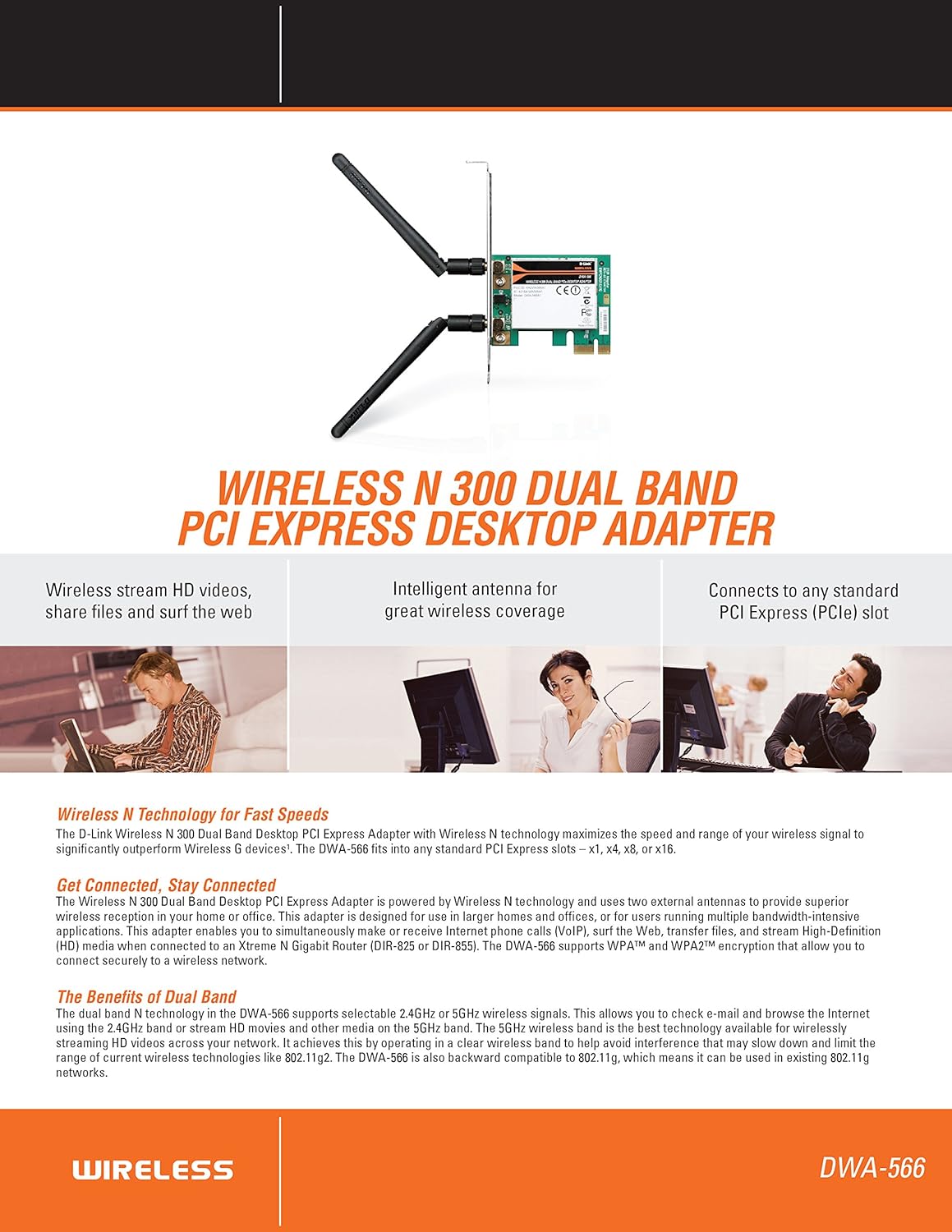
ምስል 2.1 - ተጠናቀቀview of DWA-566 features and benefits.
3. የጥቅል ይዘቶች
ጥቅልዎ የሚከተሉትን ንጥሎች መያዙን ያረጋግጡ፡-
- Wireless N 300 Dual Band PCI Express Adapter (DWA-566)
- ሁለት ሊነጣጠሉ የሚችሉ አንቴናዎች
- ዝቅተኛ-ፕሮfile የመትከያ ቅንፍ
- ፈጣን የመጫኛ መመሪያ
- CD-ROM with:
- D-Link ሽቦ አልባ ግንኙነት አስተዳዳሪ
- አሽከርካሪዎች
- የምርት ሰነድ
4. የስርዓት መስፈርቶች
Before installing the DWA-566, ensure your system meets the following minimum requirements:
- Computer with an available PCI Express slot
- Windows operating system (Windows XP, Vista, 7, 8, 10)
- CD-ROM drive (for driver installation from included CD)
- Internet Explorer 7 or Firefox 3.0 and above (for viewing documentation)
- ከበይነመረብ አገልግሎት አቅራቢ (አይኤስፒ) ጋር መመዝገብ
For optimal performance, a D-Link Wireless N router (DIR-655 or DIR-825) is recommended.

Figure 4.1: Detailed technical specifications, minimum requirements, and network diagram.
5. ማዋቀር እና መጫን
5.1 የሃርድዌር ጭነት
- ኮምፒውተርን ማጥፋት፦ ኮምፒተርዎን ያጥፉ እና የኃይል ገመዱን ያላቅቁ።
- የኮምፒውተር መያዣ ክፈት፡ Remove the computer case cover.
- PCI ኤክስፕረስ ማስገቢያ ያግኙ: Find an available PCI Express slot on your motherboard.
- አስማሚ አስገባ፡ Carefully insert the DWA-566 adapter into the PCI Express slot, ensuring it is seated firmly.
- ደህንነቱ የተጠበቀ አስማሚ፡- Secure the adapter with a screw to the computer chassis.
- አንቴናዎችን ያያይዙ፡ Screw the two included antennas onto the connectors on the adapter.
- መያዣ እና ኃይልን ዝጋ፦ Replace the computer case cover, plug in the power cord, and power on your computer.

Figure 5.1: DWA-566 adapter with antennas attached, ready for installation.
5.2 የሶፍትዌር ጭነት
After hardware installation, proceed with driver and utility installation:
- የመጫኛ ሲዲ አስገባ፡ Insert the DWA-566 installation CD into your computer's CD-ROM drive. The setup wizard should launch automatically. If not, navigate to the CD drive and run the 'Setup.exe' file.
- የማያ ገጽ ላይ መመሪያዎችን ይከተሉ፡- Follow the prompts of the D-Link setup wizard to install the drivers and the D-Link Wireless Connection Manager utility.
- ኮምፒተርን እንደገና ያስጀምሩ; After the installation is complete, restart your computer when prompted.
ማስታወሻ፡- For Windows 7/8 64-bit systems, ensure you are using the latest drivers available from the official D-Link support website to avoid potential compatibility issues.
6. የአሠራር መመሪያዎች
Once the drivers are installed, you can connect to a wireless network:
- Launch Connection Manager: Open the D-Link Wireless Connection Manager utility or use the built-in Windows wireless network utility.
- አውታረ መረቦችን ይቃኙ፡ The utility will scan for available wireless networks in your area.
- አውታረ መረብ ይምረጡ፡ Choose your desired wireless network (SSID) from the list.
- የደህንነት ቁልፍ ያስገቡ፦ If the network is secured, enter the correct WPA/WPA2 security key or passphrase.
- አገናኝ፡ ገመድ አልባ ግንኙነት ለመፍጠር 'Connect' የሚለውን ጠቅ ያድርጉ።
A successful connection will be indicated by a strong signal strength and internet access.
7. ጥገና
የDWA-566 አዳፕተርዎ ጥሩ አፈጻጸም እና ረጅም ዕድሜ እንዲኖረው ለማረጋገጥ፡
- ነጂዎችን ማዘመን ያድርጉ፡ የD-Link ድጋፍን በየጊዜው ያረጋግጡ website for the latest drivers and firmware updates.
- ትክክለኛውን አየር ማናፈሻ ማረጋገጥ; Make sure your computer case has adequate airflow to prevent overheating of internal components, including the wireless adapter.
- አንቴና አቀማመጥ፡- Adjust the antennas for the best possible signal reception.
- የአካባቢ ሁኔታዎች: Avoid placing your computer near large metal objects or other devices that may cause wireless interference.
8. መላ መፈለግ
በእርስዎ DWA-566 አስማሚ ላይ ችግሮች ካጋጠሙዎት የሚከተሉትን ያስቡበት፡
8.1 No Wireless Connection
- Verify Hardware Installation: Ensure the adapter is correctly seated in the PCI Express slot and antennas are securely attached.
- አሽከርካሪዎችን ይፈትሹ፦ Confirm that the drivers are installed correctly. Check Device Manager for any error symbols next to the network adapter. Reinstall drivers if necessary.
- የራውተር ሁኔታ፡- Ensure your wireless router is powered on and broadcasting a signal.
- የደህንነት ቁልፍ፡- Double-check that the correct wireless security key (WPA/WPA2 passphrase) is entered.
- የፋየርዎል ቅንብሮች፡- Temporarily disable your computer's firewall to see if it is blocking the connection. If it resolves the issue, configure your firewall to allow the D-Link utility.
8.2 Slow Connection Speed or Frequent Disconnections
- የአንቴና ማስተካከያ; Try repositioning the antennas for better signal reception.
- ጣልቃ ገብነት፡- Move the computer away from potential sources of interference (e.g., cordless phones, microwaves, Bluetooth devices).
- የራውተር ቅርበት፡ Ensure the computer is within the effective range of your wireless router.
- ባለሁለት ባንድ አጠቃቀም፡ If your router supports it, try connecting to the 5GHz band for less interference and potentially higher speeds, especially for streaming or gaming.
- የአሽከርካሪ ማሻሻያ፡- Update the adapter drivers to the latest version from the D-Link webጣቢያ.
9. ዝርዝሮች
| ባህሪ | ዝርዝር መግለጫ |
|---|---|
| የምርት ስም | ዲ-ሊንክ |
| የሞዴል ቁጥር | DWA-566 |
| የሃርድዌር በይነገጽ | PCI ኤክስፕረስ |
| የውሂብ አገናኝ ፕሮቶኮል | IEEE 802.11n, 802.11g, 802.11a |
| የውሂብ ማስተላለፍ ፍጥነት | በሰከንድ እስከ 300 ሜጋቢትስ |
| ድግግሞሽ ባንድ | 2.4 GHz / 5 GHz (Dual Band) |
| ደህንነት | WPA፣ WPA2 |
| ተስማሚ መሣሪያዎች | ዴስክቶፕ ኮምፒውተሮች |
| የእቃው ክብደት | 0.4 ፓውንድ (181 ግራም ገደማ) |
| የውጪ ሙከራ ማረጋገጫ | FCC B, IC B, CE, C-Tick |
10. ዋስትና እና ድጋፍ
The D-Link Wireless N300 Dual Band PCI Express Desktop Adapter (DWA-566) comes with a የ 1 ዓመት የተወሰነ ዋስትና. For specific terms and conditions, please refer to the warranty documentation included with your product or visit the official D-Link webጣቢያ.
D-Link provides 24/7 Basic Installation Support to assist with initial setup and configuration. For technical assistance, driver downloads, and further product information, please visit the D-Link support webጣቢያ ወይም የደንበኛ አገልግሎታቸውን ያነጋግሩ።
D-Link ድጋፍ Webጣቢያ፡ https://support.dlink.com/