1. መግቢያ
ስለገዙ እናመሰግናለንasing the Klipsch R-5650-S II In-Wall Speaker. This manual provides essential information for the proper installation, operation, and maintenance of your speaker. Please read these instructions thoroughly before beginning installation or use to ensure optimal performance and safety.
ቁልፍ ባህሪዎች
- Dual 1-inch (2.54cm) Titanium diaphragm compression driver mated to a pivoting 90° x 90° square Tractrix Horn.
- 6.5-inch Cerametallic cone woofer for robust bass response.
- Two vertically stacked Tractrix Horn-loaded tweeters designed to enhance surround sound effects.
- Horn-loaded technology engineered to increase acoustic output and reduce distortion.
- IR receiver knock out for integration with remote control systems.
2. የደህንነት መመሪያዎች
Always observe the following safety precautions to prevent damage to the speaker or injury to yourself:
- መመሪያዎችን ያንብቡ፡- ምርቱ ከመሠራቱ በፊት ሁሉም የደህንነት እና የአሠራር መመሪያዎች ማንበብ አለባቸው.
- መመሪያዎችን ማቆየት; የደህንነት እና የአሠራር መመሪያዎች ለወደፊት ማጣቀሻዎች መቀመጥ አለባቸው.
- ትኩረት ይስጡ ማስጠንቀቂያዎች፡- በምርቱ እና በአሰራር መመሪያው ላይ ያሉ ሁሉም ማስጠንቀቂያዎች መከበር አለባቸው።
- መጫን፡ Installation should only be performed by qualified personnel. Ensure the mounting surface can support the speaker's weight.
- ሽቦ ማድረግ፡ Ensure all wiring is correctly connected and insulated to prevent short circuits or electrical hazards. Turn off power to the ampግንኙነቶችን ከማድረግዎ በፊት አረጋጋጭ።
- እርጥበት፡- This speaker is not waterproof. Do not expose it to water or excessive moisture.
- ማጽዳት፡ Unplug the product from the amplifier before cleaning. Use a dry cloth only.
3. የጥቅል ይዘቶች
The Klipsch R-5650-S II In-Wall Speaker package typically includes:
- One (1) Klipsch R-5650-S II In-Wall Speaker
- Installation Template (usually printed on the packaging)
Note: Additional tools and wiring are required for installation and are not included.
4. ማዋቀር እና መጫን
Proper installation is crucial for optimal sound performance and speaker longevity. Consult a professional installer if you are unsure about any steps.
4.1 Planning Speaker Placement
For surround sound applications, position the R-5650-S II speakers on the side or rear walls, typically at or slightly above ear level when seated. The unique horn array allows for flexible placement while maintaining an enveloping sound field.
4.2 የግድግዳ ዝግጅት
- ስቶድስን ያግኙ፡ Use a stud finder to locate wall studs and avoid them when choosing your mounting location. Ensure there are no electrical wires or plumbing in the desired area.
- Trace Cutout: Use the provided cutout template to trace the opening on the wall.
- መክፈቻን መቁረጥ; Carefully cut the opening in the drywall using a drywall saw.
4.3 የወልና ግንኙነቶች
ማንኛውንም ግንኙነት ከመጀመርዎ በፊት ያረጋግጡ ampሊፋየር ወይም ሪሲቨር ከኃይል መውጫው ተነቅሎ ጠፍቷል።
- Run speaker wire (minimum 16-gauge, heavier for longer runs) from your amplifier to the wall opening.
- Strip approximately 1/2 inch (12mm) of insulation from the ends of the speaker wires.
- Connect the positive (+) terminal of the speaker to the positive (+) terminal of the amplifier. Connect the negative (-) terminal of the speaker to the negative (-) terminal of the amplifier. Ensure correct polarity for all speakers in your system.
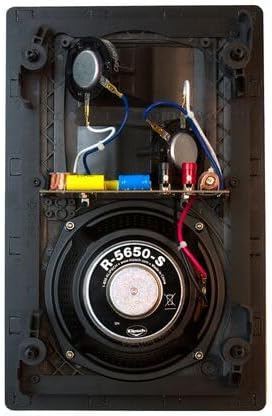 ምስል 1 - ውስጣዊ view of the Klipsch R-5650-S II In-Wall Speaker, showing the woofer, dual tweeters, and crossover components.
4.4 ተናጋሪውን መጫን
- Carefully insert the speaker into the wall opening.
- Tighten the dog-leg mounting clamps (usually by turning screws on the front baffle) until the speaker is securely fastened to the wall. Do not overtighten.
- Attach the magnetic grille to the speaker baffle. The grille is designed to snap into place.
5. የአሠራር መመሪያዎች
Once installed and connected, your Klipsch R-5650-S II In-Wall Speaker is ready for use.
- ሁሉም ግንኙነቶች ደህንነታቸው የተጠበቀ መሆኑን ያረጋግጡ።
- በእርስዎ ላይ ይሰኩት እና ያብሩት። ampማንሻ ወይም ተቀባይ.
- ተገቢውን የግቤት ምንጭ በመተግበሪያዎ ላይ ይምረጡ ampማብሰያ
- Start playback at a low volume and gradually increase it to your desired listening level.
The pivoting Tractrix Horn allows you to direct the high-frequency sound towards the primary listening area for optimized sound imaging.
6. ጥገና
Your Klipsch R-5650-S II In-Wall Speaker requires minimal maintenance.
- ማጽዳት፡ Use a soft, dry cloth to gently wipe the speaker grille and frame. Avoid using abrasive cleaners, solvents, or excessive moisture.
- የ Grille እንክብካቤ; The magnetic grille can be removed for cleaning if necessary. Handle with care to avoid bending or damaging it.
- ምርመራ፡- Periodically check speaker wire connections to ensure they remain secure.
7. መላ መፈለግ
If you encounter issues with your speaker, refer to the following common troubleshooting steps:
| ችግር | ሊሆን የሚችል ምክንያት | መፍትሄ |
|---|---|---|
| ከተናጋሪው ምንም ድምፅ የለም። | የተሳሳተ የሽቦ ግንኙነቶች Amplifier/receiver off or incorrect input selected Speaker wire damaged | Check speaker wire polarity and connections at both speaker and ampማብሰያ ያረጋግጡ ampሊፋይ በርቷል እና ትክክለኛው ግቤት ተመርጧል። Inspect speaker wire for breaks or shorts; replace if necessary. |
| የተዛባ ወይም ግልጽ ያልሆነ ድምጽ | Over-driving the speaker ልቅ ግንኙነቶች ትክክል አይደለም። ampየሊፊየር ቅንጅቶች | የድምፅ ደረጃን ይቀንሱ. ሁሉንም የድምጽ ማጉያ ሽቦ ግንኙነቶች ይፈትሹ። የእርስዎን ይመልከቱ amplifier's manual for proper settings. |
| Speaker rattling or buzzing | ልቅ መጫን Object vibrating against speaker | መጫኑን ያረጋግጡ clamps are securely tightened (do not overtighten). Check for any loose objects in the wall cavity or near the speaker. |
8. ዝርዝሮች
| ባህሪ | ዝርዝር መግለጫ |
|---|---|
| የሞዴል ስም | R-5650-S II |
| የምርት ስም | ክሊፕች |
| የድምጽ ማጉያ አይነት | በግድግዳ ውስጥ |
| ቁሳቁስ | አሲሪሎኒትሪል ቡታዲየን ስቲሪን (ኤቢኤስ) |
| Woofer ዲያሜትር | 6.5 Inches (Cerametallic cone) |
| ትዊተር | Dual 1-inch Titanium diaphragm compression driver with pivoting Tractrix Horn |
| እክል | 8 ኦኤም |
| Frequency Response (low end) | 60 Hz (Full range not specified) |
| የሚመከር የስርዓት ውቅር | 5.1 የዙሪያ ድምጽ |
| የምርት ልኬቶች (D x W x H) | 3.75" ዲ x 9.3" ዋ x 14.3" ኤች |
| የመጫኛ አይነት | የግድግዳ ተራራ |
| የውሃ መከላከያ | አይ |
| ዩፒሲ | 743878024005 |
9. የዋስትና መረጃ
The Klipsch R-5650-S II In-Wall Speaker comes with a limited warranty. For detailed information regarding warranty coverage, terms, and conditions, please refer to the official Klipsch webከግዢዎ ጋር የተካተተውን ጣቢያ ወይም የዋስትና ካርድ። የግዢ ማረጋገጫዎን ለዋስትና ጥያቄዎች ያስቀምጡ።
10. ድጋፍ
ለተጨማሪ እርዳታ፣ የቴክኒክ ድጋፍ ወይም ወደ view additional product information, please visit the official Klipsch webጣቢያ፡