
1. መግቢያ እና በላይview
This manual provides essential information for the safe and efficient operation of your Sharp AX-1100 Multi-Function Microwave Oven. This appliance combines microwave, grill, and pure steam cooking methods, offering versatile culinary options. Please read this manual thoroughly before using the appliance and keep it for future reference.
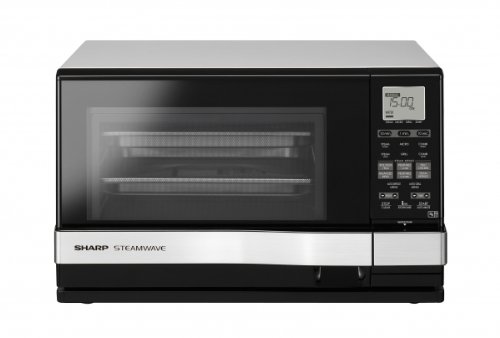
ምስል 1: የፊት view of the Sharp AX-1100 Multi-Function Microwave Oven, showcasing በውስጡ ቄንጠኛ ንድፍ እና የቁጥጥር ፓነል.
2. ጠቃሚ የደህንነት መመሪያዎች
መሳሪያዎን በሚጠቀሙበት ጊዜ የእሳት፣ የኤሌትሪክ ንዝረት፣ በሰዎች ላይ የሚደርስ ጉዳት ወይም ለከፍተኛ ማይክሮዌቭ ሃይል የመጋለጥ እድልን ለመቀነስ የሚከተሉትን ጨምሮ መሰረታዊ የጥንቃቄ እርምጃዎችን ይከተሉ፡
- መሳሪያውን ከመጠቀምዎ በፊት ሁሉንም መመሪያዎች ያንብቡ.
- ይህንን ምድጃ በበሩ ክፍት ለማድረግ አይሞክሩ ምክንያቱም ይህ ለማይክሮዌቭ ኃይል ጎጂ መጋለጥን ያስከትላል።
- ሊፈነዱ ስለሚችሉ ፈሳሾችን ወይም ሌሎች ምግቦችን በታሸጉ ኮንቴይነሮች ውስጥ አያሞቁ።
- ህጻኑ ምድጃውን በአስተማማኝ መንገድ መጠቀም እንዲችል እና ተገቢ ያልሆነ አጠቃቀም የሚያስከትለውን አደጋ እንዲገነዘብ በቂ መመሪያ ሲሰጥ ልጆች ያለ ቁጥጥር ምድጃውን እንዲጠቀሙ ይፍቀዱላቸው።
- በዚህ መሳሪያ ውስጥ የሚበላሹ ኬሚካሎችን ወይም ትነት አይጠቀሙ።
- ይህ መሳሪያ የተበላሸ ገመድ ወይም መሰኪያ ካለው፣ በትክክል የማይሰራ ከሆነ፣ ወይም የተበላሸ ወይም የተጣለ ከሆነ አይጠቀሙት።
- መሳሪያው በትክክል መሬት ላይ መሆኑን ያረጋግጡ.
3. የምርት ባህሪዎች
The Sharp AX-1100 is designed with advanced features to enhance your cooking experience:
- 100% Pure Steam Cooking: Utilizes a dedicated steam generator for healthy cooking without microwave power.
- የንክኪ ቁጥጥር ክወና; Intuitive and easy-to-clean touch panel for all settings.
- LCD ስክሪን፡ Clear display for program selection, time, and settings.
- 26 አውቶማቲክ ፕሮግራሞች; Includes 4 dedicated "full meal" menus for convenience.
- High and Low Steam Option: Adjustable steam intensity for various dishes.
- Two-Layer Cooking Option: Allows for simultaneous cooking of different items with high steam.
- 430cc Water Tank: Sufficient capacity for extended steam cooking sessions.
- 900 ዋት የማይክሮዌቭ የውጤት ኃይል፡ Efficient heating and cooking.
- አይዝጌ ብረት የውስጥ ክፍል; ዘላቂ እና ለማጽዳት ቀላል።
4. ማዋቀር
ማይክሮዌቭ ምድጃዎን ለማዘጋጀት የሚከተሉትን ደረጃዎች ይከተሉ-
- ማሸግ፡ Carefully remove the oven and all packing materials. Check for any damage. Do not operate if damaged.
- አቀማመጥ፡- Place the oven on a flat, stable surface that can support its weight. Ensure adequate ventilation around the oven (at least 10 cm at the back, 20 cm at the top, and 5 cm on the sides). Do not block air vents.
- የኃይል ግንኙነት; የኤሌክትሪክ ገመዱን መሬት ላይ ወዳለው የኤሌክትሪክ ሶኬት ይሰኩት። ጥራዝ ያረጋግጡtagሠ ከመሳሪያው መስፈርቶች ጋር ይዛመዳል.
- የመጀመሪያ ጽዳት; ከመጠቀምዎ በፊት የውስጥ እና የውጪውን ወለል በማስታወቂያ ያጽዱamp ጨርቅ.
- Water Tank (for Steam Function): For steam cooking, fill the 430cc water tank with distilled or filtered water before use. Refer to the 'Operating Instructions' for detailed steps.
5. የአሠራር መመሪያዎች
Your Sharp AX-1100 offers multiple cooking modes. Familiarize yourself with the touch control panel and LCD screen for optimal use.
5.1 መሰረታዊ ማይክሮዌቭ ምግብ ማብሰል
- ምግብን በማይክሮዌቭ-አስተማማኝ መያዣ ውስጥ በምድጃ ውስጥ ያስቀምጡ።
- የምድጃውን በር በጥንቃቄ ይዝጉ.
- Select the 'Microwave' function on the touch control panel.
- Adjust the power level (if applicable) and cooking time using the controls.
- ምግብ ማብሰል ለመጀመር 'ጀምር' ን ይጫኑ።
5.2 የእንፋሎት ምግብ ማብሰል
- Fill the water tank with distilled or filtered water. Ensure it is properly inserted.
- Place food in a steam-safe container or directly on the provided rack.
- የምድጃውን በር ዝጋ.
- Select the 'Steam' function. Choose 'High Steam' or 'Low Steam' as required.
- የተፈለገውን የማብሰያ ጊዜ ያዘጋጁ.
- Press 'Start'. The oven will generate pure steam for cooking.
5.3 ግሪል ማብሰል
- ምግቡን በተዘጋጀው የመጋገሪያ መደርደሪያ ላይ ያስቀምጡ።
- የምድጃውን በር ዝጋ.
- የ'ግሪል' ተግባርን ይምረጡ።
- የማብሰያ ጊዜውን ያዘጋጁ።
- Press 'Start'. Monitor food closely to prevent overcooking or burning.
5.4 አውቶማቲክ ፕሮግራሞች
The oven features 26 automatic programs, including 4 "full meal" menus. These programs are pre-set for specific food types and quantities.
- ምግብን በምድጃ ውስጥ ያስቀምጡ.
- Select the 'Auto Menu' button.
- Rotate the dial or use the touch controls to select the desired program number.
- Confirm the selection and press 'Start'. The oven will automatically adjust cooking time and power.
6. ጥገና እና ጽዳት
አዘውትሮ ማጽዳትና ጥገና የምድጃዎን ረጅም ጊዜ እና ጥሩ አፈፃፀም ያረጋግጣል።
- ውጫዊ፡ ውጫዊውን በማስታወቂያ ይጥረጉamp ጨርቅ እና ለስላሳ ማጠቢያ. ገላጭ ማጽጃዎችን ያስወግዱ.
- የውስጥ፡ Clean the interior cavity, especially after steam cooking, to prevent mineral buildup. Use a damp cloth with mild soap. For stubborn stains, place a bowl of water with lemon juice inside and microwave for a few minutes to loosen residue.
- በር እና ማኅተሞች፡ Keep the door seals clean to ensure proper closure.
- የውሃ ማጠራቀሚያ; Regularly empty and clean the water tank, especially if using tap water, to prevent limescale buildup.
- ግሪል መደርደሪያ; የመጋገሪያ መደርደሪያውን በሞቀ እና በሳሙና ውሃ ያጠቡ።
- ኃይል ዝጋ: ከማጽዳትዎ በፊት ሁልጊዜ ምድጃውን ይንቀሉ.
7. መላ መፈለግ
በምድጃዎ ላይ ችግሮች ካጋጠሙዎት የሚከተሉትን የተለመዱ ችግሮች እና መፍትሄዎች ይመልከቱ።
| ችግር | ሊሆን የሚችል ምክንያት | መፍትሄ |
|---|---|---|
| ምድጃ አይጀምርም | Door not closed properly; Power cord unplugged; Fuse blown/circuit breaker tripped. | በሩ በጥብቅ መዘጋቱን ያረጋግጡ; የኃይል ገመድ ግንኙነትን ያረጋግጡ; የቤት ውስጥ ፊውዝ/ሰርኩዩት ሰባሪውን ያረጋግጡ። |
| ምግብ በእኩል አይሞቅም። | Food not stirred/rotated; Incorrect power level/time. | Stir or rotate food during cooking; Adjust power level and time as needed. |
| የእንፋሎት ተግባር አይሰራም | Water tank empty or improperly inserted; Limescale buildup. | Fill water tank and ensure it is correctly seated; Clean water tank and steam generator if limescale is present. |
| ማሳያ የስህተት ኮድ ያሳያል | የውስጥ ብልሽት. | ምድጃውን ለጥቂት ደቂቃዎች ይንቀሉ እና መልሰው ይሰኩት። ስህተቱ ከቀጠለ የደንበኛ ድጋፍ ሰጪን ያግኙ። |
እነዚህን መፍትሄዎች ከሞከሩ በኋላ ችግሩ ከቀጠለ፣ እባክዎ የSharp ደንበኛ ድጋፍን ያግኙ።
8. ዝርዝሮች
Detailed technical specifications for the Sharp AX-1100 Multi-Function Microwave Oven:
- የምርት ስም፡ ስለታም
- የሞዴል ስም፡- አክስ-1100
- ክፍል ቁጥር፡- AX1100SLM
- ASIN: B007BNH156
- የኃይል ፍጆታ; 900 Watts (Microwave Output)
- ድግግሞሽ፡ 50 Hz
- የቁጥጥር አይነት፡ የንክኪ መቆጣጠሪያ
- ቁሳቁስ፡ አይዝጌ ብረት (ውስጥ)
- የተካተቱ አካላት፡- ግሪል መደርደሪያ
- የሰዓት ቆጣሪ ተግባር ይገኛል።
- Defrost System Type: ራስ-ሰር ማራገፍ
- የፕሮግራሞች ብዛት፡- 26
- የውሃ ማጠራቀሚያ አቅም; 430cc (for Steam Function)
9. ዋስትና እና ድጋፍ
የዋስትና መረጃ ለማግኘት፣ እባክዎን ከምርትዎ ጋር የተካተተውን የዋስትና ካርድ ይመልከቱ ወይም ኦፊሴላዊውን የሻርፕ ይጎብኙ website. For technical support, service, or to order replacement parts, please contact Sharp customer service through their official channels. Keep your purchase receipt as proof of purchase for warranty claims.