
ምርት አልቋልview
The iSound Twist Portable Bluetooth Wireless Speaker offers a unique design combined with superior sound quality. Its compact form factor allows for portability, while its advanced features enable wireless music streaming and hands-free calling. The speaker features full stereo sound with 6 watts total output from two 40mm drivers and a passive radiator for enhanced bass.
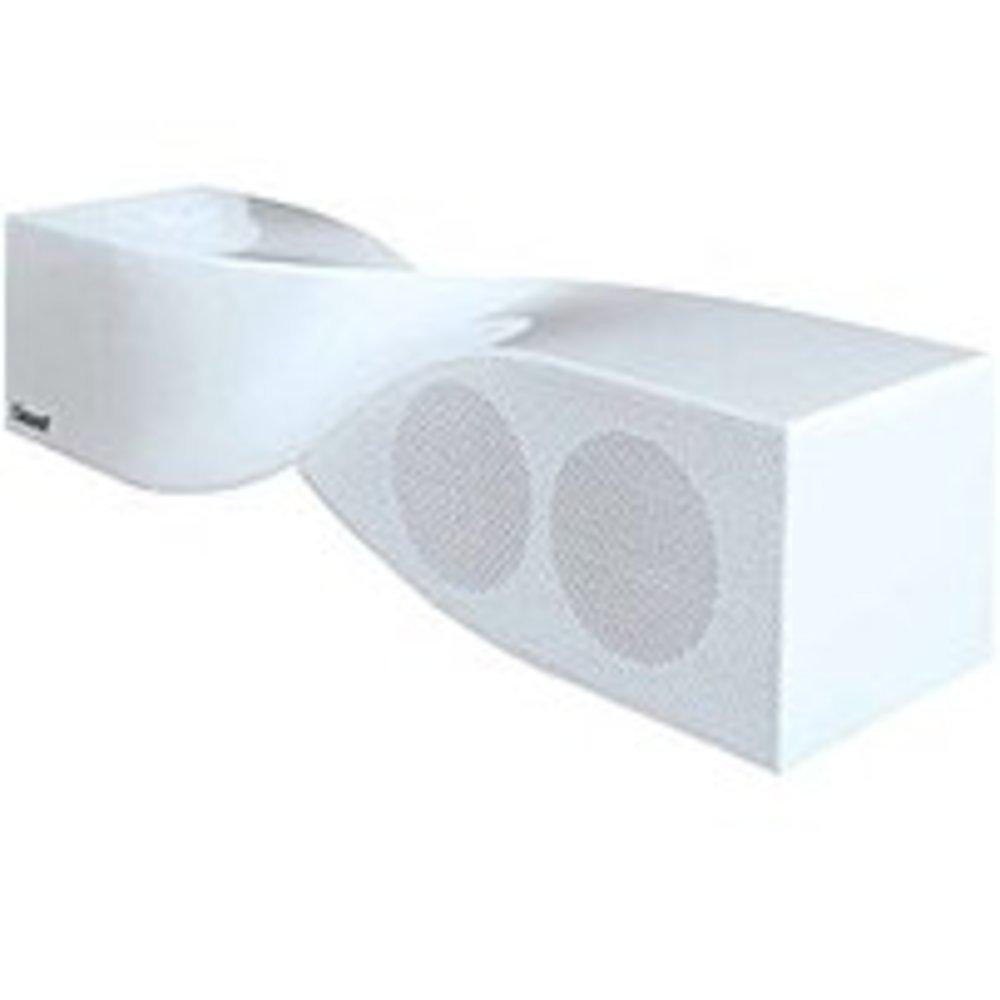
Image: The iSound Twist Portable Bluetooth Wireless Speaker in white, showcasing its unique twisted design.
የጥቅል ይዘቶች
- iSound Twist Portable Bluetooth Wireless Speaker
- የዩኤስቢ ባትሪ መሙያ ገመድ
- 3.5ሚሜ AUX የግቤት ገመድ
- የተጠቃሚ መመሪያ (ይህ ሰነድ)
ማዋቀር
1. አፈጉባ Charውን ኃይል መሙላት
Before initial use, fully charge the iSound Twist speaker. Connect the provided USB charging cable to the speaker's USB charging port and the other end to a powered USB source (e.g., computer, USB wall adapter). The charging indicator light will illuminate during charging and turn off when fully charged. A full charge provides up to 5 hours of continuous play.

Image: Rear panel of the speaker, highlighting the USB charging port, ON/OFF switch, and AUX IN port.
2. ማብራት / ማጥፋት
Locate the ON/OFF switch on the rear panel of the speaker. Slide the switch to the "ON" position to power on the device. Slide it to the "OFF" position to power off.
3. የብሉቱዝ ማጣመር
- Ensure the speaker is powered on and within close proximity to your Bluetooth-enabled device (e.g., smartphone, tablet, laptop).
- The speaker will automatically enter Bluetooth pairing mode. A blue indicator light will flash, indicating it is discoverable.
- On your device, navigate to the Bluetooth settings and enable Bluetooth.
- ፈልግ available devices. The iSound Twist speaker should appear in the list, typically named "iSound Twist" or similar.
- Select the speaker from the list to initiate pairing. If prompted for a password, enter "0000".
- Once successfully paired, the blue indicator light on the speaker will stop flashing and remain solid. You will hear an audible confirmation.
- Your device is now connected, and you can stream audio wirelessly.
4. የAUX ግቤት ግንኙነት
For devices without Bluetooth capability, or if you prefer a wired connection, use the provided 3.5mm AUX cable.
- Connect one end of the 3.5mm AUX cable to the AUX IN port on the rear of the speaker.
- Connect the other end of the cable to the headphone jack or audio output port of your audio device.
- ተናጋሪው በራስ-ሰር ወደ AUX የግቤት ሁነታ ይቀየራል።
የአሠራር መመሪያዎች
የቁጥጥር ፓነል ተግባራት
The speaker features onboard controls located on its top surface for convenient operation.
- የኃይል / ሁነታ ቁልፍ Press and hold to power on/off. Short press to switch between Bluetooth and AUX modes.
- የማጫወት/ለአፍታ አቁም/ጥሪ አዝራር፦ Short press to play or pause music. During an incoming call, short press to answer or end the call. Press and hold to reject an incoming call.
- የድምጽ መጨመር/ቀጣይ ትራክ አዝራር፡- የድምጽ መጠን ለመጨመር አጭር ይጫኑ። ወደሚቀጥለው ትራክ ለመዝለል ተጭነው ይያዙ።
- የድምጽ መጠን ወደ ታች/የቀደመው ትራክ አዝራር፡- ድምጹን ለመቀነስ አጭር ይጫኑ። ወደ ቀዳሚው ትራክ ለመሄድ ተጭነው ይያዙ።
ከእጅ ነፃ ጥሪ
When connected via Bluetooth, the iSound Twist speaker's built-in microphone allows for hands-free phone calls.
- ለጥሪ መልስ When a call comes in, the music will pause. Press the Play/Pause/Call button once to answer.
- ጥሪን በማጠናቀቅ ላይ፡- During a call, press the Play/Pause/Call button once to end the call.
- ጥሪን ባለመቀበል ገቢ ጥሪን ውድቅ ለማድረግ የPlay/Pause/Call አዝራሩን ተጭነው ይያዙት።
ጥገና
- ድምጽ ማጉያውን ከውሃ፣ እርጥበት እና ከፍተኛ የሙቀት መጠን ያርቁ።
- ድምጽ ማጉያውን ለስላሳ እና ደረቅ ጨርቅ ያጽዱ. ገላጭ ማጽጃዎችን ወይም ፈሳሾችን አይጠቀሙ.
- ተናጋሪውን ለጠንካራ ተጽእኖዎች ከመጣል ወይም ከማስገዛት ተቆጠብ።
- ለረጅም ጊዜ ጥቅም ላይ በማይውሉበት ጊዜ፣ ድምጽ ማጉያውን ቀዝቃዛና ደረቅ ቦታ ላይ ያስቀምጡትና የባትሪውን ጤና ለመጠበቅ በየጊዜው ቻርጅ ያድርጉት።
መላ መፈለግ
| ችግር | መፍትሄ |
|---|---|
| ተናጋሪው አይበራም። | Ensure the battery is charged. Connect the speaker to a power source using the USB cable and try again. |
| በብሉቱዝ በኩል ማጣመር አይቻልም። |
|
| ምንም ድምጽ ወይም ዝቅተኛ ድምጽ የለም. |
|
| የጥሪ ጥራት ደካማ ነው። |
|
ዝርዝሮች
| ባህሪ | ዝርዝር |
|---|---|
| የሞዴል ስም | ISOUND-1691 |
| የምርት ስም | iSound |
| የድምጽ ማጉያ አይነት | ግንብ |
| ልዩ ባህሪ | አብሮ የተሰራ ማይክሮፎን። |
| የሚመከር አጠቃቀሞች | For Smartphones or Tablets, Music Players |
| ተስማሚ መሣሪያዎች | ዴስክቶፕ፣ ላፕቶፕ፣ MP3 ማጫወቻ፣ ፕሮጀክተር፣ ስማርትፎን፣ ታብሌት፣ ቴሌቪዥን |
| የዙሪያ ድምጽ ቻናል ውቅር | 2.0 |
| ቀለም | ነጭ |
| የእቃው ክብደት | 13.6 አውንስ |
| ውሃ የማይገባ ነው። | ውሸት |
| ገመድ አልባ የመገናኛ ቴክኖሎጂ | ብሉቱዝ |
| የድምጽ ማጉያ መጠን | 0.75 ኢንች |
| የኃይል ምንጭ | በባትሪ የተጎላበተ |
| የባትሪዎች ብዛት | 1 ሊቲየም አዮን ባትሪዎች ያስፈልጋሉ። (ተካቷል) |
| የድምጽ ሾፌር ዓይነት | ተለዋዋጭ ሾፌር |
| የድምጽ ነጂ መጠን | 40 ሚሊሜትር |
| የምርት ልኬቶች | 5 x 4 x 11.75 ኢንች |
| የድምጽ ማጉያ ከፍተኛ የውጤት ኃይል | 6 ዋት |
| የግንኙነት ቴክኖሎጂ | ገመድ አልባ |
| የድምጽ ውፅዓት ሁኔታ | ስቴሪዮ |
| የመጫኛ አይነት | የጠረጴዛ ተራራ |
ይፋዊ የምርት ቪዲዮ
Video: Official product video for the iSound Twist Bluetooth Speaker, demonstrating its features and design. This video showcases the speaker's ability to stream audio from various devices and handle calls.
ዋስትና እና ድጋፍ
The iSound Twist Portable Bluetooth Wireless Speaker comes with a የተወሰነ ዋስትና. For specific warranty terms, conditions, and support inquiries, please refer to the warranty card included in your product packaging or visit the official iSound webጣቢያ.
For further assistance, please contact iSound customer support.