
ATI 100-505746
ATI AMD FirePro W600 Graphics Card User Manual
ሞዴል: 100-505746
1. መግቢያ
This user manual provides comprehensive instructions for the installation, operation, and maintenance of your ATI AMD FirePro W600 2GB GDDR5 6Mini DisplayPort PCI-Express Video Card. The FirePro W600 is designed for professional graphics applications, offering high performance and multi-display capabilities. Please read this manual thoroughly before installing and operating the graphics card to ensure proper functionality and safety.
2. የደህንነት መረጃ
በምርቱ ላይ ጉዳት እንዳይደርስ ወይም በራስዎ ላይ ጉዳት እንዳይደርስ ለመከላከል ሁልጊዜ የሚከተሉትን የደህንነት ጥንቃቄዎች ይጠብቁ።
- ከመጫንዎ በፊት የኮምፒውተርዎ ስርዓት ከግድግዳ ሶኬት መብራቱን እና መሰካቱን ያረጋግጡ።
- የግራፊክስ ካርዱን ከመያዝዎ በፊት የተፈጨ የብረት ነገር (ለምሳሌ የኮምፒውተር ቻሲስ) በመንካት ማንኛውንም የማይንቀሳቀስ ኤሌክትሪክ ከሰውነትዎ ውስጥ ያውጡ።
- Handle the graphics card by its edges; avoid touching the components or gold-plated connectors.
- የግራፊክስ ካርዱን ለእርጥበት ወይም ለከፍተኛ ሙቀት አያጋልጡት።
- Only use the card in a well-ventilated computer case to prevent overheating.
3. የጥቅል ይዘቶች
ሁሉም እቃዎች በጥቅልዎ ውስጥ መኖራቸውን ያረጋግጡ፡-
- ATI AMD FirePro W600 Graphics Card
- ፈጣን ጅምር መመሪያ (ከተካተተ)
- Driver CD (if included, otherwise download from manufacturer's webጣቢያ)
- Mini DisplayPort to DVI adapters (quantity may vary, often sold separately)
4. ማዋቀር እና መጫን
4.1 የስርዓት መስፈርቶች
- PCI-Express x16 slot available on motherboard.
- Sufficient power supply (consult your system's power supply specifications).
- Compatible operating system (e.g., Windows 7/8/10, Linux).
- Minimum 2GB system memory.
4.2 የሃርድዌር ጭነት
- ኮምፒተርዎን ያዘጋጁ: ኮምፒተርዎን ያጥፉና የኃይል ገመዱን ያላቅቁ። የኮምፒውተር መያዣውን ይክፈቱ።
- Locate an available PCI-Express x16 slot: Identify an empty PCI-Express x16 slot on your motherboard. Remove the corresponding expansion slot cover from the computer case.
- የግራፊክስ ካርዱን ይጫኑ; Carefully align the graphics card with the PCI-Express x16 slot. Press down firmly and evenly until the card is securely seated in the slot. Secure the card with the screw or latch mechanism of your computer case.
- Connect power (if applicable): The FirePro W600 typically does not require additional power connectors beyond the PCIe slot, but always verify your specific model's requirements.
- የኮምፒውተር መያዣውን ይዝጉ; Once the card is securely installed, close your computer case and reconnect all cables.
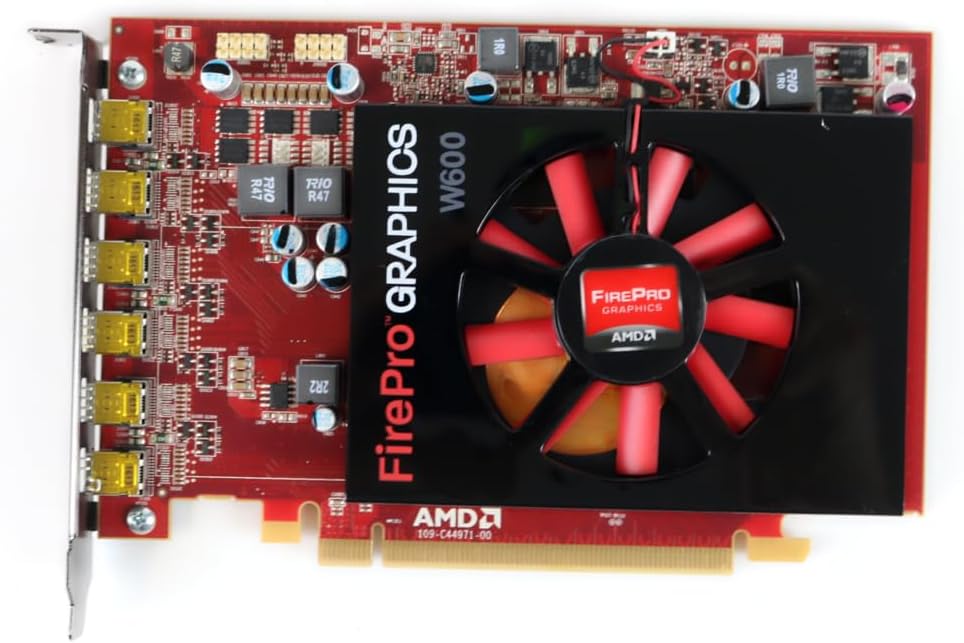
ምስል 1: የፊት view of the ATI AMD FirePro W600 graphics card, showing the cooling fan and the FirePro Graphics branding.

ምስል 2: የኋላ view of the ATI AMD FirePro W600 graphics card, displaying the intricate circuitry and components on the back of the PCB.
4.3 የአሽከርካሪዎች መጫኛ
- በኮምፒተርዎ ላይ ያብሩት; Boot your computer. The operating system may automatically detect the new hardware and install a basic driver.
- Download the latest drivers: For optimal performance and stability, it is highly recommended to download the latest professional drivers directly from the AMD official website. Navigate to the support section and search for "FirePro W600" drivers.
- Install the drivers: የወረደውን ሾፌር ጫኝ ያሂዱ እና በስክሪኑ ላይ ያሉትን ጥያቄዎች ይከተሉ። ከተጫነ በኋላ ኮምፒተርዎን እንደገና ማስጀመር ያስፈልግዎ ይሆናል.
5. የግራፊክስ ካርዱን በማስኬድ ላይ
5.1 ማሳያዎችን በማገናኘት ላይ
The ATI AMD FirePro W600 features six Mini DisplayPort outputs. You will need Mini DisplayPort cables or Mini DisplayPort to DVI/HDMI/VGA adapters (active adapters are recommended for multi-monitor setups, especially for AMD Eyefinity features) to connect your monitors.
- Connect your Mini DisplayPort cables or adapters to the Mini DisplayPort outputs on the graphics card.
- Connect the other end of the cables to your monitors.
- Power on your monitors.

Figure 3: Detail of the six Mini DisplayPort outputs on the FirePro W600, indicating its multi-display capability.
5.2 Configuring Multi-Monitor Setups (AMD Eyefinity)
The FirePro W600 supports AMD Eyefinity technology, allowing you to combine multiple displays into a single large desktop or create independent display groups.
- After driver installation, right-click on your desktop and select "AMD Radeon Settings" or "AMD Catalyst Control Center" (depending on driver version).
- Navigate to the "Display" or "Eyefinity" section.
- Follow the on-screen instructions to detect and configure your connected displays. You can arrange displays, set resolutions, and create Eyefinity display groups for a panoramic viewልምድ.
- For optimal performance with Eyefinity, ensure you are using active Mini DisplayPort adapters for any non-DisplayPort monitors.
6. ጥገና
መደበኛ ጥገና የግራፊክስ ካርድዎን ረጅም ዕድሜ እና ጥሩ አፈፃፀም ለማረጋገጥ ይረዳል።
- አቧራ ማስወገድ; Periodically clean dust from the graphics card's fan and heatsink using compressed air. Ensure the computer is powered off and unplugged before cleaning. Hold the fan blades gently to prevent over-spinning during cleaning.
- የአሽከርካሪ ማሻሻያ Keep your graphics drivers updated by regularly checking the AMD official webለቅርብ ጊዜ ስሪቶች ጣቢያ.
- የስርዓት አየር ማናፈሻ; Ensure your computer case has adequate airflow to prevent the graphics card from overheating.
7. መላ መፈለግ
በግራፊክስ ካርድዎ ላይ ችግሮች ካጋጠሙዎት የሚከተሉትን የተለመዱ ችግሮች እና መፍትሄዎች ይመልከቱ፡
| ችግር | ሊሆን የሚችል ምክንያት / መፍትሄ |
|---|---|
| ከተጫነ በኋላ ምንም የማሳያ ውጤት የለም። |
|
| የአሽከርካሪ ጭነት አለመሳካት። |
|
| Only some monitors are detected in a multi-monitor setup. |
|
| በግራፊክስ ላይ በተመሰረቱ ተግባራት ወቅት ስርዓቱ ይበላሻል ወይም ይቆማል። |
|
8. ዝርዝሮች
| ባህሪ | ዝርዝር |
|---|---|
| ቺፕሴት | AMD FirePro W600 |
| የሞተር ፕሮግራም ሰዓት | 600 ሜኸ |
| ማህደረ ትውስታ | 2GB GDDR5 |
| የማህደረ ትውስታ በይነገጽ | 128-ቢት |
| ከፍተኛ. ጥራት | 4096 x 2304 |
| ማገናኛዎች | 6x Mini DisplayPorts |
| በይነገጽ | PCI-Express x16 |
| የእቃው ክብደት | 7 አውንስ |
| የምርት ልኬቶች (LxWxH) | 1.57 x 4.21 x 6.45 ኢንች |
9. የዋስትና መረጃ
For detailed warranty information regarding your ATI AMD FirePro W600 graphics card, please refer to the warranty card included with your product or visit the official ATI/AMD support website. Warranty terms and conditions may vary by region and retailer. Keep your proof of purchase for warranty claims.
10. ድጋፍ
For technical support, driver downloads, and frequently asked questions, please visit the official AMD support webጣቢያ፡www.amd.com/am/support
You may also contact your retailer or point of purchase for assistance.
Ask a question about this manual
Ask about setup, troubleshooting, compatibility, parts, safety, or missing instructions. Manuals+ will review the question and use this page’s manual context to help answer it.