
1. መግቢያ
The D-Link GO-SW-5G is a 5-Port Unmanaged Gigabit Desktop Switch designed for home and small office environments. This device provides a simple and cost-effective solution to expand your network connectivity, offering high-speed Gigabit Ethernet ports for reliable data transfer. It incorporates D-Link's Green Technology for energy efficiency, reduced heat generation, and extended product lifespan.
This switch is a plug-and-play device, requiring no complex configuration or software installation, making it easy to integrate into an existing network.
2. የጥቅል ይዘቶች
እባክህ ከዚህ በታች የተዘረዘሩት ሁሉም እቃዎች በጥቅልህ ውስጥ መካተታቸውን አረጋግጥ፡
- D-Link GO-SW-5G 5-Port Gigabit Desktop Switch
- የኃይል አስማሚ
- ፈጣን የመጫኛ መመሪያ
ማንኛውም እቃ ከጠፋ ወይም ከተበላሸ፣ እርዳታ ለማግኘት እባክዎ ቸርቻሪዎን ያነጋግሩ።
3. የማዋቀር መመሪያዎች
The D-Link GO-SW-5G switch is designed for easy plug-and-play installation. Follow these steps to set up your device:
3.1. የኃይል አስማሚውን ያገናኙ
- Locate the power input port on the side of the D-Link GO-SW-5G switch.
- Connect the provided power adapter to this port.
- የኃይል አስማሚውን ሌላኛውን ጫፍ ወደ መደበኛ የኤሌክትሪክ ሶኬት ይሰኩት።
- The power LED on the front of the switch will illuminate, indicating that the device is receiving power.

ምስል 1፡ ጎን view of the D-Link GO-SW-5G switch with the power input port.
3.2. ከእርስዎ አውታረ መረብ ጋር ይገናኙ
- Using a standard Ethernet cable (RJ45), connect one end to an available LAN port on your router (not your modem).
- Connect the other end of this Ethernet cable to any of the five available ports on the back of the D-Link GO-SW-5G switch.
- The corresponding LED on the front of the switch will light up, indicating an active connection.
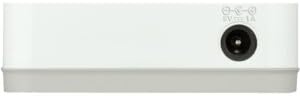
ምስል 2፡ የኋላ view of the D-Link GO-SW-5G switch with five Ethernet ports.
3.3. Connect Network Devices
- Connect your network devices (e.g., computers, gaming consoles, network printers, smart TVs) to the remaining available Ethernet ports on the D-Link GO-SW-5G switch using Ethernet cables.
- Each connected device will have its corresponding LED on the front of the switch illuminate, confirming a successful connection.

ምስል 3፡ ፊት ለፊት view of the D-Link GO-SW-5G switch showing active port LEDs.
4. የአሠራር መመሪያዎች
The D-Link GO-SW-5G is an unmanaged switch, meaning it operates automatically without requiring user configuration. Once connected as described in the Setup section, it will begin forwarding network traffic between connected devices.
- አውቶማቲክ ድርድር፡ The switch automatically detects the network speed (10/100/1000 Mbps) and duplex mode (half/full) of connected devices and adjusts accordingly.
- ራስ-ሰር MDI/MDIX፡ All ports support automatic MDI/MDIX crossover, eliminating the need for crossover cables when connecting to other switches or hubs.
- የ LED አመልካቾች Each port has an LED indicator on the front panel. A lit LED indicates an active link, and blinking indicates network activity.
5. ጥገና
To ensure optimal performance and longevity of your D-Link GO-SW-5G switch, consider the following maintenance guidelines:
- አቀማመጥ፡- ማብሪያና ማጥፊያውን ከፀሐይ ብርሃን፣ ከሙቀት ምንጮች እና ከመጠን በላይ እርጥበት ራቅ ባለ ቀዝቃዛና ደረቅ ቦታ ላይ ያስቀምጡት። በመሳሪያው ዙሪያ በቂ የአየር ዝውውር እንዲኖር ያድርጉ።
- ማጽዳት፡ Use a soft, dry cloth to clean the exterior of the switch. Avoid using liquid or aerosol cleaners, as they may damage the device.
- የኬብል አስተዳደር የኤተርኔት ገመዶችን በአግባቡ በማደራጀት እና ድንገተኛ ግንኙነቶችን ለመከላከል ያስቀምጡ።
- የኃይል ዑደት፡- If you experience network issues, a simple power cycle (unplugging the power adapter for 10 seconds and then plugging it back in) can often resolve minor problems.
6. መላ መፈለግ
If you encounter issues with your D-Link GO-SW-5G switch, refer to the following common troubleshooting steps:
- ምንም ኃይል LED;
- የኃይል አስማሚው ከማብሪያ / ማጥፊያው እና ከሚሰራው የኤሌክትሪክ ሶኬት ጋር ደህንነቱ በተጠበቀ ሁኔታ መገናኘቱን ያረጋግጡ።
- ሌላ መሳሪያ በመጫን የኤሌትሪክ ሶኬት የሚሰራ መሆኑን ያረጋግጡ።
- ለተገናኘ መሣሪያ ምንም አገናኝ/አክቲቪቲ ኤልኢዲ የለም፦
- የኢተርኔት ገመዱ በማብሪያ / ማጥፊያ ወደብ እና በአውታረ መረቡ መሳሪያ ላይ ደህንነቱ በተጠበቀ ሁኔታ መሰካቱን ያረጋግጡ።
- የተበላሸ ገመድ እንዳይኖር ለማድረግ የተለየ የኢተርኔት ገመድ ይሞክሩ።
- የተገናኘው መሳሪያ መብራቱን እና የአውታረ መረብ አስማሚው በትክክል እየሰራ መሆኑን ያረጋግጡ።
- መሳሪያውን በመቀየሪያው ላይ ወደተለየ ወደብ ለማገናኘት ይሞክሩ።
- ቀርፋፋ የአውታረ መረብ ፍጥነት፡
- Verify that all connected devices and cables support Gigabit Ethernet (1000 Mbps) for optimal performance. The switch will operate at the lowest common speed.
- Ensure your router and internet service provider (ISP) plan support the desired speeds.
- Perform a power cycle on the switch and your router.
- የሚቆራረጥ ግንኙነት;
- የተበላሹ የኬብል ግንኙነቶችን ይፈትሹ.
- Ensure the switch is not overheating; provide adequate ventilation.
- በተለያዩ የኢተርኔት ኬብሎች ይሞክሩ።
7. ዝርዝሮች
| የምርት ስም | ዲ-ሊንክ |
| የሞዴል ቁጥር | GO-SW-5G/B |
| የወደብ ብዛት | 5 |
| የመቀየሪያ አይነት | የማይተዳደር |
| የውሂብ ማስተላለፍ ፍጥነት | 1 ጊጋቢት በሰከንድ (10/100/1000 ሜጋ ባይት) |
| በይነገጽ | RJ45 |
| ቀለም | ነጭ |
| የእቃው ክብደት | 0.22 ፓውንድ £ |
| ጥራዝtage | 100-240 tsልት |
| ተስማሚ መሣሪያዎች | PC, Mac, and other Ethernet-enabled devices |
| ጨርቃጨርቅ መቀያየር | 10 ጊባበሰ |
| ዩፒሲ | 790069365669 |
8. ዋስትና እና ድጋፍ
የተወሰነ ዋስትና፡ The D-Link GO-SW-5G switch comes with a 3-year limited warranty. For detailed terms and conditions, please refer to the warranty information included in your package or visit the official D-Link webጣቢያ.
የቴክኒክ ድጋፍ; For technical assistance, product registration, or to download the latest firmware and documentation, please visit the D-Link ድጋፍ Webጣቢያ or contact D-Link customer service.