
Schellenberg 25555
Schellenberg 25555 Zeitschaltuhr Plus User Manual
Brand: Schellenberg | Model: 25555
1. መግቢያ እና በላይview
The Schellenberg 25555 Zeitschaltuhr Plus is an advanced, flush-mounted timer switch designed for the automated and convenient control of roller shutter motors. This device allows you to program daily and weekly schedules for your roller shutters, enhancing comfort, security, and energy efficiency in your home. Its user-friendly interface, featuring a large display and three intuitive buttons, ensures easy operation and programming.
This timer switch is compatible with Schellenberg STANDARD and PLUS tube motors and can be expanded with an optional sun sensor PLUS for additional automated functions.
2. በሳጥኑ ውስጥ ያለው
Upon unpacking your Schellenberg 25555 Zeitschaltuhr Plus, please ensure all the following components are present:
- 1x Schellenberg Zeitschaltuhr Plus Timer Switch
- 2x Screws for flush-mounted switch box installation
- 1x Comprehensive and illustrated assembly and operating instructions (physical manual)

Image: The retail packaging of the Schellenberg Zeitschaltuhr Plus, showing the timer switch and indicating "Made in Germany" and "Optional Sensor."
3. ባህሪያት
The Schellenberg 25555 Zeitschaltuhr Plus offers a range of features designed for optimal roller shutter control:
- የሞተር ተኳኋኝነት; Designed for comfortable control of Schellenberg STANDARD and PLUS tube motors.
- ሊስፋፋ የሚችል Can be expanded with the Schellenberg Sun Sensor PLUS for automatic sun protection.
- ለተጠቃሚ ምቹ ማሳያ፡- Features a large display for excellent readability of time and program settings.
- ቀላል አሰራር; Easy control and programming via three distinct buttons.
- የፕሮግራም አማራጮች፡- Includes both daily and weekly programming capabilities to suit various routines.
- የእረፍት ሁነታ፡ A random generator function simulates presence during vacation periods, enhancing home security.
- Environmental Functions: Integrated sun and twilight functions for automated control based on light conditions.
- አውቶማቲክ የጊዜ ለውጥ፦ Automatically adjusts for summer and winter time changes, eliminating manual adjustments.
- የኃይል መጠባበቂያ Equipped with approximately 5 hours of power reserve to maintain settings and time during power outagኢ.

ምስል: የተጠጋ ፊት view of the Schellenberg Zeitschaltuhr Plus, showing its digital display and three control buttons.
4. ማዋቀር እና መጫን
Installation of the Schellenberg Zeitschaltuhr Plus requires electrical work and should ideally be performed by a qualified electrician or a person with appropriate technical knowledge. Always ensure the main power supply to the circuit is switched off before beginning any installation work.
4.1. የመጫኛ መስፈርቶች
The timer switch is designed for flush-mounted installation in a standard electrical switch box. Ensure the switch box is adequately sized to accommodate the device and its wiring. The provided screws are for securing the unit within the flush-mounted box.
4.2. ሽቦ
Refer to the detailed wiring diagram provided in the comprehensive assembly and operating instructions included with your product. Incorrect wiring can lead to malfunction or electrical hazards. Pay close attention to the connections for power supply, motor control (up/down), and any optional sensor connections.
4.3. የመጀመሪያ ኃይል-አፕ
After installation and wiring are complete, restore power to the circuit. The display should illuminate. You may need to set the current time and date as part of the initial setup process.
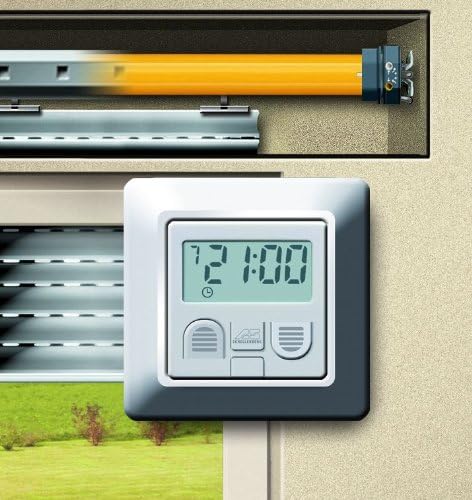
Image: The Schellenberg Zeitschaltuhr Plus installed on a wall, demonstrating its use in controlling a roller shutter.
5. የአሠራር መመሪያዎች
The Schellenberg Zeitschaltuhr Plus is operated using its three front-facing buttons and the digital display. The exact sequence for programming may vary slightly, so always consult the included manual for precise steps.
5.1. Setting Current Time and Date
መጀመሪያ ላይ ሲበራ ወይም ለረጅም ጊዜ ከቆየ በኋላtage (beyond the 5-hour reserve), you will need to set the current time and day of the week. Use the designated buttons (typically up/down arrows or menu buttons) to navigate and adjust values, confirming with a central 'OK' or 'Set' button.
5.2. በእጅ የሚሰራ
The device allows for manual control of the roller shutters. Typically, dedicated buttons or a specific mode will enable you to open or close the shutters instantly, overriding any programmed schedules temporarily.
5.3. Programming Schedules (Daily/Weekly)
Access the programming menu to set specific opening and closing times for your roller shutters. You can usually set different times for each day of the week or apply a single schedule to all weekdays and another for weekends. The large display facilitates easy entry and review of these times.
5.4. ልዩ ተግባራት
- Random Generator: Activate this mode for vacation periods. The timer will vary the programmed opening and closing times slightly each day to simulate occupancy, deterring potential intruders.
- Sun/Twilight Function: If an optional sun sensor is connected, this function allows the roller shutters to react automatically to sunlight (e.g., closing when intense sun is detected) or twilight (e.g., closing at dusk).
- Automatic Summer/Winter Time: This feature ensures the clock automatically adjusts for daylight saving time changes, removing the need for manual intervention.
6. ጥገና
The Schellenberg Zeitschaltuhr Plus is designed for long-term, maintenance-free operation. Follow these guidelines to ensure its longevity:
- ማጽዳት፡ To clean the surface of the device, use a soft, slightly damp ጨርቅ። ሻካራ ማጽጃዎችን፣ መሟሟቶችን ወይም ጠጣር ኬሚካሎችን አይጠቀሙ፣ ምክንያቱም እነዚህ ማሳያዎችን ወይም ኬሚካሎችን ሊጎዱ ይችላሉasing.
- ምንም ተጠቃሚ አገልግሎት የሚሰጡ ክፍሎች የሉም The device contains no user-serviceable parts. Do not attempt to open or repair the unit yourself. Any unauthorized opening will void the warranty.
- የአካባቢ ሁኔታዎች; Ensure the device is installed in an environment free from excessive moisture, dust, or extreme temperatures, which could affect its performance.
7. መላ መፈለግ
If you encounter issues with your Schellenberg Zeitschaltuhr Plus, consider the following common troubleshooting steps:
| ችግር | ሊሆን የሚችል ምክንያት | መፍትሄ |
|---|---|---|
| ማሳያው ባዶ ነው ወይም አይበራም። | No power supply; power outagኢ፤ ውስጣዊ ስህተት። | Check the circuit breaker. Verify power supply to the unit. If power is restored after an outage, the internal reserve should maintain settings for up to 5 hours. If still blank, consult a professional. |
| Roller shutter does not move according to program. | Incorrect programming; manual override active; motor issue; sensor interference. | Verify programmed times and days. Ensure the device is in automatic mode, not manual. Check if the random generator or sun/twilight function is active and overriding. Consult the motor's manual if the motor itself is unresponsive to manual commands. |
| Time or settings are lost after a power outage. | ኃይል ይስጥህtage exceeded the 5-hour power reserve. | Reset the current time and reprogram any lost schedules. This is normal behavior if the power reserve is depleted. |
| አዝራሮች ምላሽ የማይሰጡ ናቸው። | ጊዜያዊ የሶፍትዌር ብልሽት፤ አካላዊ ጉዳት። | Try briefly cutting power to the unit at the circuit breaker and then restoring it. If the issue persists, the unit may require professional inspection. |
For more complex issues or if the above steps do not resolve the problem, please refer to the detailed troubleshooting section in your product's full instruction manual or contact Schellenberg customer support.
8. ዝርዝሮች
| ባህሪ | ዝርዝር |
|---|---|
| የምርት ስም | ሼለንበርግ |
| የሞዴል ቁጥር | 25555 |
| የምርት ልኬቶች | 5 x 2.5 x 5 ሴሜ (በግምት 2 x 1 x 2 ኢንች) |
| የእቃው ክብደት | 200 ግ (በግምት 0.44 ፓውንድ) |
| ቀለም | ነጭ |
| የመጠባበቂያ ቦታ | Approx. 5 hours (in case of power failure) |
| የጊዜ ለውጥ | Automatic summer/winter time adjustment |
| ተኳኋኝነት | Schellenberg STANDARD and PLUS tube motors |
9. የደህንነት መረጃ
Please read and adhere to all safety instructions to prevent injury or damage to the device:
- የኤሌክትሪክ ደህንነት; Installation and maintenance should only be performed by qualified personnel. Always disconnect the main power supply before working on the device or its wiring.
- የታሰበ አጠቃቀም፡- Use the device only for its intended purpose as a timer switch for roller shutter motors. Any other use may result in damage or hazard.
- እርጥበት፡- Do not expose the device to water or high humidity. Install in dry indoor environments only.
- ልጆች፡- Keep the device and its packaging out of reach of children.
- ጉዳት፡ Do not operate the device if it appears damaged. Contact customer support for assistance.
- ማስወገድ፡ Dispose of the device according to local regulations for electronic waste. Do not dispose of with household waste.
Ask a question about this manual
Ask about setup, troubleshooting, compatibility, parts, safety, or missing instructions. Manuals+ will review the question and use this page’s manual context to help answer it.