
1. መግቢያ
This manual provides instructions for the OEM RMT-B119A remote control, designed as a replacement or secondary remote for various Sony Blu-ray player models. This remote offers full functionality for controlling your Blu-ray player's features.
Compatible Sony Blu-ray Player Models:
- BDP-BX59
- BDP-S390
- BDP-S590
- BDP-BX110
- BDP-S1100
- BDP-S3100
- BDP-BX310
2. ማዋቀር
2.1 የባትሪ ጭነት
የርቀት መቆጣጠሪያው ሁለት (2) የኤኤኤ ባትሪዎችን ይፈልጋል (አልተካተተም)። ባትሪዎቹን ለመጫን የሚከተሉትን ደረጃዎች ይከተሉ፡
- የባትሪውን ክፍል ከርቀት መቆጣጠሪያው ጀርባ ላይ ያግኙት።
- ክፍሉን ለመክፈት ትሩን ይጫኑ እና ሽፋኑን ወደ ታች ያንሸራትቱ.
- ሁለት የ AAA ባትሪዎችን አስገባ፣ አወንታዊው (+) እና አሉታዊ (-) ተርሚናሎች በክፍሉ ውስጥ ካሉት ምልክቶች ጋር በትክክል መገጣጠም።
- ደህንነቱ በተጠበቀ ሁኔታ ጠቅ እስኪያደርግ ድረስ የባትሪውን ክፍል ሽፋን ወደ ቦታው ያንሸራትቱት።
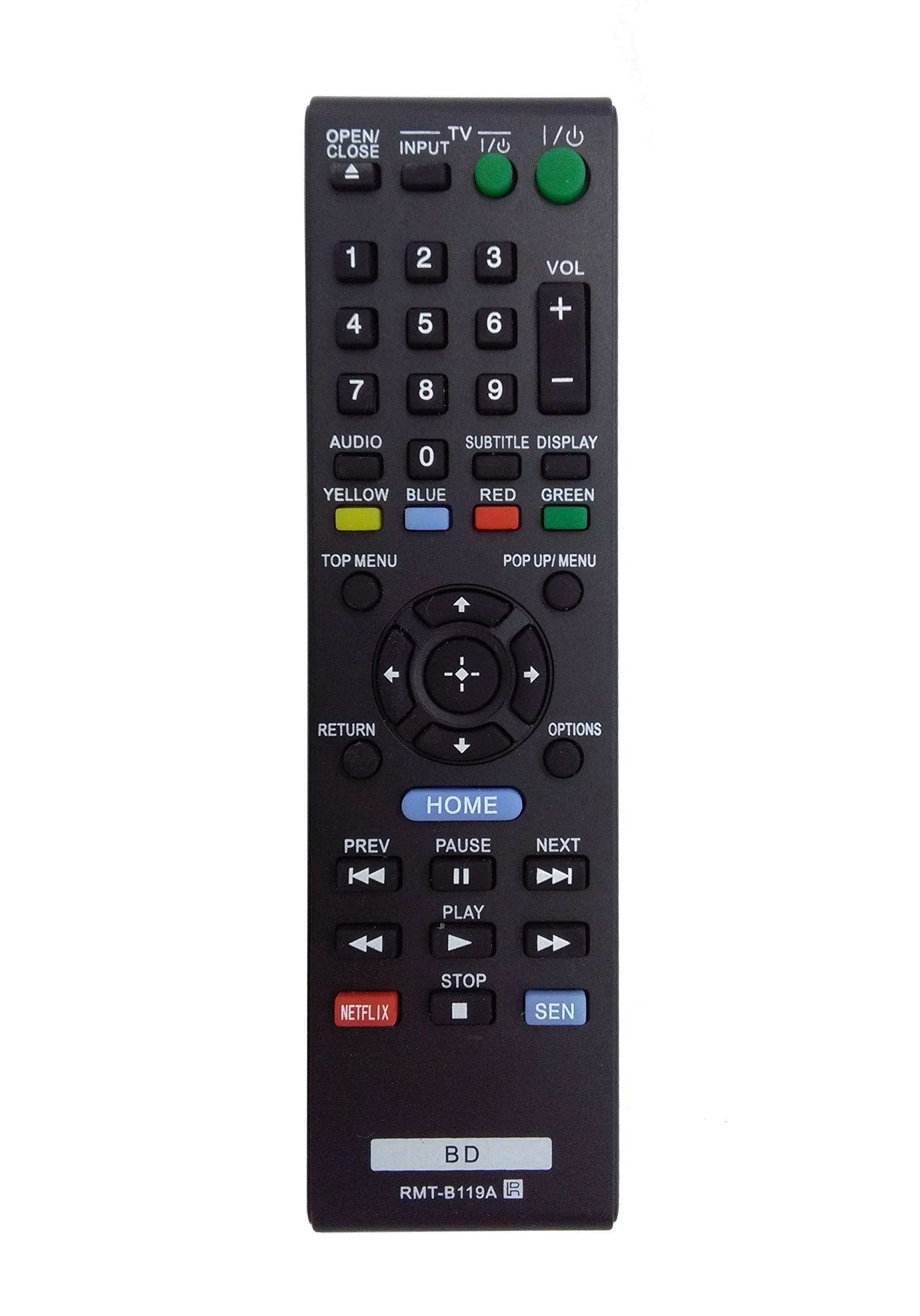
Image: The OEM RMT-B119A remote control, showing the full button layout on the front and a partial view of the open battery compartment on the back, revealing the battery terminals.
3. የአሠራር መመሪያዎች
3.1 Remote Control Layout and Button Functions
Familiarize yourself with the buttons on your RMT-B119A remote control. Below is a description of each button's primary function.
Image: The OEM RMT-B119A remote control, displaying all buttons and their labels.
- ኃይል (አይ/ኦ)፡- Turns the Blu-ray player on or off.
- OPEN/CLOSE (▲): የዲስክ ትሪውን ይከፍታል ወይም ይዘጋል.
- ግብዓት Switches the input source on the connected TV (if programmed).
- ቲቪ፡ Switches the remote to TV control mode (if programmed).
- የቁጥር ሰሌዳ (0-9): Used for direct track selection, chapter selection, or entering numerical data.
- ጥራዝ (+/-): Adjusts the volume level (typically for the connected TV, if programmed).
- ኦዲዮ፡ Changes the audio track or language during playback.
- SUBTITLE DISPLAY: Toggles subtitle display on or off, or cycles through available subtitle languages.
- YELLOW, BLUE, RED, GREEN: Color-coded function buttons, typically used for specific features within menus or interactive content. Their function varies depending on the disc or menu.
- TOP MENU Accesses the main menu of the Blu-ray disc.
- POP UP/MENU: Displays the pop-up menu during disc playback.
- Directional Pad (↑↓←→): በምናሌዎች እና አማራጮች ውስጥ ይዳስሳል።
- Center Button (Enter/Select): ምርጫን ያረጋግጣል ወይም ወደ ምናሌ ንጥል ያስገባል።
- ተመለስ፡ ወደ ቀዳሚው ማያ ገጽ ወይም ምናሌ ይመለሳል።
- አማራጮች፡- Displays context-sensitive options or settings.
- መነሻ Accesses the Blu-ray player's home menu.
- ቀዳሚ (◀◀): Skips to the beginning of the current track/chapter or the previous track/chapter.
- PAUSE (▌▌): መልሶ ማጫወት ያቆማል።
- NEXT (▶▶): ወደ ቀጣዩ ትራክ ወይም ምዕራፍ ይዝለሉ።
- አጫውት (▶): መልሶ ማጫወት ይጀምራል ወይም ይቀጥላል።
- አቁም (■): መልሶ ማጫወት ያቆማል።
- NETFLIX፡ Direct access button for the Netflix streaming service.
- ሴን Direct access button for the Sony Entertainment Network (now PlayStation Video/Music).
- ቢዲ፡ Likely a dedicated button for Blu-ray Disc functions or to switch to Blu-ray mode.
4. ጥገና
የርቀት መቆጣጠሪያዎ ረጅም ጊዜ እና በአግባቡ እንዲሠራ ለማረጋገጥ የሚከተሉትን የጥገና መመሪያዎች ይከተሉ፡
- ማጽዳት፡ የርቀት መቆጣጠሪያውን ለስላሳ እና ደረቅ ጨርቅ ይጥረጉ። ለግትር ቆሻሻ፣ በትንሹ መampen the cloth with water or a mild, non-abrasive cleaner. Avoid using harsh chemicals or solvents.
- የባትሪ መተካት፡ Replace batteries when the remote's response becomes sluggish or it stops functioning. Always replace both batteries at the same time with new ones of the same type.
- ማከማቻ፡ የርቀት መቆጣጠሪያውን ከፀሐይ ብርሃን፣ ከከፍተኛ ሙቀት እና ከፍተኛ እርጥበት ራቅ ባለ ቀዝቃዛና ደረቅ ቦታ ያስቀምጡ። የርቀት መቆጣጠሪያው ለረጅም ጊዜ ጥቅም ላይ የማይውል ከሆነ፣ እንዳይፈስ ለመከላከል ባትሪዎቹን ያስወግዱ።
- ጠብታዎችን ያስወግዱ፡ ጠብታዎች ውስጣዊ ክፍሎችን ሊጎዱ ስለሚችሉ የርቀት መቆጣጠሪያውን ከአካላዊ ተጽዕኖ ይጠብቁ።
5. መላ መፈለግ
በርቀት መቆጣጠሪያዎ ላይ ችግሮች ካጋጠሙዎት፣ የተለመዱ ችግሮችን እና መፍትሄዎችን ለማግኘት የሚከተለውን ሰንጠረዥ ይመልከቱ፡
| ችግር | ሊሆን የሚችል ምክንያት | መፍትሄ |
|---|---|---|
| የርቀት መቆጣጠሪያ አይሰራም። | የሞቱ ወይም በስህተት የገቡ ባትሪዎች። | ባትሪዎችን በአዲሶቹ ይተኩ፣ ይህም ትክክለኛውን ፖላሪቲ (+/-) ያረጋግጣል። |
| የርቀት መቆጣጠሪያ ያለማቋረጥ ይሰራል። | የባትሪ አቅም ዝቅተኛ ወይም እንቅፋት። | Replace batteries. Ensure no objects are blocking the remote's signal path to the Blu-ray player. |
| የርቀት መቆጣጠሪያ ቴሌቪዥኑን አይቆጣጠርም። | Remote not programmed for TV or TV mode not selected. | This remote is primarily for Blu-ray players. TV control functionality may require specific programming not covered by this manual, or may not be supported by this OEM model. |
| አዝራሮች ምላሽ የማይሰጡ ወይም የሚጣበቁ ናቸው። | ከአዝራሮች በታች የሆነ ቆሻሻ ወይም ፍርስራሽ። | Clean the remote control surface. Avoid spilling liquids on the remote. |
6. ዝርዝሮች
- የምርት ስም፡ OEM
- የሞዴል ቁጥር፡- RMT-B119A
- የግንኙነት ቴክኖሎጂ; ኢንፍራሬድ (IR)
- ተስማሚ መሣሪያዎች Sony Blu-ray Players (specific models listed in Introduction)
- የኃይል ምንጭ፡- 2 x AAA ባትሪዎች (አልተካተተም)
- ከፍተኛው ክልል፡ በግምት 10 ሜትር (33 ጫማ)
- ልዩ ባህሪ፡ Ergonomic ንድፍ
7. ዋስትና እና ድጋፍ
This OEM RMT-B119A remote control comes with a የ 30 ቀን ዋስትና ከተገዛበት ቀን ጀምሮ የማምረቻ ጉድለቶችን ይሸፍናል. ለዋስትና ጥያቄዎች እባክዎ የግዢ ማረጋገጫዎን ያቆዩ።
For technical support or warranty inquiries, please contact the retailer or manufacturer directly. Refer to your purchase documentation for specific contact information.