
Phanteks PH-ES813P_BL
Phanteks Enthoo Series Primo Ultimate Full Tower Computer Case User Manual
Model: PH-ES813P_BL
መግቢያ
The Phanteks Enthoo Primo is a full tower computer case designed for enthusiasts seeking exceptional cooling possibilities and functional design. This manual provides detailed instructions for setting up, operating, maintaining, and troubleshooting your Enthoo Primo case, ensuring optimal performance and longevity.

Figure 1: Phanteks Enthoo Primo Ultimate Full Tower Computer Case (Black/Blue)
ማዋቀር እና መጫን
Proper installation is crucial for the performance and stability of your system. Follow these steps carefully.
1. የኃይል አቅርቦት ክፍል (PSU) መጫን
The Enthoo Primo features a unique thermally isolated PSU location at the rear of the case, promoting cooler temperatures and improved cable management.
- Locate the PSU compartment at the bottom rear of the case.
- Slide your PSU into the designated area.
- Secure the PSU with the provided screws from the rear of the case.
Video 1: Animated demonstration of internal case features, including PSU placement, HDD trays, and cable management. This video highlights the thermally isolated PSU location and hidden cable routing.

ምስል 2: የኋላ view of the Enthoo Primo case, showing the PSU mounting area at the bottom.
2. Drive Installation (HDD/SSD)
The case supports up to 6 HDDs with dual repositionable and removable HDD cages, and features Drop-n-Lock double stack SSD brackets.
- Access the hidden HDD trays by removing the side panel.
- Slide your 3.5" HDDs into the trays and secure them.
- For 2.5" SSDs, utilize the removable Drop-n-Lock brackets. These can be installed in three different locations within the case.
- Ensure all drives are securely fastened to prevent vibration.

ምስል 3: የውስጥ view of the Enthoo Primo, highlighting the hidden HDD trays and SSD mounting points.
3. የእናትቦርድ እና የክፍሎች መጫኛ
The Enthoo Primo supports ATX motherboards and offers ample space for various components.
- Install your ATX motherboard onto the standoffs.
- Install your CPU, RAM, and graphics cards as per their respective manuals.
- Utilize the pre-installed cable management tools behind the motherboard tray to route cables neatly.
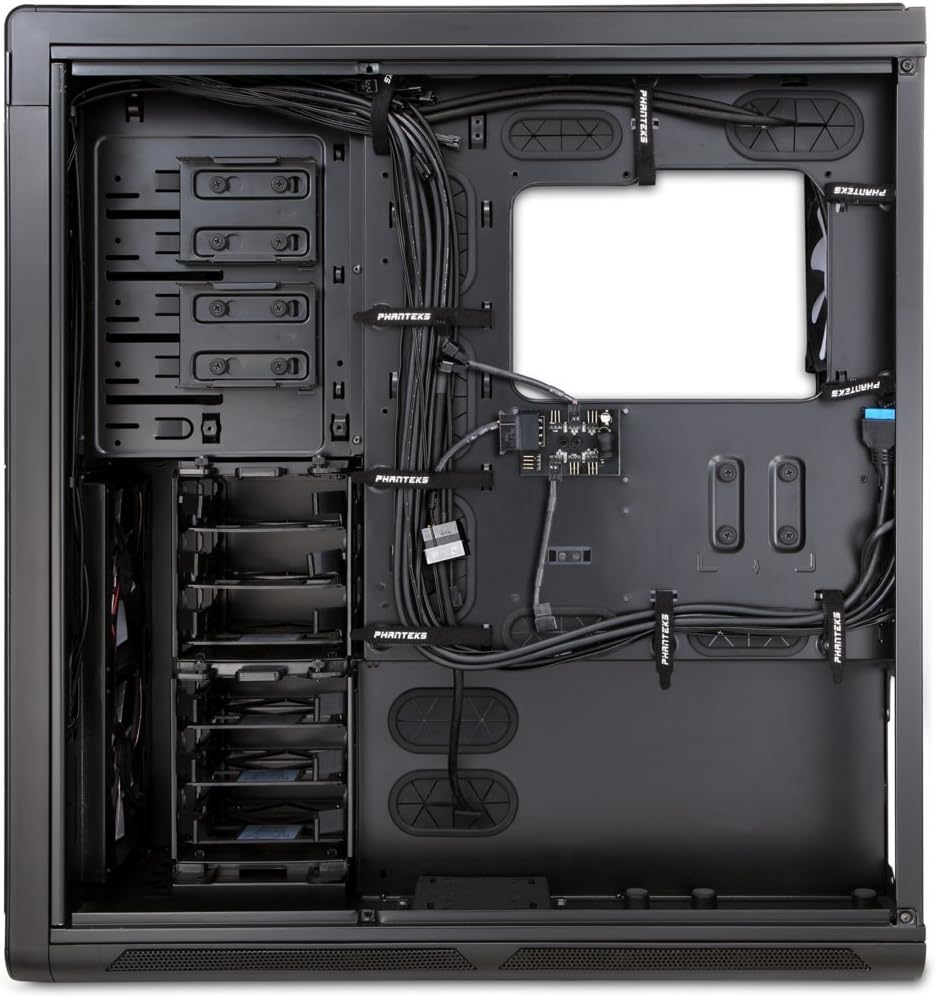
ምስል 4: የውስጥ view of the Enthoo Primo, showcasing the cable management features behind the motherboard tray.
የአሠራር ባህሪዎች
The Enthoo Primo is designed with user convenience and optimal performance in mind.
የፊት ፓነል I / O
The front I/O panel provides easy access to essential ports and controls:
- 2 x የዩኤስቢ 3.0 ወደቦች፡ ለከፍተኛ ፍጥነት የውሂብ ዝውውር።
- 2 x የዩኤስቢ 2.0 ወደቦች፡ ለመደበኛ የዳርቻ ግንኙነቶች።
- ማይክሮፎን ጃክ ለድምጽ ግብአት።
- 3.5ሚሜ ኦዲዮ ጃክ፡ ለድምጽ ውፅዓት።
- የ LED መቀየሪያ; Controls the integrated LED lighting (LED strip & Fan LED).

ምስል 5፡ ከላይ አንግል ያለው view of the Enthoo Primo, illustrating the accessible front I/O panel.
የማቀዝቀዣ ሥርዓት
The Enthoo Primo offers extensive cooling support for both air and liquid cooling configurations.
- አስቀድመው የተጫኑ አድናቂዎች; Includes 1x 140mm fan on top, 2x 140mm LED fans in front, 1x 140mm fan in the rear, and 1x 140mm fan on the bottom. All are Phanteks' PH-F140SP fans.
- የአየር ማቀዝቀዣ፡ Supports up to 14x 120mm fans or 11x 140mm fans for comprehensive airflow.
- የውሃ ማቀዝቀዣ; Provides up to 5 different installation areas for slim and thick radiators (120mm and 140mm form factors), including clearance for push-pull fan configurations. Innovative liquid cooling mounting systems include radiator brackets and a versatile reservoir/pump bracket.

ምስል 6: የፊት view of the Enthoo Primo, showcasing the clean design and intake areas.
ጥገና
Regular maintenance ensures optimal performance and extends the lifespan of your computer case.
- የአቧራ ማጣሪያዎች; The Enthoo Primo features removable dust filters located at the front, top, bottom (2x), and side panel (2x). Regularly remove and clean these filters to maintain optimal airflow and prevent dust buildup inside the case.
- የውጭ ጽዳት; ለስላሳ ይጠቀሙ, መamp cloth to wipe down the aluminum front and top panels. Avoid abrasive cleaners.
- የቤት ውስጥ ጽዳት: Periodically use compressed air to clear dust from internal components and fan blades. Ensure the system is powered off and unplugged before cleaning.
መላ መፈለግ
ይህ ክፍል ሊያጋጥሙዎት የሚችሉ የተለመዱ ጉዳዮችን ይመለከታል።
- ኃይል የለም፡
- Ensure the PSU is properly seated and connected to the motherboard and wall outlet.
- የፊት ፓነል የኃይል ማብሪያ / ማጥፊያ ገመድ ከእናትቦርዱ ራስጌ ጋር በትክክል መገናኘቱን ያረጋግጡ።
- Fans Not Spinning / LED Not Lighting:
- Check fan connections to the motherboard or fan hub.
- Ensure the fan hub is powered (SATA connection).
- Verify the LED switch on the front panel is in the 'on' position.
- የዩኤስቢ ወደቦች የማይሰሩ
- Confirm that the USB 3.0 and USB 2.0 headers from the front panel are securely connected to the motherboard.
- ከመጠን በላይ ጫጫታ;
- Check if all fans are securely mounted and free from obstructions.
- Ensure drive trays are properly secured to minimize vibration.
- Clean dust filters and fan blades if necessary.
ዝርዝሮች
| ባህሪ | ዝርዝር |
|---|---|
| የሞዴል ስም | PH-ES813P_BL |
| የጉዳይ ዓይነት | ሙሉ ግንብ |
| የማዘርቦርድ ተኳኋኝነት | ATX |
| ቁሳቁስ | Aluminum Faceplates, Steel Chassis |
| ቀለም | ጥቁር / ሰማያዊ |
| ልኬቶች (LxWxH) | 23.62 x 9.84 x 25.59 ኢንች |
| የእቃው ክብደት | 50 ፓውንድ |
| ዩኤስቢ 3.0 ወደቦች | 2 |
| ዩኤስቢ 2.0 ወደቦች | 2 |
| የድምጽ ወደቦች | 1x Microphone, 1x 3.5mm Audio Jack |
| የማስፋፊያ ቦታዎች | 8 |
| የማቀዝቀዣ ዘዴ | አየር / ውሃ |
| ቀድሞ የተጫኑ አድናቂዎች | 5x 140mm (1 top, 2 front LED, 1 rear, 1 bottom) |
| ከፍተኛ የደጋፊ ድጋፍ | 14 x 120 ሚሜ ወይም 11 x 140 ሚሜ |
| የራዲያተር ድጋፍ | Up to 5 locations (120mm/140mm form factors) |
ዋስትና እና ድጋፍ
For warranty information and technical support, please refer to the official Phanteks webጣቢያ ወይም ሙሉ የተጠቃሚ መመሪያ.
You can download the complete user manual in PDF format here: Phanteks Enthoo Primo User Manual (PDF)
Ask a question about this manual
Ask about setup, troubleshooting, compatibility, parts, safety, or missing instructions. Manuals+ will review the question and use this page’s manual context to help answer it.