
1. መግቢያ
This manual provides essential information for the safe and effective operation of the Rigol DG5352 Function/Arbitrary Waveform Generator. The DG5352 is a high-performance, 2-channel device capable of generating various waveforms with a maximum frequency of 350 MHz and a sampling rate of 1 GSa/s. Please read this manual thoroughly before using the instrument to ensure proper functionality and to prevent damage.
2. የደህንነት መረጃ
Observe the following safety precautions to prevent injury and avoid damage to the instrument or any connected products.
- የኃይል ምንጭ፡- Connect the instrument to a power source that provides the specified voltagሠ ክልል።
- መሬት ላይ የኤሌክትሪክ ንዝረትን ለመከላከል መሳሪያው በትክክል መሬት ላይ መቀመጡን ያረጋግጡ።
- የአየር ማናፈሻ; Do not block ventilation openings. Ensure adequate airflow around the instrument.
- አካባቢ፡ Operate the instrument in a dry, well-ventilated area, away from direct sunlight, high temperatures, and excessive dust.
- ማጽዳት፡ ከማጽዳትዎ በፊት ኃይልን ያላቅቁ. ለስላሳ ይጠቀሙ, መamp ጨርቅ; የሚበላሹ ማጽጃዎችን ወይም ፈሳሾችን ያስወግዱ።
- አገልግሎት መስጠት፡ Refer all servicing to qualified service personnel. Do not attempt to repair the instrument yourself.
3. ምርት አብቅቷልview
The Rigol DG5352 is a versatile function/arbitrary waveform generator designed for a wide range of applications in electronics testing and development. It features two independent output channels, allowing for simultaneous generation of different waveforms or synchronized signals.
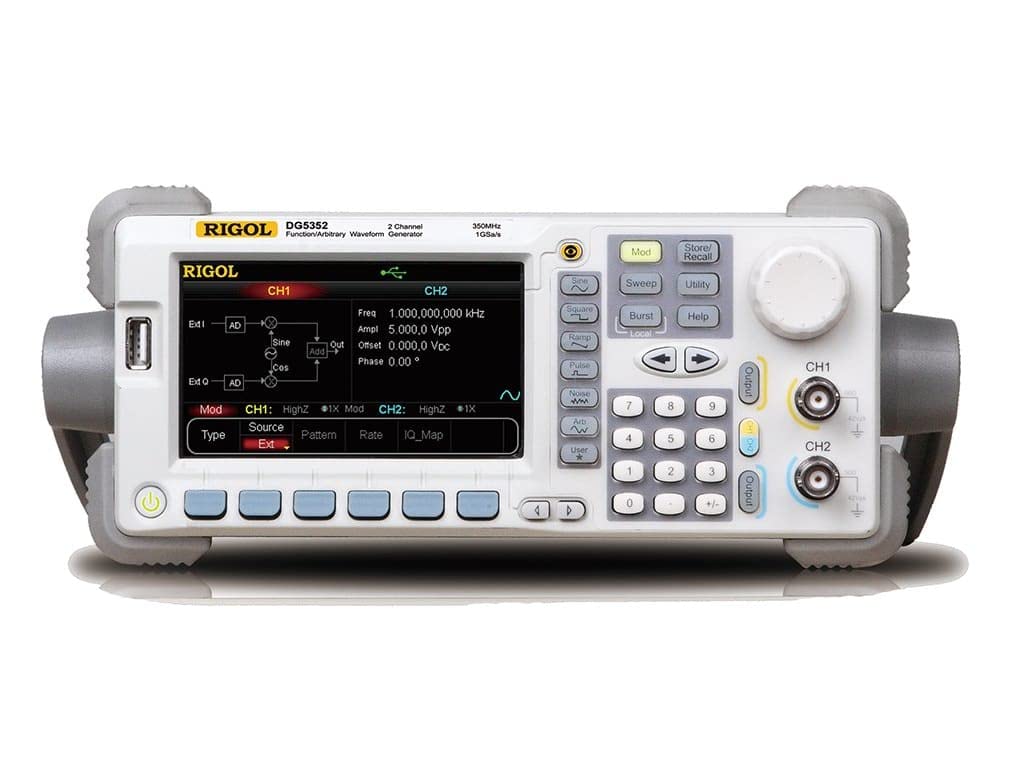
Figure 3.1: Front Panel of the Rigol DG5352. This image displays the front panel of the Rigol DG5352, highlighting its main display, control buttons, rotary knob, and output connectors for Channel 1 (CH1) and Channel 2 (CH2). The display shows current settings for frequency, amplitude, offset, and phase, along with waveform type and modulation options.
ቁልፍ ባህሪዎች
- ቻናሎች፡ 2 independent output channels.
- የድግግሞሽ ክልል፡ Up to 350 MHz.
- Sampየሊንግ ተመን ፦ 1 GSa/s.
- Waveform Types: ሳይን፣ ካሬ፣ አርamp, Pulse, Noise, Arbitrary, and more.
- Modulation Functions: AM, FM, PM, FSK, ASK, PSK, PWM, Sweep, Burst.
- የተጠቃሚ በይነገጽ፡ Intuitive front panel with a clear display, dedicated function buttons, and a rotary knob for precise adjustments.
4. ማዋቀር
- ማሸግ፡ Carefully remove the DG5352 from its packaging. Verify that all accessories listed in the packing list are present.
- የኃይል ግንኙነት; Connect the provided power cord to the AC input on the rear panel of the instrument, then plug the other end into a grounded AC power outlet.
- አብራ፡ መሳሪያውን ለማብራት በፊት ፓነል ላይ የሚገኘውን የኃይል ቁልፍ ይጫኑ። ማሳያው ያበራል፣ እና ስርዓቱ የራስ-ሙከራ ያካሂዳል።
- የውጤት ግንኙነቶች Connect your test leads or cables to the desired output channels (CH1 or CH2) on the front panel. Ensure proper impedance matching for your application.
- USB/LAN Connection (Optional): For remote control or data transfer, connect a USB cable to the USB host/device port or an Ethernet cable to the LAN port on the rear panel.
5. የአሠራር መመሪያዎች
This section outlines basic operation procedures for generating standard waveforms.
5.1. Generating a Standard Waveform (e.g., Sine Wave)
- ቻናል ይምረጡ፡- የሚለውን ይጫኑ CH1 or CH2 button on the front panel to select the desired output channel. The active channel will be highlighted on the display.
- Select Waveform Type: የሚለውን ይጫኑ ሳይን button (or other waveform buttons like ካሬ, Ramp, የልብ ምት) located on the left side of the control panel. The display will show the default sine wave parameters.
- ድግግሞሽ አዘጋጅ፡ Use the numeric keypad to enter the desired frequency value, then press the corresponding unit button (e.g., ሜኸ, ኪሄዝ). Alternatively, use the rotary knob to adjust the frequency.
- አዘጋጅ Ampጭልፊት የሚለውን ይጫኑ Ampl softkey on the display. Use the numeric keypad and unit buttons (e.g., ቪ.ፒ.ፒ) or the rotary knob to set the peak-to-peak ampሥነ ሥርዓት
- Set Offset: የሚለውን ይጫኑ ማካካሻ softkey. Use the numeric keypad and unit buttons (e.g., ቪዲሲ) or the rotary knob to set the DC offset voltage.
- ውጤትን አንቃ፡ የሚለውን ይጫኑ ውፅዓት button for the selected channel (CH1 or CH2) to enable the waveform output. The button will illuminate when active.
5.2. Modulation Functions
The DG5352 supports various modulation types. To access these, press the ሞድ button on the front panel. Follow the on-screen prompts and use the softkeys and rotary knob to configure the desired modulation parameters (e.g., AM, FM, PM).
5.3. Storing and Recalling Settings
To save current instrument settings, press the አከማች/አስታውስ button. Select a memory location using the softkeys and rotary knob, then confirm to save. To recall settings, press አከማች/አስታውስ again, select the desired memory location, and confirm.
6. ጥገና
- ማጽዳት፡ የመሳሪያውን ውጫዊ ክፍል ለስላሳና ደረቅ በሆነ ጨርቅ አዘውትረው ያጽዱ። ለጠንካራ ቆሻሻ፣ ቀለል ያለ ጨርቅ ይጠቀሙ።ampበውሃ የታሸገ ። ኃይለኛ ኬሚካሎችን ወይም ፈሳሾችን አይጠቀሙ.
- የአየር ማናፈሻ; Ensure that the ventilation openings on the instrument remain clear of dust and obstructions to prevent overheating.
- ማከማቻ፡ When not in use for extended periods, store the DG5352 in a clean, dry environment within its specified operating temperature range.
- ልኬት፡ Periodic calibration by qualified personnel is recommended to maintain measurement accuracy. Refer to Rigol's official support for calibration services.
7. መላ መፈለግ
| ችግር | ሊሆን የሚችል ምክንያት | መፍትሄ |
|---|---|---|
| መሳሪያ አይበራም። | Power cord not connected; power outlet faulty; internal fuse blown. | Check power cord connection; test power outlet; contact service for fuse replacement. |
| የውጤት ምልክት የለም። | Output channel not enabled; incorrect waveform parameters; faulty cable. | የሚለውን ይጫኑ ውፅዓት button for the channel; verify frequency/amplitude settings; check/replace cables. |
| ማሳያ የስህተት መልእክት ያሳያል። | System error; invalid input. | Refer to the on-screen message for specific instructions; restart the instrument; contact support if persistent. |
8. ዝርዝሮች
The following are key specifications for the Rigol DG5352 Function/Arbitrary Waveform Generator.
- የሞዴል ቁጥር፡- ዲጂ5352
- አምራች፡ ሪጎል
- ቻናሎች፡ 2
- ከፍተኛ ድግግሞሽ፡ 350 ሜኸ
- Sampየሊንግ ተመን ፦ 1 GSa/s
- ASIN: B00EPECMLC
- መጀመሪያ የሚገኝ፡- ሴፕቴምበር 3፣ 2014
9. ዋስትና እና ድጋፍ
Rigol products typically come with a standard manufacturer's warranty. For detailed warranty terms, technical support, or service inquiries, please refer to the official Rigol website or contact your local Rigol distributor. Keep your purchase receipt as proof of purchase for warranty claims.