
መግቢያ
This manual provides essential information for the proper use and care of your Beats Studio Wireless Over-Ear Headphones. Please read these instructions carefully before using your headphones to ensure optimal performance and longevity. The Beats Studio Wireless headphones offer a premium audio experience with wireless connectivity and Adaptive Noise Canceling technology.
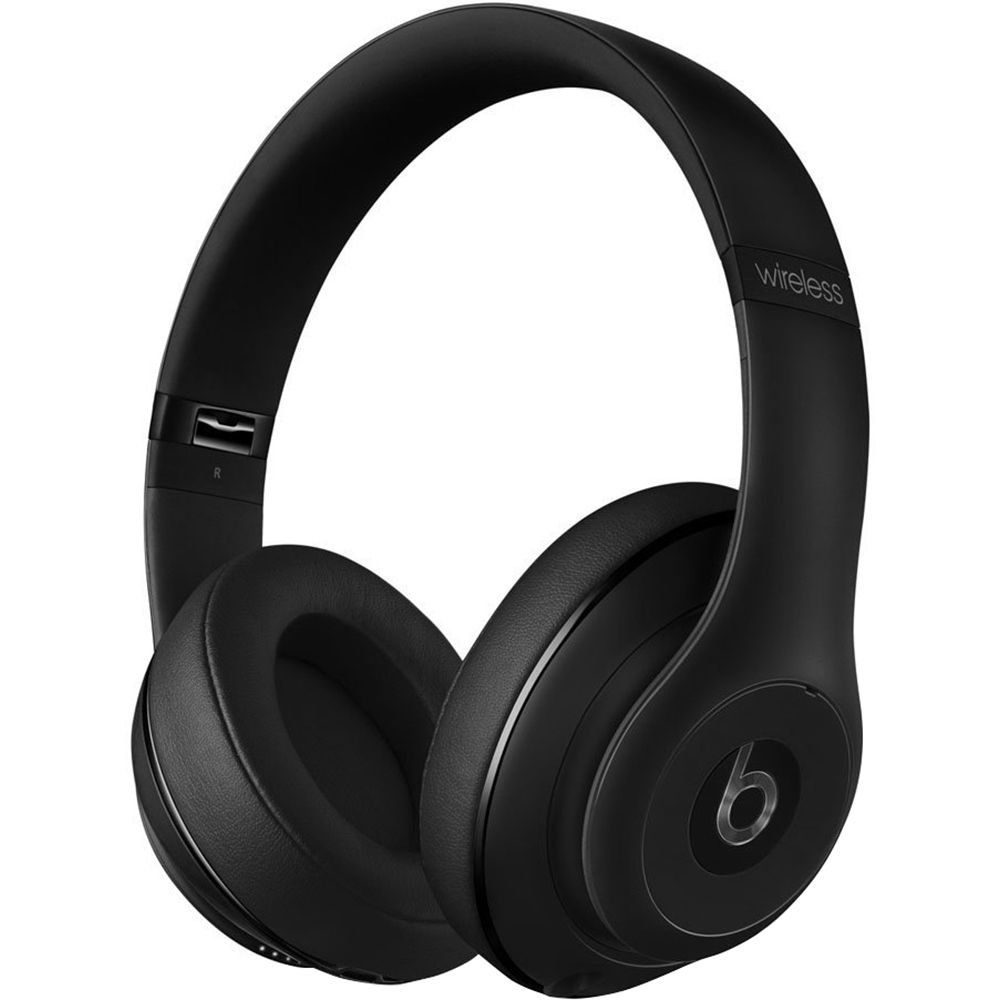
Image: Beats Studio Wireless Over-Ear Headphones in Matte Black, showcasing ለስላሳ ንድፍ.
በሣጥኑ ውስጥ ያለው
ሁሉም እቃዎች በጥቅልዎ ውስጥ መኖራቸውን ያረጋግጡ፡-
- Beats Studio Wireless over-ear headphones
- 3.5mm audio cable with RemoteTalk (for wired connection and controls)
- Standard 3.5 mm audio cable (for wired connection without RemoteTalk features)
- USB 2.0 cable (USB-A to USB Micro-B) for charging
- Hard-shell carrying case with carabiner clip

Image: The Beats Studio Wireless headphones, hard-shell carrying case, and various cables laid out from the packaging.
ማዋቀር
1. የጆሮ ማዳመጫዎችን መሙላት
Before first use, fully charge your Beats Studio Wireless headphones. A full charge provides approximately 12 hours of wireless playback or 20 hours of wired playback with Adaptive Noise Canceling enabled.
- Connect the small end of the USB 2.0 cable (USB-A to USB Micro-B) to the Micro-USB port on the right earcup of the headphones.
- Connect the larger end of the USB cable to a USB power adapter (not included) or a powered USB port on a computer.
- The Fuel Gauge LEDs on the right earcup will indicate charging status. When all five LEDs are solid white, the headphones are fully charged.
ማስታወሻ፡- The headphones cannot be used while charging.
2. የብሉቱዝ ማጣመር
Pair your headphones with your Bluetooth-enabled device for wireless audio.
- የጆሮ ማዳመጫዎችዎ ቻርጅ መደረጉን እና መብራታቸውን ያረጋግጡ።
- Press and hold the power button on the right earcup for 3-5 seconds until the Fuel Gauge LEDs begin to pulse. This indicates pairing mode.
- በመሳሪያዎ ላይ ወደ የብሉቱዝ ቅንብሮች ይሂዱ እና ብሉቱዝን ያንቁ።
- Select "Beats Studio Wireless" from the list of available devices.
- Once paired, the Fuel Gauge LEDs will turn solid white.
The headphones have a Bluetooth range of up to 30 feet (9 meters).
3. ባለገመድ ግንኙነት
For a wired connection, use the provided 3.5mm audio cables.
- Plug one end of the 3.5mm audio cable into the audio input port on the left earcup.
- ሌላኛውን ጫፍ በመሳሪያዎ 3.5ሚሜ የድምጽ ውፅዓት መሰኪያ ላይ ይሰኩት።
The RemoteTalk cable allows for inline control of music and calls when connected to compatible devices.
የአሠራር መመሪያዎች
1. ማብራት / ማጥፋት
- ለማብራት፡- Press and hold the power button on the right earcup until the Fuel Gauge LEDs illuminate.
- ለማጥፋት፡- Press and hold the power button until the Fuel Gauge LEDs turn off.
2. Controls (Wireless Mode)
The "b" button on the left earcup and the volume buttons control playback and calls.
- አጫውት/ ለአፍታ አቁም፡ Press the "b" button once.
- ቀጣይ ትራክ፡ Press the "b" button twice quickly.
- ቀዳሚ ትራክ Press the "b" button three times quickly.
- ድምጽ ጨምር Press the top volume button.
- ጥራዝ ታች Press the bottom volume button.
- መልስ/ጥሪ ጨርስ፡ Press the "b" button once during an incoming call or active call.
- ጥሪን ውድቅ አድርግ፡ Press and hold the "b" button for 2 seconds during an incoming call.
- የድምፅ ረዳት አግብር Press and hold the "b" button for 2 seconds (functionality depends on device).
3. Adaptive Noise Canceling (ANC)
The Beats Studio Wireless headphones feature Dual-Mode Adaptive Noise Canceling. ANC is automatically active when the headphones are powered on. There are two modes:
- Full ANC: Engaged when listening to music or media, providing maximum noise reduction.
- ANC Only: When the audio cable is unplugged and the headphones are powered on, ANC will automatically switch to a more aggressive mode to reduce external noise without playing audio.
ጥገና
1. ማጽዳት
የጆሮ ማዳመጫዎችዎን ገጽታ እና አፈጻጸም ለመጠበቅ፦
- የጆሮ መሸፈኛዎቹንና የራስ ማሰሪያውን ለስላሳ፣ ደረቅና ከላጣ ነፃ በሆነ ጨርቅ ይጥረጉ።
- ሻካራ ማጽጃዎችን፣ አልኮልን ወይም ኬሚካዊ ፈሳሾችን አይጠቀሙ።
- እርጥበት ወደ ማናቸውም ክፍት ቦታዎች እንዳይገባ ያድርጉ.
2. ማከማቻ
When not in use, store your headphones in the provided hard-shell carrying case to protect them from damage.
- Fold the headphones carefully to fit into the case.
- Keep headphones away from extreme temperatures and humidity.
3. የባትሪ እንክብካቤ
የባትሪ ዕድሜን ለማራዘም;
- በተደጋጋሚ ባትሪውን ሙሉ በሙሉ ከመሙላት ይቆጠቡ።
- የጆሮ ማዳመጫዎቹን ለረጅም ጊዜ ባይጠቀሙም እንኳ በመደበኛነት ቻርጅ ያድርጉ።
- በቀዝቃዛና ደረቅ ቦታ ውስጥ ያከማቹ.
መላ መፈለግ
If you encounter issues with your Beats Studio Wireless headphones, try the following solutions:
ኃይል የለም / አይበራም።
- የጆሮ ማዳመጫዎቹ ሙሉ በሙሉ መሞላቸውን ያረጋግጡ። የዩኤስቢ ገመዱን በመጠቀም ከኃይል ምንጭ ጋር ያገናኙዋቸው።
- ለማንኛውም ጉዳት የዩኤስቢ ገመድ እና የኃይል መሙያ ወደብ ያረጋግጡ።
No Sound / Intermittent Audio
- ገመድ አልባ፡
- የጆሮ ማዳመጫዎች ከመሳሪያዎ ጋር መገናኘታቸውን እና መገናኘታቸውን ያረጋግጡ።
- በሁለቱም የጆሮ ማዳመጫዎች እና በመሳሪያዎ ላይ የድምጽ ደረጃዎችን ይፈትሹ.
- Move closer to your device to avoid interference or exceeding Bluetooth range.
- የጆሮ ማዳመጫዎችን ከመሳሪያዎ ጋር ለማራገፍ እና ለማጣመር ይሞክሩ።
- ባለገመድ:
- Ensure the 3.5mm audio cable is securely plugged into both the headphones and your audio source.
- Try a different 3.5mm audio cable if available.
የማጣመር ጉዳዮች
- Ensure the headphones are in pairing mode (pulsing Fuel Gauge LEDs).
- ያጥፉ እና ከዚያ የመሣሪያዎን ብሉቱዝ ያብሩ።
- Forget "Beats Studio Wireless" from your device's Bluetooth list and attempt to pair again.
- ሌሎች የብሉቱዝ መሳሪያዎች በማጣመር ሂደቱ ውስጥ ጣልቃ እየገቡ አለመሆናቸውን ያረጋግጡ።
Adaptive Noise Canceling (ANC) Not Working
- Ensure the headphones are powered on. ANC requires power.
- Check for any obstructions around the external microphones on the earcups.
ዝርዝሮች
Key technical specifications for the Beats Studio Wireless Over-Ear Headphones:
- የሞዴል ስም፡- ስቱዲዮ
- የግንኙነት ቴክኖሎጂ; Bluetooth (Wireless), 3.5 mm Jack (Wired)
- የገመድ አልባ የግንኙነት ቴክኖሎጂ፡- ብሉቱዝ
- የብሉቱዝ ክልል: እስከ 30 ጫማ (9 ሜትር)
- የድምጽ መቆጣጠሪያ; Active Noise Cancellation (Dual-Mode Adaptive Noise Canceling)
- የባትሪ ህይወት፡ Approximately 12 hours (wireless), 20 hours (wired with ANC)
- የባትሪ ዓይነት፡ 1 የሊቲየም አዮን ባትሪ (እንደገና ሊሞላ የሚችል)
- የቁጥጥር አይነት፡ Media Control (on-earcup "b" button, volume buttons)
- ማይክሮፎን ለእጅ-ነጻ ጥሪዎች አብሮ የተሰራ
- የቅጽ ምክንያት፡ ከጆሮ በላይ
- የጆሮ አቀማመጥ; ከጆሮ በላይ
- ቁሳቁስ፡ ፕላስቲክ
- የእቃው ክብደት፡ በግምት 9.2 አውንስ (0.26 ኪሎ ግራም)
- የምርት መጠኖች: 9.6 x 7.3 x 4.5 ኢንች
- አምራች፡ ኤሌክትሮኒክስ ይመታል ፣ ኤል.ኤል.
- መጀመሪያ የሚገኝ ቀን፡- ዲሴምበር 1፣ 2013

ምስል፡ መቀራረብ view of the headphone's inner band, displaying the model number B0501.
ዋስትና እና ድጋፍ
For warranty information and customer support, please refer to the official Beats webጣቢያ ወይም በቀጥታ የደንበኛ አገልግሎታቸውን ያግኙ። ለዋስትና ጥያቄዎች የግዢ ማረጋገጫዎን ያስቀምጡ።
ማስታወሻ፡- This product is an older model. Specific warranty terms may vary based on purchase date and region. Please consult the manufacturer's official resources for the most accurate and up-to-date information.
ለተጨማሪ እርዳታ፣ ይጎብኙ፡- የድብደባ ድጋፍ