
መግቢያ
This manual provides instructions for the proper use, setup, and maintenance of your Beats by Dr. Dre In-Ear Headphones, Model OMEL-MR-PN-6694832. Please read this manual thoroughly before using the product to ensure optimal performance and longevity.
ምርት አልቋልview
The Beats by Dr. Dre In-Ear Headphones are designed for high-quality audio delivery and convenience. Key features include:
- Solid Metal Housing: Constructed with durable metal for enhanced resilience.
- Grid-Iron Tough Build: Engineered for robustness and durability.
- አብሮ የተሰራ ማይክሮፎን; Facilitates hands-free calls. Note that inline remote or microphone functionality may be limited with Apple devices.
- Tangle-Free Cables: Designed to prevent tangling for ease of use and storage.
- ቀላል እና ሊታጠፍ የሚችል ዲዛይን; Offers portability and comfort during extended wear.
- የድምጽ መቆጣጠሪያ፡- Integrated controls for easy audio adjustments.
- Android Phone Control Support: Optimized for use with Android devices.
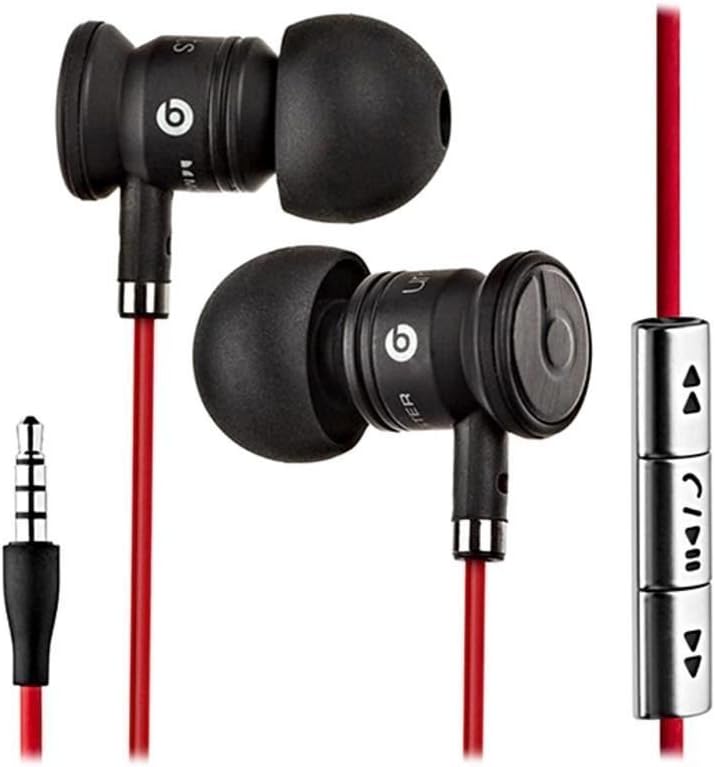
Image: The Beats by Dr. Dre In-Ear Headphones, featuring black earbuds, a red tangle-free cable, and an inline remote with control buttons.
ማዋቀር
- የጆሮ ምክሮችን ይምረጡ፡- Choose the ear tips that provide the most comfortable and secure fit for your ears. The headphones come with various sizes to ensure optimal sound isolation and comfort.

Image: The Beats by Dr. Dre In-Ear Headphones displayed with a selection of different sized ear tips and a branded carrying pouch.
- ከመሳሪያ ጋር ተገናኝ፡ Insert the 3.5mm audio jack into the headphone port of your audio device (smartphone, tablet, MP3 player, etc.).
- የጆሮ ማዳመጫዎች አቀማመጥ፡ Gently insert the earbuds into your ears, ensuring a snug fit. The cable should hang comfortably.
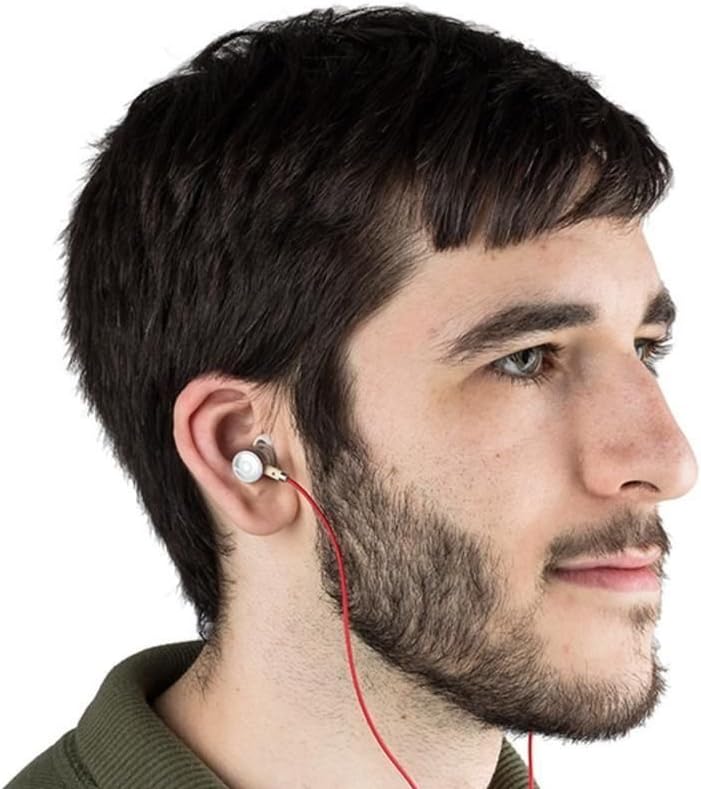
Image: A person wearing the Beats by Dr. Dre In-Ear Headphones, demonstrating proper earbud placement.
የአሠራር መመሪያዎች
የድምጽ መልሶ ማጫወት
- አጫውት/ ለአፍታ አቁም፡ Press the center button on the inline remote once.
- ቀጣይ ትራክ፡ ማዕከላዊውን ቁልፍ በፍጥነት ሁለት ጊዜ ይጫኑ ፡፡
- ቀዳሚ ትራክ ማዕከላዊውን ቁልፍ ሶስት ጊዜ በፍጥነት ይጫኑ ፡፡
- ድምጽ ጨምር Press the '+' button on the inline remote.
- ጥራዝ ታች Press the '-' button on the inline remote.
የጥሪ አስተዳደር
- መልስ/ጥሪ ጨርስ፡ በሚመጣ ጥሪ ወይም ንቁ ጥሪ ወቅት የመሃል አዝራሩን አንድ ጊዜ ይጫኑ።
- ጥሪን አለመቀበል ፦ Press and hold the center button for approximately two seconds during an incoming call.
ማስታወሻ፡- Functionality of the inline remote and microphone may be limited or vary when used with Apple devices compared to Android devices.
ጥገና
- ማጽዳት፡ Regularly wipe the earbuds and cable with a soft, dry, lint-free cloth. Do not use harsh chemicals or abrasive materials.
- የጆሮ ጫፍ እንክብካቤ; የጆሮ ምክሮችን በየጊዜው ያስወግዱ እና በትንሽ ሳሙና እና ውሃ ያጽዱ. እንደገና ከማያያዝዎ በፊት ሙሉ በሙሉ ደረቅ መሆናቸውን ያረጋግጡ.
- ማከማቻ፡ When not in use, store your headphones in the provided carrying pouch to protect them from dust, dirt, and tangling.

Image: The black carrying pouch with the Beats by Dr. Dre logo, designed for headphone storage.
- እርጥበትን ያስወግዱ; የጆሮ ማዳመጫዎችን ከውሃ እና ከመጠን በላይ እርጥበት ያርቁ.
መላ መፈለግ
- ድምጽ የለም፡
- - Ensure the 3.5mm jack is fully inserted into your device.
- - Check the volume level on both your device and using the inline remote.
- - Test the headphones with another audio device to rule out device issues.
- ማይክሮፎን አይሰራም;
- - Verify that your device's microphone settings are correctly configured.
- - Remember that microphone functionality may be limited with Apple devices.
- - Ensure the microphone is not obstructed.
- የርቀት መቆጣጠሪያ ጉዳዮች፡-
- - Confirm compatibility with your device. Full functionality is primarily supported on Android devices.
- - Ensure the connection is secure.
ዝርዝሮች
| ባህሪ | ዝርዝር |
|---|---|
| የምርት ስም | የሚመታ |
| የሞዴል ቁጥር | OMEL-MR-PN-6694832 |
| የጆሮ አቀማመጥ | በጆሮ ውስጥ |
| የቅጽ ምክንያት | በጆሮ ውስጥ |
| የግንኙነት ቴክኖሎጂ | ባለገመድ |
| የእቃው ክብደት | 0.3 አውንስ |
| የማቀፊያ ቁሳቁስ | ብረት |
| የኬብል ባህሪያት | Tangle ነፃ |
| ተጨማሪ ባህሪያት | Foldable, Lightweight, Volume Control, Android Phone Control |
| የመቆጣጠሪያ ዓይነት | የርቀት |
ይፋዊ የምርት ቪዲዮ
ቪዲዮ፡ አንድ ባለሥልጣን አብቅቷል።view of the Beats by Dr. Dre In-Ear Headphones, demonstrating key features and design elements. Note: The video narration incorrectly refers to the product as wireless; these headphones are wired as shown in the video and product images.
ዋስትና እና ድጋፍ
For warranty information and customer support, please refer to the official Beats by Dr. Dre webጣቢያ ወይም ቸርቻሪዎን ያነጋግሩ። ለዋስትና ጥያቄዎች የግዢ ማረጋገጫዎን ያስቀምጡ።
ለተጨማሪ እርዳታ፣ ን መጎብኘት ይችላሉ። የቢትስ መደብር በአማዞን ላይ.