
1. መግቢያ
This manual provides essential information for the safe and efficient operation, maintenance, and troubleshooting of your Siemens TE712501DE EQ. 7 Plus Aromasense automatic coffee machine. Please read all instructions carefully before using the appliance and keep this manual for future reference.
2. የደህንነት መመሪያዎች
በመሳሪያው ላይ የግል ጉዳት ወይም ጉዳት እንዳይደርስ ለመከላከል ሁል ጊዜ የሚከተሉትን የደህንነት ጥንቃቄዎች ይከተሉ።
- የኤሌክትሪክ ደህንነት; Ensure the appliance is connected to a properly grounded outlet. Do not immerse the appliance, cord, or plug in water or other liquids.
- ትኩስ ቦታዎች እና ፈሳሾች፡ The appliance produces hot water and steam. Exercise caution to avoid burns. Do not touch hot surfaces.
- ልጆች እና ደካማ ሰዎች; ይህንን መሳሪያ እድሜያቸው 8 እና ከዚያ በላይ ለሆኑ ህፃናት እና የአካል፣ የስሜት ህዋሳት ወይም አእምሮአዊ ችሎታዎች ወይም ልምድ እና እውቀት ማነስ ባላቸው ሰዎች መሳሪያውን በአስተማማኝ መንገድ ቁጥጥር ወይም መመሪያ ከተሰጣቸው እና የሚመለከታቸውን አደጋዎች ከተረዱ ሊጠቀሙበት ይችላሉ። .
- ጥገና፡- Unplug the appliance before cleaning or performing any maintenance. Only use original spare parts and accessories.
- ጉዳት፡ Do not operate the appliance if it has a damaged cord or plug, or if it has been dropped or damaged in any manner. Contact authorized service personnel.
3. ማዋቀር
3.1 ማሸግ እና የመጀመሪያ ጽዳት
Carefully remove all packaging materials. Clean the water tank, milk container, and drip tray with warm water and a mild detergent before first use. Rinse thoroughly.
3.2 Water Hardness Determination
Use the provided test strips to determine your water hardness. This information is crucial for proper descaling intervals and optimal machine performance. Refer to the display menu to enter the water hardness level.
3.3 የውሃ ማጠራቀሚያውን መሙላት
Remove the water tank and fill it with fresh, cold tap water up to the 'MAX' mark. Reinsert the tank securely.
3.4 የባቄላውን መያዣ መሙላት
Open the lid of the bean container and fill it with whole coffee beans. Close the lid firmly to preserve aroma.
3.5 የኃይል ግንኙነት
የኃይል ገመዱን ወደ ተስማሚ የኤሌክትሪክ ሶኬት ይሰኩ። ማሽኑ የመጀመሪያ የራስ ምርመራ ያካሂዳል።
4. የአሠራር መመሪያዎች
4.1 ማብራት/ማጥፋት
ማሽኑን ለማብራት ወይም ለማጥፋት የኃይል ቁልፉን ይጫኑ። ማሽኑ ሲጀመር እና ሲዘጋ አውቶማቲክ የማጠቢያ ዑደት ያካሂዳል።
4.2 የቡና መጠጦችን ማዘጋጀት
The EQ. 7 Plus Aromasense features a OneTouch Function for various coffee specialties.
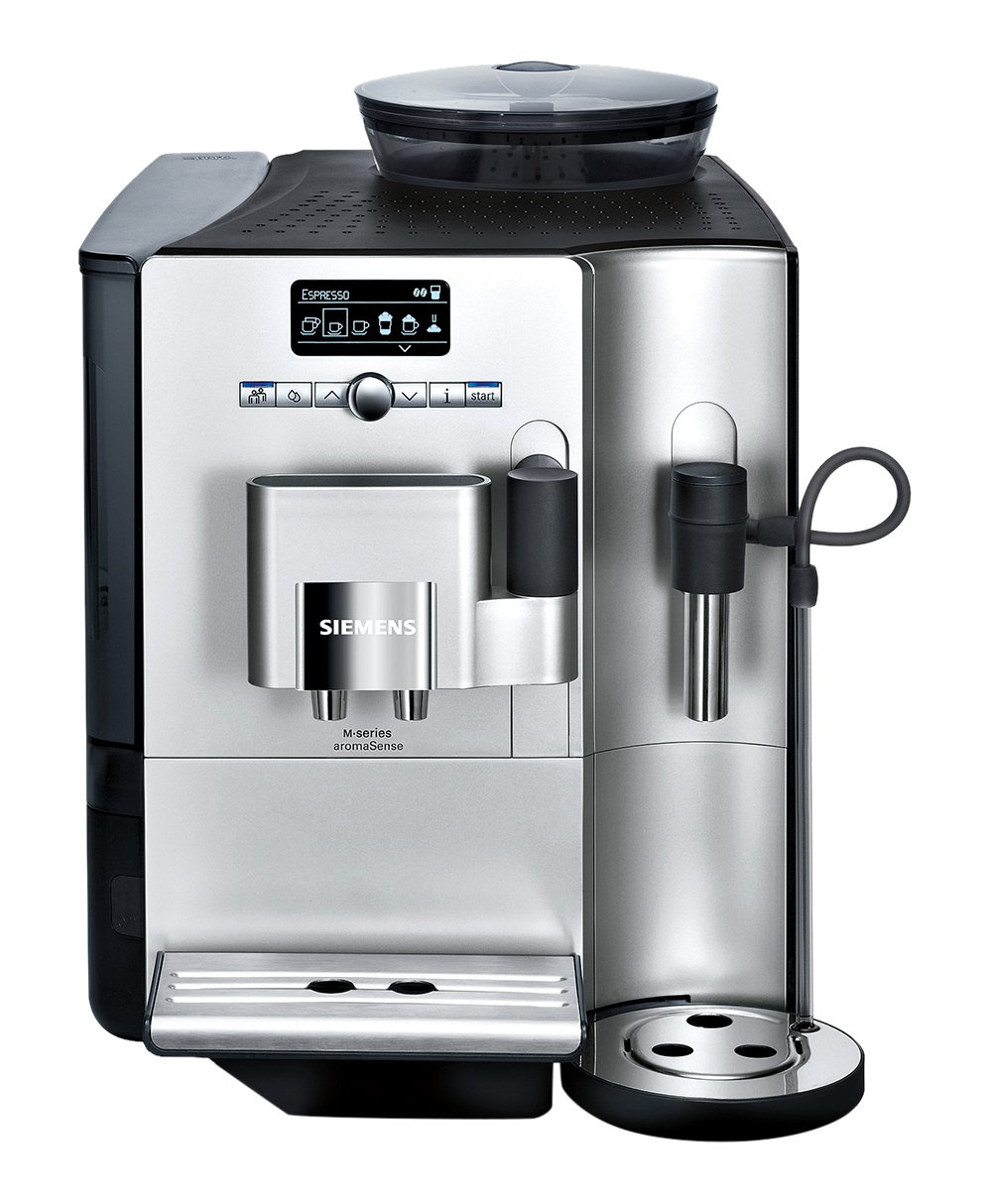
ምስል፡ The control panel showing 'ESPRESSO' selected, indicating the machine is ready to brew an espresso.
- መጠጥ ይምረጡ፡- Use the rotary selector or arrow buttons on the control panel to navigate through the available beverages (e.g., Espresso, Coffee, Cappuccino, Latte Macchiato).
- ቅንብሮችን አስተካክል (አማራጭ) For some beverages, you can adjust strength, temperature, or cup size using the menu options.
- ጠመቃ ጀምር፡ Press the start button (usually the rotary selector) to begin the brewing process.

ምስል፡ The Siemens TE712501DE machine dispensing a fresh espresso into a small white cup, showcasing the brewing process.
4.3 Aroma Double Shot
For an extra strong coffee with reduced bitterness, select the Aroma Double Shot function. This feature involves two grinding and brewing processes to extract maximum flavor.
4.4 Individual Coffee System
The machine allows you to store up to 6 user profiles with personal settings for your favorite beverages. This includes preferred strength, cup size, and milk foam quantity. Access this feature through the main menu.

ምስል፡ The control panel showing 'MACCHIATO' selected, with options to customize the drink, such as quantity or strength, for personalized brewing.
4.5 Coffee Sensor System
The intelligent grinder automatically adapts to different bean types, ensuring the optimal grinding degree and quantity for each preparation.
4.6 SensoFlow System
The HEATER Inside SensoFlow System ensures a consistent and ideal brewing temperature throughout the entire brewing process, guaranteeing maximum aroma extraction.

ምስል፡ The Siemens TE712501DE machine preparing a Latte Macchiato, showing the milk frother tube connected to a milk container and dispensing frothed milk into a glass.
5. ጥገና እና ጽዳት
ለቡና ማሽንዎ ረጅም ዕድሜ እና ጥሩ አፈፃፀም መደበኛ ጽዳት እና ጥገና አስፈላጊ ናቸው።
5.1 ዕለታዊ ጽዳት
- የሚንጠባጠብ ትሪ እና የቡና ሜዳ መያዣ፡ ባዶ ያድርጉ እና በየቀኑ ያጠቡ።
- Milk System (CreamCenter Cleaner): The integrated CreamCenter Cleaner function ensures easy and hygienic cleaning of the milk system after each use. Follow the on-screen prompts.
- የጠመቃ ክፍል የቢራ ጠመቃ ክፍሉ መወገድ እና በየሳምንቱ በሚፈስ ውሃ ስር መታጠብ አለበት።
5.2 ማቃለል
The machine will prompt you when descaling is required. Use only descaling agents recommended by Siemens. Follow the instructions provided on the display.
5.3 የጽዳት ፕሮግራም
Periodically run the automatic cleaning program as indicated by the machine's display. This ensures thorough cleaning of internal components.
6. መላ መፈለግ
If you encounter issues, consult the following table before contacting customer service:
| ችግር | ሊሆን የሚችል ምክንያት | መፍትሄ |
|---|---|---|
| ቡና አይሰጥም. | Water tank empty, beans empty, brewing unit blocked. | Fill water tank/beans. Clean brewing unit. |
| ቡና በጣም ደካማ ነው. | Grind setting too coarse, insufficient coffee quantity. | Adjust grind setting finer. Select stronger coffee strength. |
| ወተት አይፈጭም. | Milk system dirty, milk too warm/cold. | Clean milk system thoroughly. Use cold milk (approx. 5°C). |
| Machine displays 'Descaling required'. | በስርዓቱ ውስጥ የማዕድን መገንባት. | Perform the descaling program as prompted. |
7. ዝርዝሮች
- የምርት ስም፡ ሲመንስ
- ሞዴል፡ TE712501DE
- አቅም፡ 2.1 liters (water tank)
- ቀለም፡ ብር
- Important Feature: ራስ-ሰር መዝጋት
- ቁሳቁስ፡ አይዝጌ ብረት
8. ዋስትና እና ድጋፍ
Your Siemens TE712501DE coffee machine comes with a manufacturer's warranty. For detailed warranty terms and conditions, please refer to the warranty card included with your purchase or visit the official Siemens website. For technical support, spare parts, or service inquiries, please contact Siemens customer service in your region.