
መግቢያ
The Nyko Media Remote for Xbox One provides convenient control over your Xbox One console and various media applications. This remote simplifies navigation and playback of streaming content and physical media, offering dedicated buttons for common functions. It also features the ability to power your Xbox One on and off, and control basic functions of your television.

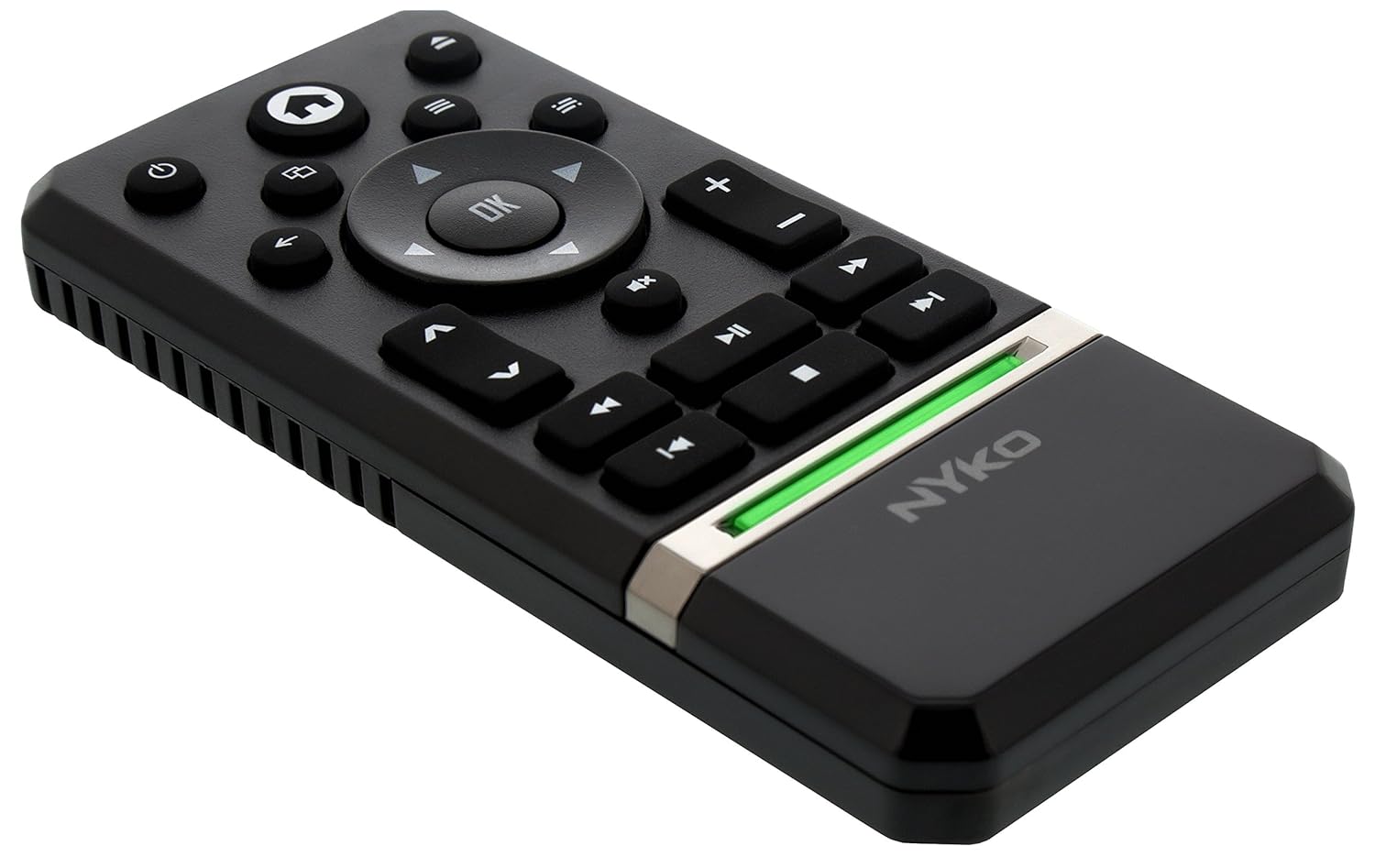
Image: Nyko Media Remote for Xbox One, front view.
የጥቅል ይዘቶች
- Nyko Media Remote for Xbox One (Model: 86116)
- ማስታወሻ፡ AAA ባትሪዎች አልተካተቱም እና ለብቻው መግዛት አለባቸው።

Image: Nyko Media Remote for Xbox One in its retail packaging.
ማዋቀር
1. የባትሪ ጭነት
- የባትሪውን ክፍል በርቀት መቆጣጠሪያው ጀርባ ላይ ያግኙት።
- ለመክፈት የባትሪውን ሽፋን ወደ ታች ያንሸራትቱ።
- ሁለት (2) የAA ባትሪዎችን ያስገቡ፣ በክፍሉ ውስጥ እንደተገለጸው ትክክለኛ የፖላራይቲ (+/-) ትክክለኛነትን ያረጋግጡ።
- የባትሪውን ሽፋን ወደ ቦታው እስኪገባ ድረስ ወደ ላይ በማንሸራተት ይተኩት።
ምስል: የኋላ view of the remote with the battery cover removed, illustrating the AAA battery placement.
2. የመጀመሪያ ግንኙነት
The Nyko Media Remote uses infrared (IR) technology. No manual pairing is required for the Xbox One. Simply ensure a clear line of sight between the remote's IR emitter and the Xbox One's IR receiver.
For TV control functions (volume, channels, power), your TV must be configured to respond to the Xbox One's IR signals, typically through the Xbox One's OneGuide settings. The remote sends commands to the Xbox One, which then relays them to your TV via its IR blaster (if configured) or Kinect sensor.
የአሠራር መመሪያዎች
The Nyko Media Remote provides comprehensive control for your Xbox One and various media applications. Refer to the diagram below for button identification and their primary functions.

ምስል፡ ፊት ለፊት view of the Nyko Media Remote, displaying all control buttons.
የአዝራር ተግባራት፡-
| አዝራር | ተግባር |
|---|---|
| የኃይል አዝራር (⏻) | Powers the Xbox One console on or off. |
| መነሻ አዝራር (⌂) | Returns to the Xbox One Home screen. |
| View አዝራር (🗀) | Accesses additional information or options within an app or game. |
| የምናሌ አዝራር (☰) | አውድ-ስሱ የሆኑ ምናሌዎችን ወይም አማራጮችን ይከፍታል። |
| የአቅጣጫ ፓድ (ዲ-ፓድ) | በምናሌዎች እና በይዘት ውስጥ ያስሱ። |
| እሺ አዝራር | Confirms selections. Can also function as Play/Pause in some apps. |
| ተመለስ አዝራር (←) | ወደ ቀዳሚው ማያ ገጽ ወይም ምናሌ ይመለሳል። |
| OneGuide Button (📱) | Launches the Xbox OneGuide for live TV and media. |
| ድምጽ ወደ ላይ/ወደታች (⏸ / ⏷) | Adjusts the television volume (requires TV setup via Xbox One). |
| ድምጸ-ከል አዝራር (🔇) | Mutes or unmutes television audio. |
| ሰርጥ ወደላይ/ወደታች (▲ / ▼) | Changes television channels (requires TV setup via Xbox One). |
| ፈጣን ወደኋላ መመለስ (⏪) | የሚዲያ መልሶ ማጫወትን ያፋጥናል። |
| ተጫወት/ ለአፍታ አቁም (⏯) | የሚዲያ መልሶ ማጫወትን ያጫውታል ወይም ለአፍታ ያቆማል። |
| ፈጣን ወደፊት (⏩) | ፈጣን የሚዲያ መልሶ ማጫወት። |
| የቀድሞ ትራክ (⏮) | ወደ አሁኑ ትራክ መጀመሪያ ወይም ወደ ቀዳሚው ትራክ ይዘላል. |
| ተወ (⏹) | የሚዲያ መልሶ ማጫወትን ያቆማል። |
| ቀጣይ ትራክ (⏭) | ወደ ቀጣዩ ትራክ ወይም ምዕራፍ ይዝለሉ። |
Media and App Control:
The remote is designed for seamless control of various Xbox One applications, including:
- OneGuide
- ኔትፍሊክስ
- ሁሉ ፕላስ
- የአማዞን ፈጣን ቪዲዮ
- Other streaming services and Blu-ray/DVD playback
Dedicated playback buttons (Play, Pause, Fast Forward, Rewind, Stop, Skip) provide intuitive control for movies, music, and other media.
ጥገና
የባትሪ መተካት፡
When the remote's performance diminishes or it stops responding, it is likely time to replace the batteries. Follow the "Battery Installation" steps in the Setup section to replace the two AAA batteries.
ማጽዳት፡
To clean the remote, gently wipe it with a soft, dry cloth. Avoid using harsh chemicals, abrasive cleaners, or excessive moisture, as these can damage the remote's finish or internal components.
መላ መፈለግ
- የርቀት ምላሽ የማይሰጥ፡
- ትኩስ የ AAA ባትሪዎች በትክክል መጫኑን ያረጋግጡ።
- Verify there is a clear line of sight between the remote and the Xbox One console. Obstructions can block the infrared signal.
- Move closer to the Xbox One console. The remote has a maximum effective range of approximately 9 meters (25 feet).
- TV Control (Volume, Channel, Power) Not Working:
- Confirm that your Xbox One's OneGuide settings are properly configured for your television. The remote sends commands to the Xbox One, which then controls the TV.
- Ensure any necessary IR blasters or Kinect sensors are correctly set up and positioned.
- Intermittent Response:
- This can sometimes occur due to weak batteries or environmental interference. Replace batteries and ensure a clear line of sight.
ዝርዝሮች
| ባህሪ | ዝርዝር |
|---|---|
| የምርት ስም | ኒኮ |
| የሞዴል ስም | የሚዲያ የርቀት መቆጣጠሪያ |
| የሞዴል ቁጥር | 86116 |
| የግንኙነት ቴክኖሎጂ | ኢንፍራሬድ (IR) |
| ተስማሚ መሣሪያዎች | Xbox One, Television (via Xbox One IR blaster/Kinect) |
| የባትሪ ዓይነት | 2 x AAA ባትሪዎች (አልተካተተም) |
| ከፍተኛው ክልል | እስከ 9 ሜትር (25 ጫማ) |
| የእቃው ክብደት | 0.1 ፓውንድ (በግምት 45 ግራም) |
| ቀለም | ጥቁር ግራጫ |
| ተጨማሪ ባህሪያት | Ergonomic design, dedicated media playback controls. |
ዋስትና እና ድጋፍ
Nyko products are designed for quality and reliability. For specific warranty details, please refer to the documentation included with your purchase or visit the official Nyko website. The product includes warranty information in multiple languages.
የደንበኛ ድጋፍ፡
- ኢሜይል፡- customer.support@nyko.com
- ስልክ፡ + 1-888-400-6956
- የመስመር ላይ ምዝገባ፡- www.nyko.com
- ተጨማሪ መረጃ፡- http://uqr.me/nykotechnologies/qr/83215

ምስል: የኋላ view of the product packaging, detailing features and customer support contact information.


