
1. ምርት አብቅቷልview
The Soundstream VR-930B is a single DIN car DVD player featuring a 9.3-inch motorized LCD touchscreen display and Bluetooth connectivity. This unit supports playback of various media types including CD, CD-R/RW, DVD, DVD-R/RW, MP3, WMA, and AAC. It includes a front USB input and a front SD card slot for expanded media options. The device also offers AM/FM radio tuning and MP3 ID3 Tag Display for track information.
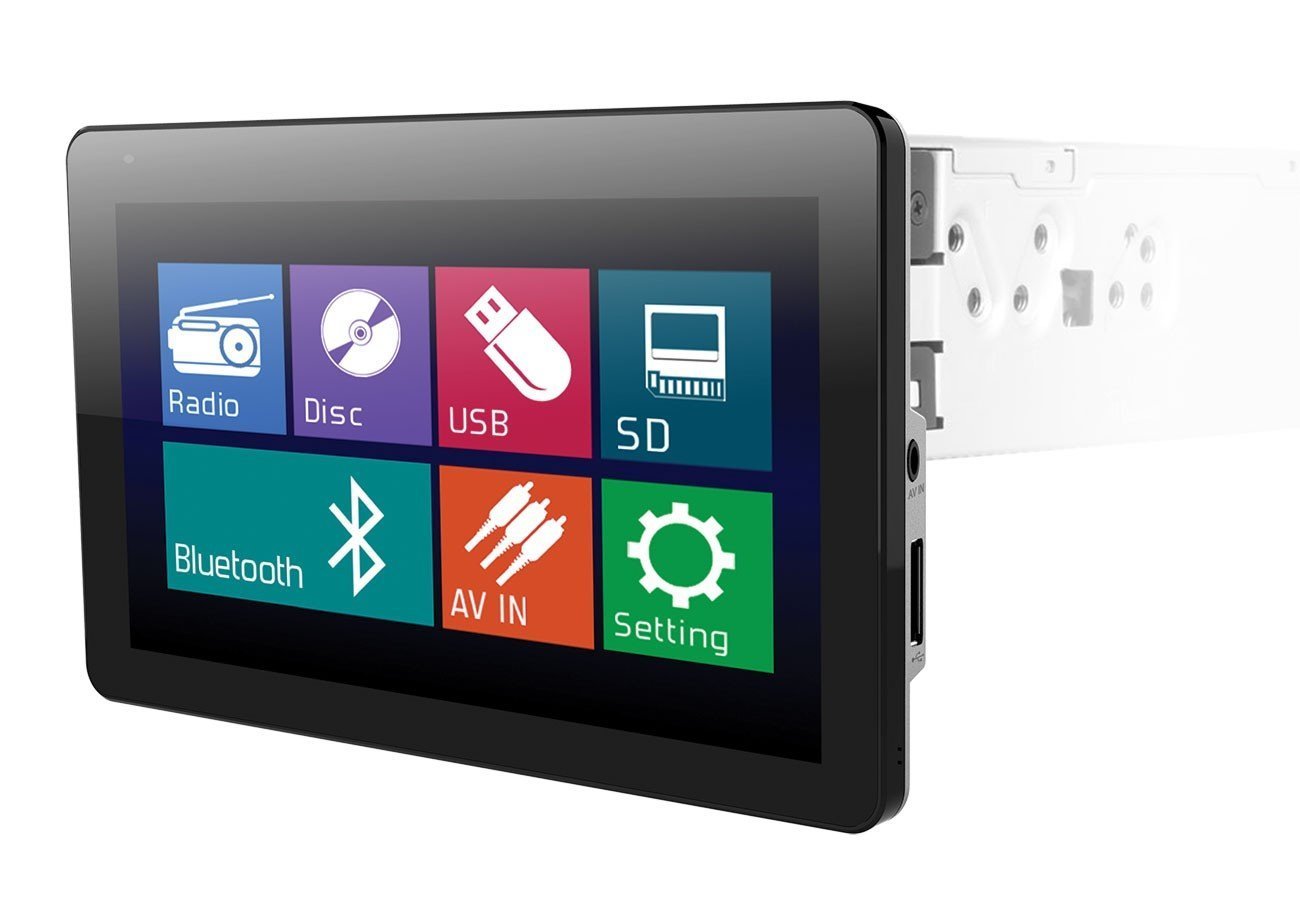
Image: The Soundstream VR-930B car DVD player, showcasing its large 9.3-inch motorized LCD touchscreen display in a vehicle dashboard.
ቁልፍ ባህሪዎች
- Single DIN chassis with a 9.3-inch motorized LCD touchscreen display.
- Bluetooth for audio streaming and hands-free calling.
- Media playback from CD, DVD, USB, and SD cards.
- AM/FM tuner with MP3 ID3 Tag ማሳያ።
- Maximum power output of 52 watts x 4 channels.
- ለደህንነት ሲባል ሊወገድ የሚችል የፊት ሰሌዳ።
- Includes a wireless remote control.
2. የደህንነት መረጃ
Read all instructions carefully before installation and operation. Failure to follow these instructions may result in damage to the unit, vehicle, or personal injury. Always ensure the vehicle is parked and the parking brake is engaged when operating features that require visual attention, such as DVD playback or extensive menu navigation. Do not operate the unit in a manner that distracts you from driving safely. Consult a professional for installation if you are unsure about any wiring or mounting procedures.
3. የጥቅል ይዘቶች
Verify that all items are present in the package before beginning installation. The typical package includes:
- Soundstream VR-930B Head Unit
- የሽቦ Harness
- ገመድ አልባ የርቀት መቆጣጠሪያ
- ሃርድዌር ማፈናጠጥ
- የተጠቃሚ መመሪያ (ይህ ሰነድ)
4. ማዋቀር
4.1 መጫን
The VR-930B is designed for single DIN dashboard openings. Professional installation is highly recommended to ensure proper wiring and functionality. Incorrect installation can lead to damage to the unit or vehicle electrical system. Ensure the vehicle's battery is disconnected before starting any installation work.
4.2 የሽቦ ዲያግራም
Refer to the detailed wiring diagram provided in the separate installation guide or on the unit's chassis for specific connections. Key connections include power (constant 12V, accessory 12V, ground), speaker outputs, antenna, parking brake sensor, and reverse gear input.
4.3 የመነሻ ኃይል በርቷል
After installation, reconnect the vehicle battery. Press the power button on the unit or remote control. The unit should power on and display the Soundstream logo. Follow any on-screen prompts for initial setup, such as language selection or clock setting.
5. የአሠራር መመሪያዎች
5.1 መሰረታዊ ቁጥጥሮች
- የኃይል ቁልፍ፡- ክፍሉን ለማብራት/ለማጥፋት ይጫኑ።
- Volume Knob/Buttons: የድምጽ ውፅዓት ደረጃን ያስተካክሉ።
- ሁነታ አዝራር፡- Cycle through available audio sources (Radio, DVD, USB, SD, Bluetooth, AUX).
- የምናሌ አዝራር፡- Access the main system settings and options.
5.2 ዲቪዲ/ሲዲ መልሶ ማጫወት
Insert a DVD or CD into the disc slot. The unit will automatically detect the disc and begin playback. Use the on-screen controls or remote control for functions such as Play, Pause, Stop, Skip Track/Chapter, and Fast Forward/Rewind. Ensure the parking brake is engaged for video playback.
5.3 የብሉቱዝ ግንኙነት
የብሉቱዝ መሣሪያን ለማጣመር፡-
- በተንቀሳቃሽ መሣሪያዎ ላይ ብሉቱዝን ያንቁ።
- On the VR-930B, select the Bluetooth source.
- ፈልግ available devices on your mobile phone. The unit's name will typically appear as "Soundstream VR-930B" or similar.
- Select the unit and enter the default PIN (usually "0000") if prompted.
Once paired, you can stream audio from your device or make/receive hands-free calls through the unit.
5.4 ዩኤስቢ/ኤስዲ ሚዲያ መልሶ ማጫወት
Insert a USB drive into the front USB port or an SD card into the front SD card slot. The unit will automatically switch to the respective source and display the media files. Navigate through folders and select files using the touchscreen or remote control. Supported formats include MP3, WMA, and AAC.
5.5 የሬዲዮ ኦፕሬሽን (AM/FM)
Select the Radio source. Use the 'Seek' or 'Tune' functions to find radio stations. You can save your favorite stations as presets for quick access. Press the 'Band' button to switch between AM and FM bands.
5.6 የንክኪ ማያ ገጽ አሠራር
The 9.3-inch LCD is a resistive touchscreen. Use light pressure with your fingertip or a stylus to interact with on-screen icons and menus. The motorized screen allows for angle adjustment to optimize viewing
6. ጥገና
6.1 ክፍሉን ማጽዳት
Wipe the unit's surface and touchscreen with a soft, dry cloth. For stubborn dirt, use a slightly damp cloth with a mild, non-abrasive cleaner. Avoid using harsh chemicals or solvents, as they can damage the finish or screen. Ensure the unit is powered off before cleaning.
6.2 የዲስክ እንክብካቤ
Handle discs by their edges to avoid fingerprints and scratches. Store discs in their cases when not in use. Clean dirty discs with a soft, lint-free cloth, wiping from the center outwards. Do not use abrasive cleaners or solvents on discs.
7. መላ መፈለግ
If you encounter issues with your VR-930B, refer to the table below for common problems and solutions.
| ችግር | ሊሆን የሚችል ምክንያት | መፍትሄ |
|---|---|---|
| ዩኒት ኃይል የለውም። | የተሳሳተ ሽቦ፤ የተነፈሰ ፊውዝ፤ የተሽከርካሪ ባትሪ ዝቅተኛ ነው። | የኃይል እና የመሬት ግንኙነቶችን ይፈትሹ። የተሽከርካሪ ፊውዞችን ይመርምሩ። ባትሪው መሙላቱን ያረጋግጡ። |
| ድምጽ የለም። | የድምጽ መጠኑ በጣም ዝቅተኛ ነው፤ ድምጸ-ከል ተደርጓል፤ የድምጽ ማጉያ ሽቦዎች ተቋርጠዋል። | Increase volume. Deactivate mute. Check speaker wiring connections. |
| Disc error. | የቆሸሸ ወይም የተቧጨረ ዲስክ፤ የማይደገፍ የዲስክ ቅርጸት። | ዲስኩን አጽዳ። የተለየ ዲስክ ሞክር። የዲስክ ቅርጸት መደገፉን አረጋግጥ። |
| ብሉቱዝ አይገናኝም። | ብሉቱዝ በመሳሪያው ላይ አልነቃም፤ ዩኒቱ በማጣመር ሁነታ ላይ አይደለም፤ ጣልቃ ገብነት። | Ensure Bluetooth is on and visible. Put unit in pairing mode. Move closer to the unit. |
| Video not playing. | Parking brake not engaged; Incorrect video format. | Ensure parking brake is fully engaged. Check video file የቅርጸት ተኳሃኝነት. |
8. ዝርዝሮች
Below are the technical specifications for the Soundstream VR-930B:
| ባህሪ | ዝርዝር መግለጫ |
|---|---|
| የሞዴል ቁጥር | ቪአር-930 ቢ |
| የማሳያ መጠን | 9.3 ኢንች |
| የማሳያ ዓይነት | Motorized LCD Touchscreen |
| የማሳያ ጥራት | 800 x 480 |
| ከፍተኛው የኃይል ውፅዓት | 52 ዋት x 4 ቻናሎች |
| የሚዲያ ዓይነቶች ይደገፋሉ | CD+RW, CD-R, MP3, DVD, DVD-R/RW, WMA, AAC |
| የግንኙነት ቴክኖሎጂ | ብሉቱዝ ፣ ዩኤስቢ |
| የኃይል ምንጭ | 12 ቪ |
| የምርት ክብደት | 2.8 ፓውንድ £ |
| GTIN / UPC | 709483047792 |
9. የዋስትና መረጃ
የሳውንድስትሪም ምርቶች ከፍተኛ ጥራት ባላቸው ደረጃዎች የተነደፉ እና የተመረቱ ናቸው። ይህ ምርት በቁሳቁሶች እና በስራ ጉድለቶች ላይ በተወሰነ ዋስትና የተሸፈነ ነው። የዋስትናው ጊዜ እና የአገልግሎት ውል እንደ ክልል እና ቸርቻሪ ሊለያይ ይችላል። እባክዎን የዋስትና ጥያቄዎችን ለማግኘት የግዢ ማረጋገጫዎን ያስቀምጡ። ለተወሰኑ የዋስትና ዝርዝሮች፣ ከምርትዎ ጋር የተካተተውን የዋስትና ካርድ ይመልከቱ ወይም የሳውንድስትሪም የደንበኛ ድጋፍን ያነጋግሩ።
10. የደንበኛ ድጋፍ
ለቴክኒካል ድጋፍ፣ ከዚህ ማኑዋል በላይ መላ መፈለግ፣ ወይም የዋስትና ጥያቄዎች፣ እባክዎ የSoundstream ደንበኛ ድጋፍን ያግኙ። ኦፊሴላዊውን Soundstream ይጎብኙ website for contact information, FAQs, and additional resources. When contacting support, please have your product model number (VR-930B) and proof of purchase readily available.


