
1. መግቢያ
The Cellet Portable Bluetooth Wireless Keyboard BKP200 offers a convenient and functional solution for typing on the go. Its foldable design and QWERTY layout with low-profile keys provide an efficient typing experience. The built-in rechargeable lithium battery ensures extended use, making it ideal for smartphones, tablets, laptops, and other Bluetooth-enabled devices.
በሣጥኑ ውስጥ ያለው
- Wireless foldable keyboard
- Keyboard case (doubles as a phone holder stand)
- የማይክሮ ዩኤስቢ ባትሪ መሙያ ገመድ
- የተጠቃሚ መመሪያ

Image: The Cellet Portable Bluetooth Wireless Keyboard, shown unfolded, alongside its protective case which functions as a phone/tablet stand, and a micro USB charging cable.
2. ጠቃሚ የደህንነት መመሪያዎች
Before using this product, please read all instructions carefully and retain them for future reference. Adherence to these guidelines ensures safe operation and prevents damage.
- This product may be used by children and individuals with physical, sensory, or mental disabilities, or those lacking experience and knowledge, provided they receive proper supervision or instruction regarding safe use and understanding of associated hazards.
- ጽዳት እና ጥገና ያለ ቁጥጥር በልጆች መከናወን የለበትም.
- ልጆች ከመሳሪያው ጋር እንደማይጫወቱ ለማረጋገጥ ክትትል ሊደረግባቸው ይገባል.
- ምርቱን ለታቀደለት ዓላማ ብቻ ይጠቀሙ.
- For indoor use only. Do not expose the product to water, excessive moisture, or snow.
- Do not place the product in or near flammable, explosive, or hazardous objects.
- ምርቱን በተበላሸ ገመድ ወይም መሰኪያ አይጠቀሙ.
- በምንም መልኩ ተጎድቶ ከሆነ ምርቱን አይጠቀሙ።
- ምርቱን አይበታተኑ. መበታተን የደህንነት አደጋዎችን ሊያስከትል ይችላል.
- Avoid throwing or shaking the product.
3. ማዋቀር
የመነሻ ኃይል መሙላት
Before first use, fully charge the keyboard for approximately 1.5 to 2 hours using the provided Micro USB charging cable. The charging indicator light will glow red during charging and turn off once fully charged. If the battery is low, the Bluetooth status light will flash.
የብሉቱዝ ማጣመር ደረጃዎች
- ደረጃ 1፡ Unfold the keyboard. The Bluetooth status indicator light will illuminate for 3 seconds and then turn off.
- ደረጃ 2፡ የሚለውን ይጫኑ Fn + ሲ buttons simultaneously. The Bluetooth indicator light will begin blinking, indicating it is in pairing mode.
- ደረጃ 3፡ On your device (smartphone, tablet, etc.), activate Bluetooth and search for available devices. Select "Cellet BKP200 Keyboard" from the list to connect.
- ደረጃ 4፡ Once successfully connected, the Bluetooth indicator light on the keyboard will turn off.

Image: The Cellet foldable keyboard displayed with a tablet and smartphone, illustrating its universal compatibility.
4. የአሠራር መመሪያዎች
የስርዓተ ክወና ምርጫ
To optimize keyboard functionality for your device, select the correct operating system:
- For Android devices: Press and hold Fn + ጥ.
- For Windows devices: Press and hold Fn + W.
- For iOS devices: Press and hold Fn + ኢ.
አቋራጭ ቁልፍ ተግባራት
To use the shortcut keys, press and hold the Fn key while simultaneously pressing the desired shortcut key.
| ተግባር | ቁልፍ ጥምረት | ማስታወሻዎች |
|---|---|---|
| የቀድሞ ትራክ | fn+1 | |
| የድምጽ መጠን መቀነስ | fn+2 | |
| የድምጽ መጠን መጨመር | fn+3 | |
| ተጫወት/ ለአፍታ አቁም | fn+4 | |
| ቋንቋ መቀየር | fn+5 | |
| ፍለጋ | fn+6 | |
| ቅዳ | fn+7 | |
| ቁረጥ | fn+8 | |
| ሁሉንም ይምረጡ | fn+9 |
System-Specific Functions:
| አንድሮይድ ሲስተምስ | ተግባር |
|---|---|
| PgUp | የመጨረሻ ገጽ |
| ፒጂዲኤን | ቀጣይ ገጽ |
| iOS Systems | ተግባር |
|---|---|
| ቤት | ቤት |
| PgUp | Cursor to the top |
| ፒጂዲኤን | Cursor to the bottom |
| የዊንዶውስ ሲስተምስ | ተግባር |
|---|---|
| Web አሳሽ | ክፈት web አሳሽ |
| ESC | ማምለጥ |
| PgUp | የመጨረሻ ገጽ |
| ፒጂዲኤን | ቀጣይ ገጽ |

Image: The keyboard case is shown transforming into a stand, holding both a smartphone and a tablet in landscape orientation for convenient viewእየተየቡ እያለ።
5. ጥገና
Proper care and maintenance will extend the life of your Cellet keyboard.
- የቁልፍ ሰሌዳውን ለስላሳ ጨርቅ ያጽዱ መampበውሃ ወይም በአልኮል መጠጥ።
- የቁልፍ ሰሌዳውን ከሹል ነገሮች ያርቁ።
- በቁልፍ ሰሌዳው ላይ ከባድ ዕቃዎችን አታስቀምጡ.
- Do not microwave the keyboard.
- የቁልፍ ሰሌዳውን አያስገድዱ ወይም አያዛቡ.
- Keep away from any oil, chemicals, or other organic liquids.
6. መላ መፈለግ
If you encounter issues with your keyboard, consider the following:
- የቁልፍ ሰሌዳ አልተጣመረም፦ Ensure the keyboard is fully charged and in pairing mode (Bluetooth indicator blinking). Check your device's Bluetooth settings to ensure it's discoverable and try re-scanning for devices.
- ምላሽ የማይሰጡ ቁልፎች፡- Verify the keyboard is connected to your device. If connected, try restarting both the keyboard and your device. Ensure no debris is lodged under the keys.
- የማያቋርጥ ግንኙነት; Ensure the keyboard is within the 10-meter operating range of your device and there are no significant obstructions. Other wireless devices might cause interference.
- የተተየቡ የተሳሳቱ ቁምፊዎች፡ Confirm that you have selected the correct operating system for your device (Fn + Q for Android, Fn + W for Windows, Fn + E for iOS).
- ባትሪ እየሞላ አይደለም Check the Micro USB cable and charging port for damage. Try using a different charging cable or power source.
If problems persist, refer to the Cellet support webለተጨማሪ እርዳታ ጣቢያ ወይም የደንበኛ አገልግሎትን ያነጋግሩ።
7. ዝርዝሮች
Detailed technical specifications for the Cellet BKP200 Portable Bluetooth Wireless Keyboard:
| ባህሪ | ዝርዝር መግለጫ |
|---|---|
| የብሉቱዝ ስሪት | 5.1 |
| በይነገጽ | USB-C (for charging) |
| የክወና ርቀት | እስከ 10 ሜትር |
| የማሻሻያ ስርዓት | GFSK |
| ኦፕሬቲንግ ቁtage | 3.0-4.2 ቪ |
| የአሁኑን ስራ | <3.0mA |
| ተጠባባቂ ወቅታዊ | <0.3mA |
| እንቅልፍ አሁን | <0.1mA |
| የአሁኑን ኃይል መሙላት | <200mA |
| የመጠባበቂያ ጊዜ | ወደ 100 ቀናት አካባቢ |
| ክፍያ ጊዜ | <2 ሰአት |
| የሊቲየም ባትሪ አቅም | 110mAh |
| ያልተቋረጠ የስራ ጊዜ | > 40 ሰዓታት |
| ሊቲየም የባትሪ ህይወት | 3 አመት |
| Lithium Battery Dimensions | 30 x 15 x 23 ሚሜ |
| Key Force | 50-80 ግ |
| ቁልፍ ህይወት | 3 ሚሊዮን ምት |
| የሥራ ሙቀት | -10 እስከ +55 ℃ |
| የእቃው ክብደት | 7.5 አውንስ |
| የምርት ልኬቶች (የታጠፈ) | 5.75 x 3.5 x 0.75 ኢንች |
| የምርት መጠኖች (ተከፍተዋል) | 11.5 x 3.3 x 0.27 inches (approximate, derived from image) |
| ቀለም | ጥቁር |
| ተስማሚ ስርዓተ ክወናዎች | አንድሮይድ፣ አይኦኤስ፣ ዊንዶውስ |
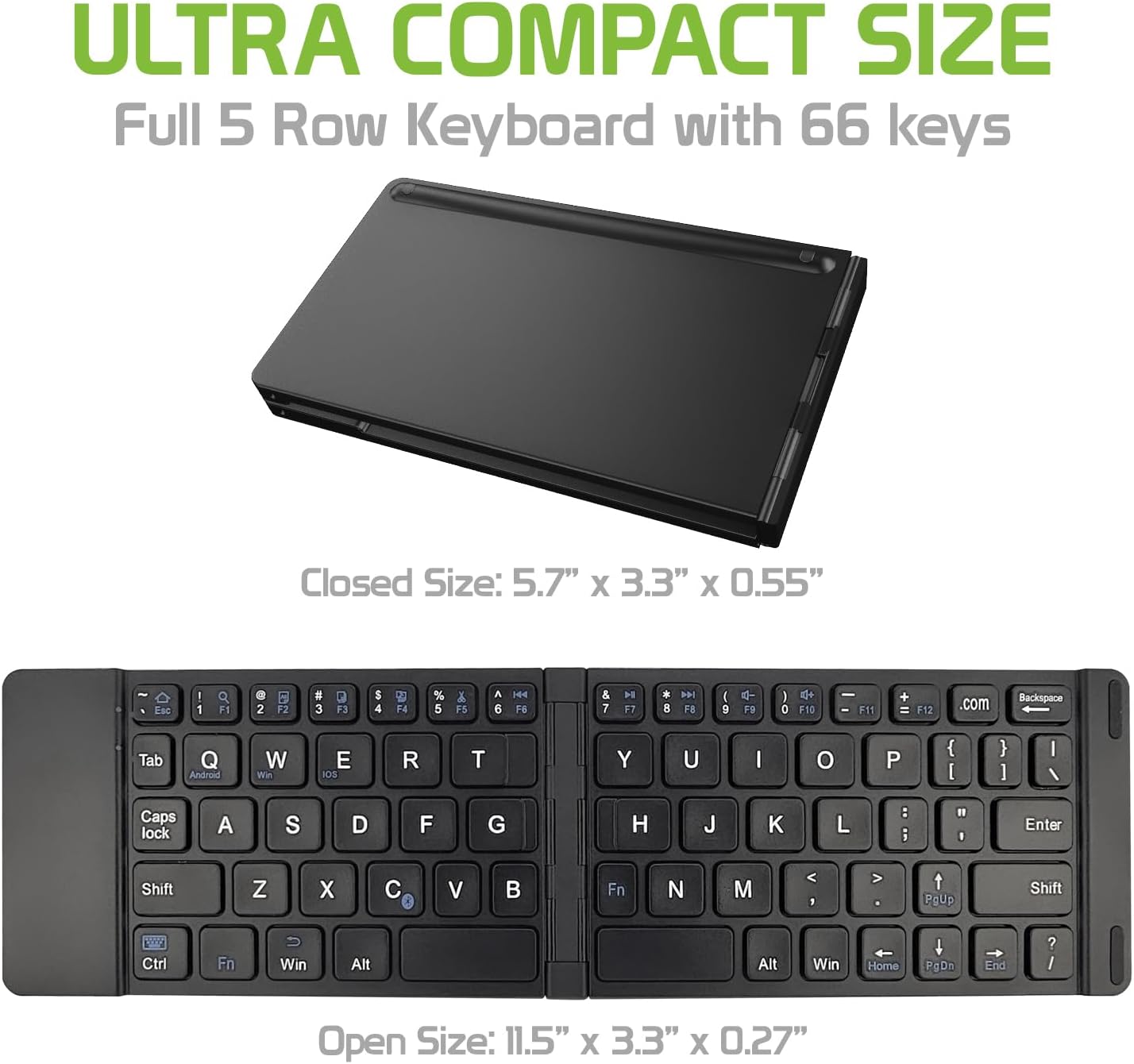
Image: The Cellet keyboard in both its closed, compact state and its unfolded, full-size state, with dimensions indicating its portability and functional size.
8. ዋስትና እና ድጋፍ
For warranty information or technical support, please visit the official Cellet webጣቢያ ወይም የደንበኞች አገልግሎት ክፍልን ያነጋግሩ። ለዋስትና ጥያቄዎች የግዢ ደረሰኝዎን ያስቀምጡ።
ለአካባቢ ተስማሚ መጣል
To dispose of the product responsibly, follow these guidelines:
- Carefully pry up the plastic top to remove it completely. This action will likely render the keyboard unusable.
- Turn the top over and remove any tape securing the battery.
- Separate the battery from the circuit board.
- Dispose of the battery according to local regulations and laws. Recycle remaining keyboard parts where possible.