
መግቢያ
This manual provides comprehensive instructions for the setup, operation, maintenance, and troubleshooting of your Proscan CRK83X PSVR82 TV Remote Control. This remote is designed to work seamlessly with various Proscan TV and VCR models, offering a direct replacement or compatible control solution.
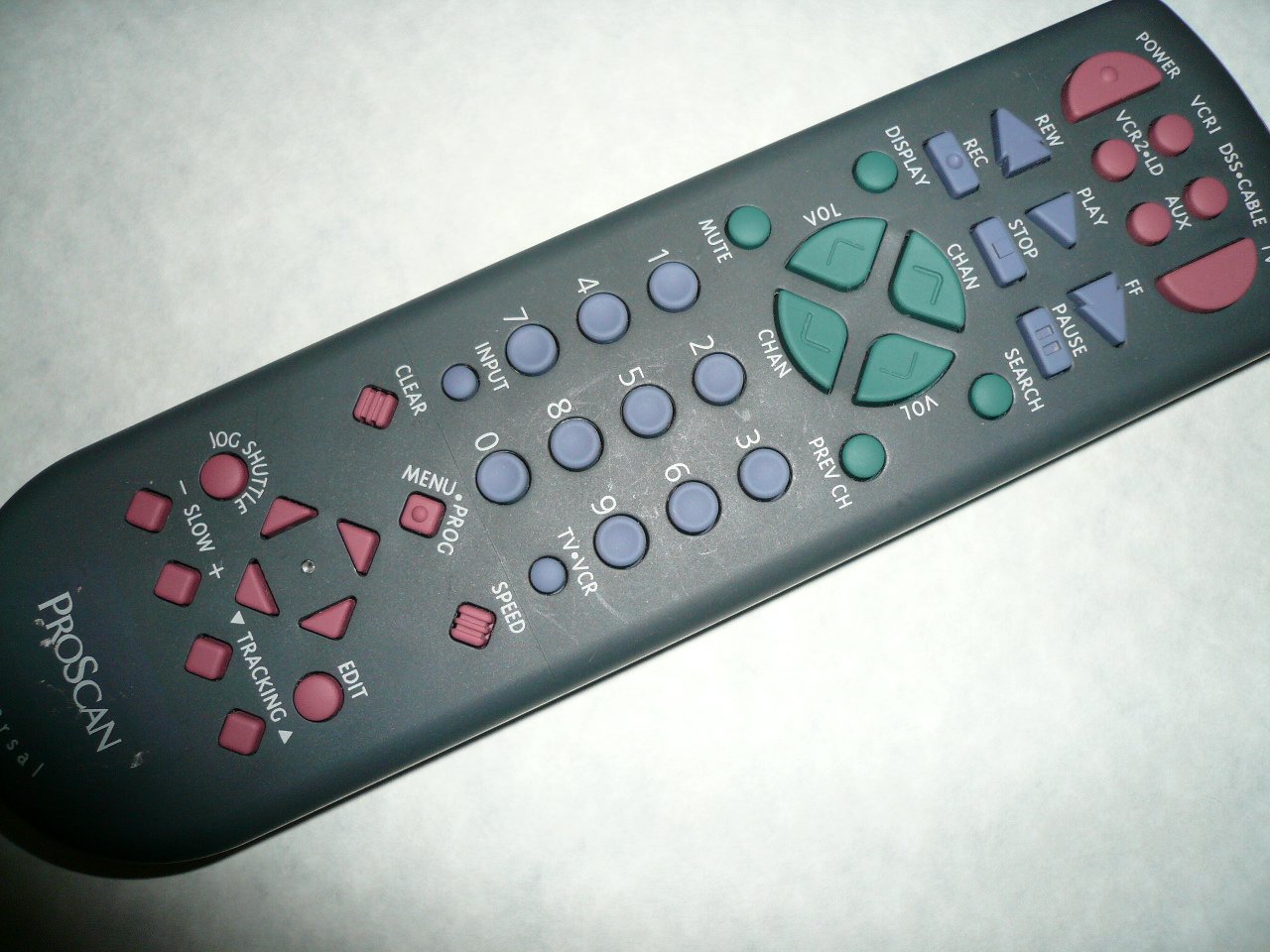
An image showing the Proscan CRK83X PSVR82 TV Remote Control, highlighting its ergonomic design and button layout. The remote is dark gray with purple and teal buttons, clearly labeled for various functions.
ማዋቀር
1. የባትሪ ጭነት
- የባትሪውን ክፍል ከርቀት መቆጣጠሪያው ጀርባ ላይ ያግኙት።
- ሽፋኑን ወደ ታች ያንሸራትቱ ወይም ለመክፈት መከለያውን ይጫኑ.
- ሁለት (2) የAA ባትሪዎችን (ያልተካተተ) ያስገቡ፣ አወንታዊ (+) እና አሉታዊ (-) ተርሚናሎች በክፍሉ ውስጥ ካሉት ምልክቶች ጋር በትክክል እንዲጣጣሙ ያረጋግጡ።
- ደህንነቱ በተጠበቀ ሁኔታ ጠቅ እስኪያደርግ ድረስ የባትሪውን ክፍል ሽፋን ወደ ቦታው በማንሸራተት ይተኩ።
2. የመጀመሪያ አጠቃቀም
The Proscan CRK83X PSVR82 remote control is typically pre-programmed for compatible Proscan TV and VCR models. No complex programming steps are usually required for initial use with supported devices. Simply point the remote at your device and press the desired function button.
This remote is compatible with a wide range of models, including but not limited to: P5VR74, PAVR57, PCVR72, PRVR71, PSDR72, PSDR73, PSNKVSR72, PSNPSVR57, PSNPSVR65, PSNPSVR70, PSNPSVR71, PSNPSVR72, PSNPSVR73, PSNPSVR74, PSNPSVRR73, PSNR65, PSNVR74, PSRV65, PSRV71, PSRV72, PSRV74, PSRVR65, PSRVR71, PSUR70, PSUR72, PSV174, PSV65, PSV71, PSV72, PSVDR73, PSVER72, PSVH57, PSVP71, PSVR22, PSVR27, PSVR57, PSVR61, PSVR62, PSVR65, PSVR72L, PSVR72VCR, PSVR75, PSVR79, PSVR83, PSVT73, PSVV73, PSZR65, PSZR71, PSZR73, PVSR73, R65, RCU800, RSVR73, SPVR65, SSVR62, VR653HF, VR730, VR730HF.
የአሠራር መመሪያዎች
Familiarize yourself with the buttons and their functions for optimal control of your television and VCR.
| የአዝራር ስም | ተግባር |
|---|---|
| ኃይል | Turns the connected device (TV/VCR) on or off. |
| VCR1, DSS/CABLE, VCR2/LD, AUX | Selects the input source for the television or VCR. |
| ሙት | የድምጽ ውፅዓት ድምጸ-ከል ያደርገዋል ወይም ያጠፋል። |
| ቮልት +/- | የድምጽ ደረጃውን ወደ ላይ ወይም ወደ ታች ያስተካክላል. |
| ቻን +/- | ቻናሉን ወደላይ ወይም ወደ ታች ይለውጠዋል። |
| PREV CH | ወደ ቀድሞው ይቀየራል። viewኤድ ሰርጥ። |
| አሳይ | Displays on-screen information such as channel number or time. |
| REC | Initiates recording on the VCR. |
| REW | Rewinds the tape during VCR playback. |
| ተጫወት | Starts playback of a tape or disc. |
| FF | Fast forwards the tape during VCR playback. |
| ተወ | መልሶ ማጫወት ወይም መቅዳት ያቆማል። |
| ለአፍታ አቁም | Pauses playback or recording. |
| ፈልግ | Activates search function, typically for VCR content. |
| የቁጥር ፓድ (0-9) | የሰርጥ ቁጥሮችን ወይም የምናሌ ምርጫዎችን በቀጥታ ያስገባል። |
| ግቤት | በሚገኙ የግቤት ምንጮች ዑደቶች። |
| አጽዳ | Clears entered numbers or menu selections. |
| MENU / PROG | Accesses the on-screen menu or programming functions. |
| ቲቪ-ቪሲአር | Toggles control between TV and VCR modes. |
| ጆግ ሹትል | Provides frame-by-frame or variable speed control for VCR playback. |
| ቀስ ብሎ +/- | Adjusts slow-motion speed during VCR playback. |
| ፍጥነት | Adjusts playback speed, typically for VCR. |
| TRACKING ▲/▼ | Adjusts the VCR tracking for optimal picture quality. |
| አርትዕ | Activates editing functions, typically for VCR. |
ጥገና
የርቀት መቆጣጠሪያውን ማጽዳት
- የርቀት መቆጣጠሪያውን ለስላሳ እና ደረቅ ጨርቅ ይጥረጉ።
- ለግትር ቆሻሻ፣ በትንሹ መampጨርቁን በውሃ ወይም መለስተኛ ፣ የማይበላሽ ማጽጃ። ማጽጃውን በቀጥታ ወደ የርቀት መቆጣጠሪያው አይረጩ።
- ኃይለኛ ኬሚካሎችን፣ ሟሟቶችን ወይም ሻካራ የጽዳት ፓዶችን ከመጠቀም ይቆጠቡ፤ ምክንያቱም እነዚህ ፓዶች የርቀት መቆጣጠሪያውን ገጽ ወይም የውስጥ ክፍሎችን ሊጎዱ ይችላሉ።
የባትሪ መተካት
Replace batteries when the remote's response becomes sluggish or it stops functioning. Refer to the "Battery Installation" section under Setup for detailed instructions.
ያገለገሉ ባትሪዎችን ሁልጊዜ በአካባቢው ደንቦች መሠረት በኃላፊነት ይጣሉ።
መላ መፈለግ
| ችግር | ሊሆን የሚችል ምክንያት / መፍትሄ |
|---|---|
| የርቀት መቆጣጠሪያ አይሰራም። |
|
| የርቀት መቆጣጠሪያ ያለማቋረጥ ይሰራል። |
|
| የተወሰኑ አዝራሮች ምላሽ አይሰጡም። |
|
ዝርዝሮች
- የምርት ስም፡ ፕሮስካን
- ሞዴል፡ CRK83X PSVR82
- አምራች፡ ፕሮስካን
- ተስማሚ መሣሪያዎች Television (and various Proscan VCR models as listed in Setup section)
- የግንኙነት ቴክኖሎጂ; ኢንፍራሬድ
- የመቆጣጠሪያ ዓይነት: የአዝራር መቆጣጠሪያ
- ልዩ ባህሪ፡ Ergonomic ንድፍ
- ASIN: B00P82T2LS
- መጀመሪያ የሚገኝ ቀን፡- ህዳር 4፣ 2014
ዋስትና እና ድጋፍ
Specific warranty information for the Proscan CRK83X PSVR82 TV Remote Control is not provided in this manual. Please refer to the product packaging or contact your retailer for details regarding warranty coverage.
For further assistance or technical support, please contact the manufacturer or your point of purchase. No specific support contact details are available in this document.