
COTEK SP-1000-224
Cotek SP-1000-224 Pure Sine Wave Inverter User Manual
Model: SP-1000-224 | Brand: COTEK
1. መግቢያ
This manual provides detailed instructions for the installation, operation, and maintenance of the Cotek SP-1000-224 Pure Sine Wave Inverter. This inverter is designed to convert 24VDC power to 230VAC, providing a stable and reliable power source for various applications.
ቁልፍ ባህሪዎች
- ለስሱ ኤሌክትሮኒክስ ንፁህ የሲን ሞገድ ውፅዓት።
- Power ON / OFF remote control capability (Green Terminal).
- Input & output fully isolated for enhanced safety.
- Temperature & load controlled cooling fan for optimal performance.
- ለተጠቃሚ ምቹ በይነገጽ።
- Output frequency (50/60 Hz) selectable via DIP switch.
- የውጤት ጥራዝtage selectable via DIP switch.
- Power saving mode adjustable via variable resistor.
- 3-color LED status indicators for easy monitoring.
- Comprehensive input protection: Reverse Polarity (Fuse), Under Voltagሠ ፣ በላይ ጥራዝtage.
- Robust output protection: Short Circuit, Overload, Over Temperature.
- Type 1 Indoor Aluminum Enclosure.
- E13 / UL / CE / FCC approved.
2. የደህንነት መረጃ
WARNING: Please read and understand all safety instructions before installing or operating this inverter. Failure to follow these instructions may result in electric shock, fire, serious injury, or death.
- የኤሌክትሪክ አደጋ; This unit produces high voltage. Do not open the inverter casinሰ. ሁሉንም አገልግሎቶች ብቁ ለሆኑ ባለሙያዎች ያመልክቱ።
- የባትሪ ደህንነት፡ Work in a well-ventilated area. Batteries can produce explosive gases. Do not smoke or allow sparks or flames near the battery.
- ትክክለኛ የአየር ማናፈሻ; በኢንቨርተሩ ዙሪያ በቂ የአየር ዝውውር መኖሩን ያረጋግጡ። የአየር ማናፈሻ ክፍተቶችን አይዘጉ።
- የአካባቢ ሁኔታዎች; Do not expose the inverter to rain, moisture, or excessive dust. Operate in a dry, cool environment.
- መሬት ላይ The inverter must be properly grounded. Follow all local and national electrical codes.
- የመጫን አቅም፡ Do not exceed the inverter's rated power output. Overloading can cause damage to the inverter and connected devices.
- የካሊፎርኒያ ሃሳብ 65 ማስጠንቀቂያ፡- ይህ ምርት በካሊፎርኒያ ፕሮፖዚሽን 65 የተጠበቁ ቁሳቁሶችን ሊይዝ ይችላል።
3. ምርት አብቅቷልview እና አካላት
Familiarize yourself with the various parts of your Cotek SP-1000-224 Pure Sine Wave Inverter.

ምስል 3.1፡ አንግል view of the Cotek SP-1000-224 Pure Sine Wave Inverter, showing its blue aluminum casing and grey end caps with ventilation and connection ports.

ምስል 3.2፡ Front panel of the inverter, featuring the AC output socket (Schuko type), a power switch, LED indicators, and DIP switches for configuration.

ምስል 3.3፡ Rear panel of the inverter, showing the DC input terminals for battery connection, a remote control port (RJ45), and a green terminal block for remote ON/OFF control.

ምስል 3.4፡ ጎን view of the inverter, highlighting its robust blue aluminum heat sink casing designed for efficient heat dissipation.
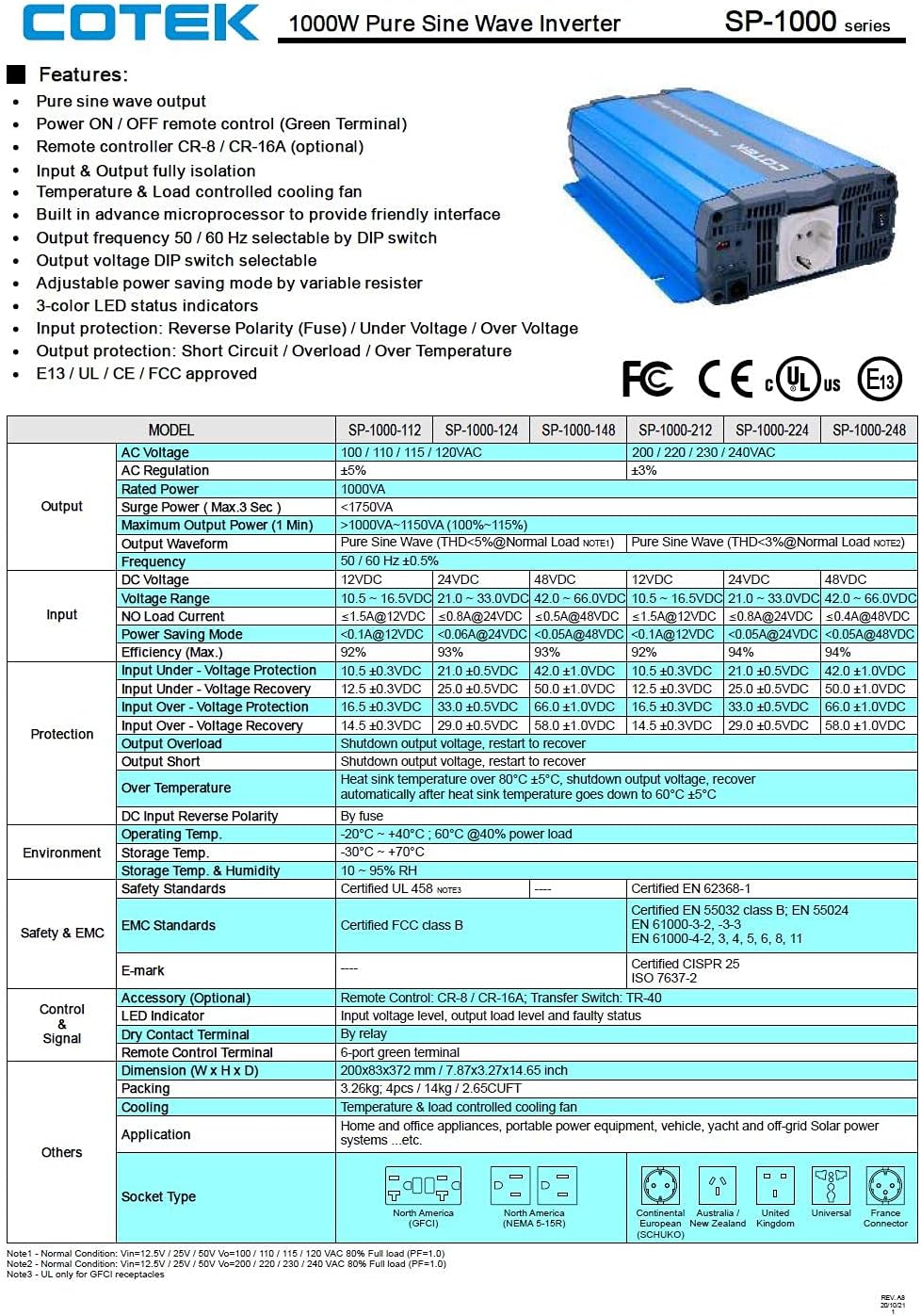
ምስል 3.5፡ A detailed table outlining the features and technical specifications of the Cotek SP-1000 series inverters, including input/output parameters, protections, and certifications.

ምስል 3.6፡ Mechanical drawings providing dimensions of the inverter, along with power voltage and power temperature curves illustrating performance characteristics.
4. ማዋቀር እና መጫን
4.1 ቦታ መምረጥ፡
- ኢንቬንተሩን በደረቅ፣ ቀዝቃዛና በደንብ አየር በሚተነፍስበት ቦታ ውስጥ ይጫኑት።
- ቀጥተኛ የፀሐይ ብርሃንን፣ የሙቀት ምንጮችን እና እርጥበትን ያስወግዱ።
- Ensure sufficient clearance around the inverter for proper airflow, especially around the cooling fan and ventilation openings.
- Mount the inverter securely on a stable, non-combustible surface.
4.2 DC Input Connection:
- የኢንቨርተሩ የኃይል ማብሪያ / ማጥፊያ በOFF ቦታ ላይ መሆኑን ያረጋግጡ።
- Connect the positive (+) terminal of the 24VDC battery bank to the positive (+) DC input terminal on the inverter.
- Connect the negative (-) terminal of the 24VDC battery bank to the negative (-) DC input terminal on the inverter.
- Use appropriately sized cables to minimize voltage drop and ensure safe operation. Refer to electrical standards for cable sizing.
- ሁሉም ግንኙነቶች ጥብቅ እና አስተማማኝ መሆናቸውን ያረጋግጡ።
4.3 AC Output Connection:
- Plug your AC appliances directly into the AC output socket on the inverter.
- Ensure the total power consumption of all connected appliances does not exceed the inverter's 1000W continuous output rating.
4.4 የመሬት አቀማመጥ;
Proper grounding is essential for safety. Connect the inverter's chassis ground terminal to a reliable earth ground using a suitable grounding wire. Consult local electrical codes for specific grounding requirements.
4.5 Remote Control (Optional):
The inverter supports remote ON/OFF control via the green terminal block or an optional RJ45 remote control unit. Refer to the accessory manual for detailed instructions on connecting and using the remote control.
4.6 DIP Switch Configuration:
The inverter features DIP switches on the front panel to select output frequency (50/60 Hz) and output voltage. Refer to the table below for common settings. Ensure the inverter is OFF before changing DIP switch settings.
| በማቀናበር ላይ | DIP የመቀየሪያ አቀማመጥ |
|---|---|
| የውጤት ድግግሞሽ 50Hz | Switch 1: OFF, Switch 2: OFF (Example, refer to actual product manual/Figure 3.5) |
| የውጤት ድግግሞሽ 60Hz | Switch 1: ON, Switch 2: OFF (Example, refer to actual product manual/Figure 3.5) |
| የውጤት ቁtagሠ 230 ቪኤሲ | Switch 3: ON, Switch 4: OFF (Example, refer to actual product manual/Figure 3.5) |
Note: The exact DIP switch configurations for specific voltage and frequency settings are detailed in the product's full technical specifications (refer to Figure 3.5). Always verify settings before operation.
5. ኦፕሬሽን
5.1 Powering On the Inverter:
- Ensure all DC and AC connections are secure and correct.
- If using the remote control, ensure it is connected and in the ON position.
- Flip the main power switch on the inverter's front panel to the "ON" position.
- Observe the 3-color LED status indicators. A green light indicates normal operation.
5.2 LED Status Indicators:
- አረንጓዴ፥ መደበኛ ክወና.
- ቢጫ/አምበር፡ Warning (e.g., input voltage slightly low/high, minor overload). The inverter may continue to operate but requires attention.
- ቀይ፥ Fault condition (e.g., severe overload, short circuit, over-temperature, critical input voltage). The inverter will shut down to protect itself and connected devices.
5.3 Power Saving Mode:
The inverter features a power saving mode, adjustable via a variable resistor. This mode reduces power consumption when no load or a very light load is detected. Adjust the resistor to set the sensitivity for entering/exiting power saving mode.
5.4 Powering Off the Inverter:
- Turn off all connected AC appliances.
- Flip the main power switch on the inverter's front panel to the "OFF" position.
- If using a remote control, turn it off as well.
6. ጥገና
መደበኛ ጥገና የኢንቨርተርዎን ረጅም ጊዜ እና አስተማማኝ አሠራር ያረጋግጣል።
- ማጽዳት፡ የኢንቨርተሩን ውጫዊ ክፍል በደረቅና ለስላሳ ጨርቅ በየጊዜው ያጽዱ። ፈሳሽ ማጽጃዎችን ወይም መሟሟቶችን አይጠቀሙ። የአየር ማናፈሻ ክፍተቶች ከአቧራ እና ከቆሻሻ የፀዱ መሆናቸውን ያረጋግጡ።
- ግንኙነቶች፡ Periodically check all DC and AC connections to ensure they are tight and free from corrosion. Loose connections can cause overheating and poor performance.
- የአየር ማናፈሻ; Ensure the cooling fan and ventilation grilles are not obstructed. The fan operates based on temperature and load, so ensure it can draw and expel air freely.
- የባትሪ ጤና፡ Monitor the health of your battery bank. A weak or failing battery can negatively impact inverter performance and lifespan.
WARNING: Do not attempt to service the inverter yourself. There are no user-serviceable parts inside. Refer all servicing to qualified personnel.
7. መላ መፈለግ
This section provides solutions to common issues you might encounter with your inverter. If the problem persists after following these steps, contact customer support.
| ችግር | ሊሆን የሚችል ምክንያት | መፍትሄ |
|---|---|---|
| Inverter does not turn on (No LED indication) |
|
|
| Red LED is on, inverter shuts down |
|
|
| Yellow/Amber LED is on |
|
|
| ምንም የAC ውፅዓት የለም። |
|
|
8. ቴክኒካዊ ዝርዝሮች
The following table provides detailed technical specifications for the Cotek SP-1000-224 Pure Sine Wave Inverter. For a comprehensive overview, refer to Figure 3.5.
| መለኪያ | Value (SP-1000-224) |
|---|---|
| ሞዴል | SP-1000-224 |
| የኤሲ ውፅዓት ቁtage | 230VAC (selectable) |
| የዲሲ ግብዓት ቁtage | 24VDC |
| ቀጣይነት ያለው ኃይል | 1000 ዋ |
| Surge Power (3 sec) | 1750 ቫ |
| የውጤት ሞገድ ቅርጽ | ንፁህ ሳይን ሞገድ (THD <3%) |
| የውጤት ድግግሞሽ | 50/60 Hz (የሚመረጥ) |
| ቅልጥፍና (ከፍተኛ) | 92% |
| ግቤት በ Voltagሠ ጥበቃ | 21.0 ± 0.5 ቪዲሲ |
| ግቤት በላይ ጥራዝtagሠ ጥበቃ | 33.0 ± 0.5 ቪዲሲ |
| የአሠራር ሙቀት | -20°C ~ +40°C (60% power load) |
| ልኬቶች (L x W x H) | 17 x 10 x 6 ኢንች (በግምት) |
| ክብደት | 8.94 ፓውንድ |
| የምስክር ወረቀቶች | E13 / UL / CE / FCC ጸድቋል |
Note: Specifications are subject to change without notice. Always refer to the product label or manufacturer's official documentation for the most accurate and up-to-date information.
9. የዋስትና መረጃ
COTEK products are manufactured to high quality standards. For specific warranty terms and conditions, including duration and coverage, please refer to the warranty card included with your product or visit the official COTEK webጣቢያ. ለዋስትና ጥያቄዎች የግዢ ማረጋገጫዎን ያስቀምጡ።
Typical warranties cover defects in materials and workmanship under normal use. Damage caused by improper installation, misuse, abuse, or unauthorized modifications is generally not covered.
10. የደንበኛ ድጋፍ
If you have any questions, require technical assistance, or need to report an issue with your Cotek SP-1000-224 Pure Sine Wave Inverter, please contact COTEK customer support or your authorized dealer.
ድጋፍ በሚያገኙበት ጊዜ፣ እባክዎ የሚከተለውን መረጃ ያዘጋጁ፡-
- Product Model: SP-1000-224
- Serial Number (if applicable, usually found on the product label)
- የተገዛበት ቀን
- እያጋጠመዎት ስላለው ችግር ዝርዝር መግለጫ።
For the most up-to-date contact information, please visit the official COTEK webጣቢያ፡ www.cotek.com.tw (ይህ ቦታ ያዥ ነው URL፣ እባክዎን ትክክለኛውን አምራች ያረጋግጡ webጣቢያ)
Ask a question about this manual
Ask about setup, troubleshooting, compatibility, parts, safety, or missing instructions. Manuals+ will review the question and use this page’s manual context to help answer it.