
መግቢያ
ስለገዙ እናመሰግናለንasing the Soundmaster DAB500SI Portable Digital Radio. This manual provides essential information for the safe and efficient operation of your device. Please read it thoroughly before use and retain it for future reference.
ምርት አልቋልview
The Soundmaster DAB500SI is a compact and versatile digital radio, offering both DAB/DAB+ and FM reception. It features a clear display, intuitive controls, and a headphone output for personal listening. Its portable design allows for use in various locations.
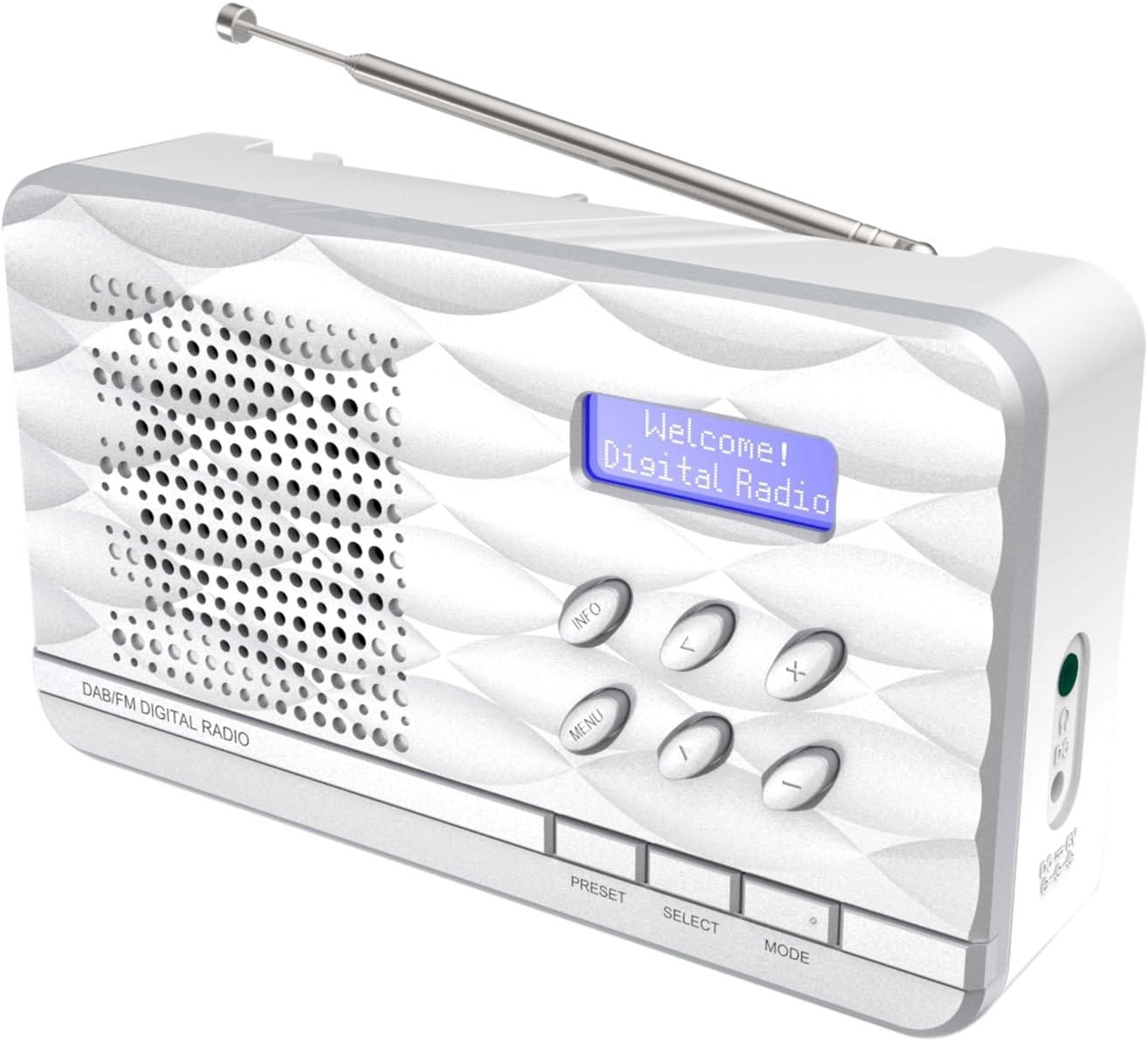
ምስል 1፡ Soundmaster DAB500SI Portable Digital Radio. The image shows the silver radio with its extendable antenna, front speaker grille, blue backlit display showing "Welcome! Digital Radio", and control buttons labeled INFO, MENU, PRESET, SELECT, MODE, and navigation arrows. Dimensions are indicated as 19cm (width), 11cm (height), and 7cm (depth).
ማዋቀር
1. ማሸግ
Carefully remove the radio from its packaging. Ensure all components are present: the DAB500SI radio unit and this user manual.
2. የኃይል ግንኙነት
The DAB500SI is powered by mains electricity. Locate the DC IN port on the side of the unit. Connect the provided power adapter to this port and then plug it into a standard wall outlet.
Alternatively, the unit can be powered by 4x AA batteries (not included) for portable use. Open the battery compartment on the rear of the unit and insert the batteries, observing correct polarity.
3. የአንቴና ማስተካከያ
Extend the telescopic antenna fully for optimal DAB/DAB+ and FM reception. Adjust its position to achieve the best signal quality.
የአሠራር መመሪያዎች
1. ማብራት / ማጥፋት
የሚለውን ይጫኑ ኃይል button (usually combined with the MODE button or a dedicated button) to turn the radio on or off.
2. Mode Selection (DAB/FM)
የሚለውን ይጫኑ MODE በDAB/DAB+ እና በኤፍኤም የሬዲዮ ሁነታዎች መካከል ለመቀያየር አዝራር።
3. DAB/DAB+ የሬዲዮ ኦፕሬሽን
- የመጀመሪያ ጊዜ ማዋቀር; When first powered on in DAB mode, the radio will automatically perform a full scan for available stations. This may take a few minutes.
- የጣቢያ ምርጫ፡- የሚለውን ተጠቀም ግራ/ቀኝ navigation buttons (labeled < and > on the device) to browse through the list of available DAB stations. Press ምረጥ ምርጫዎን ለማረጋገጥ.
- በእጅ ቅኝት; If you move the radio to a new location or wish to update the station list, press MENU, then navigate to "Full Scan" or "Auto Scan" and press ምረጥ.
- የመረጃ ማሳያ፡- የሚለውን ይጫኑ መረጃ button repeatedly to cycle through various information displays such as program type, signal strength, time, date, and DLS (Dynamic Label Segment) text.
4. የኤፍኤም ሬዲዮ ኦፕሬሽን
- ራስ -ሰር ቅኝት ፦ በኤፍ ኤም ሞድ ላይ ተጭነው ይያዙት። ምረጥ button to perform an auto scan. The radio will scan and store available stations.
- በእጅ ማስተካከል የሚለውን ተጠቀም ግራ/ቀኝ navigation buttons (labeled < and > on the device) to manually tune the frequency in small increments.
- RDS Information: If available, RDS (Radio Data System) information such as station name and program type will be displayed. Press መረጃ ባለው RDS ውሂብ በኩል ለማሽከርከር።
5. ቅድመ-ቅምጦች
The radio supports up to 20 preset stations for both DAB and FM modes.
- Storing a Preset: ወደሚፈለገው ጣቢያ ያስተካክሉ። ተጭነው ይያዙት። ቅድመ ሁኔታ button until "Preset Store" appears on the display. Use the navigation buttons to select a preset number (1-20) and press ምረጥ ለማረጋገጥ.
- ቅድመ-ቅምጥን ማስታወስ፦ የሚለውን ይጫኑ ቅድመ ሁኔታ button briefly. Use the navigation buttons to select the desired preset number and press ምረጥ እሱን ለማስተካከል።
6. የድምጽ መቆጣጠሪያ
የሚለውን ተጠቀም +/- buttons (labeled + and - on the device) to adjust the volume level.
7. የጆሮ ማዳመጫ አጠቃቀም
Connect standard 3.5mm headphones to the headphone jack on the side of the unit for private listening. The internal speaker will be muted automatically.
ጥገና
1. ማጽዳት
Wipe the radio with a soft, dry cloth. Do not use abrasive cleaners, waxes, or solvents as they may damage the finish. Ensure the unit is unplugged before cleaning.
2. ማከማቻ
ሬዲዮውን ለረጅም ጊዜ ካከማቹ፣ እንዳይፈስ ለመከላከል ባትሪዎቹን ያስወግዱ። ከፀሐይ ብርሃን እና ከፍተኛ የሙቀት መጠን ራቅ ባለ ቀዝቃዛና ደረቅ ቦታ ያስቀምጡ።
3. የባትሪ መተካት
When using batteries, replace all four AA batteries simultaneously when the low battery indicator appears or audio quality degrades. Ensure correct polarity when inserting new batteries.
መላ መፈለግ
| ችግር | ሊሆን የሚችል ምክንያት | መፍትሄ |
|---|---|---|
| ኃይል የለም | Power adapter not connected or faulty; batteries depleted or incorrectly inserted. | Check power adapter connection and wall outlet. Replace batteries, ensuring correct polarity. |
| ደካማ DAB/FM አቀባበል | አንቴና አልተራዘመም ወይም በደንብ ያልተቀመጠ; ደካማ የምልክት ቦታ. | Fully extend and adjust the telescopic antenna. Try repositioning the radio. Perform a full scan in DAB mode. |
| ከተናጋሪው ምንም ድምፅ የለም። | የድምጽ መጠኑ በጣም ዝቅተኛ ነው፤ የጆሮ ማዳመጫዎች ተገናኝተዋል። | Increase volume. Disconnect headphones if not desired. |
| Radio freezes or becomes unresponsive | ጊዜያዊ የሶፍትዌር ችግር። | Disconnect power for a few seconds, then reconnect. If using batteries, remove and reinsert them. |
ዝርዝሮች
- የሞዴል ቁጥር፡- DAB500SI
- የምርት ስም፡ ድምፃዊ
- የሚደገፉ የሬዲዮ ባንዶች፡- AM, DAB, DAB+, FM
- አስቀድመው የተቀመጡ ጣቢያዎች፡ 20 (DAB/FM)
- ከፍተኛው የድምጽ ማጉያ ውፅዓት ኃይል፡- 1 ዋት
- የግንኙነት ቴክኖሎጂ; ረዳት (የጆሮ ማዳመጫ መሰኪያ 3.5 ሚሜ)
- የኃይል ምንጭ፡- Mains (AC adapter) or 4x AA Batteries (not included)
- ማሳያ፡- የኋላ ብርሃን LCD
- የእቃው ክብደት፡ 400 ግራም
- መጠኖች (በግምት): 19 ሴሜ (ስፋት) x 11 ሴሜ (ቁመት) x 7 ሴሜ (ጥልቀት)
- ቀለም፡ ብር
- የተካተቱ አካላት፡- Radio unit, User Manual
ዋስትና እና ድጋፍ
የዋስትና መረጃ
Please refer to the warranty card included with your product for detailed warranty terms and conditions. Keep your purchase receipt as proof of purchase for any warranty claims.
የደንበኛ ድጋፍ
For technical assistance, troubleshooting, or spare parts inquiries, please contact your retailer or the Soundmaster customer service department. Contact details can typically be found on the manufacturer's official webጣቢያ ወይም በምርቱ ማሸጊያ ላይ.
Note: Spare parts availability information is not provided by the manufacturer. Software updates are not guaranteed.