
1. መግቢያ
The GAMDIAS Hermes GKB3000 is a mechanical gaming keyboard designed for enhanced durability and performance. It features GAMDIAS Certified Blue Switches with a 50 million actuation lifecycle, a 7-color spectrum backlight with 14 lighting effects, and various functional keys for an optimized gaming and typing experience. This manual provides instructions for setting up, operating, and maintaining your keyboard.
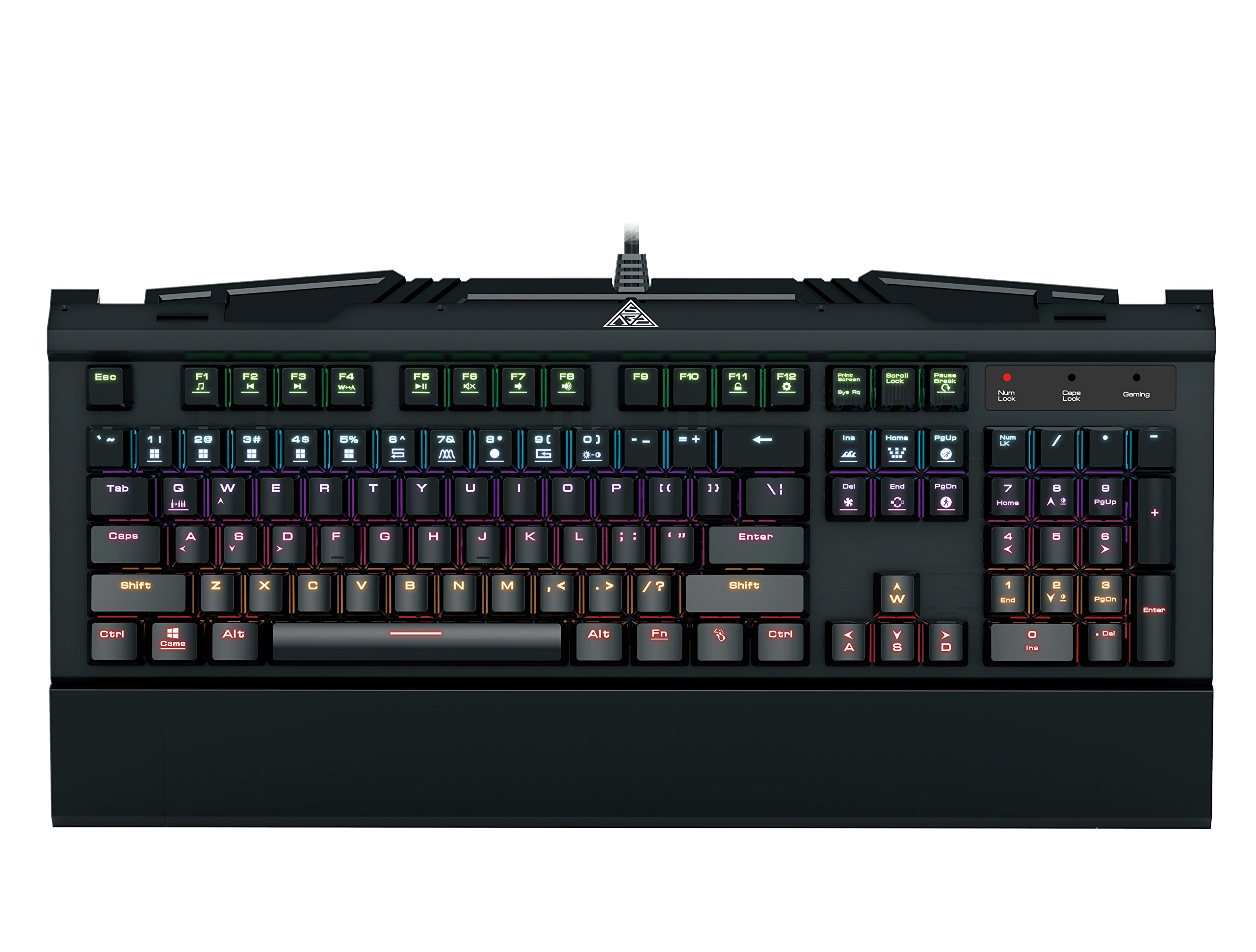
Image 1.1: The GAMDIAS Hermes GKB3000 Mechanical Gaming Keyboard. This image displays the full keyboard with its key layout and design, highlighting its compact yet robust build.
2. የጥቅል ይዘቶች
ሁሉም እቃዎች እንዳሉ እና እንዳልተበላሹ ለማረጋገጥ የጥቅሉን ይዘት ከሳጥኑ ሲያወጡ ያረጋግጡ።
- GAMDIAS Hermes GKB3000 Mechanical Gaming Keyboard
- የተጠቃሚ መመሪያ (ይህ ሰነድ)
3. ማዋቀር
Follow these steps to set up your GAMDIAS Hermes GKB3000 keyboard:
- የቁልፍ ሰሌዳውን ይንቀሉት፡- የቁልፍ ሰሌዳውን ከማሸጊያው በጥንቃቄ ያስወግዱት።
- ከኮምፒዩተር ጋር ይገናኙ; Plug the USB-A connector of the keyboard cable into an available USB port on your computer.
- የአሽከርካሪ ጭነት; The keyboard is plug-and-play. Your operating system (e.g., Windows) will automatically detect and install the necessary drivers. No additional software installation is typically required for basic functionality.
- አቀማመጥ፡- Place the keyboard on a stable, flat surface for comfortable use.
4. የአሠራር መመሪያዎች
4.1. የመብራት ውጤቶች
The Hermes GKB3000 features a 7-color spectrum backlight with 14 sets of lighting effects. These include 9 preset effects and 5 customizable patterns.
- የመቀየሪያ ውጤቶች፡ Use the dedicated function keys (often combined with the Fn key) to cycle through the preset lighting effects. Refer to the keyboard's keycap legends for specific combinations.
- Customizing Effects: The keyboard supports 5 customizable lighting patterns. Instructions for programming these patterns are typically found in the full software suite available for download from the GAMDIAS webጣቢያ, አስፈላጊ ከሆነ.
- የብሩህነት ማስተካከያ; Adjust backlight brightness using designated function key combinations.
4.2. Multimedia Control Keys
Access multimedia functions quickly using the dedicated multimedia control keys, often activated by holding the Fn ከ F-ቁልፎች (F1-F12) ጋር በማጣመር ቁልፍ።
- የድምጽ መቆጣጠሪያ፡- Increase, decrease, or mute audio.
- የሚዲያ መልሶ ማጫወት Play/pause, stop, previous track, next track.
- ሌሎች ተግባራት፡- May include opening default browser, email client, or calculator.
4.3. Special Gaming Functions
- WASD-Arrow Key Swap: This feature allows you to swap the functionality of the WASD keys with the arrow keys. This is useful for certain games or user preferences. Activate this function using a specific Fn key combination (e.g., Fn + W).
- Consecutive Attack Mode: This mode enhances rapid key input for gaming. Refer to the keyboard's specific documentation or GAMDIAS software for activation and configuration details.
- የቁልፍ ሰሌዳ መቆለፊያ፡ Temporarily disable the keyboard input to prevent accidental presses. Activate using a Fn የቁልፍ ጥምር.
- Windows Key Disable: Prevent accidental presses of the Windows key during gaming, which can minimize your game. Activate using a Fn key combination (e.g., Fn + Win key).
- ኤን-ቁልፍ ሮቨር፡ The GKB3000 supports N-key rollover, meaning multiple keys can be pressed simultaneously without ghosting or missed inputs. This ensures accurate and responsive commands during intense gaming sessions.
5. ጥገና
ትክክለኛ ጥገና የቁልፍ ሰሌዳዎን ረጅም ዕድሜ እና ጥሩ አፈፃፀም ያረጋግጣል።
- ማጽዳት፡
- ከማጽዳትዎ በፊት የቁልፍ ሰሌዳውን ከኮምፒዩተርዎ ያላቅቁት.
- ለስላሳ፣ ከቆሸሸ ነፃ የሆነ ጨርቅ በትንሹ ተጠቀምampንጣፉን ለማጥፋት በውሃ ወይም ለስላሳ የጽዳት መፍትሄ.
- በቁልፍ መካከል አቧራ እና ፍርስራሾች, የታመቀ አየር ይጠቀሙ.
- ኃይለኛ ኬሚካሎችን፣ ሻካራ ማጽጃዎችን ወይም ፈሳሾችን ከመጠቀም ይቆጠቡ።
- ማከማቻ፡ ለረጅም ጊዜ ጥቅም ላይ በማይውልበት ጊዜ የቁልፍ ሰሌዳውን በቀጥታ ከፀሐይ ብርሃን እና ከከፍተኛ ሙቀት ርቆ በቀዝቃዛና ደረቅ ቦታ ያከማቹ።
- አያያዝ፡ Avoid dropping the keyboard or exposing it to excessive force, as this can damage the mechanical switches or internal components.
6. መላ መፈለግ
If you encounter issues with your GAMDIAS Hermes GKB3000 keyboard, refer to the following common solutions:
| ችግር | ሊሆን የሚችል መፍትሄ |
|---|---|
| የቁልፍ ሰሌዳ ምላሽ እየሰጠ አይደለም። |
|
| የጀርባ ብርሃን አይሰራም ወይም ደብዛዛ ነው። |
|
| የተወሰኑ ቁልፎች አይሰሩም። |
|
| WASD keys are acting as arrow keys. |
|
If the problem persists after trying these solutions, please contact GAMDIAS customer support for further assistance.
7. ዝርዝሮች
The following are the technical specifications for the GAMDIAS Hermes GKB3000 Mechanical Gaming Keyboard:
| ባህሪ | ዝርዝር |
|---|---|
| የምርት ስም | ጋምዲያስ |
| የሞዴል ቁጥር | GKB3000 |
| የመቀየሪያ አይነት | GAMDIAS Certified Mechanical Blue Switches |
| Actuation Lifecycle | 50 ሚሊዮን ቁልፎች |
| የኋላ መብራት | 7-Color Spectrum, 14 Lighting Effects (9 preset, 5 customizable) |
| ፀረ-መናፍስት | N-ቁልፍ ሮሎቨር |
| ግንኙነት | ዩኤስቢ-ኤ |
| ስርዓተ ክወና | ዊንዶውስ |
| የእቃው ክብደት | 2.42 ፓውንድ (በግምት 1.1 ኪግ) |
| የምርት ልኬቶች (LxWxH) | 18.8 x 10.5 x 2 ኢንች (በግምት. 47.75 x 26.67 x 5.08 ሴሜ) |
| ቁሳቁስ | Plastic with Elegant Metal Plate Design |
8. ዋስትና እና ድጋፍ
GAMDIAS products are manufactured to the highest quality standards. For information regarding warranty coverage, terms, and conditions, please refer to the warranty card included with your product or visit the official GAMDIAS webጣቢያ.
For technical support, troubleshooting assistance, or any product-related inquiries, please contact GAMDIAS customer support through their official webበምርት ማሸጊያዎ ውስጥ የቀረበው ጣቢያ ወይም የእውቂያ መረጃ።
GAMDIAS Official Webጣቢያ፡ www.gamdias.com


