
መግቢያ
This manual provides detailed instructions for the setup, operation, and maintenance of your Theater Solutions TS212 by Goldwood Bluetooth 2.1 Speaker System. Please read this manual thoroughly before using the product to ensure proper function and to maximize your listening experience. Keep this manual for future reference.
በሣጥኑ ውስጥ ያለው
ሁሉንም ክፍሎች በጥንቃቄ ይክፈቱ እና ሁሉም እቃዎች መኖራቸውን ያረጋግጡ። ማንኛውም እቃዎች ከጎደሉ ወይም ከተበላሹ፣ እባክዎን የደንበኞች ድጋፍን ያነጋግሩ።
- የተጎላበተ Subwoofer ድምጽ ማጉያ
- 2 Passive Wired Satellite Speakers
- ሙሉ ተግባር የርቀት መቆጣጠሪያ
- ከ 3.5 ሚሜ እስከ RCA ኦዲዮ ገመድ
- የተጠቃሚ መመሪያ (ይህ ሰነድ)

Image: All components included in the TS212 system package.
ምርት አልቋልview
Subwoofer Front Panel

ምስል፡ ፊት ለፊት view of the TS212 subwoofer.
- Woofer Front-firing for enhanced bass response.
- ወደብ፡ Bass reflex port for optimized airflow.
- የቁጥጥር ፓነል (ከላይ): Includes volume, mode selection, and playback controls.
Subwoofer Top Panel (USB/SD)

Image: Top panel of the TS212 subwoofer with media inputs.
- የኤስዲ/ኤምኤምሲ ካርድ ማስገቢያ፡ ኦዲዮ ለማጫወት files from an SD or MMC card.
- U Disk (USB) Port: ኦዲዮ ለማጫወት files from a USB drive or charging devices.
Subwoofer የኋላ ፓነል

ምስል: የኋላ view of the TS212 subwoofer.
- የኃይል መቀየሪያ Toggles the system power ON/OFF.
- ኤሲ ውስጥ Power input for the included power cord.
- ትሬብል ቮል ከፍተኛ-ድግግሞሽ ውጤትን ያስተካክላል።
- ባስ ቮል ዝቅተኛ-ድግግሞሽ ውጤትን ያስተካክላል።
- ግቤት/ውጤት፡- RCA stereo input and output jacks for connecting audio sources and satellite speakers.
የሳተላይት ድምጽ ማጉያ

Image: One of the TS212 satellite speakers.
- የሙሉ ክልል ነጂ; Delivers clear mid-range and high-frequency audio.
- ባለገመድ ግንኙነት፡ Connects directly to the subwoofer via integrated RCA cables.
የርቀት መቆጣጠሪያ
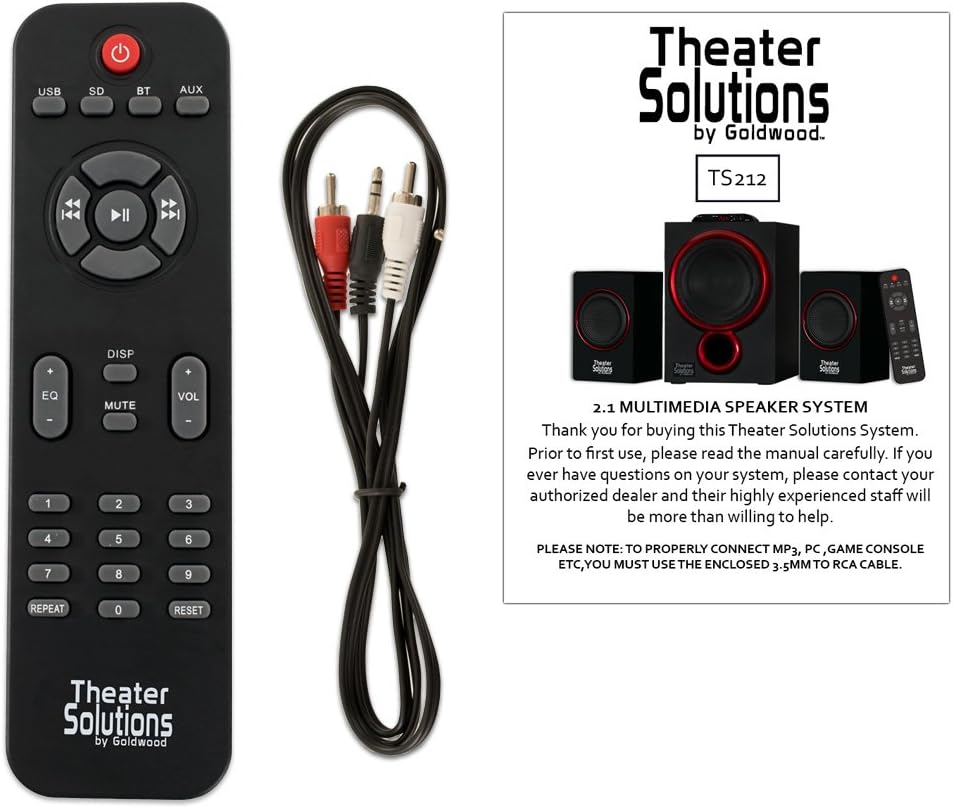
Image: Remote control for the TS212 system.
- የኃይል ቁልፍ፡- ስርዓቱን ያበራል ወይም ያጠፋል.
- ሁነታ አዝራር፡- Cycles through input modes (Bluetooth, AUX, USB, SD).
- ጥራዝ +/- ዋናውን የድምፅ መጠን ያስተካክላል።
- የመልሶ ማጫወት መቆጣጠሪያዎች፡- አጫውት/አቁም፣ ወደፊት/ወደ ኋላ ዝለል።
- EQ: የማመጣጠኛ ቅድመ-ቅምጦችን ይመርጣል።
- ድምጸ-ከል አድርግ፡ የድምጽ ውጤቱን ድምጸ-ከል ያደርገዋል።
- የቁጥር ቁልፍ ሰሌዳ፡ For direct track selection in USB/SD mode.
ማዋቀር
1. አቀማመጥ
- Place the subwoofer on a stable, flat surface, preferably on the floor, to optimize bass performance.
- Position the satellite speakers to the left and right of your listening area, facing towards you, for optimal stereo imaging. Ensure they are on a stable surface.
2. Connecting Satellite Speakers
- Connect the RCA cables from the two satellite speakers to the corresponding RCA output jacks on the rear panel of the subwoofer. Match the colors (typically red for right, white/black for left).
3. የድምጽ ምንጭን ማገናኘት
- For devices with a 3.5mm audio output (e.g., smartphones, laptops, MP3 players), use the included 3.5mm to RCA cable. Connect the 3.5mm end to your device and the RCA ends to the INPUT jacks on the subwoofer's rear panel.
- For devices with RCA audio outputs (e.g., DVD players, some TVs), use a standard RCA to RCA cable (not included) to connect to the INPUT jacks on the subwoofer.
4. የኃይል ግንኙነት
- Ensure the power switch on the rear of the subwoofer is in the OFF position.
- Connect the power cord to the AC IN port on the subwoofer and then plug it into a standard 110V grounded wall outlet.
የአሠራር መመሪያዎች
1. ማብራት / ማጥፋት
- Flip the power switch on the rear of the subwoofer to the ON position. The LED display on the subwoofer will illuminate.
- To turn off the system, flip the power switch to the OFF position.
2. ሁነታ ምርጫ
- Press the 'MODE' button on the subwoofer's top panel or the remote control to cycle through available input modes: Bluetooth (BT), Auxiliary (AUX), USB, and SD. The selected mode will be shown on the LED display.
3. የብሉቱዝ ኦፕሬሽን
- Select 'BT' mode using the 'MODE' button. The system will enter pairing mode, indicated by a flashing 'BT' on the display.
- On your Bluetooth-enabled device (e.g., smartphone), search for Bluetooth devices and select 'TS212' from the list.
- Once paired, the 'BT' indicator will stop flashing, and you can play audio from your device through the speaker system.
4. ረዳት (AUX) ግቤት
- Select 'AUX' mode using the 'MODE' button.
- Ensure your audio source is connected to the RCA INPUT jacks on the subwoofer's rear panel.
- ከተገናኘው መሳሪያዎ ድምጽ ያጫውቱ።
5. የዩኤስቢ/ኤስዲ ካርድ መልሶ ማጫወት
- Insert a USB drive into the 'U DISK' port or an SD/MMC card into the 'SD/MMC CARD' slot on the subwoofer's top panel.
- ስርዓቱ በራስ-ሰር ወደ ዩኤስቢ ወይም ኤስዲ ሁነታ ይቀየራል እና ተኳሃኝ ኦዲዮ መጫወት ይጀምራል files. If not, select the appropriate mode using the 'MODE' button.
- Use the playback controls on the subwoofer or remote to manage your music.
6. Adjusting Volume, Bass, and Treble
- ማስተር ጥራዝ Use the 'VOL +/-' buttons on the subwoofer's top panel or the remote control.
- ባስ/ትሬብል፡ Use the 'BASS VOL' and 'TREBLE VOL' knobs on the rear panel of the subwoofer to fine-tune the low and high frequencies.
ጥገና
- ማጽዳት፡ Use a soft, dry cloth to clean the surfaces of the speakers. Do not use liquid cleaners or abrasive materials.
- የአየር ማናፈሻ; Ensure the subwoofer has adequate ventilation and its vents are not blocked to prevent overheating.
- ማከማቻ፡ ረዘም ላለ ጊዜ ጥቅም ላይ በማይውልበት ጊዜ ስርዓቱን በቀጥታ ከፀሀይ ብርሀን እና ከከፍተኛ ሙቀት ርቆ በቀዝቃዛና ደረቅ ቦታ ያከማቹ።
መላ መፈለግ
| ችግር | ሊሆን የሚችል ምክንያት | መፍትሄ |
|---|---|---|
| ኃይል የለም | የኃይል ገመድ አልተገናኘም፤ የኃይል ማብሪያ / ማጥፊያ ጠፍቷል፤ መውጫው አይሰራም | Ensure power cord is securely plugged in; Turn power switch ON; Test outlet with another device |
| ድምጽ የለም። | Incorrect mode selected; Volume too low; Audio cable loose/incorrect; Device not playing audio | Select correct input mode; Increase volume; Check all cable connections; Ensure audio is playing on source device |
| ብሉቱዝ አይገናኝም። | በብሉቱዝ ሁነታ ላይ አይደለም፤ መሳሪያው በጣም ሩቅ ነው፤ አስቀድሞ ከሌላ መሳሪያ ጋር ተጣምሯል | Select 'BT' mode; Move device closer (within 10 meters); Disconnect from other devices and try pairing again |
| ዩኤስቢ/ኤስዲ አይጫወትም። | የተሳሳተ ሁነታ፤ ተኳሃኝ ያልሆነ file format; Corrupted media; Media not inserted correctly | Select USB/SD mode; Ensure files are compatible (e.g., MP3); Try different USB/SD media; Reinsert media |
| የተዛባ ድምጽ | Volume too high; Source audio quality poor; Incorrect bass/treble settings | Reduce volume on both system and source; Use high-quality audio files; Adjust Bass/Treble knobs |
ዝርዝሮች
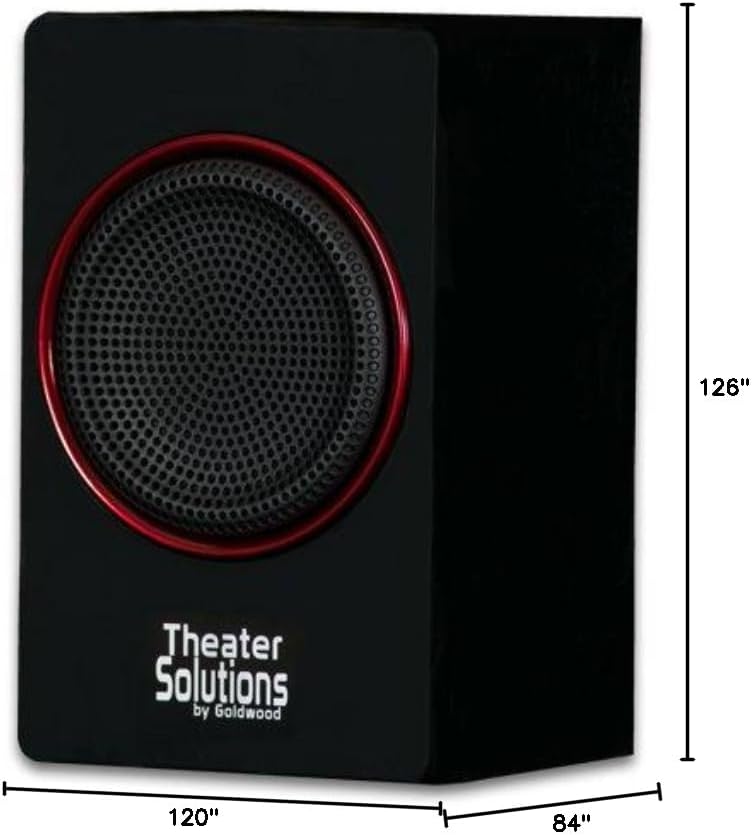
Image: Dimensions of the TS212 subwoofer.
| ባህሪ | ዝርዝር |
|---|---|
| የሞዴል ቁጥር | TS212 |
| የምርት ስም | የቲያትር መፍትሄዎች |
| የድምጽ ማጉያ ውቅር | 2.1 ቻናል |
| ከፍተኛ የውጤት ኃይል | 600 ዋት (ከፍተኛ) |
| የግንኙነት ቴክኖሎጂ | ረዳት፣ ብሉቱዝ፣ አርሲኤ፣ ዩኤስቢ |
| የብሉቱዝ ክልል | 10 ሜትር |
| የድምጽ ውፅዓት ሁኔታ | ስቴሪዮ |
| Subwoofer ዲያሜትር | 10 ኢንች |
| የሳተላይት ድምጽ ማጉያ መጠን | 5.25 ኢንች |
| የኃይል ምንጭ | Corded Electric (110V US Standard) |
| የእቃው ክብደት | 12 ፓውንድ £ |
| የሱብዎፈር ልኬቶች (ዲ x ወ x ኤች) | 84"D x 120"W x 126"H (Note: These dimensions appear to be for packaging or an illustrative image, actual product dimensions are typically smaller: Subwoofer 10.5" x 7" x 10", Satellites 6" x 3.75" x 3.5" each) |
| ተስማሚ መሣሪያዎች | ላፕቶፕ፣ MP3 ማጫወቻ፣ ስማርትፎን፣ ታብሌት፣ ቴሌቪዥን |
ዋስትና እና ድጋፍ
This Theater Solutions TS212 by Goldwood speaker system comes with a Lifetime Warranty against manufacturer's defects. For warranty claims or technical support, please contact Goldwood Sound, Inc. or your authorized dealer. Please retain your proof of purchase for warranty validation.