
1. መግቢያ
This manual provides essential instructions for the installation, operation, maintenance, and troubleshooting of your APC Smart-UPS SRT 3000VA RM 230V (SRT3000RMXLI). This Uninterruptible Power Supply (UPS) is designed to provide high-density, true double-conversion online power protection for critical electronic equipment, including servers, voice/data networks, medical labs, and light industrial applications. Please read this manual thoroughly before installing or operating the UPS to ensure proper and safe usage.
2. የደህንነት መረጃ
Observe all warnings and operating instructions in this manual. Failure to do so may result in injury or equipment damage. This UPS contains hazardous voltages. Do not attempt to disassemble the unit. There are no user-serviceable parts inside.
አጠቃላይ ደህንነት
- ይህ UPS ለቤት ውስጥ አገልግሎት ብቻ የታሰበ ነው።
- ይህንን ዩፒኤስ በቀጥታ በፀሀይ ብርሀን ፣ ከፈሳሾች ጋር ንክኪ ወይም ከመጠን በላይ አቧራ ወይም እርጥበት ባለበት ቦታ ላይ አያድርጉ።
- Ensure the ventilation openings on the UPS are not blocked. Maintain adequate clearance around the unit for proper airflow.
- Connect the UPS power cable directly to a grounded wall outlet. Do not use extension cords or surge suppressors.
የባትሪ ደህንነት
- Batteries are heavy. Remove the battery module before installing the UPS in a rack or tower configuration.
- Battery service should be performed or supervised by personnel knowledgeable of batteries and the required precautions.
- ባትሪዎችን በእሳት ውስጥ አታስቀምጡ. ባትሪዎቹ ሊፈነዱ ይችላሉ.
- ባትሪዎችን አይክፈቱ ወይም አያጉድሉ. የተለቀቀው ኤሌክትሮላይት ለቆዳ እና ለዓይን ጎጂ ነው. ምናልባት መርዛማ ሊሆን ይችላል.
- ባትሪዎቹን መጀመሪያ ላይ እንደተጫኑት በተመሳሳይ የባትሪ ዓይነት እና ብዛት ይተኩ።
3. የጥቅል ይዘቶች
ክፍሉን በጥንቃቄ ይክፈቱ እና የመርከብ ጉዳት መኖሩን ያረጋግጡ። ማንኛውም ጉዳት ከተገኘ፣ ለአገልግሎት አቅራቢው እና ለአከፋፋዩ ያሳውቁ። ፓኬጁ የሚከተሉትን ነገሮች መያዝ አለበት፡
- APC Smart-UPS SRT 3000VA RM 230V (SRT3000RMXLI) unit
- Battery module (may be pre-installed or separate)
- Rack-mounting hardware (rails, brackets)
- Tower stand (for tower configuration)
- የዩኤስቢ ግንኙነት ገመድ
- ተከታታይ የመገናኛ ገመድ
- ሰነድ ሲዲ
- Safety information and warranty guide
4. ምርት አብቅቷልview
The APC Smart-UPS SRT 3000VA RM 230V is a high-performance Uninterruptible Power Supply designed to protect your critical equipment from power disturbances. It features a rack/tower convertible form factor for flexible deployment.
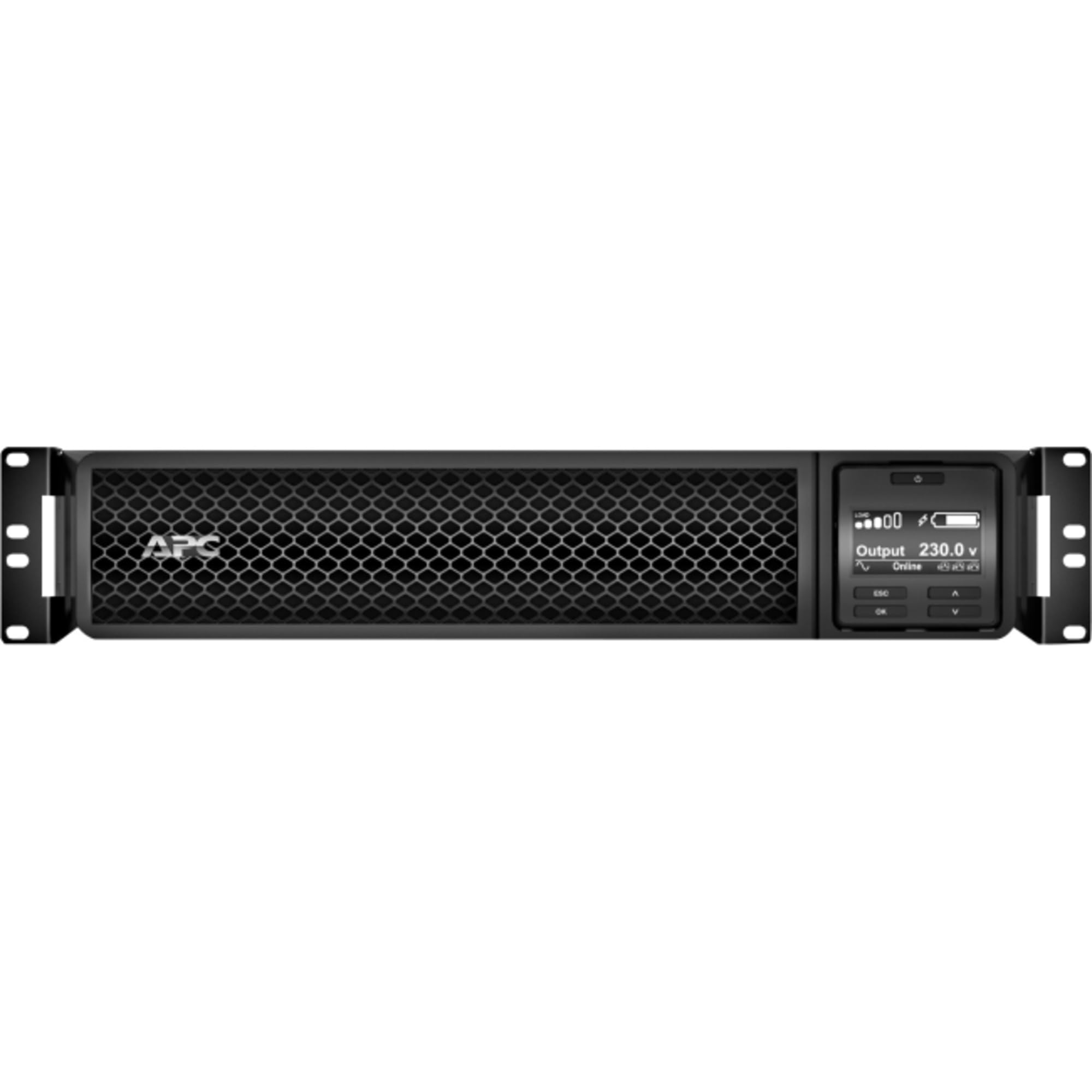
ምስል 1: የፊት view of the APC Smart-UPS SRT 3000VA RM 230V. This image displays the front panel with the LCD display, control buttons, and ventilation grilles.
ቁልፍ አካላት
- Front Panel LCD Display: Provides real-time status information, configuration options, and alarm notifications.
- የመቆጣጠሪያ አዝራሮች; Used to navigate the LCD menu, power on/off the UPS, and perform self-tests.
- የባትሪ ሞጁል፡- በኦው ወቅት ምትኬ ኃይል ይሰጣልtages. Hot-swappable for easy replacement.
- የግቤት ኃይል አገናኝ ዩፒኤስን ከኃይል ምንጭ ጋር ያገናኛል።
- Output Receptacles (IEC 320): Provide protected power to connected equipment.
- Communication Ports (USB, Serial): For connecting to a computer or network management card for monitoring and control.
- ኢፖ (የአደጋ ጊዜ ኃይል አጥፋ) ወደብ የUPSን ድንገተኛ አደጋ በርቀት እንዲዘጋ ያስችላል።
5. ማዋቀር
Follow these steps for initial setup of your UPS.
ደረጃ 1: ሥፍራ ይምረጡ
- Place the UPS on a sturdy, level surface or install it in a standard 19-inch rack.
- የአካባቢው የሙቀት መጠን ከ0°ሴ እስከ 40°ሴ (32°ፋ እና 104°ፋ) መካከል መሆኑን ያረጋግጡ።
- Maintain at least 10 cm (4 inches) of clearance at the front and rear of the unit for proper ventilation.
Step 2: Install the Battery Module
If the battery module is not pre-installed, slide it into the battery bay until it clicks into place. Connect the battery cables as indicated by the labels.
Step 3: Connect to Utility Power
- Connect the UPS input power cord to a grounded 230V AC outlet.
- The UPS will perform a self-test and the LCD display will illuminate.
ደረጃ 4፡ መሳሪያዎችን ያገናኙ
- Connect your critical equipment (servers, network devices, etc.) to the output receptacles on the rear of the UPS.
- Ensure the total load does not exceed the UPS capacity (3000VA / 2700W).
Step 5: Connect Communication Cables (Optional)
- Connect the USB or serial cable from the UPS to your computer or server for monitoring and graceful shutdown capabilities.
- Install the PowerChute software (available from APC website) on your computer for advanced management.
6. ዩፒኤስን ማሄድ
በ UPS ላይ ኃይል መስጠት
Press and hold the power button on the front panel until you hear a beep. The UPS will start up and provide power to connected equipment.
Powering Off the UPS
Press and hold the power button until the UPS shuts down. Ensure all connected equipment is safely shut down before powering off the UPS.
LCD ማሳያ እና አሰሳ
The LCD display provides detailed information about the UPS status, battery charge, load level, and various settings. Use the navigation buttons (up, down, enter, escape) to browse through the menus and adjust settings.
ራስን መሞከር
Regularly perform a self-test to ensure the UPS battery and internal components are functioning correctly. This can typically be initiated via the LCD menu or PowerChute software.
7. ጥገና
የባትሪ መተካት
The UPS batteries have a typical lifespan of 3-5 years. The UPS will indicate when the batteries need replacement. Refer to the safety information before attempting battery replacement. Use only APC-approved replacement battery modules (APCRBC152).
ማጽዳት
Clean the exterior of the UPS with a soft, damp cloth. Do not use solvents or abrasive cleaners. Ensure ventilation openings are free from dust and debris.
የአካባቢ ግምት
Store the UPS in a cool, dry place when not in use. Avoid extreme temperatures and humidity, which can shorten battery life.
8. መላ መፈለግ
ይህ ክፍል ከዩፒኤስዎ ጋር ሊያጋጥሙዎት ለሚችሉ የተለመዱ ችግሮች መፍትሄዎችን ይሰጣል።
| ችግር | ሊሆን የሚችል ምክንያት | መፍትሄ |
|---|---|---|
| UPS አይበራም። | No utility power; Battery not connected; UPS fault | Check power outlet; Ensure battery cables are connected; Contact APC support if fault persists. |
| UPS ያለማቋረጥ ይጮኻል | በባትሪ ኃይል ላይ፤ ከመጠን በላይ ጭነት፤ ዝቅተኛ ባትሪ | Check utility power; Reduce connected load; Allow battery to recharge. |
| ባትሪ እየሞላ አይደለም። | Battery disconnected; Battery fault; Internal fault | Verify battery connection; Replace battery if faulty; Contact APC support. |
| የተገናኙ መሳሪያዎች ኃይል ያጣሉ | UPS overload; Battery depleted; UPS fault | Reduce load; Allow battery to recharge; Contact APC support. |
9. ዝርዝሮች
Detailed technical specifications for the APC Smart-UPS SRT 3000VA RM 230V (SRT3000RMXLI).
| ባህሪ | ዝርዝር |
|---|---|
| የሞዴል ቁጥር | SRT3000RMXLI |
| የምርት ስም | ኤ.ፒ.ሲ |
| አቅም | 3000 VA / 2700 ዋት |
| ግብዓት Voltage | 230 ቮልት |
| የውጤት ቁtage | 230 ቮልት |
| የቅጽ ምክንያት | Rack/Tower Convertible (2U) |
| የባትሪ ዓይነት | የእርሳስ አሲድ |
| Typical Runtime (Full Load) | በግምት 4 ደቂቃዎች |
| የወጪዎች ብዛት | 8 x IEC 320 C13፣ 2 x IEC 320 C19 |
| የመገናኛ ወደቦች | USB, Serial (RJ45), SmartSlot |
| ልኬቶች (H x W x D) | 8.5 ሴሜ x 43.2 ሴሜ x 63.5 ሴሜ (3.35 ኢን x 17.0 በ x 25.0 ኢንች) |
| ክብደት | 31.3 ኪግ (69 ፓውንድ) |
| ቀለም | ጥቁር |
10. ዋስትና እና ድጋፍ
የዋስትና መረጃ
APC provides a standard warranty for this product. Please refer to the warranty card included in your package or visit the official APC webለክልልዎ የተወሰኑ የዋስትና ውሎች እና ሁኔታዎች ጣቢያ። ለዋስትና ጥያቄዎች የግዢ ማረጋገጫዎን ያስቀምጡ።
የቴክኒክ ድጋፍ
For technical assistance, troubleshooting beyond this manual, or to inquire about replacement parts, please contact APC customer support. Support contact information can typically be found on the APC website or in the documentation provided with your unit. When contacting support, please have your model number (SRT3000RMXLI) and serial number ready.