
1. መግቢያ
Thank you for choosing the OSD Audio PRE-1 High Definition Preamplifier. This unit is designed to enhance your audio experience by providing versatile source selection and precise audio control. The PRE-1 acts as a central hub for various audio components, including turntables, CD/DVD players, and tape decks, delivering a clean and powerful signal to your main ampማብሰያ
This manual provides detailed instructions for the proper setup, operation, and maintenance of your PRE-1 preamplifier. Please read this manual thoroughly before operating the unit to ensure optimal performance and longevity.
2. ጠቃሚ የደህንነት መረጃ
- የኃይል ምንጭ፡- አሃዱን በማርክ መስጫ መለያው ላይ ከተጠቀሰው የኃይል ምንጭ አይነት ጋር ብቻ ያገናኙ።
- የአየር ማናፈሻ; Ensure adequate ventilation. Do not block any ventilation openings. Install in accordance with the manufacturer’s instructions.
- ውሃ እና እርጥበት; ይህንን መሳሪያ ከውሃ አጠገብ አይጠቀሙ ወይም ለጠብታ ወይም ለመርጨት አያጋልጡት።
- ሙቀት፡ እንደ ራዲያተሮች፣ ሙቀት መመዝገቢያዎች፣ ምድጃዎች፣ ወይም ሌሎች መሳሪያዎችን (ያጠቃልለው) ካሉ የሙቀት ምንጮች አጠገብ አይጫኑ። ampማሞቂያዎች) ሙቀትን ያመነጫሉ.
- ማጽዳት፡ በደረቅ ጨርቅ ብቻ አጽዳ.
- አገልግሎት መስጠት፡ ይህንን ምርት እራስዎ ለማገልገል አይሞክሩ። ሁሉንም አገልግሎት ወደ ብቃት ላለው የአገልግሎት ሠራተኛ ያማክሩ።
- መሬት ላይ ይህ ክፍል በትክክል መሠረተ ቢስ መሆን አለበት።
3. የጥቅል ይዘቶች
እባክዎ የሚከተሉት ነገሮች በጥቅልዎ ውስጥ መካተታቸውን ያረጋግጡ፡-
- OSD Audio PRE-1 High Definition Preampማብሰያ
- የኃይል ገመድ
- የተጠቃሚ መመሪያ (ይህ ሰነድ)
4. ምርት አብቅቷልview
4.1. የፊት ፓነል
The front panel provides access to all primary controls and a microphone input for convenient use.

This image displays the front panel of the OSD Audio PRE-1 Preamplifier, including its physical dimensions for installation planning.

ዝርዝር view of the left side of the PRE-1's front panel, highlighting the Microphone Level, Bass, Midrange, and Treble adjustment knobs.

ዝርዝር view of the right side of the PRE-1's front panel, showing the Loudness, Balance, and Volume controls, along with input selection and function buttons.
- የኃይል ቁልፍ፡- ክፍሉን ያበራል ወይም ያጠፋል.
- የማይክሮ ግብዓት 1/4-inch jack for connecting a microphone.
- የማይክ ደረጃ Adjusts the volume of the microphone input.
- የባስ ቁጥጥር፡- ዝቅተኛ-ድግግሞሽ ውጤትን ያስተካክላል።
- Mid Control: Adjusts the mid-range frequency output.
- ትሬብል ቁጥጥር፡- ከፍተኛ-ድግግሞሽ ውጤትን ያስተካክላል።
- ጩኸት Engages or disengages a loudness contour for enhanced bass and treble at low volumes.
- ሚዛን፡ የግራ/ቀኝ የቻናል ሚዛንን ያስተካክላል።
- መጠን፡- ለሁሉም ውጤቶች ዋና የድምጽ መቆጣጠሪያ።
- የግቤት ምርጫ፡- Rotary knob to choose between Phono, AUX1, AUX2, and CD/DVD inputs.
- Tape Button: Activates the Tape Monitor loop.
- ሞኖ አዝራር፡- Combines stereo signals into a monaural output.
- ዝቅተኛ ማጣሪያ፡ Engages a low-frequency cut-off filter.
- ድምጸ-ከል አድርግ፡ Silences all audio output.
4.2. የኋላ ፓነል
The rear panel houses all the necessary input and output connections for your audio system.
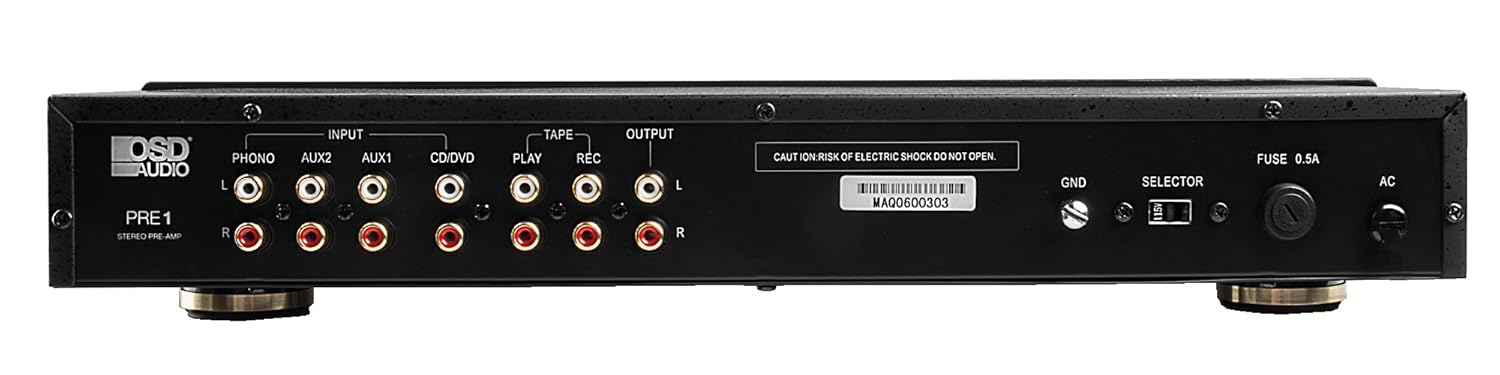
The rear panel of the PRE-1 Preamplifier, showing all input and output connections for various audio devices.
- Phono Input (L/R): RCA inputs for connecting a turntable. Includes a ground terminal.
- AUX1 Input (L/R): RCA inputs for general auxiliary devices.
- AUX2 Input (L/R): RCA inputs for a second auxiliary device.
- CD/DVD Input (L/R): RCA inputs for CD or DVD players.
- Tape Play (L/R): RCA inputs for the playback output of a tape deck or other recording device.
- Tape Rec (L/R): RCA outputs for connecting to the recording input of a tape deck or other recording device.
- Output (L/R): RCA outputs to connect to your main power ampማብሰያ
- Ground Terminal (GND): Connects to the ground wire of your turntable to reduce hum.
- መራጭ መቀየሪያ፡- For internal configuration (typically left in default position unless specified).
- ፊውዝ Replace only with the specified fuse type and rating.
- የኤሲ የኃይል ግቤት Connects to the supplied power cable.
5. ማዋቀር እና ግንኙነቶች
Follow these steps to properly set up your OSD Audio PRE-1 Preampማስታገሻ ፦
- አቀማመጥ፡- Place the PRE-1 on a stable, flat surface, ensuring adequate ventilation around the unit. Avoid placing it near heat sources or in direct sunlight.
- ኃይል ዝጋ: Ensure all audio components, including the PRE-1 and your main amplifier, are turned off before making any connections.
- የግንኙነት ምንጮች፡-
- ተርሚናል- Connect the RCA cables from your turntable to the Phono Input (L/R) on the PRE-1. Connect the turntable's ground wire to the ጂኤንዲ terminal on the PRE-1.
- የሲዲ/ዲቪዲ ማጫወቻ፡ Connect the RCA cables from your CD/DVD player to the CD/DVD Input (L/R).
- Other Devices (e.g., Streamer, Tuner): Connect RCA cables from these devices to the AUX1 Input (L/R) or AUX2 Input (L/R).
- Tape Deck: Connect the playback outputs of your tape deck to the Tape Play (L/R) inputs. Connect the recording inputs of your tape deck to the Tape Rec (L/R) ውጤቶች.
- ተገናኝ Ampማስታገሻ ፦ ያገናኙት። Output (L/R) RCA jacks on the PRE-1 to the input jacks of your main power ampማብሰያ
- የኃይል ግንኙነት; የቀረበውን የኃይል ገመድ ከ የ AC ኃይል ግብዓት on the rear panel of the PRE-1, then plug it into a suitable wall outlet.
- የመጀመሪያ ኃይል በርቷል፡ Turn on your main power amplifier first, then turn on the PRE-1. When powering off, turn off the PRE-1 first, then your main ampማብሰያ
6. የአሠራር መመሪያዎች
Once your PRE-1 is connected, follow these steps for basic operation:
- ግቤትን ይምረጡ፡- የሚለውን ተጠቀም የግቤት ምርጫ rotary knob on the front panel to choose the desired audio source (Phono, AUX1, AUX2, CD/DVD).
- የድምጽ መጠን አስተካክል; በ ጀምር ድምጽ knob at its minimum setting. Begin playing your selected audio source and slowly increase the volume to a comfortable listening level.
- የድምጽ መቆጣጠሪያዎች፡- የሚለውን ተጠቀም ባስ, መሃል, እና ትሬብል knobs to adjust the tonal characteristics of your audio. Turn clockwise to increase, counter-clockwise to decrease.
- የሒሳብ ቁጥጥር፡- አስተካክል። ሚዛን knob to fine-tune the left and right channel output for optimal stereo imaging.
- ጩኸት የሚለውን ይጫኑ ጩኸት button to activate a contour that boosts bass and treble frequencies, which can be beneficial at lower listening volumes. Press again to deactivate.
- ዝቅተኛ ማጣሪያ፡ የሚለውን ይጫኑ ዝቅተኛ ማጣሪያ button to engage a filter that reduces very low frequencies. This can help eliminate rumble from turntables or other unwanted low-frequency noise. Press again to deactivate.
- ሞኖ፡ የሚለውን ይጫኑ ሞኖ button to combine the left and right stereo channels into a single monaural signal. This is useful for playing mono recordings. Press again for stereo.
- ድምጸ-ከል አድርግ፡ የሚለውን ይጫኑ ድምጸ-ከል አድርግ button to instantly silence the audio output. Press again to restore sound.
- የማይክሮፎን አጠቃቀም፡- Plug a microphone into the የማይክሮፎን ግቤት. Adjust the microphone's volume using the የማይክ ደረጃ እንቡጥ.
- Tape Monitoring/Recording: If you have a tape deck connected, select the appropriate input for playback. To record, ensure your tape deck is set to record and the PRE-1 is passing the desired source through the Tape Rec outputs.
7. ጥገና
Proper care and maintenance will ensure the longevity and optimal performance of your PRE-1 Preampማብሰያ
- ማጽዳት፡ Use a soft, dry cloth to clean the exterior of the unit. Do not use liquid cleaners, aerosols, or harsh chemicals, as they may damage the finish or internal components.
- የአየር ማናፈሻ; የአየር ማናፈሻ ክፍተቶች ከአቧራ እና ከመስተጓጎል ነፃ መሆናቸውን በየጊዜው ያረጋግጡ።
- ግንኙነቶች፡ Occasionally check all cable connections to ensure they are secure. Loose connections can lead to signal loss or interference.
- ማከማቻ፡ ክፍሉን ረዘም ላለ ጊዜ ካስቀመጠው ከኃይል ማከፋፈያው ያላቅቁት እና ከፀሀይ ብርሀን እና ከፍተኛ የሙቀት መጠን ርቀው በቀዝቃዛና ደረቅ ቦታ ያስቀምጡት።
8. መላ መፈለግ
If you experience issues with your OSD Audio PRE-1, refer to the following common problems and solutions:
| ችግር | ሊሆን የሚችል ምክንያት | መፍትሄ |
|---|---|---|
| ኃይል የለም | Power cable not connected; Power outlet not active; Blown fuse | Ensure power cable is securely connected. Test the outlet with another device. Check and replace the fuse if necessary (refer to specifications for fuse type). |
| ምንም የድምፅ ውፅዓት የለም። | Incorrect input selected; Volume too low; Mute engaged; Loose audio cables; Main amplifier off or incorrect input selected | Select the correct input source. Increase the volume. Disengage Mute. Check all RCA cable connections. Ensure your main amplifier is on and set to the correct input. |
| የተዛባ ድምጽ | Volume too high (clipping); Incorrect tone control settings; Faulty cables | Reduce the volume. Adjust Bass, Mid, and Treble controls to neutral or desired settings. Try replacing audio cables. |
| የሚጮህ ወይም የሚጮህ ድምጽ | Ground loop; Loose ground wire (Phono); Interference from other electronics | Ensure turntable ground wire is connected to the PRE-1's GND terminal. Try moving the PRE-1 or other audio components away from power cables or other electronic devices. Use a ground loop isolator if necessary. |
| ማይክሮፎን አይሰራም | Mic not connected; Mic Level too low; Faulty microphone | Ensure microphone is securely plugged into the Mic Input. Increase the Mic Level. Test with another microphone if available. |
9. ዝርዝሮች
Below are the technical specifications for the OSD Audio PRE-1 Preampማስታገሻ ፦
| ባህሪ | ዝርዝር መግለጫ |
|---|---|
| ሞዴል | ቅድመ-1 |
| የምርት ስም | ኦኤስዲ ኦዲዮ |
| የሰርጦች ብዛት | 2 |
| የመጫኛ አይነት | Surface ተራራ |
| ዩፒሲ | 819603012446 |
| ASIN | B01MPYJLPX |
| አምራች | ኦኤስዲ ኦዲዮ |
10. ዋስትና እና ድጋፍ
OSD Audio products are designed for reliability and performance. For specific warranty details and terms, please refer to the warranty card included with your product or visit the official OSD Audio website. If you require technical assistance or have questions not covered in this manual, please contact OSD Audio customer support.
OSD Audio Customer Support: Please visit the OSD Audio webየእውቂያ መረጃ እና የድጋፍ ምንጮች ለማግኘት ጣቢያ.