
Western Digital WD10S21X
Western Digital WD10S21X 1TB SSHD User Manual
Model: WD10S21X
1. መግቢያ
This user manual provides comprehensive instructions for the installation, operation, maintenance, and troubleshooting of your Western Digital WD10S21X 1TB Solid State Hybrid Drive (SSHD). Please read this manual carefully before installing and using your new drive to ensure optimal performance and longevity.
2. ምርት አብቅቷልview
The Western Digital WD10S21X is a 1TB Solid State Hybrid Drive (SSHD) designed to offer a balance of capacity and speed. It integrates NAND flash SSD technology with traditional hard disk drive storage, aiming to provide quicker system boots, faster application loads, and improved responsiveness compared to conventional hard drives.
ቁልፍ ባህሪዎች
- Capacity: 1TB (1000GB)
- Buffer Size: 16MB Cache + 8GB NAND (Flash memory)
- Interface: SATA 6.0Gb/s (SATA III), 7mm height (Slim)
- Form Factor: 2.5" SSHD Hybrid Drive
- Optimal amount of built-in NAND flash for enhanced performance.
- Compatible with most configurations, including PC, Mac, laptop, PlayStation 3, and PlayStation 4.
የምርት ምስሎች፡-

ፊት ለፊት view of the Western Digital WD10S21X 1TB SSHD, showing the "Slim" branding and WD logo.

The Western Digital WD10S21X 1TB SSHD sealed in its anti-static protective packaging.
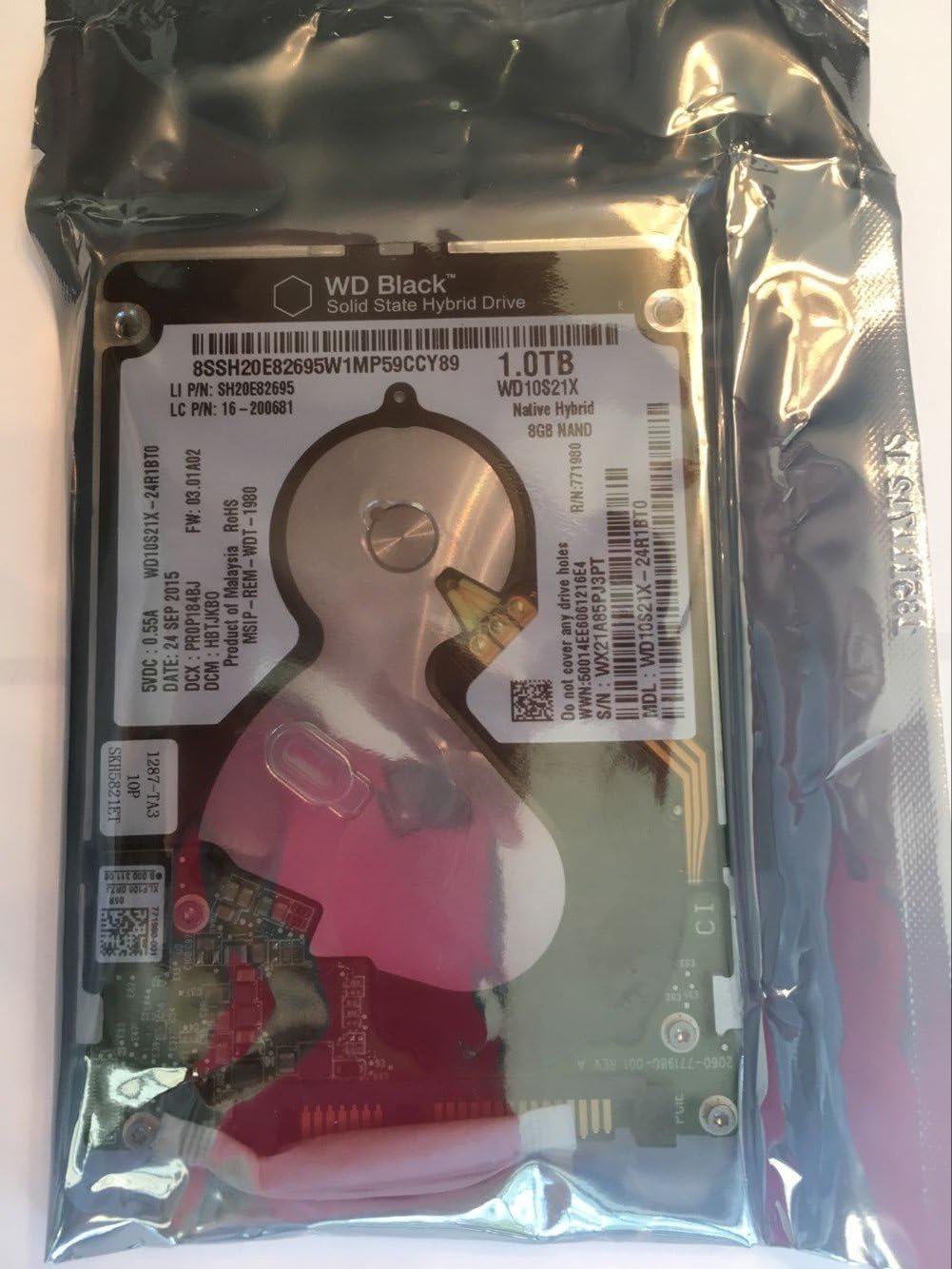
መቀራረብ view of the product label on the Western Digital WD10S21X 1TB SSHD, visible through its anti-static bag. Key details like model number WD10S21X-24R1BT0 and serial number WX21A85PJ3PT are visible.

ሌላ ዝርዝር መግለጫ view of the Western Digital WD10S21X 1TB SSHD label, highlighting the model number WD10S21X-24R1BT0 and serial number WX21A85PJ3PT.
3. ማዋቀር እና መጫን
This section outlines the general steps for installing your WD10S21X SSHD. Specific installation procedures may vary depending on your computer or console model. Always refer to your device's manufacturer manual for detailed instructions.
3.1 ከመጀመርዎ በፊት፡
- ምትኬ ውሂብ፡ If you are replacing an existing drive, ensure all important data is backed up to an external storage device or cloud service.
- ኃይል ዝጋ: Completely shut down your computer or console and disconnect it from the power source.
- የማይንቀሳቀሱ ጥንቃቄዎች፡- Wear an anti-static wrist strap or frequently touch a grounded metal object (like the computer chassis) to discharge static electricity, which can damage electronic components.
- መሳሪያዎች፡ አስፈላጊዎቹን መሳሪያዎች ይሰብስቡ፣ በተለይም የፊሊፕስ ጭንቅላት ዊንዲቨር።
3.2 አካላዊ ጭነት፡
- መሣሪያ ክፈት፦ Carefully open your computer case or console according to its manufacturer's instructions.
- Drive Bay ን ያግኙ፡ Identify an available 2.5-inch drive bay. If replacing an old drive, remove it first.
- ድራይቭን ሰካ፡ Slide the WD10S21X SSHD into the drive bay. Secure it with screws if required by your system's design.
- ገመዶችን ማገናኘት;
- የSATA ዳታ ኬብልን ከድራይቭ ወደ ማዘርቦርድዎ ላይ ወደሚገኝ የSATA ወደብ ያገናኙ።
- Connect a SATA power cable from your power supply unit to the drive.
- መሳሪያውን ዝጋ፦ Carefully close your computer case or console.
3.3 Initial Software Setup (Windows/macOS):
- አብራ፡ Reconnect power and turn on your computer.
- Access Disk Management (Windows):
- በጀምር ቁልፍ ላይ በቀኝ ጠቅ ያድርጉ እና "ዲስክ አስተዳደር" ን ይምረጡ።
- Your new drive should appear as "Unallocated Space".
- Right-click on the unallocated space and select "New Simple Volume" (or "Initialize Disk" if prompted, choose GPT for modern systems).
- Follow the wizard to format the drive and assign a drive letter.
- Access Disk Utility (macOS):
- Open "Disk Utility" from Applications > Utilities.
- Select your new drive from the sidebar.
- Click "Erase" and choose a format (e.g., APFS or Mac OS Extended (Journaled)) and a scheme (GUID Partition Map).
- Click "Erase" to format the drive.
- Operating System Installation (if applicable): If this is your primary drive, proceed with installing your operating system.
4. Operating Your SSHD
The WD10S21X SSHD intelligently manages data to optimize performance. Frequently accessed data is automatically moved to the faster NAND flash component, while less frequently accessed data resides on the higher-capacity HDD platters.
4.1 Performance Expectations:
- Adaptive Learning: The drive's performance will improve over time as it "learns" your usage patterns and caches frequently accessed files.
- ፈጣን የማስነሻ ጊዜዎች፡- Expect quicker operating system boot times after a few restarts.
- Application Responsiveness: Applications you use regularly should launch and perform faster.
- ሚዛን፡ While offering SSD-like speed for hot data, it retains the cost-effectiveness and large capacity of a traditional HDD. It will not match the sustained performance of a pure SSD for all operations.
4.2 አጠቃላይ የአጠቃቀም ምክሮች፡
- Keep OS Updated: Ensure your operating system is up-to-date to benefit from the latest storage drivers and optimizations.
- ድንገተኛ የኃይል ማጣት ያስወግዱ; Always shut down your system properly to prevent data corruption.
- መደበኛ ምትኬዎች፡- Continue to perform regular data backups.
5. ጥገና
Proper maintenance helps ensure the longevity and reliability of your WD10S21X SSHD.
5.1 Data Backup:
Regularly back up your important data. While SSHDs are reliable, no storage device is immune to failure. Consider using cloud storage, external hard drives, or network-attached storage (NAS) for your backup strategy.
5.2 የጽኑ ትዕዛዝ ዝማኔዎች፡
Occasionally, Western Digital may release firmware updates for your drive to improve performance, stability, or address specific issues. Check the official Western Digital support website for your model (WD10S21X) for any available firmware updates and follow their instructions carefully.
5.3 Physical Care:
- የሙቀት መጠን፡ Ensure your system has adequate ventilation to prevent the drive from overheating.
- ንዝረት፡ Avoid excessive vibration or sudden impacts to your computer or console, as this can damage the mechanical components of the HDD.
- ንጽህና፡- Keep the interior of your computer free from dust, which can impede airflow and lead to overheating.
6. መላ መፈለግ
This section provides solutions to common issues you might encounter with your WD10S21X SSHD.
6.1 Drive Not Detected:
- ኬብሎችን ይፈትሹ፡ የSATA ዳታ እና የኃይል ገመዶች ከድራይቭ እና ከእናትቦርዱ/ከኃይል አቅርቦቱ ጋር ደህንነቱ በተጠበቀ ሁኔታ መገናኘታቸውን ያረጋግጡ።
- ባዮስ/UEFI ቅንብሮች፡- Enter your system's BIOS/UEFI setup and verify that the SATA port the drive is connected to is enabled and that the drive is recognized.
- የኃይል አቅርቦት; የኃይል አቅርቦት ዩኒትዎ (PSU) በቂ ዋት እንዳለው ያረጋግጡ።tagሠ እና የSATA የኃይል ማገናኛው ተግባራዊ መሆኑን።
- Another Port/Cable: Try connecting the drive to a different SATA port on the motherboard or using different SATA cables.
- Disk Management/Utility: As described in Section 3.3, check if the drive appears in Disk Management (Windows) or Disk Utility (macOS) as uninitialized or unallocated.
6.2 Slow Performance:
- Initial Learning Phase: Remember that SSHDs have an adaptive learning phase. Performance will improve as the drive identifies and caches frequently used data.
- SATA ሁነታ፡- Ensure your motherboard's SATA controller is set to AHCI mode in the BIOS/UEFI for optimal performance.
- አሽከርካሪዎች፡- Verify that your motherboard's chipset drivers are up-to-date.
- የዲስክ ቦታ፡ Ensure the drive is not excessively full. While SSHDs manage space, very low free space can impact performance.
- ዳራ ሂደቶች፡- Check for any background applications or processes consuming significant disk I/O.
- የማልዌር ቅኝት፡- ለቫይረሶች ወይም ለተንኮል አዘል ዌር ሙሉ የስርዓት ቅኝት ያሂዱ።
6.3 Unusual Noises:
While some clicking or whirring is normal for a mechanical hard drive, loud grinding, repetitive clicking, or scraping sounds can indicate a failing drive. Immediately back up any critical data and consider replacing the drive.
7. ዝርዝሮች
| ባህሪ | ዝርዝር |
|---|---|
| የሃርድ ድራይቭ አቅም | 1 ቴባ (1000 ጊባ) |
| ቋት መጠን | 16MB Cache + 8GB NAND Flash |
| በይነገጽ | SATA 6.0Gb/s (SATA III) |
| የቅጽ ምክንያት | 2.5 Inches (7mm height) |
| ተከታታይ | WD ጥቁር |
| የሞዴል ቁጥር | WD10S21X |
| የሃርድዌር መድረክ ተኳኋኝነት | Mac, PC, Laptop, PlayStation 3, PlayStation 4 |
| የእቃው ክብደት | 4.2 አውንስ |
| የምርት ልኬቶች (LxWxH) | 0.39 x 3.94 x 2.76 ኢንች |
| ቀለም | ጥቁር |
| አምራች | ምዕራባዊ ዲጂታል |
| መጀመሪያ የሚገኝ ቀን | ዲሴምበር 23፣ 2016 |
8. ዋስትና እና ድጋፍ
8.1 የምርት ዋስትና፡-
The Western Digital WD10S21X SSHD typically comes with a 2-year warranty from the reseller. Please retain your proof of purchase for warranty claims. For specific warranty terms and conditions, refer to the documentation provided with your purchase or visit the official Western Digital webጣቢያ.
8.2 Data Recovery Plans:
Optional data recovery plans may be available for purchase separately, such as 2-Year or 3-Year Data Recovery Plans. These plans provide additional protection for your data in case of drive failure. Check with your retailer or Western Digital for details on these services.
8.3 የቴክኒክ ድጋፍ፡
For technical assistance, troubleshooting beyond this manual, or warranty inquiries, please visit the official Western Digital support website. You can often find FAQs, knowledge base articles, driver downloads, and contact information for customer support there.
የምዕራባዊ ዲጂታል ድጋፍ Webጣቢያ፡ https://support.wdc.com
Western Digital Store: Western Digital Store on Amazon