
መግቢያ
The Anderic RR3UNV is a versatile 3-device universal remote control designed to simplify the management of your entertainment systems. This remote can control up to three different devices, including TVs, DVD players, VCRs, cable boxes, satellite receivers, and audio systems. It features a learning function for expanded compatibility and glow-in-the-dark buttons for ease of use in low-light conditions. This manual provides detailed instructions for setup, operation, and maintenance of your RR3UNV remote control.
ማዋቀር
1. የባትሪ ጭነት
The Anderic RR3UNV remote requires two (2) AA batteries for operation. Ensure correct polarity when inserting the batteries.
- በርቀት መቆጣጠሪያው ጀርባ ላይ የሚገኘውን የባትሪውን ክፍል ክዳን ይክፈቱ።
- ሁለት አዳዲስ የAA ባትሪዎችን ያስገቡ፣ በክፍሉ ውስጥ እንደተገለጸው (+) እና (-) ተርሚናሎችን ያዛምዱ።
- የባትሪውን ክፍል ደህንነቱ በተጠበቀ ሁኔታ ይዝጉ።

ምስል: የኋላ view of the Anderic RR3UNV remote control, showing the battery compartment cover at the bottom. The back is black with a textured grip area.
2. የርቀት መቆጣጠሪያውን ፕሮግራሚንግ ማድረግ
The RR3UNV can be programmed using direct code entry or the learning function. Refer to the included code booklet for a list of compatible device codes.
2.1. Direct Code Entry
- ፕሮግራም ለማድረግ የሚፈልጉትን መሳሪያ (ለምሳሌ ቲቪ፣ ዲቪዲ ማጫወቻ) ያብሩ።
- የተፈለገውን የመሣሪያ ቁልፍ ተጭነው ይያዙ (TV, ዲቪዲ, ወይም ኦዲዮ) for approximately 5 seconds until the device button lights up and stays lit.
- Enter the 3-digit code for your device brand from the code booklet.
- If the code is valid, the device button light will blink twice and then turn off.
- የርቀት መቆጣጠሪያውን በመጫን ይሞክሩ ኃይል button. If the device turns off, the programming was successful. If not, repeat the process with the next code listed for your brand.
2.2. የመማር ተግባር
The learning function allows the RR3UNV to learn commands directly from your original remote control.
- Place the RR3UNV and your original remote control head-to-head on a flat surface, approximately 1-2 inches apart.
- የተፈለገውን የመሣሪያ ቁልፍ ተጭነው ይያዙ (TV, ዲቪዲ, ወይም ኦዲዮ) on the RR3UNV for approximately 5 seconds until the device button lights up and stays lit.
- Press and release the button on the RR3UNV that you want to program (e.g., ኃይል). The device button light will start blinking slowly.
- Press and hold the corresponding button on your original remote control (e.g., ኃይል).
- The device button light on the RR3UNV will blink rapidly three times and then stay lit, indicating successful learning.
- Repeat steps 3-5 for all other buttons you wish to program.
- To exit learning mode, press the device button again. The light will turn off.
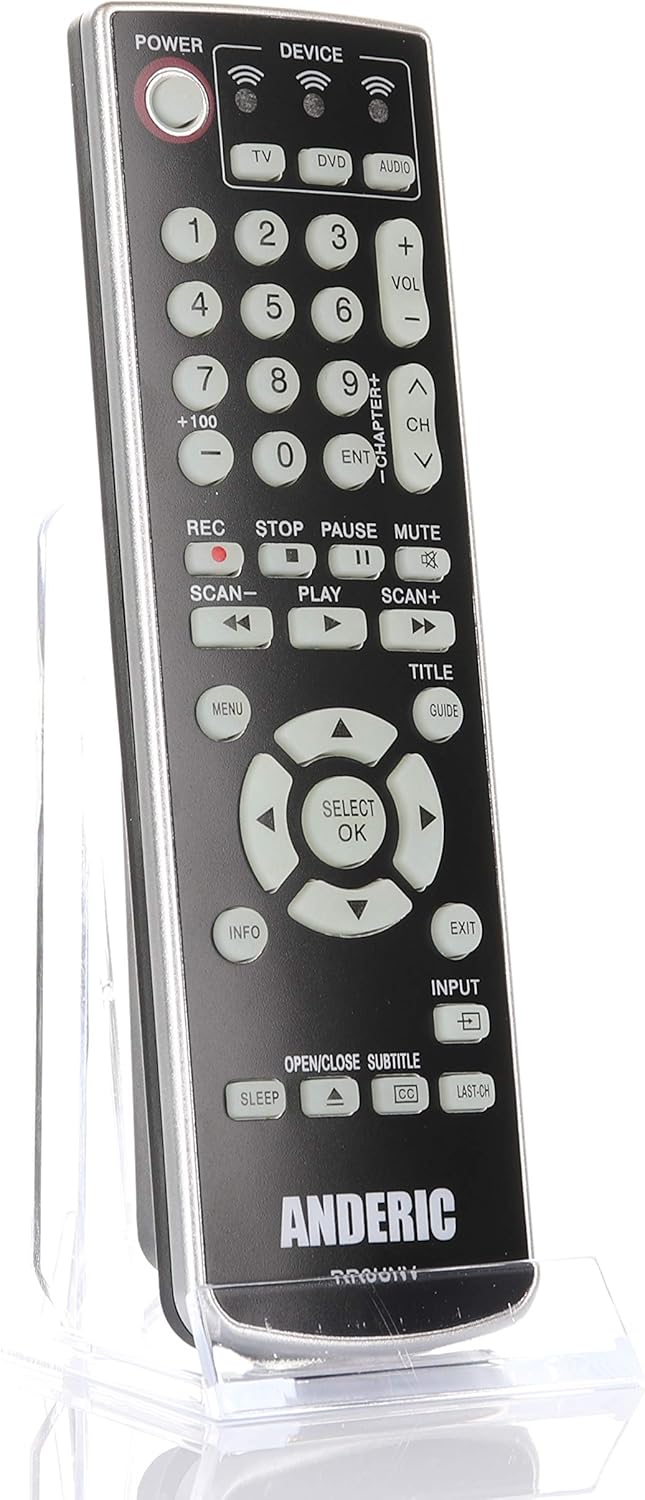
ምስል፡ ፊት ለፊት view of the Anderic RR3UNV remote control. It is black with silver trim, featuring glow-in-the-dark buttons for power, device selection, number pad, volume, channel, playback, menu, and navigation controls.
የርቀት መቆጣጠሪያውን በመስራት ላይ
Once programmed, the Anderic RR3UNV remote functions like your original remote. Select the desired device mode before sending commands.
- የመሣሪያ ምርጫ፡- የሚለውን ይጫኑ TV, ዲቪዲ, ወይም ኦዲዮ button to select the device you want to control. The selected device button will light up briefly.
- ኃይል፡- የሚለውን ይጫኑ ኃይል የተመረጠውን መሣሪያ ለማብራት ወይም ለማጥፋት አዝራር.
- የድምጽ መቆጣጠሪያ፡- የሚለውን ተጠቀም ቮል+ እና ድምጽ- ድምጹን ለማስተካከል ቁልፎች.
- የሰርጥ ቁጥጥር፡- የሚለውን ተጠቀም CH+ እና CH- ሰርጦችን ለመለወጥ ቁልፎች.
- ድምጸ-ከል አድርግ፡ የሚለውን ይጫኑ ሙት ድምጹን ጸጥ ለማድረግ የሚያስችል አዝራር።
- የቁጥር ሰሌዳ፡ የሰርጥ ቁጥሮችን ወይም ሌሎች የቁጥር ግብዓቶችን በቀጥታ ለማስገባት የቁጥር አዝራሮችን (0-9) ይጠቀሙ።
- የመልሶ ማጫወት መቆጣጠሪያዎች፡- እንደ አዝራሮች ተጫወት, ለአፍታ አቁም, ተወ, REC, SCAN-, እና SCAN+ control media playback functions.
- አሰሳ፡ The directional arrow buttons and SELECT/OK button are used for menu navigation.
- Menu/Guide/Info/Exit: These buttons provide access to device-specific menus, program guides, information displays, and exit functions.
- ግቤት፡ የ ግቤት button cycles through available input sources on your TV.
- እንቅልፍ፡ የ ተኛ button may activate a sleep timer function on compatible devices.
- CC/Subtitles: የ CC/SUBTITLE button toggles closed captions or subtitles.
ጥገና
- የባትሪ መተካት፡ Replace batteries when the remote's performance degrades or if the device indicator light does not illuminate. Always replace both AA batteries at the same time with new ones.
- ማጽዳት፡ Clean the remote control with a soft, dry cloth. Do not use liquid cleaners or abrasive materials, as they may damage the remote's surface or internal components.
- ማከማቻ፡ Store the remote in a dry place away from direct sunlight and extreme temperatures. If storing for an extended period, remove the batteries to prevent leakage.
መላ መፈለግ
| ችግር | ሊሆን የሚችል ምክንያት | መፍትሄ |
|---|---|---|
| የርቀት መቆጣጠሪያ ጨርሶ አይሰራም። | የሞቱ ወይም በስህተት የገቡ ባትሪዎች። | ትክክለኛውን ዋልታ በማረጋገጥ ባትሪዎችን በአዲስ AA ባትሪዎች ይተኩ። |
| የርቀት መቆጣጠሪያ አንዳንድ ተግባራትን ይቆጣጠራል ነገር ግን ሌሎችን አይቆጣጠርም። | Incorrect device code or incomplete learning. | Try a different code for your device brand or re-program specific buttons using the learning function. |
| Device does not respond to remote commands. | Remote not aimed correctly; obstruction; device not selected. | Ensure the remote is aimed directly at the device's IR sensor. Remove any obstructions. Press the correct device button (TV, DVD, AUDIO) before sending commands. |
| የመማር ተግባር አልተሳካም። | Original remote batteries low; remotes too far apart; ambient light interference. | Ensure original remote has fresh batteries. Place remotes 1-2 inches apart. Try learning in a dimly lit room. |
ዝርዝሮች
- የምርት ስም፡ አንድሪክ
- የሞዴል ስም፡- RR3UNV
- የሞዴል ቁጥር፡- RR3UNV
- የሚደገፉ መሳሪያዎች ብዛት፡- 3
- የግንኙነት ቴክኖሎጂ; ኢንፍራሬድ (IR)
- የባትሪ ዓይነት፡ 2 x AA ባትሪዎች (አልተካተተም)
- ከፍተኛው ክልል፡ በግምት 25 ጫማ (7.6 ሜትር)
- Button Quantity: 41
- ልዩ ባህሪያት፡ Universal compatibility, Learning function, Glow-in-the-dark buttons
- ተስማሚ መሣሪያዎች TV, DVD, VCR, Cable, Satellite, Audio, DVD/VCR Combos, TV/DVD/VCR Combos
የዋስትና መረጃ
Anderic products typically come with a limited warranty covering manufacturing defects. For specific warranty details, including duration and terms, please refer to the documentation included with your purchase or visit the official Anderic webጣቢያ. ለዋስትና ጥያቄዎች የግዢ ማረጋገጫዎን ያስቀምጡ።
የደንበኛ ድጋፍ
For technical assistance, programming help, or general inquiries regarding your Anderic RR3UNV remote control, please contact Anderic customer support:
- Webጣቢያ፡ www.anderic.com
- ስልክ፡ 1-855-573-6683
Please have your model number (RR3UNV) and a description of your issue ready when contacting support.