
1. መግቢያ
This user manual provides detailed instructions for the installation, operation, and maintenance of the Transition Networks M/GE-PSW-SX-01 Mini Gigabit Ethernet Media Converter. This device is designed to convert 10/100/1000Base-TX Ethernet signals to 1000Base-SX fiber optic signals, enabling seamless integration of copper-based Ethernet networks with fiber optic infrastructure.
The M/GE-PSW-SX-01 is a compact and reliable solution for extending network distances or connecting different network segments using fiber optic cabling.
2. ባህሪያት
- Device Type: Fiber media converter
- Form Factor: External, compact design
- የግንኙነት ቴክኖሎጂ: ባለገመድ
- Cabling Type Support: 10Base-T, 100Base-TX, 1000Base-T (copper) and 1000Base-SX (fiber)
- Data Link Protocol: 10Mb LAN, 100Mb LAN, GigE
- የውሂብ ማስተላለፍ ፍጥነት፡ እስከ 1 Gbps
- Optical Wave Length: 850 nm
- Maximum Transfer Distance: Up to 1800 ft (550 meters) over fiber
- Status Indicators: Comprehensive LEDs for Port status, Power, Link/Activity for both copper and fiber ports
3. የጥቅል ይዘቶች
ጥቅሉ በተለምዶ የሚከተሉትን ነገሮች ያካትታል:
- Transition Networks M/GE-PSW-SX-01 Media Converter Unit
- ውጫዊ የኃይል አስማሚ
- Quick Start Guide or User Manual (this document)
ማስታወሻ፡- Please check the packaging for any additional accessories or documentation.
4. ምርት አብቅቷልview
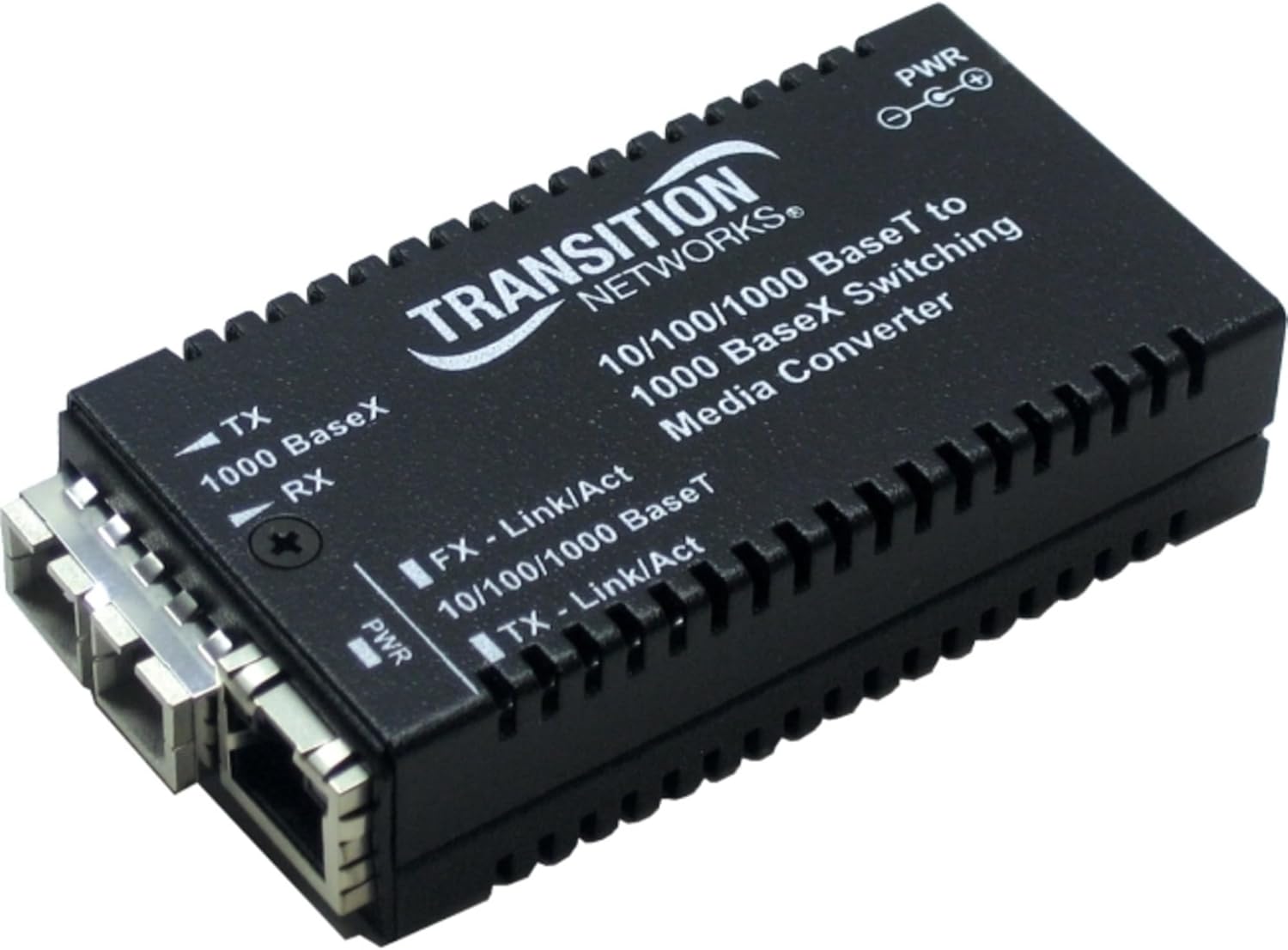
ምስል 1፡ Transition Networks M/GE-PSW-SX-01 Media Converter
This image displays the Transition Networks M/GE-PSW-SX-01 media converter. It is a compact black device with a ribbed casing. The front panel features an RJ45 Ethernet port and an SC fiber optic port. Several LED indicators are visible, including PWR (Power), FX-Link/Act (Fiber Link/Activity), and TX-Link/Act (Ethernet Link/Activity), along with labels for TX (Transmit) and RX (Receive) for the fiber connection.
የ LED አመልካቾች
- PWR Indicates power status. Lit when the device is powered on.
- FX - Link/Act: Indicates the status of the fiber optic (FX) port. Lit when a valid fiber link is established; blinks when data is being transmitted or received.
- TX - Link/Act: Indicates the status of the copper Ethernet (TX) port. Lit when a valid Ethernet link is established; blinks when data is being transmitted or received.
- 10/100/1000 BaseT: (Often integrated with TX-Link/Act or a separate LED) Indicates the speed of the copper Ethernet connection (10 Mbps, 100 Mbps, or 1000 Mbps).
- 1000 BaseX: (Often integrated with FX-Link/Act) Indicates the speed of the fiber optic connection (1000 Mbps).
5. ማዋቀር እና መጫን
- መሣሪያዎችን ማጥፋት; Before making any connections, ensure that all devices (network switches, routers, computers) are powered off.
- የፋይበር ኦፕቲክ ገመድን ያገናኙ; Insert the SC fiber optic cable into the "FX" port of the media converter. Connect the other end of the fiber optic cable to your fiber network device (e.g., fiber switch, another media converter). Ensure the TX (Transmit) and RX (Receive) fibers are correctly matched.
- የኤተርኔት ገመድን ያገናኙ፡ Insert a standard RJ45 Ethernet cable into the "TX" port of the media converter. Connect the other end of the Ethernet cable to your copper-based network device (e.g., computer, switch, router).
- የኃይል አስማሚን ያገናኙ፡ Plug the provided external power adapter into the DC power input port on the media converter. Then, plug the power adapter into a suitable electrical outlet.
- በመሳሪያዎች ላይ ኃይል; Power on the media converter. The PWR LED should illuminate. Then, power on your connected network devices.
- ግንኙነቶችን ያረጋግጡ፡ Check the Link/Act LEDs for both the FX and TX ports. They should illuminate steadily when a valid link is established and blink to indicate data activity.
ጠቃሚ፡- Always handle fiber optic cables with care. Avoid bending them sharply or touching the optical connectors.
6. የአሠራር መመሪያዎች
Once properly installed, the M/GE-PSW-SX-01 operates automatically. It functions as a transparent converter between the copper Ethernet and fiber optic segments of your network.
የመከታተያ ሁኔታ፡
Observe the LED indicators on the device to monitor its operational status:
- ጠንካራ PWR LED indicates the unit is receiving power.
- ጠንካራ FX - Link/Act LED indicates a stable fiber optic link. Blinking indicates data transmission.
- ጠንካራ TX - Link/Act LED indicates a stable copper Ethernet link. Blinking indicates data transmission.
- If the Link/Act LEDs are off, it suggests a problem with the cable connection or the connected device.
7. ጥገና
The Transition Networks M/GE-PSW-SX-01 is designed for reliable, maintenance-free operation. However, following these guidelines can help ensure its longevity:
- አካባቢ፡ መሳሪያውን በተወሰነው የሙቀት መጠን እና የእርጥበት ክልል ውስጥ ያንቀሳቅሱት። ከፍተኛ የሙቀት መጠንን፣ ቀጥተኛ የፀሐይ ብርሃንን እና ከፍተኛ እርጥበትን ያስወግዱ።
- ማጽዳት፡ Keep the device clean and free of dust. Use a soft, dry cloth for cleaning the exterior. Do not use liquid cleaners or aerosols.
- የኬብል አስተዳደር Ensure cables are not excessively bent or strained, especially fiber optic cables, as this can degrade performance or cause damage.
- የኃይል አቅርቦት; ከመሳሪያው ጋር የቀረበውን የኃይል አስማሚ ብቻ ይጠቀሙ።
8. መላ መፈለግ
| ችግር | ሊሆን የሚችል ምክንያት | መፍትሄ |
|---|---|---|
| ምንም ኃይል የለም (PWR LED ጠፍቷል) | የኃይል አስማሚው አልተገናኘም ወይም ጉድለት አለበት፤ የኃይል መውጫ ችግር። | Ensure power adapter is securely connected to the converter and a working electrical outlet. Try a different outlet. |
| No Link on Fiber (FX - Link/Act LED off) | Incorrect fiber connection (TX/RX swapped); damaged fiber cable; issue with connected fiber device. | Verify fiber cable connections (ensure TX connects to RX on the other end). Inspect fiber cable for damage. Check the status of the connected fiber device. |
| No Link on Ethernet (TX - Link/Act LED off) | Faulty Ethernet cable; incorrect cable type (e.g., crossover vs. straight-through); issue with connected Ethernet device. | Replace Ethernet cable. Ensure the cable is appropriate for the connection. Check the status of the connected Ethernet device. |
| Poor Performance/Intermittent Connection | Cable quality issues; network congestion; environmental interference. | Use high-quality cables. Check for sources of electromagnetic interference. Ensure network devices are not overloaded. |
9. ዝርዝሮች
| ባህሪ | ዝርዝር |
|---|---|
| የሞዴል ቁጥር | M/GE-PSW-SX-01-NA |
| የመሣሪያ ዓይነት | የፋይበር ሚዲያ መለወጫ |
| የቅጽ ምክንያት | ውጫዊ |
| ግንኙነት | ባለገመድ |
| የመዳብ ወደቦች | 1 x RJ-45 (10/100/1000Base-T) |
| ፋይበር ወደቦች | 1 x SC (1000Base-SX) |
| የውሂብ አገናኝ ፕሮቶኮል | 10Mb LAN, 100Mb LAN, GigE |
| የውሂብ ማስተላለፍ ፍጥነት | 1 ጊባበሰ |
| የኦፕቲካል ሞገድ ርዝመት | 850 nm |
| Max Transfer Distance | 1800 ጫማ (550 ሜትር) |
| የምርት ልኬቶች | 11 x 9.5 x 3.25 ኢንች |
| የእቃው ክብደት | 1 ፓውንድ |
| አካባቢያዊነት | ሰሜን አሜሪካ |
10. ዋስትና እና ድጋፍ
For information regarding product warranty, technical support, or service, please contact Transition Networks directly or visit their official webጣቢያ. ለዋስትና ጥያቄዎች የግዢ ደረሰኝዎን እንደ ግዢ ማረጋገጫ ያቆዩት።
Transition Networks Contact Information:
- Webጣቢያ፡ www.transition.com
- Refer to the product packaging or the Transition Networks webበጣም ወቅታዊ የእውቂያ ዝርዝሮች ለማግኘት ጣቢያ.