
መግቢያ
This manual provides essential information for the safe and efficient use of your SANSUI SCM39-B11 39V High-Vision LCD TV. Please read these instructions thoroughly before operating the television and retain them for future reference. This television features a reliable Japanese design, incorporating a main board developed by Toshiba Visual Solutions Corporation, with evaluation and production management handled by a specialized team in Echizen City, Fukui Prefecture.
The SCM39-B11 model is a 2017 release, designed for terrestrial digital broadcasting, and supports external HDD recording via USB connection.
የደህንነት መረጃ
ይህንን ቴሌቪዥን ሲጠቀሙ የእሳት፣ የኤሌትሪክ ንዝረት እና የመቁሰል አደጋን ለመቀነስ ሁል ጊዜ መሰረታዊ የደህንነት ጥንቃቄዎችን ይከተሉ።
- ቴሌቪዥኑን ለዝናብ ወይም ለእርጥበት አያጋልጡት።
- የአየር ማናፈሻ ክፍተቶችን አይዝጉ። ለትክክለኛ የአየር ዝውውር በቴሌቪዥኑ ዙሪያ በቂ ቦታ ያረጋግጡ።
- ቴሌቪዥኑን ባልተረጋጋ ጋሪ፣ ማቆሚያ፣ ትራይፖድ፣ ቅንፍ ወይም ጠረጴዛ ላይ አያስቀምጡ።
- በመብረቅ ማዕበል ወቅት ወይም ለረጅም ጊዜ ጥቅም ላይ በማይውልበት ጊዜ ቴሌቪዥኑን ያላቅቁ።
- ሁሉንም አገልግሎቶች ብቁ ለሆኑ የአገልግሎት ሰራተኞች ያመልክቱ።
የጥቅል ይዘቶች
ሁሉም እቃዎች በጥቅሉ ውስጥ መኖራቸውን ያረጋግጡ፡-
- SANSUI SCM39-B11 39V LCD TV
- የርቀት መቆጣጠሪያ
- ባትሪዎች (ለርቀት መቆጣጠሪያ)
- MiniB-CAS Card
- B-CAS Card Cover (with screws)
- Stand (with screws)
- የትምህርት መመሪያ (ይህ ሰነድ)
- የዋስትና ካርድ
የማዋቀር መመሪያ
1. የቁም መጫኛ
Carefully place the television screen-down on a soft, flat surface. Attach the included stand to the bottom of the television using the provided screws. Ensure the stand is securely fastened before placing the television upright.

ምስል፡ ፊት ለፊት view of the SANSUI SCM39-B11 TV with its stand, showing the display and the two silver-colored feet.
2. ገመዶችን ማገናኘት
Refer to the back panel of the television for connection ports.

ምስል: የኋላ view of the SANSUI SCM39-B11 TV, displaying the back panel with various input ports including HDMI, USB, and antenna connections.
- የአንቴና ግንኙነት; Connect your terrestrial digital antenna cable to the ANTENNA IN port.
- HDMI መሳሪያዎች፡- Connect DVD players, Blu-ray players, game consoles, or other HDMI-compatible devices to the HDMI 1 or HDMI 2 ports. This model has 2 HDMI ports.
- የዩኤስቢ ውጫዊ HDD፡ For recording, connect a compatible external USB Hard Disk Drive (HDD) to the USB port.
- ኃይል፡- Connect the power cord to the AC inlet on the television and then to a wall outlet.
3. የመጀመሪያ ደረጃ ማዋቀር
After connecting all cables and powering on the TV, the initial setup wizard will guide you through the process. This typically includes:
- የቋንቋ ምርጫ።
- የክልል ምርጫ።
- Automatic channel scan for terrestrial digital broadcasts. Ensure your antenna is properly connected for this step.
የአሠራር መመሪያዎች
መሰረታዊ ስራዎች
- ማብራት/ማጥፋት፡ የሚለውን ይጫኑ ኃይል በርቀት መቆጣጠሪያው ላይ ያለው አዝራር.
- የሰርጥ ምርጫ፡- የሚለውን ተጠቀም CH +/- buttons or the number buttons on the remote.
- የድምጽ ማስተካከያ; የሚለውን ተጠቀም ቮልት +/- አዝራሮች.
- የግቤት ምንጭ፡- የሚለውን ይጫኑ ግቤት button to cycle through connected devices (TV, HDMI 1, HDMI 2, etc.).
Recording with External HDD
This TV supports recording terrestrial digital broadcasts to an external USB HDD. Ensure your HDD is connected to the USB port.
- የቀረጻዎችን የጊዜ ሰሌዳ ማስያዝ፡ Use the Electronic Program Guide (EPG) to select programs for recording. The EPG supports a 1-week display.
- Automatic Chapter Marking: The TV can detect commercials during recording and automatically set chapter marks, allowing for easier navigation during playback.
የመልሶ ማጫወት ተግባራት
When playing back recorded content from an external HDD, the following functions are available:
- መልሶ ማጫወትን ድገም፦ Replay a section or the entire program.
- የቼዝ መልሶ ማጫወት፦ Watch a program from the beginning while it is still being recorded.
- 1.5x Speed Playback: Watch recorded content at an accelerated speed.
የምስል እና የድምፅ ማሻሻያዎች
- Blue Light Guard: Activate this function via the remote control to reduce blue light emission by up to approximately 50%, which may help reduce eye strain.
- Picture Enhancer: This feature automatically adjusts the super-resolution processing level according to the input content, ensuring optimal image display at all times.
- Japanese Paper Speakers: The integrated speakers utilize Japanese paper for clear sound reproduction across high to low frequencies.
ተጨማሪ ባህሪያት
- Screen Freeze Function: Pause the live broadcast or current display.
- HDMI Connected Device Linkage: Control compatible HDMI-connected devices using the TV remote.
- Bi-directional Data Communication: Supports two-way data communication.
ጥገና
የቴሌቪዥን ማጽዳት
- ስክሪን፡ ስክሪኑን በቀስታ ለስላሳ፣ ደረቅ፣ ከተሸፈነ ጨርቅ ይጥረጉ። ለግትር ምልክቶች፣ በትንሹ መampen the cloth with water or a specialized screen cleaner (ensure it is safe for LCD screens) and wipe carefully. Do not spray liquid directly onto the screen.
- አካል፡ Wipe the television body with a soft, dry cloth. Avoid using abrasive cleaners, waxes, or solvents as they can damage the finish.
የርቀት መቆጣጠሪያ እንክብካቤ
- Replace batteries when the remote control's response becomes slow or inconsistent.
- አሮጌ እና አዲስ ባትሪዎችን, ወይም የተለያዩ አይነት ባትሪዎችን አያቀላቅሉ.
- የርቀት መቆጣጠሪያውን ከእርጥበት እና ከፀሐይ ብርሃን በቀጥታ ያርቁ።
መላ መፈለግ
If you encounter issues with your television, refer to the following common problems and solutions before contacting support.
| ችግር | ሊሆን የሚችል ምክንያት / መፍትሄ |
|---|---|
| ኃይል የለም | Ensure the power cord is securely plugged into both the TV and the wall outlet. Check if the outlet is functioning. |
| No picture / No signal | Verify antenna connection. Check the input source selection (e.g., HDMI 1, HDMI 2, TV). Perform a channel scan if necessary. |
| ድምጽ የለም። | Check volume level and mute status. Ensure external audio devices are properly connected if used. |
| የርቀት መቆጣጠሪያ አይሰራም | ባትሪዎችን ይፈትሹ እና ይተኩ. በርቀት መቆጣጠሪያው እና በቴሌቪዥኑ IR ዳሳሽ መካከል ምንም እንቅፋቶች አለመኖራቸውን ያረጋግጡ። |
| External HDD recording issues | Ensure the USB HDD is properly connected and formatted for the TV. Some HDDs may have compatibility issues. Try a different USB port or HDD if available. |
| HDMI device not recognized | Ensure the HDMI cable is securely connected. Try a different HDMI port or cable. Power cycle both the TV and the HDMI device. |
የምርት ዝርዝሮች

Image: A table detailing the specifications of the SANSUI SCM39-B11 TV, including screen size, resolution, tuner type, recording capabilities, connectivity, and power consumption.
| ባህሪ | ዝርዝር መግለጫ |
|---|---|
| የሞዴል ስም | SCM39-B11 |
| የስክሪን መጠን | 39V-type (39 inches) |
| የማሳያ ቴክኖሎጂ | LCD |
| ጥራት | High-Vision (HD 1366 x 768) |
| መቃኛዎች | Terrestrial Digital x1, BS Digital: None, CS Digital: None |
| External HDD Recording | Supported via USB |
| HDMI ወደቦች | 2 ስርዓቶች |
| የዩኤስቢ ወደቦች | የ 1 ስርዓት |
| የግድግዳ ተራራ ተስማሚ | VESA 200 ሚሜ x 200 ሚሜ |
| የምርት ክብደት | 6.1 ኪ.ግ |
| ልኬቶች (W x H x D) | Approx. 88.8 cm x 57.5 cm x 21.0 cm (with stand) |
| የኃይል ፍጆታ | 61 ዋ |
| የተለቀቀበት ዓመት | 2017 |

ምስል፡ ፊት ለፊት view of the SANSUI SCM39-B11 TV with overlaid measurements for width (88.8cm), height (57.5cm), and weight (6.1kg).

ምስል: ጎን view of the SANSUI SCM39-B11 TV, illustrating the depth of the television body (9.9cm) and the total depth including the stand (21cm).
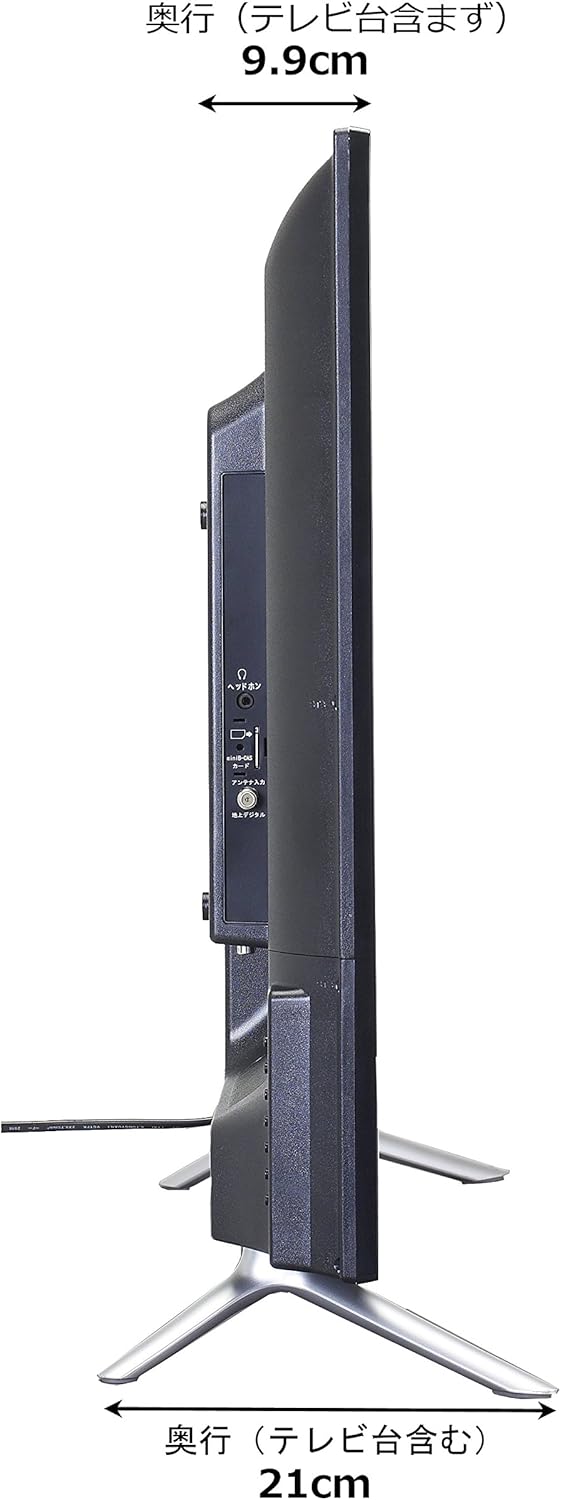
Image: Diagram showing the SANSUI SCM39-B11 TV on a stand next to a human figure (approx. 160cm tall) for visual scale, with TV dimensions indicated.
ዋስትና እና ድጋፍ
Your SANSUI SCM39-B11 television comes with a warranty. Please refer to the included warranty card for details regarding coverage period and terms. Keep your purchase receipt as proof of purchase.
For technical support, service, or inquiries not covered in this manual, please contact SANSUI customer service. Contact information can typically be found on the warranty card or the official SANSUI webጣቢያ.