
1. ምርት አብቅቷልview
The LinQ W735 is a versatile dynamic microphone designed for both wired and wireless operation. It features a durable metal construction, an internal shock mount, a hum-compensating coil, and a neodymium magnet. The microphone includes an on/off switch with a locking mechanism. For wireless use, it offers a range of up to 30 meters with its included receiver, which connects directly to a karaoke machine or amplifier's 6.5 mm jack input. Alternatively, a 3-meter wired connection is possible using the provided cable. The microphone is powered by AA batteries, which are included. It is designed to be insensitive to acoustic noise, boasts a high sound pressure level of over 150 dB SPL, and features a silent switch. Its cardioid polar pattern focuses on sound from the front, minimizing background noise.
1.1 የጥቅል ይዘቶች
- LinQ W735 Dynamic Microphone
- Wireless Receiver (6.5 mm Jack)
- 3-meter Audio Cable (6.5 mm Jack to 6.5 mm Jack)
- AA Batteries (for microphone and receiver)

Image 1.1: LinQ W735 microphone, wireless receiver, and product packaging.
2. የደህንነት መረጃ
- Do not expose the microphone or receiver to water or excessive moisture.
- መሳሪያውን ለጠንካራ ተጽእኖዎች ከመጣል ወይም ከማስገዛት ተቆጠብ።
- Do not attempt to disassemble or modify the microphone or receiver. This will void the warranty.
- Use only the specified AA batteries. Ensure correct polarity when inserting batteries.
- መሳሪያው እንዳይፈስ ለመከላከል መሳሪያው ረዘም ላለ ጊዜ ጥቅም ላይ የማይውል ከሆነ ባትሪዎችን ያስወግዱ.
- ባትሪዎችን ልጆች በማይደርሱበት ቦታ ያስቀምጡ.
3. የምርት ባህሪዎች
- ባለሁለት ሁነታ አሠራር፡- Supports both wireless and wired connections.
- Unidirectional (Cardioid) Polar Pattern: Captures sound primarily from the front, reducing background noise.
- ዘላቂ ግንባታ; Features a metal microphone body for longevity.
- የውስጥ አስደንጋጭ ተራራ; የአያያዝ ጫጫታ ይቀንሳል።
- Hum-Compensating Coil & Neodymium Magnet: Enhances audio clarity.
- On/Off Switch with Lock: Prevents accidental power changes.
- የገመድ አልባ ክልል፡ Up to 30 meters (line of sight).
- ከፍተኛ የ SPL አያያዝ; Capable of handling sound pressure levels over 150 dB.
- በባትሪ የተጎላበተ፡ Uses AA batteries for convenience.
4. ማዋቀር
4.1 የባትሪ ጭነት
- ማይክሮፎን Unscrew the bottom part of the microphone handle. Insert two AA batteries, ensuring correct polarity (+/-). Screw the handle back on securely.
- ገመድ አልባ ተቀባይ; Open the battery compartment on the receiver. Insert one AA battery, ensuring correct polarity (+/-). Close the compartment.
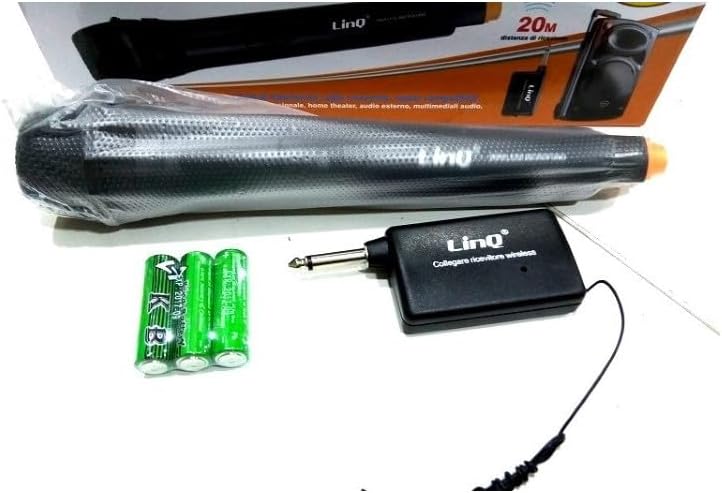
Image 4.1: LinQ W735 microphone, wireless receiver, audio cable, and AA batteries.
4.2 ገመድ አልባ ግንኙነት
- Ensure batteries are correctly installed in both the microphone and the wireless receiver.
- Insert the 6.5 mm jack of the wireless receiver directly into the microphone input of your amplifier, karaoke machine, or mixer.
- Turn on the wireless receiver.
- Slide the ON/OFF switch on the microphone to the 'ON' position.
- The microphone and receiver should automatically pair. Adjust the volume on your audio device as needed.
4.3 ባለገመድ ግንኙነት
- Ensure batteries are installed in the microphone. The microphone requires power even in wired mode for optimal performance.
- Connect one end of the 3-meter audio cable to the microphone's output port.
- Connect the other end of the audio cable to the microphone input of your amplifier, karaoke machine, or mixer.
- Slide the ON/OFF switch on the microphone to the 'ON' position.
- Adjust the volume on your audio device as needed.
5. የአሠራር መመሪያዎች
5.1 ማብራት / ማጥፋት
To power on the microphone, slide the switch located on the microphone body to the 'ON' position. To power off, slide the switch to the 'OFF' position. The switch also features a 'LOCK' position to prevent accidental power changes during use.
5.2 የአጠቃቀም ምክሮች
- ማይክሮፎኑን ከአፍዎ በግምት ከ2-6 ኢንች (5-15 ሴ.ሜ) ርቀት ላይ ይያዙት እና ጥሩ የድምፅ ቀረጻ ያድርጉ።
- Point the top of the microphone directly towards the sound source.
- Avoid covering the microphone grille with your hand, as this can affect sound quality.
- When using wirelessly, ensure a clear line of sight between the microphone and the receiver for best performance and range.
- Adjust the volume on your connected audio device (amplifier, mixer) to achieve the desired sound level.
6. ጥገና
- ማጽዳት፡ Wipe the microphone body with a soft, dry cloth. Do not use liquid cleaners or abrasive materials.
- ማከማቻ፡ Store the microphone and receiver in a cool, dry place away from direct sunlight and extreme temperatures.
- የባትሪ መተካት፡ Replace batteries when the sound quality degrades or the microphone/receiver fails to power on. Always replace all batteries at the same time.
7. መላ መፈለግ
| ችግር | ሊሆን የሚችል ምክንያት | መፍትሄ |
|---|---|---|
| No sound output (Wireless) | Microphone/receiver off; Low batteries; Receiver not connected; Out of range; Volume too low. | Ensure microphone and receiver are ON. Replace batteries. Connect receiver securely. Move closer to receiver. Increase volume on audio device. |
| No sound output (Wired) | Microphone off; Cable not connected; Volume too low. | Ensure microphone is ON. Connect cable securely. Increase volume on audio device. |
| ደካማ የድምፅ ጥራት/ጣልቃ ገብነት | Low batteries; Obstructions in wireless path; Other electronic interference; Incorrect microphone placement. | Replace batteries. Ensure clear line of sight. Move away from other electronic devices. Adjust microphone position. |
| Microphone not powering on | የሞቱ ወይም በስህተት የገቡ ባትሪዎች። | ባትሪዎችን በአዲሶቹ ይተኩ። |
8. ዝርዝሮች
| ሞዴል | ወ735 |
| ዓይነት | ተለዋዋጭ ማይክሮፎን |
| የዋልታ ንድፍ | ባለአቅጣጫ (Cardioid) |
| የድግግሞሽ ምላሽ | 80 - 12,000 ኸርዝ |
| ስሜታዊነት | 1.5 mV/PA |
| ስመ ኢምፔዳንስ | 350 ኦኤም |
| ዝቅተኛው የጭነት መከላከያ | 1000 ኦኤም |
| ከፍተኛው SPL | > 150 dB SPL |
| የማገናኛ አይነት | 6.5 mm Jack (for receiver and wired cable) |
| ገመድ አልባ ክልል | እስከ 30 ሜትር |
| የኃይል ምንጭ | AA Batteries (2 for microphone, 1 for receiver) |
| የማይክሮፎን ልኬቶች | 48 x 180 ሚ.ሜ |
| ቁሳቁስ | Metal (microphone body), ABS Plastic (receiver) |
| የሚመከር አጠቃቀሞች | ዘፈን ፣ ካራኦኬ |
9. ዋስትና እና ድጋፍ
የዋስትና መረጃ ወይም የቴክኒክ ድጋፍ ለማግኘት፣ እባክዎን በግዢው ጊዜ የቀረቡትን ሰነዶች ይመልከቱ ወይም ቸርቻሪዎን ያነጋግሩ። ለማንኛውም የዋስትና ጥያቄ የግዢ ማረጋገጫዎን ያስቀምጡ።