
1. መግቢያ
This manual provides essential information for setting up, operating, maintaining, and troubleshooting your Microsoft Surface Pro Model 1796. The Surface Pro is a versatile 2-in-1 device designed to function as both a high-performance laptop and a portable tablet. Please read these instructions carefully to ensure optimal use and longevity of your device.
2. ምርት አብቅቷልview
The Microsoft Surface Pro Model 1796 features a 12.3-inch PixelSense multi-touch display, an Intel Core i5 processor, 4GB of RAM, and a 128GB SSD. It operates on Windows 10 Pro, offering a full desktop experience in a portable form factor. The device supports a detachable keyboard (Surface Pro Signature Type Cover) and a digital pen (Surface Pen), both sold separately, to enhance its functionality.

Figure 2.1: Microsoft Surface Pro in tablet mode, displaying the lock screen.
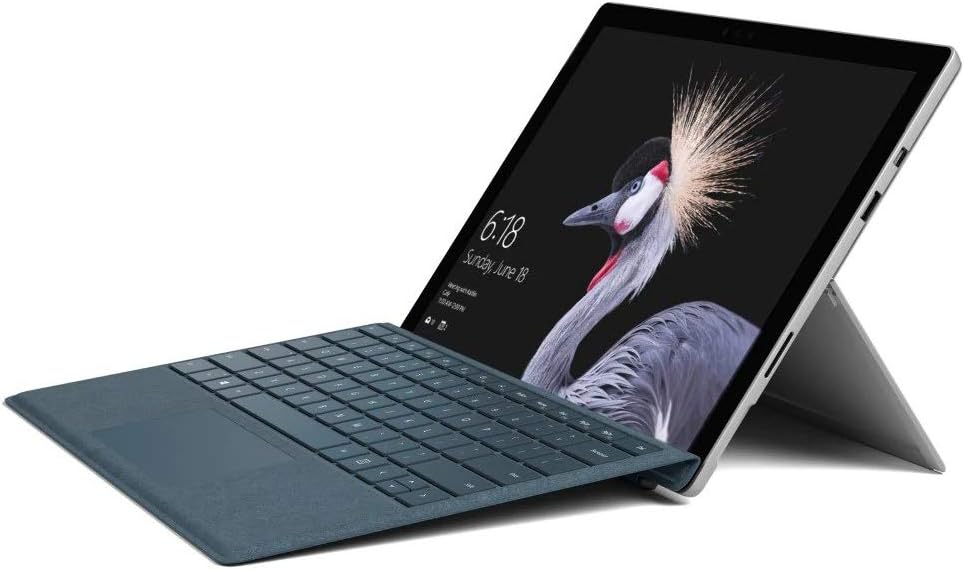
Figure 2.2: Microsoft Surface Pro with Signature Type Cover attached, configured as a laptop.

Figure 2.3: Microsoft Surface Pro tablet and detached Signature Type Cover.
3. ማዋቀር
3.1 የመነሻ ኃይል በርቷል
- Connect the power supply to the Surface Pro and a power outlet.
- በመሳሪያው የላይኛው ጠርዝ ላይ የሚገኘውን የኃይል አዝራሩን ይጫኑ።
- የቋንቋ ምርጫን፣ የአውታረ መረብ ግንኙነትን እና የተጠቃሚ መለያ መፍጠርን ጨምሮ የመጀመሪያውን የዊንዶውስ 10 ፕሮ ማዋቀር ለማጠናቀቅ በስክሪኑ ላይ ያሉትን መመሪያዎች ይከተሉ።
3.2 መለዋወጫዎችን ማገናኘት
- Surface Pro Signature Type Cover: Align the Type Cover with the magnetic connector along the bottom edge of the Surface Pro until it clicks into place.
- የገጽታ ብዕር፡ The Surface Pen connects via Bluetooth. Go to መቼቶች > መሳሪያዎች > ብሉቱዝ እና ሌሎች መሳሪያዎች to pair the pen.
3.3 መሳሪያውን መሙላት
Use the provided power adapter to charge your Surface Pro. The charging port is located on the right side of the device. A full charge provides approximately 13 hours of typical device usage.
4. የአሠራር መመሪያዎች
4.1 መሰረታዊ ዳሰሳ
- ንካ፡ Use multi-touch gestures on the PixelSense display for navigation, zooming, and scrolling.
- የሽፋን አይነት፡ Utilize the keyboard and trackpad for traditional laptop input.
- የገጽታ ብዕር፡ Write, draw, and annotate directly on the screen.
4.2 ዊንዶውስ 10 ፕሮ ባህሪዎች
Your Surface Pro comes with Windows 10 Pro, offering features such as:
- ዊንዶውስ ሰላም፡ For fast, secure, password-free sign-in using facial recognition.
- ኮርታና፡ Your personal digital assistant.
- የማይክሮሶፍት ኤጅ፡ ነባሪው web አሳሽ.
- የጡባዊ ሁነታ: Automatically or manually switch to a touch-optimized interface when the Type Cover is detached.
4.3 የማሳያ ቅንብሮች
The 12.3-inch PixelSense display has a resolution of 2736 x 1824 pixels. You can adjust display settings such as brightness, resolution, and scaling through ቅንብሮች > ስርዓት > ማሳያ.
5. ጥገና
5.1 መሳሪያውን ማጽዳት
- ለስላሳ፣ ከቆሸሸ ነፃ የሆነ ጨርቅ ይጠቀሙ መampened with water or an approved screen cleaner to clean the display.
- For the device body, use a soft, dry cloth. Avoid harsh chemicals or abrasive materials.
5.2 የሶፍትዌር ዝመናዎች
Regularly check for and install Windows updates to ensure your device has the latest security patches and features. Go to መቼቶች > አዘምን እና ደህንነት > የዊንዶውስ ዝመና.
5.3 የባትሪ እንክብካቤ
- የባትሪውን ዕድሜ ሊያበላሹ ስለሚችሉ ከፍተኛ ሙቀትን ያስወግዱ።
- የባትሪውን ጤና ለማሻሻል ባትሪውን ሙሉ በሙሉ ያለማቋረጥ ቻርጅ ማድረግ ወይም ለረጅም ጊዜ 100% ቻርጅ ማድረግን ያስወግዱ።
6. መላ መፈለግ
6.1 የተለመዱ ጉዳዮች
- መሣሪያው እየበራ አይደለም፡- Ensure the device is charged. Try holding the power button for 10-15 seconds to perform a force restart.
- ስክሪን ምላሽ አይሰጥም፡ Restart the device. If the issue persists, check for driver updates.
- የአፈጻጸም ችግሮች፡ Close unnecessary applications, check for Windows updates, or run a disk cleanup.
6.2 የእውቂያ ድጋፍ
For more complex issues or technical assistance, please visit the official Microsoft Support website or contact their customer service. Have your device's model number (FJU-00001) and serial number ready.
7. ዝርዝሮች
| ባህሪ | ዝርዝር መግለጫ |
|---|---|
| የሞዴል ስም | FJU-00001 |
| የማሳያ መጠን | 12.3 ኢንች |
| የማያ ጥራት | 2736 x 1824 ፒክስል |
| ፕሮሰሰር | ኢንቴል ኮር i5 (2.6 ጊኸ) |
| ራም | 4 ጊባ DDR3 |
| ማከማቻ | 128 ጊባ SSD |
| ግራፊክስ ኮፕሮሰሰር | ኢንቴል ኤችዲ ግራፊክስ 620 |
| ስርዓተ ክወና | ዊንዶውስ 10 ፕሮ |
| የገመድ አልባ አይነት | 802.11b፣ 802.11g፣ 802.11n |
| አማካይ የባትሪ ህይወት | 13 ሰዓታት |
| የእቃው ክብደት | 1.7 ፓውንድ |
| የምርት ልኬቶች | 11.5 x 0.33 x 7.93 ኢንች |
| የኋላ Webየካሜራ ጥራት | 5 ሜፒ |
8. ዋስትና እና ድጋፍ
Your Microsoft Surface Pro Model 1796 is covered by a limited hardware warranty provided by Microsoft. For detailed warranty terms and conditions, please refer to the documentation included with your purchase or visit the official Microsoft support webጣቢያ. ለዋስትና ጥያቄዎች የግዢ ማረጋገጫዎን ያስቀምጡ።
For technical support, driver downloads, and service information, please visit ድጋፍ.microsoft.com. You may need to provide your device's serial number and model information.