
1. መግቢያ
Thank you for choosing the HTC USB Type-C Hi-Res Earphones, Model 99H20317-00. These earphones are designed to provide a high-quality audio experience with their advanced features and ergonomic design. This manual provides essential information for the proper setup, operation, maintenance, and troubleshooting of your new earphones.
ቁልፍ ባህሪያት የሚከተሉትን ያካትታሉ:
- Concert hall design for unparalleled sound.
- Larger 13mm speakers for a fuller sound profile.
- Enhanced port optimization for improved bass reproduction.
- Lighter and thinner aerospace polymer diaphragm to increase sound frequency response.
- Ergonomic design for maximum comfort during extended use.
2. የደህንነት መረጃ
Please read and follow these safety guidelines to ensure safe and optimal use of your earphones:
- የመስማት ችሎታ; የመስማት ችግርን ለመከላከል ለረጅም ጊዜ በከፍተኛ ድምጽ ማዳመጥን ያስወግዱ።
- የአካባቢ ግንዛቤ; Do not use earphones in situations where the inability to hear ambient sounds could be dangerous, such as while driving, cycling, or walking in traffic.
- ማጽዳት፡ Clean the earphones regularly with a soft, dry cloth. Do not use liquid cleaners or solvents.
- የውሃ መጋለጥ; These earphones are not waterproof. Avoid exposure to water or excessive moisture.
- ልጆች፡- Keep out of reach of small children due to small parts that could pose a choking hazard.
3. የጥቅል ይዘቶች
ሁሉም እቃዎች በጥቅልዎ ውስጥ መኖራቸውን ያረጋግጡ፡-
- HTC USB Type-C Hi-Res Earphones (Model: 99H20317-00)
- Additional ear tips (if included)
- የተጠቃሚ መመሪያ (ይህ ሰነድ)
4. ማዋቀር
These earphones are designed for simple plug-and-play operation.
- አገናኝ፡ Insert the USB Type-C connector of the earphones into the USB Type-C port of your compatible device (Smartphone, Laptop, Tablet).
- የመሣሪያ እውቅና፡ Your device should automatically recognize the earphones. If prompted, select the earphones as the audio output device.
- የድምጽ መጠን አስተካክል; Begin playback at a low volume and gradually increase to a comfortable listening level.
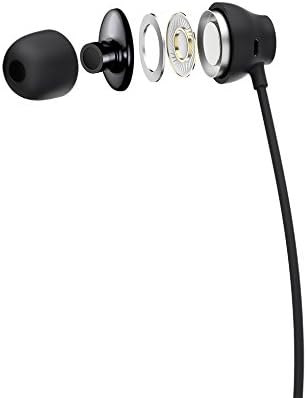
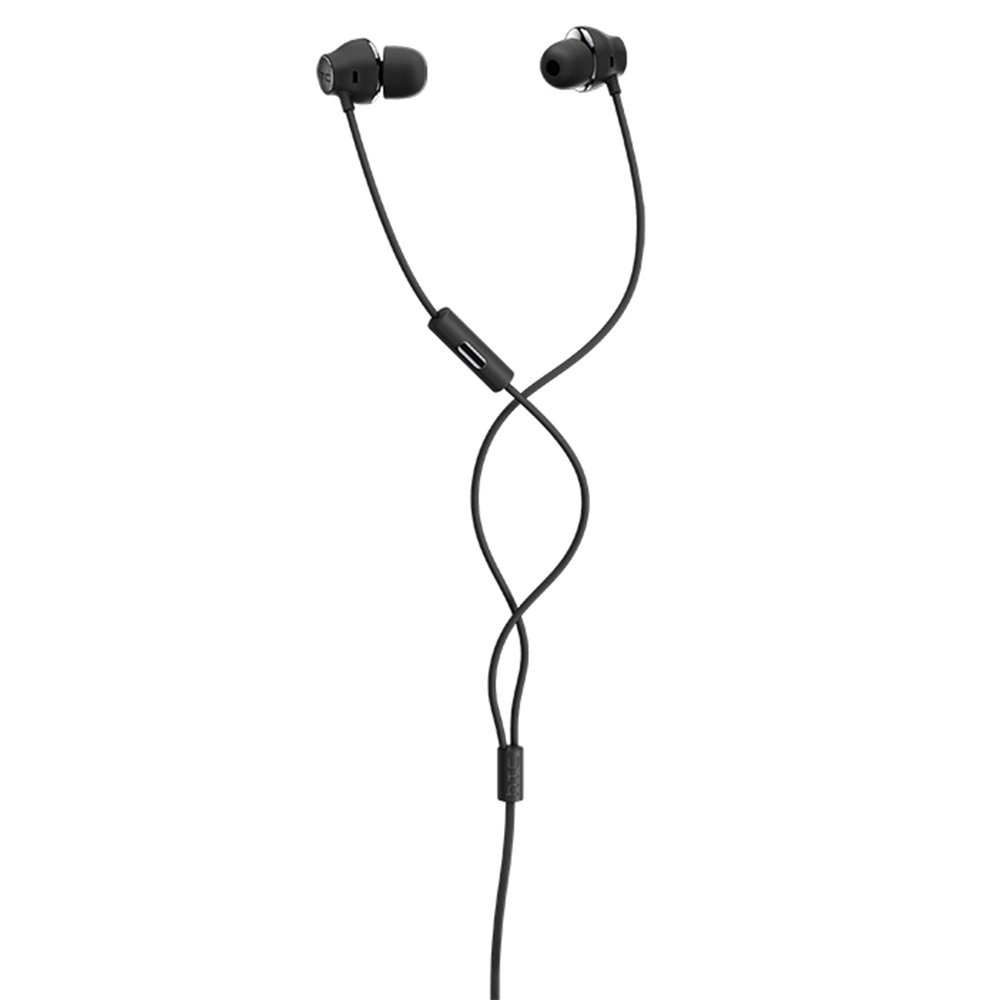
Figure 1: HTC USB Type-C Hi-Res Earphones connected to a device.
5. የአሠራር መመሪያዎች
Once connected, your earphones are ready for use.
- የድምጽ መልሶ ማጫወት፡ Play audio from your connected device. The sound will be routed through the earphones.
- የጥሪ አስተዳደር፡ For devices supporting call functions, you can typically answer/end calls using the device's interface.
- የመተግበሪያ ቁጥጥር This model supports control via an application. Refer to your device's app store for any official HTC audio control applications that may offer additional features or sound customization.
6. ጥገና እና እንክብካቤ
Proper care extends the lifespan of your earphones:
- የጆሮ ማጽዳት ጠቃሚ ምክሮች: Gently remove ear tips and clean them with a mild soap solution and water. Ensure they are completely dry before reattaching.
- የጆሮ ማዳመጫ አካልን ማጽዳት; Wipe the earphone body and cable with a soft, dry, lint-free cloth. Do not use abrasive materials or harsh chemicals.
- ማከማቻ፡ ጥቅም ላይ በማይውሉበት ጊዜ የጆሮ ማዳመጫዎቹን ንጹህና ደረቅ ቦታ ላይ ያስቀምጡ፣ በተለይም ከመተጣጠፍና ከመጎዳት ለመከላከል በመከላከያ ከረጢት ውስጥ ያስቀምጡ።
- የኬብል አስተዳደር Avoid tightly winding the cable or subjecting it to sharp bends, which can damage internal wires.
ምስል 2፡ ፈነዳ view of earphone components, highlighting the 13mm speaker and aerospace polymer diaphragm.
7. መላ መፈለግ
ችግሮች ካጋጠሙዎት የሚከተሉትን የተለመዱ ችግሮች እና መፍትሄዎች ይመልከቱ።
| ችግር | ሊሆን የሚችል ምክንያት | መፍትሄ |
|---|---|---|
| ድምጽ የለም። | Earphones not properly connected; device volume too low; incorrect audio output selected on device. | Ensure the USB Type-C connector is fully inserted. Increase device volume. Check device audio settings to confirm earphones are selected as output. |
| ደካማ የድምፅ ጥራት | Dirty ear tips; damaged cable; low-quality audio source. | Clean ear tips. Inspect the cable for visible damage. Try a different audio source or file. |
| Earphones uncomfortable or fall out | የጆሮ ጫፍ ትክክል ያልሆነ መጠን። | Try different sized ear tips (if provided) to find the best fit for your ears. |
8. ዝርዝሮች
| ባህሪ | ዝርዝር |
|---|---|
| የምርት ስም | HTC |
| የሞዴል ቁጥር | 99H20317-00 |
| የግንኙነት ቴክኖሎጂ | ባለገመድ (USB አይነት-C) |
| የድምጽ ማጉያ መጠን | 13 ሚ.ሜ |
| ቁሳቁስ | Synthetic leather (ear tips/housing accents) |
| ክብደት | 50 ግራም |
| የምርት ልኬቶች | 0.1 x 0.1 x 0.1 cm (packaging/shipping dimensions, actual earphone size is compact) |
| የመቆጣጠሪያ ዘዴ | መተግበሪያ |
| የብሉቱዝ ድጋፍ | አይ |
| ባትሪዎች ያስፈልጋሉ። | አይ |
| ተስማሚ መሣሪያዎች | Smartphone, Laptop, Tablet with USB Type-C audio output |
| ቀለም | ጥቁር ግራጫ |
| የጆሮ አቀማመጥ | በጆሮ ውስጥ |
9. ዋስትና እና ድጋፍ
For warranty information and technical support, please refer to the documentation provided with your purchase or visit the official HTC support webጣቢያ. ለዋስትና ጥያቄዎች የግዢ ማረጋገጫዎን ያስቀምጡ።