
Cambridge Soundworks SWOA3UBLK
የOontZ አንግል 3 እጅግ በጣም ተንቀሳቃሽ የብሉቱዝ ድምጽ ማጉያ የተጠቃሚ መመሪያ
Model: SWOA3UBLK
መግቢያ
ስለገዙ እናመሰግናለንasing the OontZ Angle 3 Ultra Portable Bluetooth Speaker by Cambridge Soundworks. This manual provides essential information for setting up, operating, maintaining, and troubleshooting your speaker. Designed for superior sound quality and durability, the OontZ Angle 3 Ultra features a 14-watt output, rich bass, IPX7 waterproofing, and an impressive 30-meter Bluetooth range. Enjoy up to 20 hours of playtime on a single charge.

Image: The OontZ Angle 3 Ultra Portable Bluetooth Speaker, showcasing its sleek black, triangular design with control buttons on one end.
ማዋቀር
1. የተካተቱ ዕቃዎች
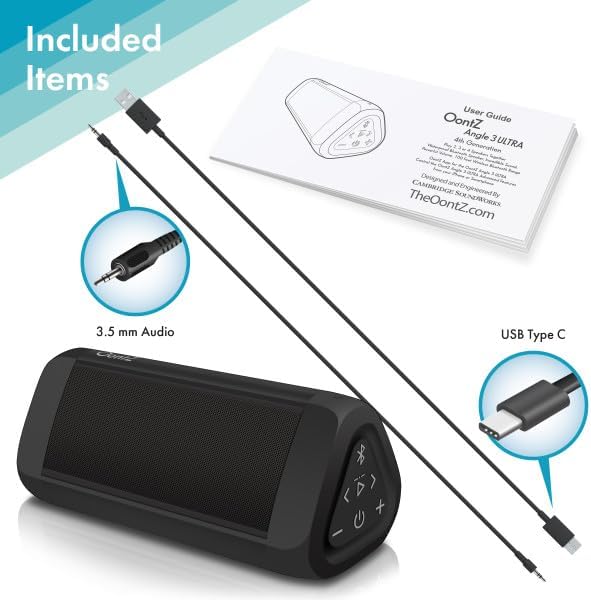
Image: The OontZ Angle 3 Ultra speaker along with its accessories: a Quick Start Guide, a 3.5mm audio cable, and a USB Type-C charging cable.
Before first use, ensure all components are present:
- OontZ Angle 3 Ultra Bluetooth Speaker
- Quick Start Guide (Full manual available online)
- 3.5 ሚሜ የድምጽ ገመድ
- የዩኤስቢ ዓይነት-ሲ ባትሪ መሙያ ገመድ
2. አፈጉባ Charውን ኃይል መሙላት
The speaker comes with a built-in rechargeable Lithium-ion battery. For optimal performance, fully charge the speaker before first use.
- Locate the charging port on the side of the speaker, protected by a rubber flap.
- Connect the supplied USB Type-C charging cable to the speaker's charging port.
- Connect the other end of the USB cable to a USB wall charger (not included) or a computer USB port.
- The charging indicator light will illuminate. A full charge takes approximately 20 hours for the first charge, and subsequent charges will be faster.

ምስል፡ መቀራረብ view of the speaker's side, showing the 3.5mm AUX input and the USB-C charging port, typically protected by a waterproof flap.
3. የብሉቱዝ ማጣመር
Pair your OontZ Angle 3 Ultra with your Bluetooth-enabled device (smartphone, tablet, laptop).
- የኃይል ቁልፉን በመጫን እና በመያዝ ድምጽ ማጉያውን ያብሩ (⏻) until the indicator light flashes blue.
- በመሳሪያዎ ላይ ወደ የብሉቱዝ ቅንብሮች ይሂዱ እና ብሉቱዝ መንቃቱን ያረጋግጡ።
- Look for "OontZ Angle 3 Ultra" in the list of available devices and select it.
- Once paired, the speaker will emit a confirmation tone, and the indicator light will turn solid blue.
4. በ AUX ግቤት በኩል መገናኘት
You can connect non-Bluetooth devices using the 3.5mm audio cable.
- Connect one end of the 3.5mm audio cable to the AUX IN port on the speaker.
- ሌላኛውን ጫፍ ከጆሮ ማዳመጫ መሰኪያ ወይም ከመሳሪያዎ የድምጽ ውፅዓት ጋር ያገናኙ።
- ድምጽ ማጉያው በራስ-ሰር ወደ AUX ሁነታ ይቀየራል።
5. Pairing Two Speakers for Stereo Sound (OontZ Dual Wireless Stereo)
Enhance your audio experience by wirelessly connecting two OontZ Angle 3 Ultra speakers for impressive stereo separation.

Image: Two OontZ Angle 3 Ultra speakers positioned to provide stereo sound, with two individuals enjoying music in an outdoor setting.
- Ensure both OontZ Angle 3 Ultra speakers are charged and powered on.
- ሁለቱንም ድምጽ ማጉያዎች ከዚህ ቀደም ከተጣመሩ የብሉቱዝ መሳሪያዎች ያላቅቁ።
- On one speaker (this will be the Left Channel), press and hold the Bluetooth button (Ⓑ) for 3 seconds until you hear a tone.
- On the second speaker (this will be the Right Channel), press and hold the Bluetooth button (Ⓑ) for 3 seconds until you hear a tone.
- The speakers will automatically connect to each other. Once connected, you will hear a confirmation tone, and the indicator lights on both speakers will turn solid blue.
- Now, connect your audio device to the Left Channel speaker via Bluetooth as described in "Bluetooth Pairing" above.
- For video audio, connect your device or TV to the Left Channel speaker using the 3.5mm audio cable.
የአሠራር መመሪያዎች
1. በላይ ይቆጣጠራልview
| አዝራር/አመላካች | ተግባር |
|---|---|
| ⏻ (ኃይል) | ለማብራት/ለማጥፋት ተጭነው ይያዙ። |
| + (ድምጽ ከፍ ያለ) | ድምጹን ለመጨመር ይጫኑ። |
| - (ድምጽ ወደ ታች) | ድምጽን ለመቀነስ ይጫኑ። |
| ▷ (አጫውት/አፍታ አቁም) | ሙዚቃን ለማጫወት/ለአፍታ ለማቆም ይጫኑ። |
| < (Previous Track) | ወደ ቀዳሚው ትራክ ለመሄድ ይጫኑ። |
| > (Next Track) | ወደ ቀጣዩ ትራክ ለመሄድ ይጫኑ። |
| Ⓑ (ብሉቱዝ) | Press to disconnect current Bluetooth device and enter pairing mode. Press and hold for 3 seconds to initiate OontZ Dual Wireless Stereo pairing. |
| አመልካች ብርሃን | Flashes blue for pairing, solid blue for connected, red for charging. |
2. ከእጅ ነፃ ጥሪ
The OontZ Angle 3 Ultra has a built-in microphone for hands-free calls.
- ጥሪ ሲገባ ሙዚቃው ይቆማል። ይጫኑ። ▷ ጥሪውን ለመመለስ አዝራር።
- ጥሪን ለማቆም፣ የሚለውን ይጫኑ ▷ አዝራር እንደገና.
- ጥሪን ላለመቀበል ተጭነው ይያዙ ▷ አዝራር ለ 2 ሰከንዶች.
- To activate Siri or Google Assistant, press and hold the ▷ button for 2 seconds when not on a call.
3. Waterproof Features (IPX7)
The OontZ Angle 3 Ultra is IPX7 certified, meaning it is fully waterproof and can be immersed in water up to 1 meter (3.3 feet) for up to 30 minutes.
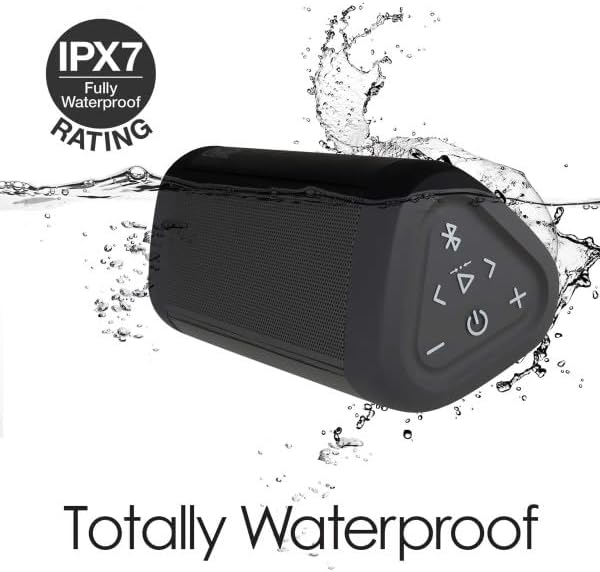
Image: The OontZ Angle 3 Ultra speaker shown partially submerged in water, illustrating its IPX7 waterproof capability.
- Ensure the rubber flap covering the charging and AUX ports is securely closed before exposing the speaker to water.
- Ideal for use by the pool, at the beach, or in the shower.
- Do not expose to salt water or chemicals. Rinse with fresh water after exposure to chlorinated water.
ጥገና
1. ማጽዳት
ድምጽ ማጉያዎን ለማጽዳት፣ ለስላሳ፣ ዲ ይጠቀሙamp ጨርቅ. ገላጭ ማጽጃዎችን ወይም ፈሳሾችን አይጠቀሙ.
2. ማከማቻ
ድምጽ ማጉያውን በቀጥታ ከፀሀይ ብርሀን እና ከከፍተኛ ሙቀት ርቆ በቀዝቃዛና ደረቅ ቦታ ያከማቹ።
3. የባትሪ እንክብካቤ
የባትሪ ዕድሜን ለማራዘም;
- በተደጋጋሚ ባትሪውን ሙሉ በሙሉ ከመሙላት ይቆጠቡ።
- የባትሪ ጤናን ለመጠበቅ በአገልግሎት ላይ ባይሆንም እንኳ የድምጽ ማጉያውን በመደበኛነት ኃይል ይሙሉ።
- ድምጽ ማጉያውን ከ60°ሴ (140°ፋ) በላይ ለሆነ የሙቀት መጠን አያጋልጡት።
መላ መፈለግ
| ችግር | መፍትሄ |
|---|---|
| ድምጽ ማጉያ አይበራም። | ባትሪው መሙላቱን ያረጋግጡ። የዩኤስቢ-ሲ ገመድ በመጠቀም ድምጽ ማጉያውን ከኃይል ምንጭ ጋር ያገናኙ። |
| ምንም ድምጽ ወይም ዝቅተኛ ድምጽ የለም. | Check the volume level on both the speaker and your connected device. Ensure the speaker is properly paired via Bluetooth or connected via AUX. |
| በብሉቱዝ በኩል ማጣመር አይቻልም። | Ensure the speaker is in pairing mode (flashing blue light). Turn off and on Bluetooth on your device. Move the speaker closer to your device. Disconnect from other Bluetooth devices. |
| በከፍተኛ ድምጽ ላይ የድምፅ ማዛባት. | Reduce the volume on the speaker or your connected device. Ensure the audio source is not distorted. |
| OontZ Dual Wireless Stereo not connecting. | Ensure both speakers are disconnected from other Bluetooth devices. Follow the pairing steps carefully, ensuring both speakers are in pairing mode for stereo connection. |
ዝርዝሮች
Key technical specifications for the OontZ Angle 3 Ultra Portable Bluetooth Speaker:
- የሞዴል ቁጥር፡- SWOA3UBLK
- ልኬቶች (L x W x H)፦ 16.26 x 7.11 x 7.11 ሴሜ (6.4 x 2.8 x 2.8 ኢንች)
- ክብደት፡ 480 ግራም (1.06 ፓውንድ)
- የድምጽ ማጉያ ውፅዓት ኃይል፡- 14 ዋት
- የብሉቱዝ ስሪት፡ 4.2
- የገመድ አልባ ክልል፡ እስከ 30 ሜትር (100 ጫማ) ድረስ ያለ ምንም እንቅፋት
- የባትሪ ህይወት፡ Up to 20 hours (at 2/3 volume)
- የውሃ መከላከያ ደረጃ IPX7 (እስከ 1 ሜትር ለ 30 ደቂቃዎች የሚገዛ)
- ግንኙነት፡ Bluetooth, 3.5mm AUX Input, USB-C Charging
- የተካተቱት ክፍሎች፡- Speaker, 3.5mm Audio Cable, USB-C Charging Cable, Quick Start Guide

Image: Diagram showing the dimensions of the OontZ Angle 3 Ultra speaker: 6.5 inches in length, 3 inches in width, and 2.75 inches in height.
ዋስትና እና ድጋፍ
For detailed warranty information and customer support, please visit the official OontZ website. The full localized manual is also available there.
ኦፊሴላዊ Webጣቢያ፡ www.theoontz.com
Cambridge Soundworks is committed to providing high-quality audio products and customer satisfaction.
Ask a question about this manual
Ask about setup, troubleshooting, compatibility, parts, safety, or missing instructions. Manuals+ will review the question and use this page’s manual context to help answer it.