
1. መግቢያ
This manual provides essential information for the safe and efficient operation of your Rigol DS1104Z-S Plus 100 MHz Digital Oscilloscope. Please read this manual thoroughly before using the instrument to ensure proper functionality and to prevent damage. The Rigol DS1104Z-S Plus is a 4-channel digital storage oscilloscope designed for precise signal analysis with a 100 MHz bandwidth and a 1 GSa/s real-time sample ተመን።
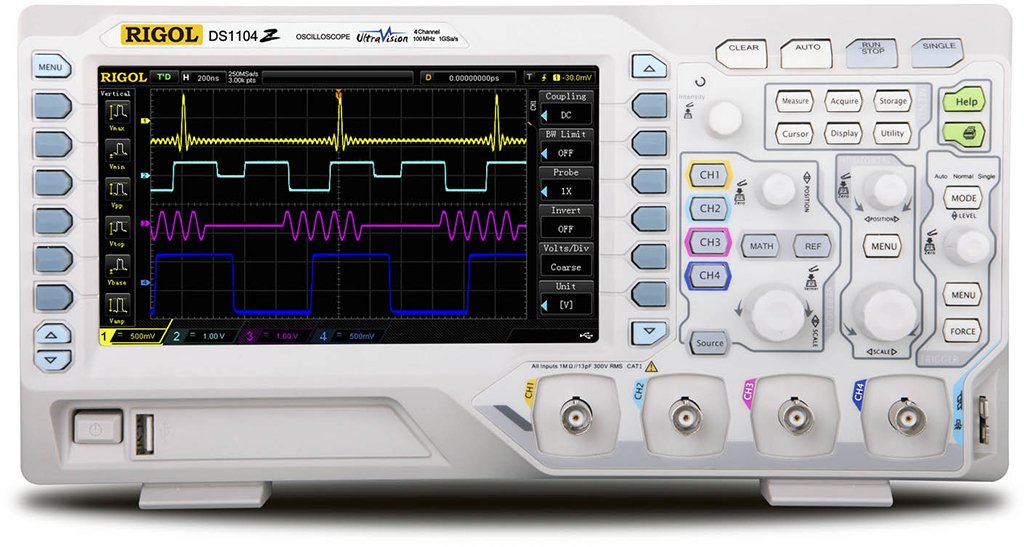
Figure 1: Rigol DS1104Z-S Plus Digital Oscilloscope. This image shows the front panel of the oscilloscope with its display, control knobs, and input channels.
2. የደህንነት መረጃ
በመሳሪያው ላይ ጉዳት እና ጉዳት እንዳይደርስ ለመከላከል የሚከተሉትን የደህንነት ጥንቃቄዎች ሁልጊዜ ይከተሉ፡
- የኃይል ምንጭ፡- Connect the instrument only to a power source with the specified voltagሠ እና ድግግሞሽ.
- መሬት ላይ የኤሌክትሪክ ንዝረትን ለመከላከል መሳሪያው በትክክል መሬት ላይ መቀመጡን ያረጋግጡ።
- የአየር ማናፈሻ; Do not block ventilation openings. Ensure adequate airflow around the instrument.
- አካባቢ፡ Operate the oscilloscope in a dry, well-ventilated area, away from direct sunlight, high temperatures, and excessive dust.
- ምርመራዎች፡- Use only probes designed for the specified voltagሠ እና ድግግሞሽ ደረጃዎች.
- አገልግሎት መስጠት፡ Refer all servicing to qualified service personnel. Do not attempt to repair the instrument yourself.
- ማጽዳት፡ ከማጽዳትዎ በፊት ኃይልን ያላቅቁ. ለስላሳ ይጠቀሙ, መamp ጨርቅ. ገላጭ ማጽጃዎችን ወይም ፈሳሾችን አይጠቀሙ.
3. የጥቅል ይዘቶች
ጥቅልዎ የሚከተሉትን ንጥሎች መያዙን ያረጋግጡ፡-
- Rigol DS1104Z-S Plus Digital Oscilloscope
- የኃይል ገመድ
- Passive Probes (4 units)
- የዩኤስቢ ገመድ
- ፈጣን መመሪያ
- Resource CD (User Manual, Programming Manual, Software)
4. ምርት አብቅቷልview
The Rigol DS1104Z-S Plus features a user-friendly interface and robust design for various measurement applications.
4.1 የፊት ፓነል
The front panel includes the display, control knobs, function buttons, and input connectors for channels 1-4.
- ማሳያ ማያ: Shows waveforms, measurement results, and menu options.
- አቀባዊ መቆጣጠሪያዎች፡ ጥራዝ ያስተካክሉtage per division and position for each channel.
- አግድም መቆጣጠሪያዎች፡ Adjust time per division and horizontal position.
- Trigger Controls: Set trigger level, mode, and type.
- የተግባር አዝራሮች፡ Access various menus such as Acquire, Measure, Storage, Utility, etc.
- Channel Inputs (CH1-CH4): BNC connectors for probe connection.
4.2 የኋላ ፓነል
The rear panel provides power input, USB host/device ports, and LAN port for connectivity.
- የኤሲ የኃይል ግቤት የኃይል ገመዱን ለማገናኘት.
- የዩኤስቢ አስተናጋጅ ወደብ፡ የዩኤስቢ ማከማቻ መሳሪያዎችን ለማገናኘት.
- የዩኤስቢ መሣሪያ ወደብ፡ For connecting to a PC.
- LAN ወደብ፡ For network connectivity and remote control.
5. ማዋቀር
5.1 የኃይል ግንኙነት
- በኋለኛው ፓነል ላይ ያለው የኃይል ማብሪያ / ማጥፊያ በጠፋው ቦታ ላይ መሆኑን ያረጋግጡ።
- የቀረበውን የኃይል ገመድ ከኦሲሎስኮፕ የኋላ ፓነል ላይ ካለው የኤሲ የኃይል ግብዓት ጋር ያገናኙ።
- የኤሌትሪክ ገመዱን ሌላኛውን ጫፍ ወደ መሰረተ የኤሲ ሃይል ሶኬት ይሰኩት።
5.2 የፍተሻ ግንኙነት
- Connect the BNC connector of a passive probe to one of the input channels (CH1, CH2, CH3, or CH4) on the front panel.
- Connect the probe's ground clip to the circuit's ground reference.
- Set the attenuation ratio on the probe to match the setting on the oscilloscope (e.g., 1X or 10X).
5.3 የመነሻ ኃይል በርቷል
- Press the power switch on the rear panel to the ON position.
- The oscilloscope will perform a self-test and display the Rigol logo.
- After startup, the default waveform display will appear.
6. የአሠራር መመሪያዎች
This section covers basic operations for acquiring and analyzing waveforms.
6.1 መሰረታዊ የሞገድ ቅርፅ ማሳያ
- ቋሚ መለኪያ (ቮልትስ/ዲቪ): Use the vertical scale knob for the active channel to adjust the voltagሠ ትብነት.
- አቀባዊ አቀማመጥ፡ Use the vertical position knob to move the waveform up or down on the screen.
- አግድም ሚዛን (SEC/DIV): Use the horizontal scale knob to adjust the time base.
- አግድም አቀማመጥ፡ Use the horizontal position knob to shift the waveform left or right.
6.2 ቀስቅሴ
Triggering stabilizes repetitive waveforms and captures single-shot events.
- ቀስቅሴ ደረጃ፡ Adjust the trigger level knob to set the voltage point at which the trigger occurs.
- Trigger Menu: የሚለውን ይጫኑ Trigger Menu button to configure trigger type (Edge, Pulse, Video, etc.), source, and slope.
- የሙከራ ሁኔታ Select between Auto, Normal, and Single modes.
6.3 የመለኪያ ተግባራት
ኦሲሎስኮፕ የተለያዩ አውቶማቲክ የመለኪያ ተግባራትን ያቀርባል።
- የሚለውን ይጫኑ ለካ button to display the measurement menu.
- Select desired measurements such as Vpp, Vmax, Vmin, Freq, Period, Rise Time, etc.
- The results will be displayed on the screen.
6.4 የውሂብ ቁጠባ
Waveforms and settings can be saved to internal memory or a USB storage device.
- የሚለውን ይጫኑ ማከማቻ አዝራር።
- Select the storage type (Waveform, Setup, Image) and destination (Internal, USB).
- Follow the on-screen prompts to save the data.
7. ጥገና
7.1 ጽዳት
To maintain the instrument's appearance and performance:
- ከማጽዳትዎ በፊት የኤሌክትሪክ ገመዱን ያላቅቁ.
- ለስላሳ ጨርቅ ይጠቀሙ መampened with mild detergent and water to clean the exterior.
- ሻካራ ማጽጃዎችን፣ ፈሳሾችን ወይም ጠንካራ ኬሚካሎችን አይጠቀሙ።
- Ensure no liquid enters the instrument.
7.2 ልኬት
The oscilloscope is factory calibrated. For optimal performance, periodic calibration by qualified service personnel is recommended, typically every 1-2 years, depending on usage.
7.3 ማከማቻ
When not in use for extended periods, store the oscilloscope in a dry, dust-free environment within the specified operating temperature range.
8. መላ መፈለግ
This section lists common problems and their solutions. If the problem persists, contact Rigol customer support.
| ችግር | ሊሆን የሚችል ምክንያት | መፍትሄ |
|---|---|---|
| ከኃይል በኋላ ምንም ማሳያ አይታይም | Power cord not connected; Power switch off; Faulty power outlet | Check power cord connection; Ensure power switch is ON; Test power outlet with another device |
| የሞገድ ቅርጽ አልታየም | Probe not connected; Incorrect channel settings; Trigger level incorrect; Input signal too small/large | Connect probe to active channel; Adjust vertical scale and position; Adjust trigger level; Check input signal source |
| ያልተረጋጋ የሞገድ ቅርፅ | Incorrect trigger settings; Noisy signal | Adjust trigger level and mode; Check signal source for noise; Use averaging acquisition mode |
| Cannot save data to USB | USB drive not formatted correctly; USB drive full; USB drive faulty | Format USB drive to FAT32; Delete unnecessary files; Try a different USB drive |
9. ዝርዝሮች
Key technical specifications for the Rigol DS1104Z-S Plus Digital Oscilloscope:
- የመተላለፊያ ይዘት 100 ሜኸ
- ቻናሎች፡ 4 አናሎግ ቻናሎች
- የእውነተኛ ጊዜ ኤስampደረጃ: እስከ 1 GSa/s
- የማስታወስ ጥልቀት; 12 Mpts (Standard), 24 Mpts (Optional)
- የሞገድ ቅርጽ ቀረጻ ፍጥነት፡ Up to 30,000 wfms/s
- ማሳያ፡- 7-inch TFT LCD (800x480 resolution)
- አቀባዊ ትብነት፡ 1 mV/div ወደ 10V/div
- የጊዜ መሠረት ክልል፡ ከ2 ns/div ወደ 50 s/div
- የትሪገር ዓይነቶች፡ Edge, Pulse, Video, Slope, Alternate, Runt, Window, Delay, Setup/Hold, Nth Edge
- በይነገጽ፡ USB Host, USB Device, LAN, Pass/Fail, Trigger Out
- የኃይል ምንጭ፡- ባለገመድ ኤሌክትሪክ
- የእቃው ክብደት፡ 1 ኪ
- ተገዢነት፡ CE
10. ዋስትና እና ድጋፍ
Rigol Technologies provides a standard warranty for its products. For detailed warranty terms and conditions, please refer to the warranty card included with your product or visit the official Rigol website. For technical support, service, or inquiries, please contact your local Rigol distributor or Rigol customer service. Contact information can typically be found on the Rigol website or in the documentation provided with your oscilloscope.
ኦፊሴላዊ Webጣቢያ፡ www.rigol.com


