
1. መግቢያ
This manual provides detailed instructions for the installation, operation, maintenance, and troubleshooting of your FSP 400W Micro ATX Power Supply (Model FSP400-60GHS(85)-R1). This power supply unit is designed for compact small form factor PC systems, offering 400 watts of power output with 80 Plus Bronze certification for high efficiency. It is compatible with Intel and AMD CPU systems and standard PC configurations.
Please read this manual thoroughly before installation and operation to ensure proper usage and to prevent damage to the unit or other components.
2. የደህንነት መረጃ
ማስጠንቀቂያ፡- የኃይል አቅርቦቶች ከፍተኛ መጠን ይይዛሉtagሠ ክፍሎች. የኃይል አቅርቦቱን አይክፈቱ ሐasinሰ. በውስጡ ለተጠቃሚ አገልግሎት የሚሰጡ ክፍሎች የሉም።asing will void the warranty and poses a risk of electric shock.
- ከመጫንዎ ወይም ከመጠገኑ በፊት የኃይል አቅርቦቱ ከኤሲ ኤሌክትሪክ መሰኪያ መቋረጡን ያረጋግጡ።
- Install the power supply in a well-ventilated area.
- Do not operate the power supply in high humidity or extreme temperature environments.
- ከኃይል አቅርቦቱ ጋር የተሰጡትን ገመዶች ብቻ ይጠቀሙ።
- ስርዓቱን ከማብራትዎ በፊት ሁሉም ገመዶች ደህንነቱ በተጠበቀ ሁኔታ መገናኘታቸውን ያረጋግጡ።
- ይህ ምርት ለግል ኮምፒውተሮች ጥቅም ላይ እንዲውል የተነደፈ ነው። ለሌላ ዓላማ አይጠቀሙበት።
3. የጥቅል ይዘቶች
ከዚህ በታች የተዘረዘሩት ሁሉም እቃዎች በጥቅልዎ ውስጥ መኖራቸውን ያረጋግጡ፡
- FSP 400W Micro ATX Power Supply (FSP400-60GHS(85)-R1)
- የ AC ኃይል ገመድ
- SFX to PS2 Bracket
- የተጠቃሚ መመሪያ
- Mounting Screws (typically included with PC cases, but sometimes with PSUs)

Figure 3.1: Package Contents. Shows the power supply unit, user manual, various power cables, an AC power cord, and an SFX to PS2 adapter bracket.
4. ምርት አብቅቷልview
The FSP400-60GHS(85)-R1 is a compact power supply designed for small form factor systems. Key features include an 80mm cooling fan with thermal sensing technology and an energy-saving 1-watt standby mode.
4.1 አካላዊ አቀማመጥ

ምስል 4.1: ማዕዘን view of the FSP 400W Micro ATX Power Supply, highlighting the fan grille, power switch, and AC power input.

ምስል 4.2: የኋላ view of the power supply, detailing the main power switch and the AC power input socket.

ምስል 4.3: ከፍተኛ view of the power supply, showing the protective grille over the 80mm cooling fan.
4.2 የውጤት ማያያዣዎች
The power supply includes various connectors to power your system components:
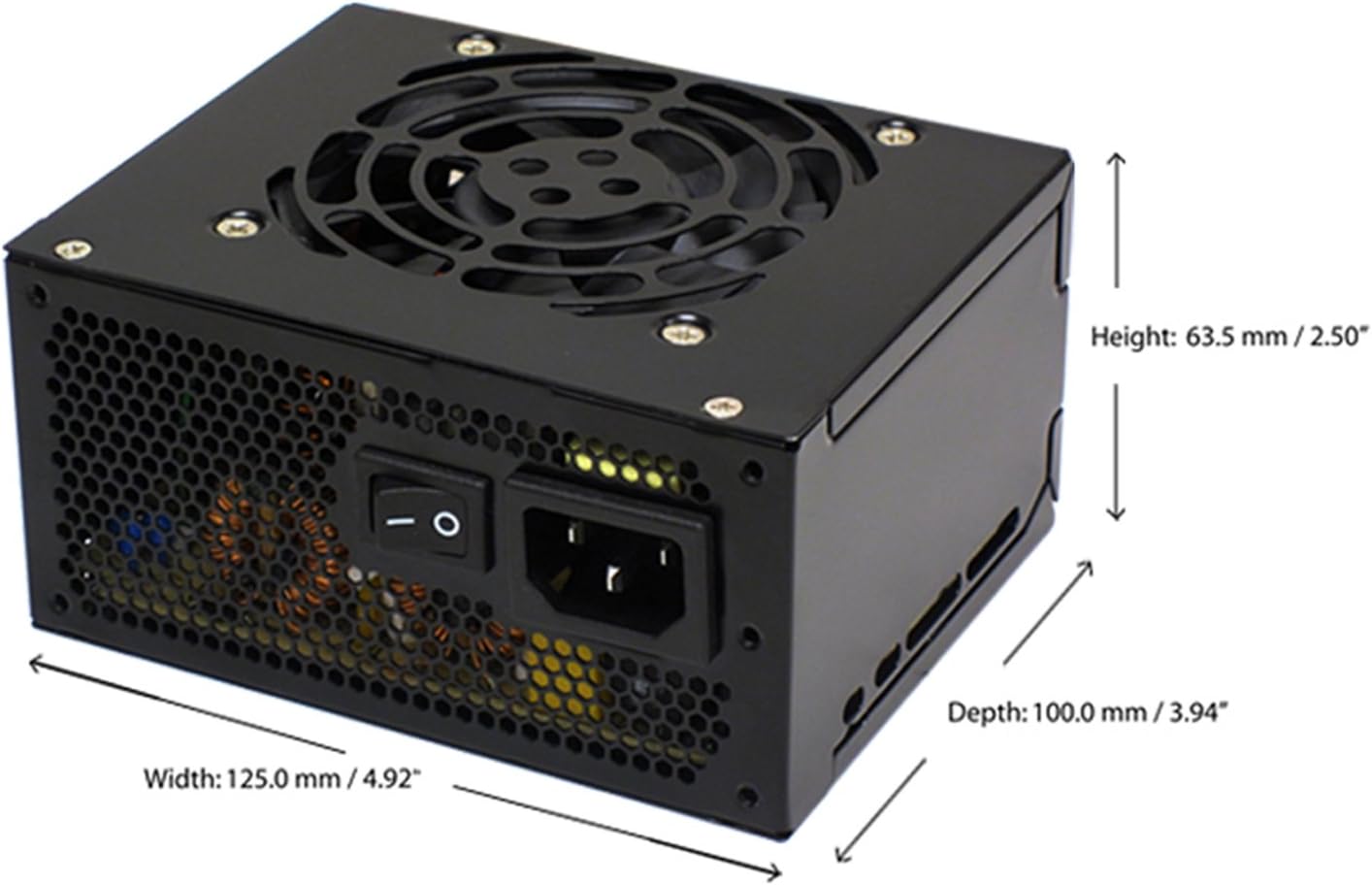
Figure 4.4: Diagram illustrating the types and quantities of output connectors available on the FSP400-60GHS(85)-R1 power supply.
- Main 24 Pin (1): ለእናትቦርድ ኃይል።
- P4 | EPS 4+4 Pin (1): ለሲፒዩ ኃይል።
- PCI-E 8 Pin (6+2) (1): ለግራፊክስ ካርዶች.
- Molex 4 Pin (3): For older peripherals and fans.
- Serial ATA 15 Pin (3): For SATA hard drives and SSDs.
- FDD 4 Pin (1): For floppy disk drives or other legacy devices.
5. ማዋቀር እና መጫን
Before beginning installation, ensure your computer system is powered off and disconnected from the AC power outlet. It is recommended to wear an anti-static wrist strap to prevent electrostatic discharge (ESD) damage to components.
5.1 የኃይል አቅርቦቱን መጫን
- ጉዳዩን ያዘጋጁ: Open your computer case. Identify the power supply mounting area.
- PSU ን መጫን;
- For SFX cases: Insert the FSP400-60GHS(85)-R1 directly into the SFX power supply bay and secure it with screws.
- For standard ATX cases: Attach the included SFX to PS2 bracket to the power supply. Then, mount the power supply with the bracket into the ATX power supply bay and secure it with screws.

Figure 5.1: The FSP 400W Micro ATX Power Supply shown with the SFX to PS2 adapter bracket installed, ready for mounting in a standard ATX case.

Figure 5.2: Illustration demonstrating how the SFX power supply fits into a PS2 (ATX) case using the provided adapter bracket.
5.2 ማገናኛ ገመዶች
Connect the appropriate cables to your motherboard and components. Refer to your motherboard and component manuals for specific connection points.
- የማዘርቦርድ ኃይል፡ Connect the 24-pin ATX connector to the corresponding socket on your motherboard.
- ሲፒዩ ሃይል፡- Connect the 4+4-pin EPS/ATX 12V connector to the CPU power socket on your motherboard.
- የግራፊክስ ካርድ ኃይል፡ If your graphics card requires external power, connect the 6+2-pin PCI-E connector(s) to the graphics card.
- የማከማቻ መሳሪያዎች፡- Connect SATA power connectors to your SATA hard drives, SSDs, and optical drives.
- ተጓዳኝ እቃዎች፡ Use Molex 4-pin connectors for case fans or other legacy peripherals as needed.
- የኬብል አስተዳደር በጉዳዩ ውስጥ ትክክለኛውን የአየር ፍሰት ለማረጋገጥ ገመዶችን በጥሩ ሁኔታ ያንቀሳቅሱ።
አንዴ ሁሉም የውስጥ ግንኙነቶች ከተደረጉ በኋላ የኮምፒተርዎን መያዣ ይዝጉ።
5.3 የውጭ ግንኙነት
- Connect the AC power cord to the power supply's AC inlet.
- የኤሲውን የኃይል ገመድ ሌላኛውን ጫፍ መሬት ላይ በተሰራ የግድግዳ መውጫ ወይም የመውጫ መከላከያ ላይ ይሰኩ።
- Ensure the power switch on the back of the power supply is in the "OFF" (O) position before plugging it in.
6. የአሠራር መመሪያዎች
6.1 ስርዓትዎን ማብራት
- After all connections are secure, flip the power switch on the back of the power supply to the "ON" (I) position.
- ስርዓቱን ለመጀመር በኮምፒተርዎ መያዣ ላይ ያለውን የኃይል ቁልፍ ይጫኑ።
6.2 Thermal Control System
The FSP400-60GHS(85)-R1 features an 80mm cooling fan with thermal sensing technology. This system automatically adjusts the fan speed based on the internal temperature of the power supply, optimizing cooling performance while minimizing noise.
6.3 Energy Saver Standby Mode
This power supply is designed with an energy-saving 1-watt standby mode, reducing power consumption when the system is in a low-power state or turned off but still connected to AC power.
7. ጥገና
ትክክለኛው ጥገና የኃይል አቅርቦትዎን ረጅም ጊዜ እና ጥሩ አፈፃፀም ያረጋግጣል።
- ማጽዳት፡ Periodically clean the exterior of the power supply and its fan grille to prevent dust buildup. Use a soft, dry cloth or compressed air. Ensure the power supply is disconnected from AC power before cleaning.
- የአየር ማናፈሻ; Ensure that the power supply's fan and ventilation openings are not obstructed. Good airflow is crucial for cooling.
- የኬብል ታማኝነት፡ የመበላሸት፣ የመበላሸት ወይም የመጎዳት ምልክቶችን ለማግኘት ሁሉንም የኃይል ገመዶች በመደበኛነት ያረጋግጡ። የተበላሹ ገመዶችን ወዲያውኑ ይተኩ።
Do not attempt to open the power supply unit for internal cleaning or repair. This will void the warranty and can be dangerous.
8. መላ መፈለግ
ከኃይል አቅርቦትዎ ጋር ችግር ካጋጠመዎት የሚከተሉትን የተለመዱ ችግሮች እና መፍትሄዎች ይመልከቱ፡
8.1 No Power to System
- የኤሲ ኃይልን ይፈትሹ፦ Ensure the AC power cord is securely plugged into both the power supply and a working wall outlet.
- የኃይል መቀየሪያ Verify that the power switch on the back of the power supply is in the "ON" (I) position.
- የውስጥ ግንኙነቶች፡- Confirm that the 24-pin ATX and 4+4-pin EPS/ATX 12V connectors are firmly seated in the motherboard.
- አጭር ወረዳ; Disconnect all peripheral power cables (SATA, Molex, PCI-E) and attempt to power on. If the system powers on, a short circuit may exist in one of the connected components or cables. Reconnect them one by one to identify the faulty component.
8.2 System Instability or Random Shutdowns
- ከመጠን በላይ መጫን የስርዓትዎ የኃይል ፍላጎቶች ከኃይል አቅርቦቱ 400W አቅም በላይ አለመሆናቸውን ያረጋግጡ።
- የአየር ማናፈሻ; Check for proper airflow within the case and ensure the power supply's fan is not obstructed. Overheating can cause instability.
- የኬብል ግንኙነቶች; Re-check all power connections to ensure they are secure. Loose connections can lead to intermittent power delivery.
8.3 ከመጠን በላይ የማራገቢያ ድምፅ
- አቧራ መገንባት; Clean the fan grille and fan blades with compressed air.
- እንቅፋት፡- Ensure no cables or foreign objects are interfering with the fan's rotation.
- የአሠራር አካባቢ; High ambient temperatures can cause the thermal control system to increase fan speed. Ensure adequate room ventilation.
If troubleshooting steps do not resolve the issue, contact FSP customer support or your retailer for assistance.
9. ዝርዝሮች
Detailed technical specifications for the FSP400-60GHS(85)-R1 power supply:
| የሞዴል ስም | FSP 400W Micro ATX Power Supply |
| የሞዴል ቁጥር | FSP400-60GHS(85)-R1 |
| የምርት ስም | FSP |
| የውጤት ዋትtage | 400 ዋት |
| 80 Plus Certification | 80 ፕላስ ነሐስ |
| የቅጽ ምክንያት | Micro ATX (SFX with PS2 bracket) |
| የማቀዝቀዣ ዘዴ | Air (80mm fan with thermal control) |
| የኃይል አቅርቦት ንድፍ | ሞዱል ያልሆነ |
| ግብዓት Voltage | 100 - 265 Volts (AC) |
| ልኬቶች (L x W x H) | 4.9 x 3.9 x 2.5 ኢንች (125.0 x 100.0 x 63.5 ሚሜ) |
| የእቃው ክብደት | 2.31 ፓውንድ £ |
| ተስማሚ መሣሪያዎች | Personal Computer (AMD/Intel CPU systems) |
| ማገናኛዎች | Main 24 Pin (1), P4 | EPS 4+4 Pin (1), PCI-E 8 Pin (6+2) (1), Molex 4 Pin (3), Serial ATA 15 Pin (3), FDD 4 Pin (1) |
| የአካባቢ ተገዢነት | RoHS, Lead-Free, Green Product (G.P) |

Figure 9.1: Physical dimensions of the FSP 400W Micro ATX Power Supply.

Figure 9.2: Illustrative diagram showing typical cable lengths for the power supply connectors.
10. የዋስትና መረጃ
The FSP 400W Micro ATX Power Supply (FSP400-60GHS(85)-R1) is covered by a የ 3 ዓመት የአምራች ዋስትና. This warranty guarantees the quality and performance of the product for the specified period from the date of purchase.
The warranty covers defects in materials and workmanship under normal use. It does not cover damage resulting from improper installation, accidents, misuse, abuse, natural disasters, or unauthorized modifications or repairs. Opening the power supply casing የዋስትናውን ዋጋ ያጣል።
For warranty claims or service, please retain your proof of purchase and contact FSP customer support.
11. የደንበኛ ድጋፍ
If you require further assistance, have questions, or need to report an issue that cannot be resolved using the troubleshooting guide, please contact FSP customer support.
- FSP Webጣቢያ፡ Visit the official FSP webየምርት መረጃ፣ ተደጋጋሚ ጥያቄዎች እና የድጋፍ ግብዓቶች ጣቢያ።
- የእውቂያ መረጃ፡- Refer to the FSP website or your product packaging for the most current customer service contact details (phone, email, or support portal).
When contacting support, please have your product model number (FSP400-60GHS(85)-R1) and proof of purchase readily available.
