
XHDATA D-808
XHDATA D-808 Portable FM Radio
የተጠቃሚ መመሪያ መመሪያ
መግቢያ
The XHDATA D-808 is a versatile portable multi-band radio designed for enthusiasts and casual listeners alike. Featuring DSP technology, it offers reception across FM, AM (MW), Shortwave (SW), Longwave (LW), and Air Band frequencies, along with Single Side Band (SSB) and RDS functionality. Its compact design and rechargeable battery make it ideal for home use, outdoor activities, and travel. This manual provides detailed instructions for setting up, operating, and maintaining your D-808 radio to ensure optimal performance.

The XHDATA D-808 is a portable digital radio suitable for various environments, including home, camping, እና ጉዞ.
የደህንነት መረጃ
- ሬዲዮውን ለከፍተኛ ሙቀት፣ ለቀጥታ የፀሐይ ብርሃን ወይም ለከፍተኛ እርጥበት አያጋልጡት።
- ሬዲዮን ለጠንካራ ተጽእኖዎች ከመጣል ወይም ከመጣል ተቆጠብ።
- ሬዲዮን ከጠንካራ መግነጢሳዊ መስኮች ያርቁ።
- ሬዲዮውን ለመበተን ወይም ለማሻሻል አይሞክሩ። ይህ ዋስትናውን ውድቅ ያደርገዋል እና ጉዳት ሊያስከትል ይችላል።
- Use only the specified rechargeable battery and charging cable provided or recommended by the manufacturer.
- በአካባቢያዊ ደንቦች መሰረት ባትሪዎችን በትክክል ያስወግዱ.
የጥቅል ይዘቶች
ሁሉም እቃዎች መኖራቸውን ለማረጋገጥ እባክዎ ሲከፍቱ የጥቅል ይዘቱን ያረጋግጡ፡
- 1 x XHDATA D-808 Radio
- 1 x Specific Carrying Bag
- 1 x ውጫዊ አንቴና
- 1 x የዩኤስቢ ቻርጅ ገመድ (ዓይነት-ሲ)
- 1 x Rechargeable Battery (18650 type)
- 1 x የእንግሊዝኛ የተጠቃሚ መመሪያ
- 1 x በእጅ ክር

The image displays the XHDATA D-808 radio along with its complete set of accessories, including the carrying bag, external antenna, USB charging cable, rechargeable battery, user manual, and wrist strap.
ምርት አልቋልview
The XHDATA D-808 features a clear LCD display, a large tuning knob, and a comprehensive keypad for easy operation. It includes a telescopic antenna for FM/SW/Air band reception and an internal ferrite antenna for AM/LW. The radio is equipped with a built-in speaker and a 3.5mm earphone jack for private listening.

The XHDATA D-808 radio, featuring its extended telescopic antenna, LCD display, and control interface.
ማዋቀር
1. የባትሪ ጭነት
- የባትሪውን ክፍል በሬዲዮው ጀርባ ላይ ያግኙት።
- የክፍሉን ሽፋን ይክፈቱ.
- የተሰጠውን 18650 ዳግም ሊሞላ የሚችል ባትሪ ያስገቡ፣ ይህም ትክክለኛውን ፖላራይቲ (+/-) ያረጋግጣል።
- የባትሪውን ክፍል ደህንነቱ በተጠበቀ ሁኔታ ይዝጉ።
2. ባትሪውን በመሙላት ላይ
ከመጠቀምዎ በፊት ባትሪውን ሙሉ በሙሉ ይሙሉት።
- Connect the supplied USB Type-C charging cable to the DC-IN 5V port on the side of the radio.
- የዩኤስቢ ገመዱን ሌላኛውን ጫፍ ከተኳሃኝ የዩኤስቢ የኃይል አስማሚ (ያልተካተተ) ወይም ከኮምፒዩተር የዩኤስቢ ወደብ ጋር ያገናኙ።
- The charging indicator on the display will show charging status. Charging is complete when the indicator shows full.

The XHDATA D-808 radio supports USB-C charging and uses a detachable 2000mAh rechargeable battery.
የአሠራር መመሪያዎች
1. ማብራት / ማጥፋት
የሚለውን ይጫኑ ኃይል button (orange button) to turn the radio on or off.
2. ባንድ ምርጫ
የሚለውን ይጫኑ FM, LW/MW/SW, ወይም አየር buttons to switch between frequency bands. For LW, MW, and SW, repeatedly press the LW/MW/SW በእነሱ ውስጥ ለማሽከርከር አዝራር።

The XHDATA D-808 is a multi-band radio capable of receiving FM, AM, SW, LW, Air Band, and SSB signals.
3. Tuning Methods
- በእጅ ማስተካከል ትልቁን አዙር ማስተካከል knob on the right side to manually adjust the frequency. Use the ማስተካከል knob for precise adjustments, especially for SSB.
- ቀጥተኛ የድግግሞሽ ግቤት፡ Use the numeric keypad (0-9) to enter a desired frequency directly, then press ድግግሞሽ.
- Auto Scan Tuning (ATS): ተጭነው ይያዙት። FM/AM/SW/AIR AUTO PRESET አዝራር (ብዙ ጊዜ የተሰየመ) ATS or similar) to automatically scan and store available stations.
4. Memory Stations
The radio can store up to 500 stations. To save a station:
- ወደሚፈለገው ጣቢያ ያቀናብሩ።
- የሚለውን ይጫኑ MEMO አዝራር።
- የማህደረ ትውስታ ቦታን ለመምረጥ የቁጥር ቁልፍ ሰሌዳውን ወይም የማስተካከያ ቁልፉን ይጠቀሙ።
- ተጫን MEMO እንደገና ለማረጋገጥ.
የተከማቸ ጣቢያን ለማስታወስ ን ይጫኑ ገጽ button and then use the numeric keypad or tuning knob to select the memory page/number.
5. Alarm Clock and Sleep Timer
The D-808 includes an alarm clock and a sleep timer function.
- ማንቂያ ደውል: የሚለውን ይጫኑ ማንቂያ button to set the alarm time. The radio can wake you up with a buzzer or a radio station.
- የእንቅልፍ ሰዓት ቆጣሪ የሚለውን ይጫኑ ተኛ button to set a timer for the radio to automatically turn off after a set period (e.g., 10, 20, 30, 60, 90 minutes).
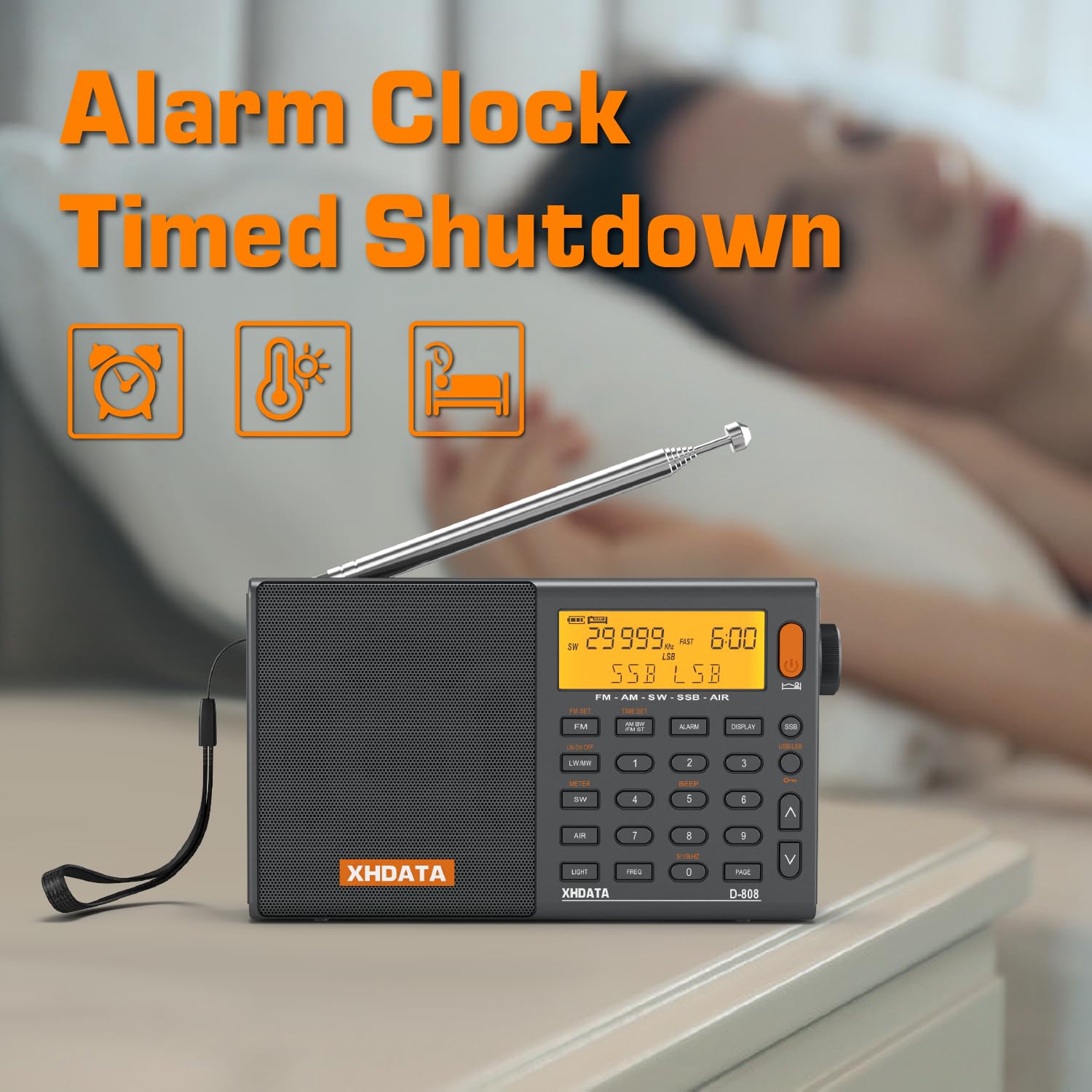
The XHDATA D-808 features an alarm clock and timed shutdown functions.
6. SSB (Single Side Band) Operation
The D-808 supports SSB reception (USB/LSB) for listening to amateur radio, utility stations, and other non-broadcast signals.
- Tune to a Shortwave frequency where SSB signals are expected.
- የሚለውን ይጫኑ SSB button to activate SSB mode. Repeatedly press to switch between USB (Upper Side Band) and LSB (Lower Side Band).
- የሚለውን ተጠቀም ማስተካከል knob to precisely adjust the frequency for clear voice reception.

The SSB feature on the XHDATA D-808 allows for reception of various signals, including maritime, meteorological, and HAM radio communications.
7. RDS Functionality (FM only)
When tuned to an FM station broadcasting RDS (Radio Data System) information, the display may show station name, program type, and other data. This also allows for automatic time calibration.
8. External Antenna Use
For improved reception, especially on SW and Air bands, connect the provided external wire antenna to the ጉንዳን jack on the side of the radio. Extend the antenna fully and position it for best signal.
9. የድምጽ መቆጣጠሪያ
አሽከርክር ድምጽ knob (integrated with the TUNING knob) to adjust the audio output level.
ጥገና
- ማጽዳት፡ የሬዲዮውን ውጫዊ ክፍል ለማጽዳት ለስላሳና ደረቅ ጨርቅ ይጠቀሙ። ሻካራ ማጽጃዎችን ወይም ሟሟቶችን አይጠቀሙ።
- ማከማቻ፡ When not in use for extended periods, remove the battery and store the radio in a cool, dry place.
- የአንቴና እንክብካቤ; ቴሌስኮፒክ አንቴናውን በጥንቃቄ ይያዙት፤ ይህም መታጠፍ ወይም መሰበርን ይከላከላል።
መላ መፈለግ
| ችግር | ሊሆን የሚችል ምክንያት | መፍትሄ |
|---|---|---|
| ሬዲዮ አይበራም። | ባትሪ ዝቅተኛ ነው ወይም በትክክል አልተጫነም። | Charge the battery or re-install it with correct polarity. |
| Poor reception/static. | ደካማ ምልክት፣ ጣልቃ ገብነት ወይም አንቴና አልተዘረጋም። | Extend the telescopic antenna fully. Use the external antenna. Move to an open area away from electronic devices. Adjust bandwidth. |
| ከተናጋሪው ምንም ድምፅ የለም። | የድምጽ መጠኑ በጣም ዝቅተኛ ነው ወይም የጆሮ ማዳመጫዎች ተገናኝተዋል። | Increase volume. Disconnect headphones if not in use. |
| SSB signal is distorted. | Fine tuning not precise. | Use the FINE TUNE knob for precise adjustment until the voice is clear. |
| ማሳያው ደብዛዛ ወይም ባዶ ነው። | Battery low or backlight setting. | Charge the battery. Check backlight settings (if applicable). |
ዝርዝሮች
| ባህሪ | ዝርዝር |
|---|---|
| የምርት ስም | XHDATA |
| ሞዴል | D-808 |
| የሬዲዮ ድግግሞሽ ክልል | FM: 64-108 MHz (Global), AM (MW): 520-1710 KHz, SW: 1711-29999 KHz, LW: 150-450 KHz, AIR: 118-137 MHz |
| የድምጽ ማጉያ ውፅዓት ኃይል | 5 ዋት |
| የማሳያ ቴክኖሎጂ | LCD |
| የኃይል ምንጭ | Battery Powered, Corded Electric (USB-C 5V) |
| የባትሪ ዓይነት | 1 x 18650 Lithium Ion (Rechargeable) |
| የምርት ልኬቶች (LxWxH) | 15 x 5 x 8.5 ሴ.ሜ |
| የእቃው ክብደት | 470 ግ |
| ግንኙነት | 3.5mm Audio Jack, USB Type-C |
ዋስትና እና ድጋፍ
The XHDATA D-808 Portable FM Radio comes with a standard manufacturer's warranty. Please refer to the warranty card included in your package for specific terms and conditions. For technical support, troubleshooting assistance, or warranty claims, please contact XHDATA customer service through their official website or the retailer from whom you purchased the product. Keep your purchase receipt as proof of purchase for warranty purposes.
Ask a question about this manual
Ask about setup, troubleshooting, compatibility, parts, safety, or missing instructions. Manuals+ will review the question and use this page’s manual context to help answer it.