
መግቢያ
This manual provides detailed instructions for the setup, operation, and maintenance of your Digoo DG-C3 Wireless Weather Station. This device integrates a hygrometer, thermometer, weather forecast station, and alarm clock functions, offering comprehensive environmental monitoring and timekeeping capabilities. Please read this manual thoroughly before using the product to ensure correct operation and to maximize its features.
የጥቅል ይዘቶች
- Digoo DG-C3 Wireless Weather Station Unit
- የዩኤስቢ ኃይል ገመድ
- የተጠቃሚ መመሪያ (ይህ ሰነድ)
ማሳሰቢያ፡ ባትሪዎች (3x AAA) አልተካተቱም እና ለብቻው መግዛት አለባቸው።
ምርት አልቋልview
Familiarize yourself with the various components of your Digoo DG-C3 weather station.
የፊት ማሳያ
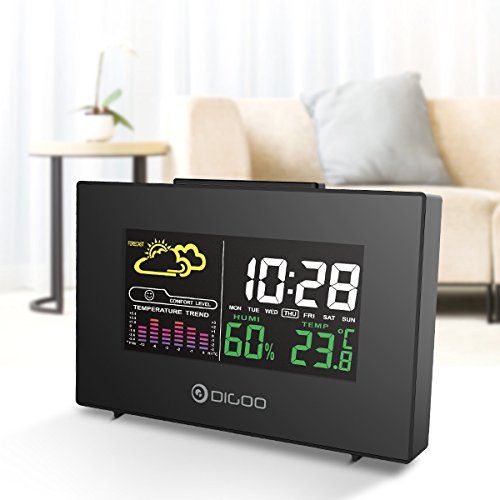
The front display features a color backlit screen showing the current time, day of the week, indoor humidity, indoor temperature, and a weather forecast icon. It also includes a comfort level indicator and a temperature trend graph.
- ሰዓት እና ቀን Digital display of current time and day.
- የአየር ሁኔታ ትንበያ: Icons indicating predicted weather conditions (e.g., sunny, cloudy, rainy).
- የምቾት ደረጃ፡ Indicates indoor comfort based on temperature and humidity.
- የሙቀት አዝማሚያ: Bar graph showing recent temperature changes.
- እርጥበት; መቶኛtage display of indoor humidity.
- የሙቀት መጠን፡ Digital display of indoor temperature (Celsius or Fahrenheit).
የኋላ ፓነል።
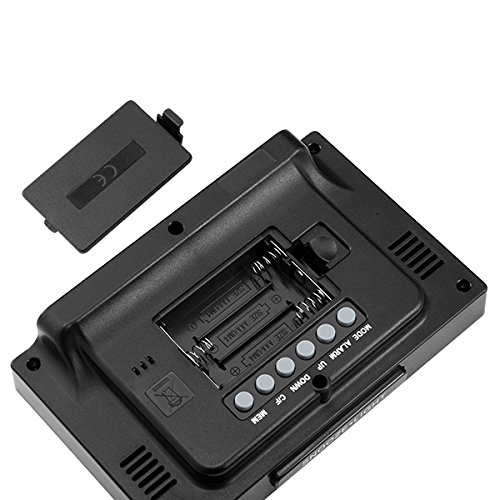
The back of the unit houses the battery compartment and various control buttons for setting the device.
- የባትሪ ክፍል፡ Holds 3x AAA batteries for power backup.
- MODE አዝራር፡- Used to switch between display modes and enter setting mode.
- የማንቂያ ቁልፍ፡- Used to set and activate/deactivate the alarm.
- የላይ አዝራር ፦ Used to increase values during settings or view maximum records.
- ታች አዝራር; Used to decrease values during settings or view minimum records.
- °C/°F አዝራር፡ በሴልሺየስ እና ፋራናይት የሙቀት አሃዶች መካከል ይቀያየራል።
- MEM አዝራር፡- ተጠቅሟል view memory records for temperature and humidity.
ከፍተኛ ፓነል
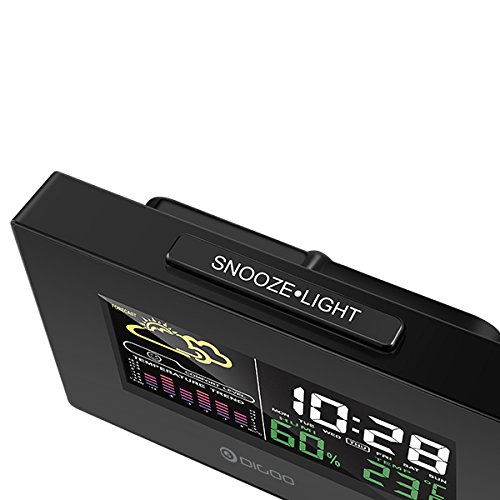
The top of the unit features a single button for snooze and backlight functions.
- SNOOZE·LIGHT Button: Press to activate the backlight or snooze the alarm.
ማዋቀር
1. ማብራት
- የባትሪ ጭነት; Open the battery compartment cover on the back of the unit. Insert 3x AAA batteries, ensuring correct polarity (+/-). Close the cover. Batteries provide backup power and allow for portability.
- USB Power Connection: For continuous power and backlight, connect the provided USB cable to the USB port on the unit and to a compatible USB power adapter (not included) or a computer USB port.
- The display will light up and show default settings.
2. Initial Settings (Time, Date, Unit)
- የጊዜ አቀማመጥ፡-
- ተጭነው ይያዙት። MODE button for approximately 3 seconds to enter time setting mode. The hour digit will flash.
- የሚለውን ተጠቀም UP or ታች ሰዓቱን ለማስተካከል ቁልፎች.
- ተጫን MODE again to confirm the hour and move to minute setting. The minute digit will flash.
- የሚለውን ተጠቀም UP or ታች ደቂቃውን ለማስተካከል አዝራሮች።
- ተጫን MODE again to confirm and move to 12/24 hour format selection.
- የሚለውን ተጠቀም UP or ታች የ12 ሰዓት ወይም የ24 ሰዓት ቅርጸት ለመምረጥ አዝራሮች።
- ተጫን MODE የጊዜ ገደቡን ለማረጋገጥ እና ለመውጣት።
- ቀን ቅንብር
- ሰዓቱን ካቀናበሩ በኋላ ይጫኑ MODE again to enter date setting mode. The year will flash.
- የሚለውን ተጠቀም UP or ታች አመቱን ለማስተካከል ቁልፎች.
- ተጫን MODE to confirm and move to month setting.
- የሚለውን ተጠቀም UP or ታች ወርን ለማስተካከል ቁልፎች.
- ተጫን MODE to confirm and move to day setting.
- የሚለውን ተጠቀም UP or ታች ቀኑን ለማስተካከል ቁልፎች.
- ተጫን MODE to confirm and exit date setting.
- የሙቀት መለኪያ ምርጫ;
- የሚለውን ይጫኑ ° ሴ / ° ፋ button on the back of the unit to switch between Celsius (°C) and Fahrenheit (°F) temperature display.
የአሠራር መመሪያዎች
1. የማንቂያ ሰዓት ተግባር
- ማንቂያውን በማዘጋጀት ላይ;
- የሚለውን ይጫኑ ማንቂያ የአሁኑን የማንቂያ ሰዓት ለማሳየት አንድ ጊዜ አዝራር።
- ተጭነው ይያዙት። ማንቂያ button for approximately 3 seconds. The hour digit will flash.
- የሚለውን ተጠቀም UP or ታች የማንቂያ ሰዓቱን ለማስተካከል ቁልፎች.
- ተጫን ማንቂያ again to confirm the hour and move to minute setting. The minute digit will flash.
- የሚለውን ተጠቀም UP or ታች የማንቂያ ደቂቃውን ለማስተካከል ቁልፎች.
- ተጫን ማንቂያ ለማረጋገጥ እና ማንቂያ ቅንብር ለመውጣት.
- ማንቂያውን ማንቃት/ማቦዘን፡-
- በመደበኛ የማሳያ ሁነታ ላይ እያሉ፣ ይጫኑ ማንቂያ button repeatedly to toggle the alarm ON or OFF. An alarm icon will appear on the display when the alarm is active.
- የማሸለብ ተግባር
- ማንቂያው ሲሰማ ፣ ይጫኑ አንቀላፋ button on the top of the unit to activate the snooze function. The alarm will temporarily stop and sound again after a few minutes (typically 5-10 minutes).
- To stop the alarm completely, press any other button on the back panel.
2. የአየር ሁኔታ ትንበያ
The weather station provides a weather forecast based on internal atmospheric pressure changes. The forecast icons (e.g., sunny, cloudy, rainy) are predictions for the next 12-24 hours and may not always match local weather services, which use more comprehensive data.
- The forecast icon is displayed on the upper left of the screen.
- The device requires a period of stable operation (typically 24 hours) to calibrate and provide accurate forecasts.
3. የሙቀት እና እርጥበት ማሳያ
- The current indoor temperature and humidity are continuously displayed on the screen.
- Viewing Min/Max Records:
- የሚለውን ይጫኑ ኤም.ኤም ከፍተኛውን የተመዘገበውን የሙቀት መጠን እና እርጥበት ለማሳየት አንድ ጊዜ አዝራር።
- ተጫን ኤም.ኤም again to display the minimum recorded temperature and humidity.
- ተጫን ኤም.ኤም a third time to return to current readings.
- To clear the min/max records, press and hold the ኤም.ኤም አዝራር ለ 3 ሰከንዶች ያህል viewመዝገቦችን ማስገባት።
4. የጀርባ ብርሃን መቆጣጠሪያ
- When powered by USB, the backlight will remain on.
- When powered by batteries only, press the አንቀላፋ button to temporarily activate the backlight for a few seconds.
ጥገና
- ማጽዳት፡ Wipe the unit with a soft, dry cloth. Do not use abrasive cleaners or solvents. Avoid getting moisture into the unit.
- የባትሪ መተካት፡ When the display becomes dim or functions irregularly, replace the 3x AAA batteries in the back compartment. Ensure correct polarity.
- ማከማቻ፡ If not using the device for an extended period, remove the batteries to prevent leakage. Store in a cool, dry place.
መላ መፈለግ
| ችግር | ሊሆን የሚችል ምክንያት | መፍትሄ |
|---|---|---|
| ማሳያ ባዶ ወይም ደብዛዛ ነው። | Low batteries or no power connection. | Replace batteries or connect the USB power cable. |
| የተሳሳተ ሰዓት/ቀን። | Time/date not set correctly after power loss or initial setup. | Follow the "Initial Settings" section to reset time and date. |
| የአየር ሁኔታ ትንበያ የተሳሳተ ይመስላል። | Device needs calibration time; local conditions may differ from pressure-based forecast. | Allow 24 hours for calibration. Understand that the forecast is based on internal pressure changes. |
| ማንቂያ አይሰማም። | ማንቂያ አልነቃም ወይም መጠኑ በጣም ዝቅተኛ ነው (የሚስተካከል ከሆነ)። | Ensure the alarm icon is displayed. Check alarm settings. |
ዝርዝሮች
| ሞዴል፡ | DG-C3 |
| ግንኙነት፡ | ዩኤስቢ (ለኃይል) |
| የኃይል ምንጭ፡- | 3x AAA Batteries (not included) or USB Power |
| ልዩ ባህሪያት፡ | Hygrometer, Thermometer, Weather Forecast, Alarm Clock, Color Backlight, Portable |
| ማሳያ፡- | Color Backlit LCD |
| የሙቀት መለኪያ; | °C / °F ሊመረጥ የሚችል |
ዋስትና እና ድጋፍ
የዋስትና መረጃ ወይም የቴክኒክ ድጋፍ ለማግኘት፣ በግዢው ጊዜ የቀረቡትን ሰነዶች ይመልከቱ ወይም ቸርቻሪዎን ያነጋግሩ። የግዢ ደረሰኝዎን እንደ ግዢ ማረጋገጫ ያስቀምጡ።