
ምርት አልቋልview
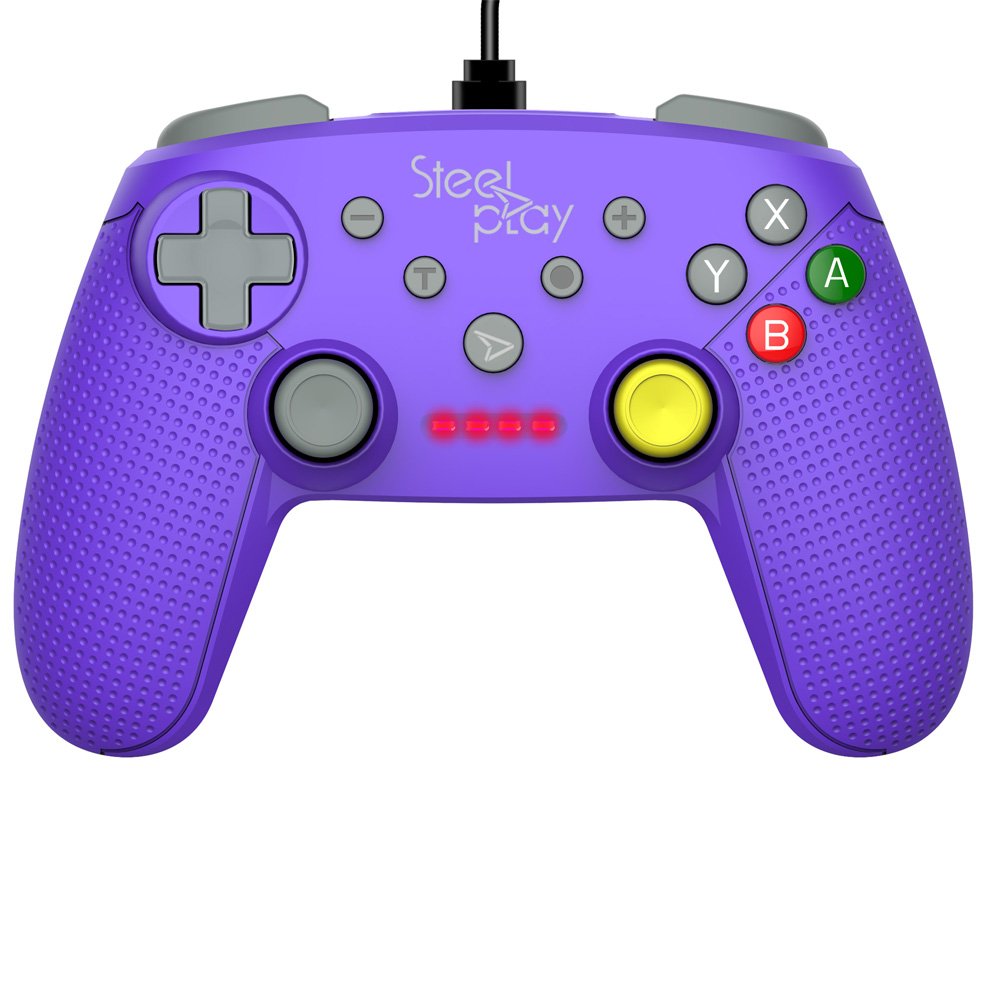
The Steelplay Wired Controller GCUBE (model ECO0622) is designed for use with the Nintendo Switch console, providing a reliable wired connection for uninterrupted gameplay. This controller features a comfortable ergonomic grip, a 2.5-meter USB cable, and includes advanced functionalities such as a gyro sensor, dual vibration feedback, and a turbo function button.
የማዋቀር መመሪያዎች
- መቆጣጠሪያውን ያገናኙ; Insert the USB connector of the Steelplay Wired Controller GCUBE into an available USB port on your Nintendo Switch dock.
- Power On the Console: Ensure your Nintendo Switch console is powered on and connected to your TV or in handheld mode with the dock.
- ራስ-ሰር እውቅና; The console should automatically detect the controller. The player indicator lights on the controller will illuminate to show its assigned player number.
- Begin Gameplay: You can now use your Steelplay Wired Controller GCUBE for gaming.
መቆጣጠሪያውን በመሥራት ላይ
The Steelplay Wired Controller GCUBE features a standard layout for intuitive gameplay.
የአዝራር ተግባራት፡-
- የግራ/ቀኝ አናሎግ ስቲኮች፡ ለእንቅስቃሴ እና ለካሜራ ቁጥጥር።
- ዲ-ፓድ (አቅጣጫ ፓድ): ለትክክለኛ የአቅጣጫ ግቤት።
- A/B/X/Y አዝራሮች፡- Action buttons, typically used for jumping, attacking, interacting, etc.
- L/R Buttons (Shoulder Buttons): Often used for quick actions or menu navigation.
- ZL/ZR Buttons (Trigger Buttons): Analog or digital triggers for specific in-game actions.
- የተቀነሰ (-) አዝራር፡- በተለምዶ የጨዋታ ምናሌዎችን ይከፍታል ወይም የተወሰኑ እርምጃዎችን ያከናውናል።
- የፕላስ (+) አዝራር፡- Typically pauses the game or opens system menus.
- መነሻ አዝራር፡- ወደ ኔንቲዶ ቀይር መነሻ ምናሌ ይመለሳል።
- የቀረጻ አዝራር፡ Takes screenshots of your gameplay.
ልዩ ባህሪያት፡
- Gyro Function: The controller includes a built-in gyro sensor for motion control in compatible games. This allows for intuitive aiming or steering by tilting the controller.
- የሁለትዮሽ ንዝረት ግብረመልስ፡ Experience enhanced immersion with haptic feedback that responds to in-game events.
- የቱርቦ ተግባር The turbo function allows for rapid, repeated input of a button press. To activate, press and hold the ቱርቦ button, then press the desired action button (e.g., A, B, X, Y, L, R, ZL, ZR). To deactivate, repeat the process.
ጥገና
Proper care ensures the longevity and optimal performance of your controller.
- ማጽዳት፡ መቆጣጠሪያውን ለማጽዳት ለስላሳ እና ደረቅ ጨርቅ ይጠቀሙ። ለጠንካራ ቆሻሻ፣ ትንሽ ጠጣርampጨርቁን በውሃ. ኃይለኛ ኬሚካሎችን፣ ፈሳሾችን ወይም ሻካራ ማጽጃዎችን ከመጠቀም ይቆጠቡ።
- ማከማቻ፡ መቆጣጠሪያውን በቀጥታ ከፀሀይ ብርሀን እና ከከፍተኛ ሙቀት ርቆ በቀዝቃዛና ደረቅ ቦታ ያከማቹ።
- የኬብል እንክብካቤ; Avoid bending or twisting the USB cable excessively. Do not pull the cable to disconnect the controller; always grasp the plug.
- ፈሳሾችን ያስወግዱ; የውስጥ ጉዳትን ለመከላከል መቆጣጠሪያውን ከፈሳሽ ያርቁ።
መላ መፈለግ
- ተቆጣጣሪ ምላሽ አይሰጥም;
- Ensure the USB cable is securely connected to both the controller and the Nintendo Switch dock.
- Try connecting the controller to a different USB port on the dock.
- የኒንቴንዶ ቀይር ኮንሶልዎን እንደገና ያስጀምሩ።
- አዝራሮች ወይም ጆይስቲክ በትክክል የማይሰሩባቸው ቦታዎች፡
- በአዝራሮቹ ወይም በጆይስቲክስ ዙሪያ ያሉ ማንኛውንም አካላዊ እንቅፋቶች ወይም ፍርስራሾችን ያረጋግጡ።
- Ensure the controller's firmware is up to date. Firmware updates may be necessary and typically require connection to a PC. Refer to the Steelplay official website for specific instructions and update tools.
- ንዝረት አይሰራም፡
- Verify that vibration is enabled in your Nintendo Switch system settings and within the game you are playing.
- መቆጣጠሪያው ደህንነቱ በተጠበቀ ሁኔታ መገናኘቱን ያረጋግጡ።
ዝርዝሮች
| ባህሪ | ዝርዝር |
|---|---|
| የሞዴል ቁጥር | ኢኮ 0622 |
| ተኳኋኝነት | ኔንቲዶ ቀይር |
| ግንኙነት | ባለገመድ (ዩኤስቢ) |
| የኬብል ርዝመት | 2.5 ሜትር |
| መጠኖች | 17.2 x 7 x 20.3 ሴ.ሜ |
| ክብደት | 360 ግ |
| ልዩ ባህሪያት | Gyro Function, Dual Vibration Feedback, Turbo Function Button, Rubberized Grip Surface, Ergonomic Grip |
የዋስትና መረጃ
For detailed warranty information regarding your Steelplay Wired Controller GCUBE, please refer to the warranty card included with your product or visit the official Steelplay webጣቢያ. የዋስትና ውሎች እና ሁኔታዎች እንደ ክልል እና ቸርቻሪ ሊለያዩ ይችላሉ።
የደንበኛ ድጋፍ
If you encounter any issues or have questions not covered in this manual, please contact Steelplay customer support. Contact information can typically be found on the official Steelplay webጣቢያ ወይም በምርቱ ማሸጊያ ላይ.


