
TFA 47.3005.01
TFA Dostmann Wireless Rain Gauge Drop 47.3005.01 User Manual
ሞዴል፡ 47.3005.01
1. መግቢያ
The TFA Dostmann Wireless Rain Gauge Drop (Model 47.3005.01) is designed to provide accurate monitoring of rainfall and indoor temperature. This digital device offers a comprehensive history of rainfall data, allowing users to track precipitation over various periods. It also functions as a clock with an alarm feature.
This manual provides detailed instructions for the setup, operation, maintenance, and troubleshooting of your rain gauge system.
2. የጥቅል ይዘቶች
ማዋቀሩን ከመጀመርዎ በፊት ሁሉም ክፍሎች መኖራቸውን ያረጋግጡ፦
- Base Station (Display Unit)
- Temperature Transmitter (Outdoor Sensor)
- Rain Gauge (Rain Collector Transmitter)
- መመሪያ መመሪያ
3. ማዋቀር
3.1. Base Station (Display Unit)
- የባትሪውን ክፍል በመሠረት ጣቢያው ጀርባ ይክፈቱ።
- Insert the required batteries (e.g., 2 x AA, not included) according to the polarity markings.
- Close the battery compartment. The display should power on.
- Place the base station indoors, in a location where the display is easily visible and away from direct sunlight or heat sources that could affect its internal temperature sensor.
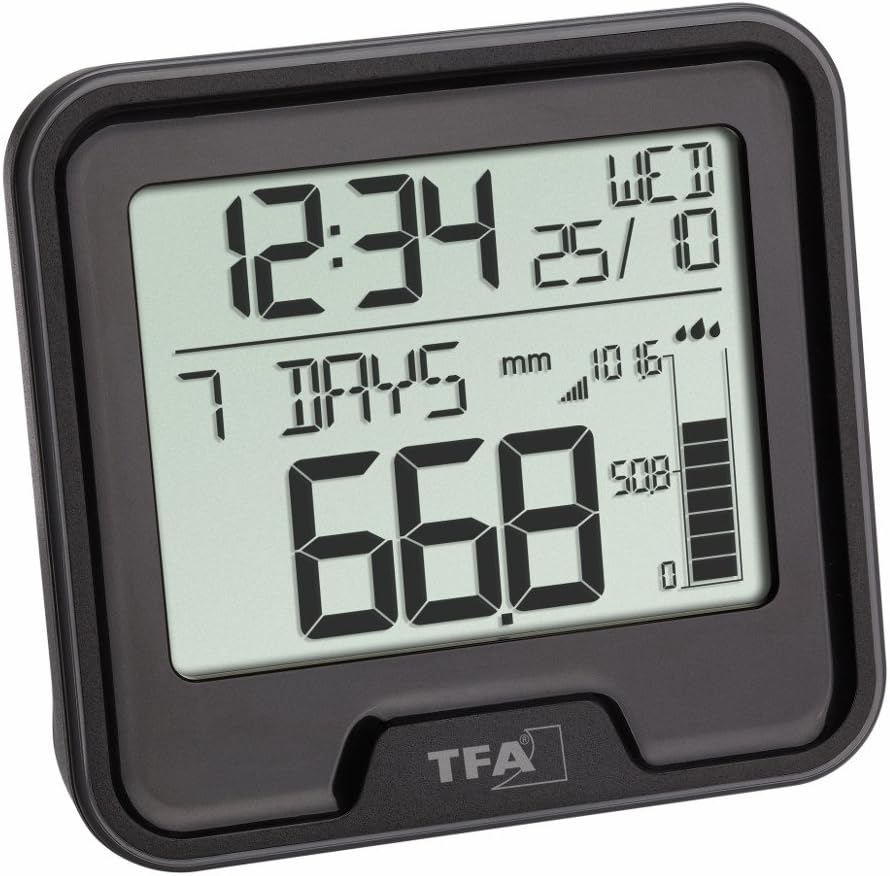
Image 1: The TFA Dostmann Wireless Rain Gauge Drop base station, showing the digital display with time, date, and rainfall data.
3.2. Rain Gauge (Rain Collector Transmitter)
- Open the battery compartment on the rain gauge unit.
- Insert the required batteries (e.g., 2 x AAA, not included) according to the polarity markings.
- Close the battery compartment securely to ensure water resistance.
- Mount the rain gauge outdoors in an open area, ensuring it is level and free from obstructions (e.g., trees, buildings) that could block rainfall. It should be easily accessible for periodic cleaning.
- Ensure the rain gauge is within the wireless transmission range of the base station.

Image 2: The TFA Dostmann Wireless Rain Gauge collector unit, designed to measure precipitation.
3.3. Temperature Transmitter (Outdoor Sensor)
- Open the battery compartment of the temperature transmitter.
- Insert the required batteries (e.g., 2 x AAA, not included) according to the polarity markings.
- የባትሪውን ክፍል ይዝጉ.
- Mount the temperature transmitter outdoors in a shaded, well-ventilated area, protected from direct sunlight and rain, to ensure accurate temperature readings.
- Ensure it is within the wireless transmission range of the base station.
3.4. Pairing Sensors with Base Station
Upon initial power-up, the base station will automatically search for signals from the rain gauge and temperature transmitters. This process may take a few minutes. Ensure all units are within range. If pairing does not occur automatically, refer to the troubleshooting section or the specific pairing instructions in the included manual (if different from this general guide).
4. የአሠራር መመሪያዎች
4.1. ማሳያ በላይview
The base station display typically shows the following information:
- Current Time and Date: በማሳያው አናት ላይ ይገኛል.
- የቤት ውስጥ ሙቀት; Measured by the base station's internal sensor.
- የውጪ ሙቀት; Received from the external temperature transmitter.
- የዝናብ መረጃ፡ Displays current, historical, and cumulative rainfall amounts.
- Wireless Signal Indicators: Show connection status for transmitters.
4.2. Rainfall Monitoring
The device provides detailed rainfall information:
- Current Rainfall: Indication of the most recent rainfall.
- ታሪካዊ መረጃ፡ View rainfall for the last hour, last 24 hours, last 7 days, current month, and cumulative rainfall.
- 365-Day History: Access rainfall data for the past 365 days. Use the 'MODE' or 'HISTORY' button (if available) to cycle through these views.
- Rainfall Alarm: Set an alarm to be notified when a certain amount of rain is measured. Refer to the specific button functions for setting this alarm.
4.3. የሙቀት ቁጥጥር
The base station displays both indoor and outdoor temperatures. The outdoor temperature is transmitted wirelessly from the external sensor.
4.4. የሰዓት እና የማንቂያ ተግባራት
The digital display shows the current time and date. It also functions as an alarm clock with a snooze function. Consult the specific button instructions for setting the time, date, and alarm.
4.5. የአዝራር ተግባራት (አጠቃላይ)
While specific button labels may vary, common functions include:
- MODE / SET: To switch between display modes or enter setup menus.
- UP / DOWN (or + / -): To adjust values during setup or navigate history.
- ዋስትና To set or activate the alarm function.
- ታሪክ፡- ለ view past rainfall data.
5. ጥገና
- Cleaning the Rain Gauge: Periodically check the rain collector for leaves, debris, or insects that could obstruct the funnel and affect accuracy. Clean with a soft cloth and water. Do not use abrasive cleaners.
- የባትሪ መተካት፡ Replace batteries in all units (base station, rain gauge, temperature transmitter) when the low battery indicator appears on the display. Use fresh, high-quality batteries.
- የዳሳሽ አቀማመጥ፡- Regularly check that the rain gauge is level and unobstructed, and that the temperature transmitter is still in a shaded, well-ventilated spot.
- አጠቃላይ ጽዳት; Wipe the base station and transmitters with a soft, damp እንደ አስፈላጊነቱ ጨርቅ.
6. መላ መፈለግ
- No Display on Base Station:
- ባትሪዎቹ በትክክል ገብተው እንደሆነ እና እንዳልተሟሉ ያረጋግጡ።
- በአዲስ ባትሪዎች ይተኩ.
- No Outdoor Temperature/Rainfall Data:
- Ensure batteries in the respective transmitters are fresh and correctly inserted.
- Check the distance between the transmitters and the base station. They might be out of range.
- Relocate units to minimize interference from other electronic devices or large metal objects.
- Try re-pairing the sensors by removing and reinserting batteries in both the base station and transmitters, ensuring the base station is powered on first.
- ትክክል ያልሆኑ የዝናብ ንባቦች፡
- Verify the rain gauge is mounted perfectly level.
- Check the rain collector for any blockages (leaves, dirt, spiderwebs) and clean it.
- Ensure no overhead obstructions are diverting or blocking rain from entering the collector.
- ትክክለኛ ያልሆነ የሙቀት ንባቦች;
- For outdoor temperature, ensure the transmitter is in a shaded area, away from direct sunlight or heat sources.
- For indoor temperature, ensure the base station is not near windows, vents, or appliances that emit heat/cold.
7. ዝርዝሮች
| ባህሪ | ዝርዝር |
|---|---|
| አምራች | TFA Dostmann |
| የንጥል ሞዴል ቁጥር | 47.3005.01 |
| የምርት ልኬቶች (የመሠረት ጣቢያ) | 9 x 3 x 8.5 ሴ.ሜ |
| የምርት ክብደት | 93 ግ |
| ተግባራት | Rainfall monitoring (current, hourly, daily, weekly, monthly, 365-day history, cumulative), Indoor temperature, Outdoor temperature, Clock, Date, Alarm with snooze. |
| የኃይል ምንጭ | Batteries (not included, types may vary per unit) |
8. ዋስትና እና ድጋፍ
TFA Dostmann products are manufactured with quality and care. For warranty information, please refer to the warranty card included in your product packaging or visit the official TFA Dostmann website. If you encounter any issues not covered in this manual, please contact TFA Dostmann customer support for assistance.
Ask a question about this manual
Ask about setup, troubleshooting, compatibility, parts, safety, or missing instructions. Manuals+ will review the question and use this page’s manual context to help answer it.